

The Logs tab of the Upstash Console lets
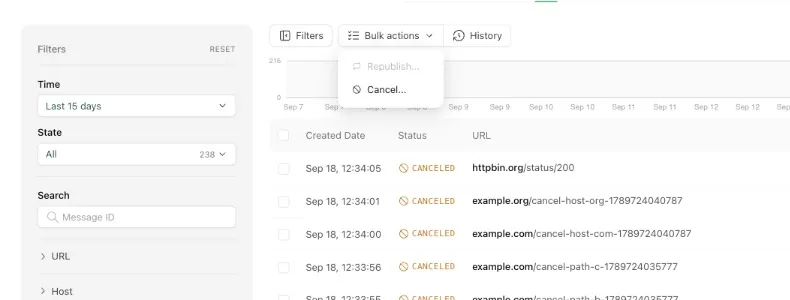
you act on many messages at once. Apply filters to narrow down the list, then
open the Bulk actions menu to cancel or republish everything that matches.
Cancelling matching messages#
Cancelling applies to every active message that satisfies the current filters, including messages that are waiting on a retry. Cancelled messages are removed without going to the DLQ.
When you cancel a small number of selected messages, the console performs the cancellation immediately. When you cancel by filter, or cancel all active messages, QStash processes the request in the background and the console shows the operation in the bulk action history.
Bulk action history#
The History button next to the Bulk actions menu opens a list of every bulk
cancellation, with its state, the filters that were used and how many messages
were cancelled. Operations still in progress update as they run, and the Active
filter shows only those.
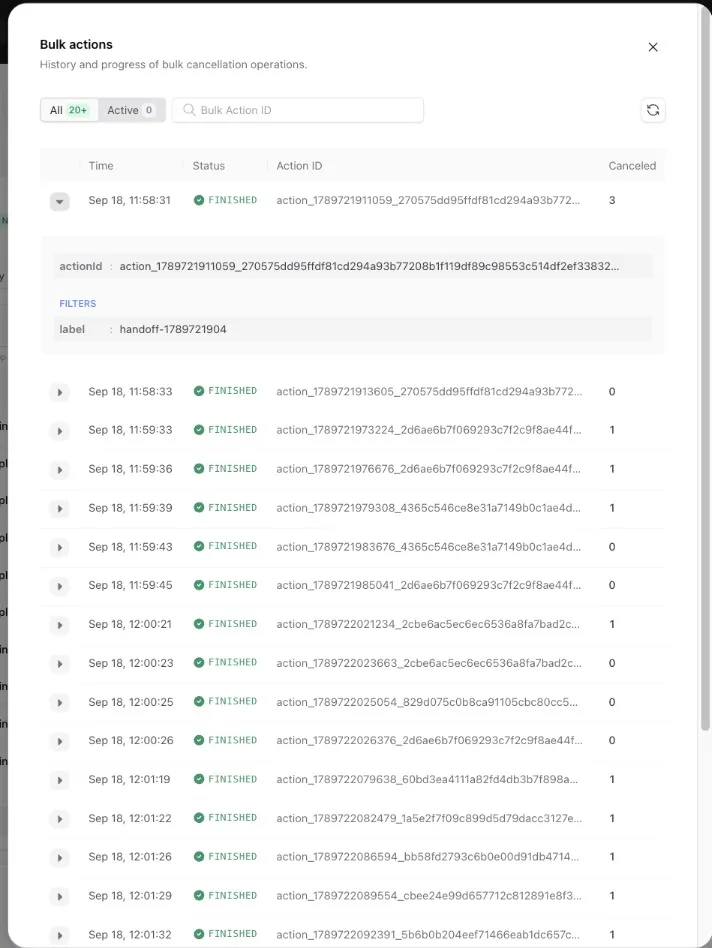
Each entry has an action ID. The toast shown after starting a bulk cancellation links directly to its entry, and you can paste an action ID into the search box to find an operation later.
From the API#
Bulk cancellation is available through the
bulk cancel messages endpoint.
Pass "async": true to run it in the background and receive an actionId you
can look up with the bulk actions
endpoints.