Railway Redis vs Upstash: Which Redis for Your Railway App?
 Cahid Arda Oz
If you have an app that's hosted on Railway and you want to use Redis for your cache, sessions, or for a queue, you can either add a Redis service to the Railway project with a few clicks, or use Upstash to provide a managed Redis database outside Railway. To connect your app to either Redis service, you'll need a standard Redis client, and a REDIS_URL environment variable.
The main difference between Redis on Railway and Redis on Upstash is who runs the Redis instance and how you pay. If you host Redis on Railway, you'll need to run a Redis container and pay for its memory and CPU usage. On the other hand, if you use Upstash, Redis is hosted for you and you pay per command or a fixed monthly price.
Railway Redis vs Upstash at a glance
Here is how the two compare for an app on Railway:
| Railway Redis | Upstash Redis | |
|---|---|---|
| What you get | A container from the official redis Docker image, in your project | A managed Redis database outside Railway |
| How the app connects | TCP on Railway's private network, REDIS_URL set for you | TCP with TLS over the internet, or HTTP |
| High availability | Opt-in Sentinel cluster with 3 or more nodes, no uptime SLA | Replicas included, multi-zone HA and SLA with the Prod Pack |
| Multi-region | App replicas can run in several regions; the Redis container runs in one | Read regions you can add from the console |
| HTTP/REST API | No | Yes, for edge and serverless code |
| Pricing model | RAM, CPU and volume by the minute | Per command, or a fixed monthly plan |
| Free option | Free plan with $1 of credit a month | One database with 250 MB and 500K commands a month |
| Who runs it | Railway runs the container; alerting and backups are yours to set up | Upstash |
Railway Redis is fantastic for having everything on a single canvas, with traffic kept on the private network. Upstash is fantastic for Redis without running it, for paying zero when there’s no traffic, or for using the same data in more than one place.
Does Upstash work with a long-running server on Railway?
Yes, Upstash Redis supports normal Redis over TCP with TLS. So any Railway app can connect to Upstash Redis with their existing Redis client using an Upstash connection string. The HTTP client is there to supplement serverless and edge codebases.
The client reads its address from REDIS_URL:
import Redis from "ioredis";

// Railway Redis: redis://...railway.internal:6379
// Upstash Redis: rediss://default:<token>@<endpoint>.upstash.io:6379
const redis = new Redis(process.env.REDIS_URL);
The only thing you need to change to move between the two is that one variable. It’s redis:// in Railway, and rediss:// in Upstash because Upstash always uses TLS. For a full app, check out the Express quickstart.
Setting it up on Railway
Either way, the end result is that your app service on Railway will have a REDIS_URL variable.
To use Railway’s Redis:
- Open your project, click + New and choose Redis. Railway deploys the official redis image as a new service.
- In your app service’s Variables tab, add a new variable
REDIS_URLwith the value${{Redis.REDIS_URL}}. This is a reference variable that gets its value from the Redis service. - Deploy the staged change.
To use Upstash Redis:
- Sign up for Upstash and create a free Redis database, picking the AWS or GCP region that is closest to your Railway region.
- Under Connect pick TCP and copy the
rediss://connection string. Note that the token embedded in the string is also the password. - In your app service’s Variables tab add a new variable
REDIS_URLwith the connection string, and deploy the staged change.
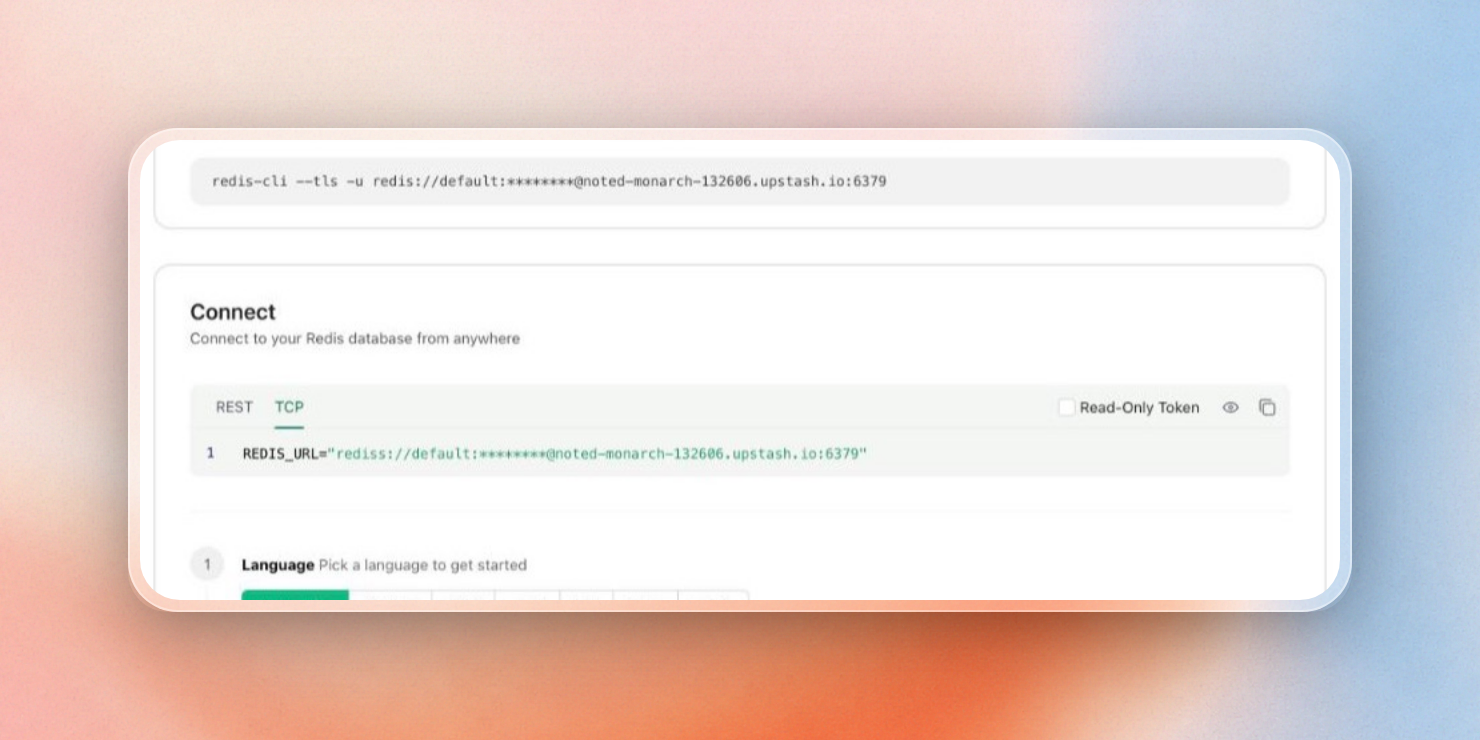
The Connect panel in the Upstash Console, with the TCP tab showing REDIS_URL
What Railway runs for you, and what you run
Railway's private network is its biggest asset. Your app connects to the Redis container using a railway.internal address and over encrypted WireGuard tunnels, avoiding any traffic through the public internet. However, an Upstash database is outside of the scope of your Railway project, so your app connects to it via the internet using TLS. To minimize the distance, you can choose an Upstash region close to the Railway region of your choice.
The default Railway Redis deployment is a single node. Railway can also convert this to a high-availability cluster using Redis Sentinel and HAProxy. The cluster can contain 3, 5, 7 or 9 nodes, with each node deployed as a container that you pay for. The cluster runs with AOF persistence enabled, so if a container restarts, it’ll be brought up with its data intact.
With Railway, you are still responsible for:
- Alerting — the cluster overview provides health information for each node, and you have to configure any alerts.
- Uptime — Railway does not publish an uptime SLA for Redis at this time.
- Backups — Railway has a Backups feature for volumes, and you have to enable it.
- Changes to the template — if you modify any image, start command, or variables, then you are responsible for maintaining the database.
These are all things that Upstash takes care of for you. On any plan, replicas and persistence to block storage are provided. With the Prod Pack on any plan, multi-zone HA and an uptime SLA are provided for $200 per database per month.
In addition, every Upstash database comes with several usage charts (commands per second, bandwidth, cache hits and misses per second, etc) out-of-the-box. Railway’s usage monitoring is left to be configured by you.
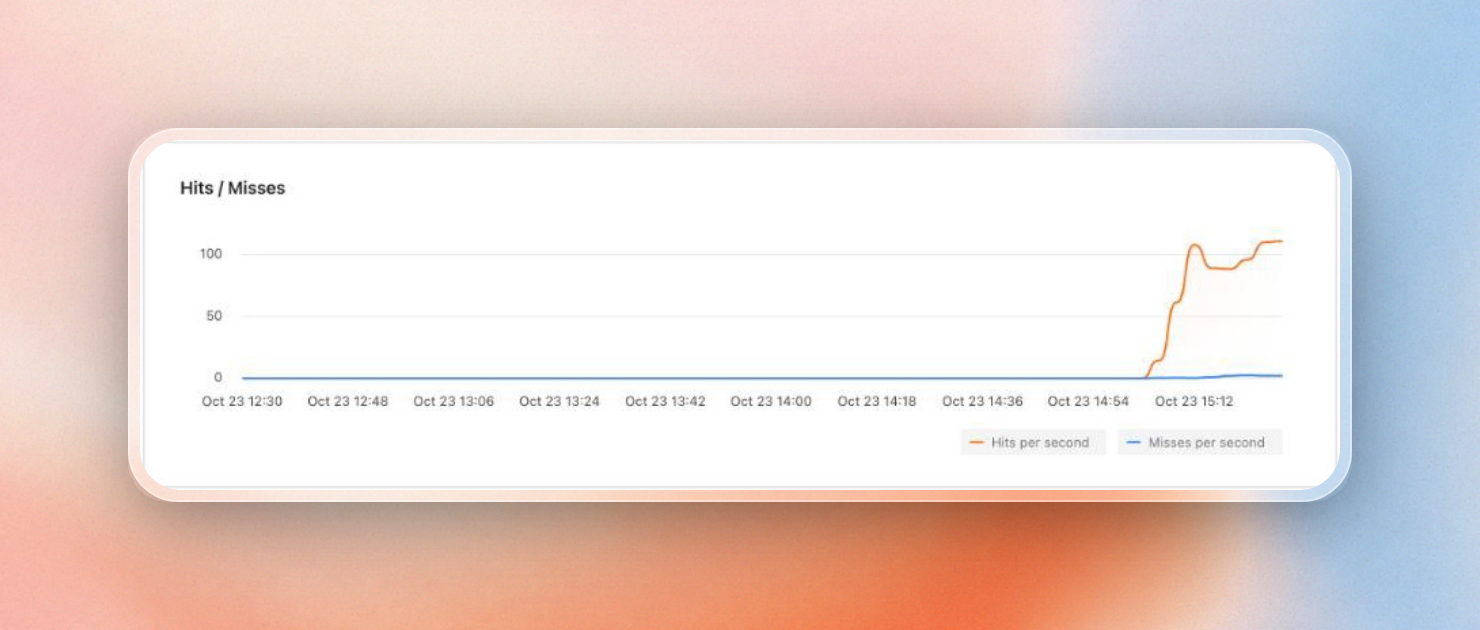
Cache hits and misses per second on a database's Usage tab in the Upstash Console
Running Railway replicas in more than one region
Your app can be deployed as replicas in different regions using Railway. It will direct traffic from the public Internet to the closest region, then balance the load to the available replicas in that region. The regions available are US West, US East, EU West (Amsterdam) and Southeast Asia (Singapore).
However, a Redis service launched from a template is still a single container in a single region. Therefore, replicas in other regions will have to read from Redis across regions on each cache read.
The Upstash Global database feature, on the other hand, allows you to have a single primary region for writes and multiple read regions. A read operation would go to the closest read region, while a write operation would be sent to the primary region and then replicated to the other regions. You could, for instance, set up a read region close to each Railway region where your app is deployed. Then, each replica would use the same REDIS_URL as before, but cache reads would be served from a nearby copy.
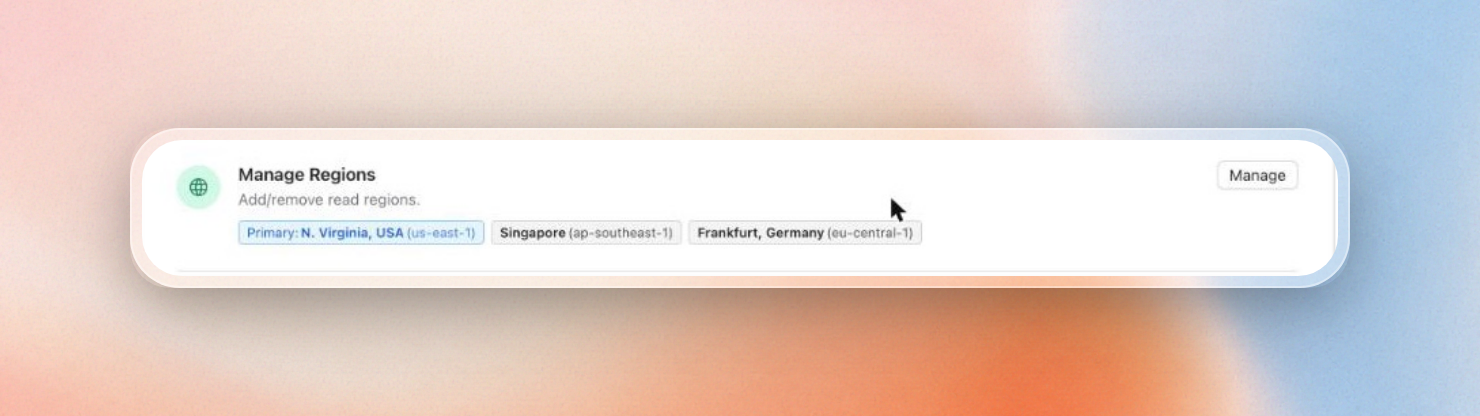
Read regions on an Upstash database, added from the console
How much does Redis cost on Railway vs Upstash?
The pricing for Railway Redis is tied to the RAM and CPU the Redis container uses, while Upstash pricing is determined by how much you use the database. This means that a Redis instance on Railway that is not being used still pays for the memory it holds, while a pay as you go database in Upstash that is not being used will be free.
Railway bills resources by the minute: the container's RAM, CPU and volume, plus network egress. A plan's monthly fee counts toward that usage. A high availability cluster means paying for at least three such containers, plus HAProxy.
Upstash Redis has three plans for most apps:
- Free: one database with 250 MB of data, 500K commands and 10 GB of bandwidth a month, with persistence.
- Pay as you go: $0.20 per 100K commands, first 1 GB of storage free and then $0.25 per GB. A database with little or no traffic costs little or nothing. The first 10 databases have no per-database fee, and each one after that is $0.50 a month, up to 100.
- Fixed: a flat $10 a month for 250 MB with no per-command billing, plus $5 for each read region.
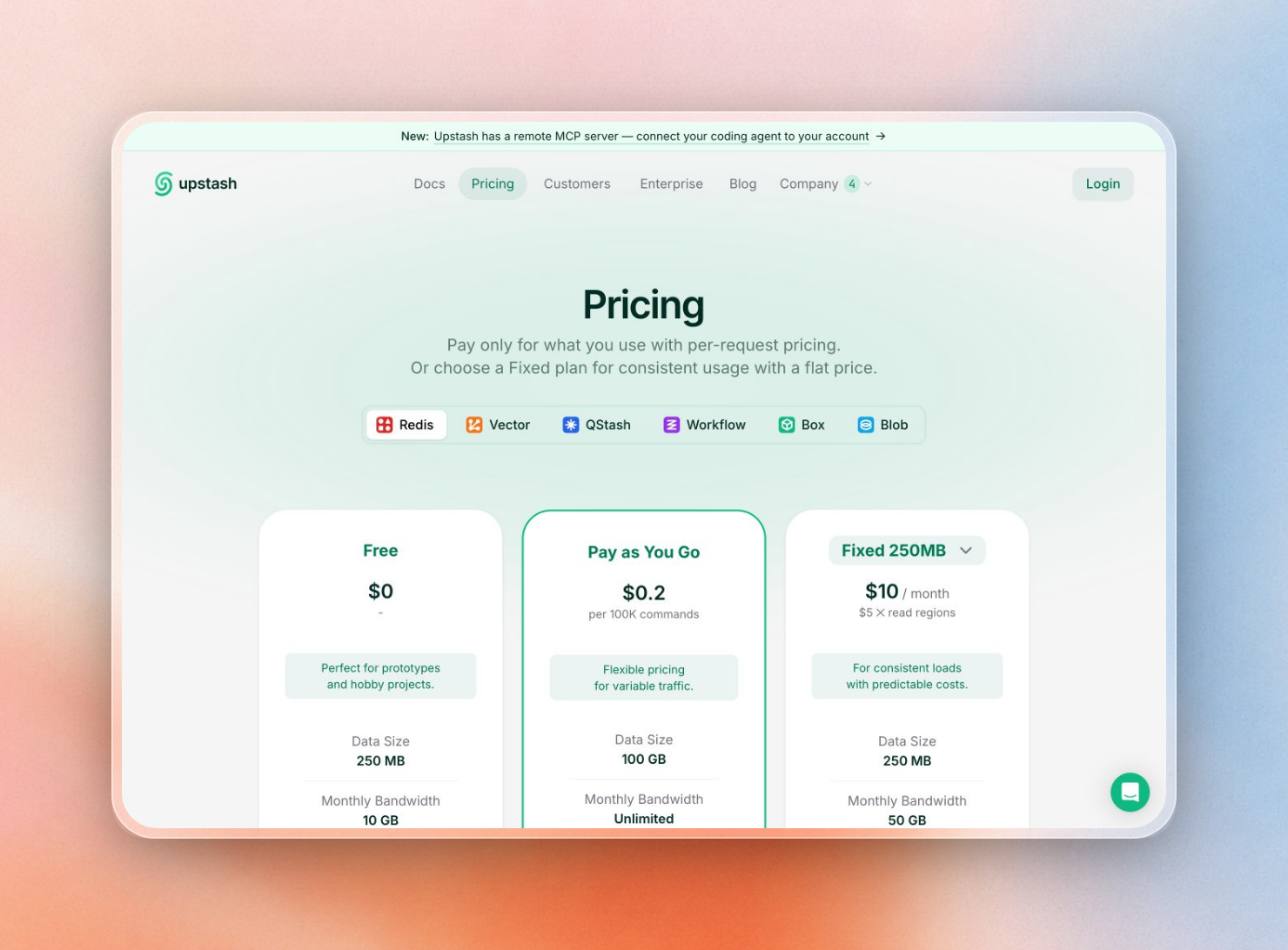
Upstash Redis plans: Free, Pay as You Go and Fixed
A simple way to choose: start on the free plan or pay as you go while traffic is low or spiky. When the cache serves a steady stream of requests all day, move to a Fixed plan, so the bill stays a flat $10 a month with no per-command charges. You change the plan in the Upstash console, and the app keeps the same REDIS_URL.
Traffic from your app to Upstash leaves Railway's private network, so it counts as Railway egress. For cache values of a few kilobytes, that adds very little.
Redis for coding agents on Railway
When people use coding agents like Claude Code, Cursor or Codex, they often want to build an app before anyone has an account. To enable this, Upstash offers an endpoint, one POST to start-redis, that returns a working database, no signup, credit card or API key required.
curl -X POST -H "User-Agent: claude-code" https://upstash.com/start-redisThe response is markdown with the database ID, an endpoint, a token, a console link and a quickstart:
# Your Redis is ready

**Database ID:** <database-id>
**Endpoint:** https://<endpoint>.upstash.io
**Token:** ***
**Expires:** 2026-10-26 (3 days from creation).
While the quickstart uses the REST API, the same database is accessible over TCP as well. Its TCP address is rediss://default:<token>@<endpoint host>:6379. The agent can set this as the REDIS_URL on Railway. This database will expire after 3 days. To keep it, the user must navigate to the console URL provided and click “Claim”.
For work on databases in your own account, connect the agent to the Upstash MCP server at https://mcp.upstash.com/mcp. With it, Claude Code, Cursor, Codex and other MCP clients can create a Redis database in the region closest to your Railway service, get its connection string, run commands and check usage, without you leaving the editor.
When Upstash is a good fit
Your app talks to both in the same way, so switching later only means changing REDIS_URL. Upstash Redis is a good fit if:
- You want a managed database with replicas and persistence that you don't set up.
- Traffic is low or spiky, so a free tier and per-command billing beat paying for idle memory.
- Edge functions, serverless code or Railway replicas in other regions need the same data, over HTTP or from read regions.
- A coding agent needs a working Redis right now, with no account, or should manage your databases through the MCP server.
For a wider comparison of managed Redis providers, check out our managed Redis comparison or our Redis pricing comparison. Both posts include Railway, Redis Cloud, ElastiCache and more.
