Free Redis databases for AI agents, in one HTTP request

We built the easiest way to spin up a Redis database for your AI agents. You don't need to sign up to Upstash or have an API key. It's just one HTTP request:
curl -X POST https://upstash.com/start-redis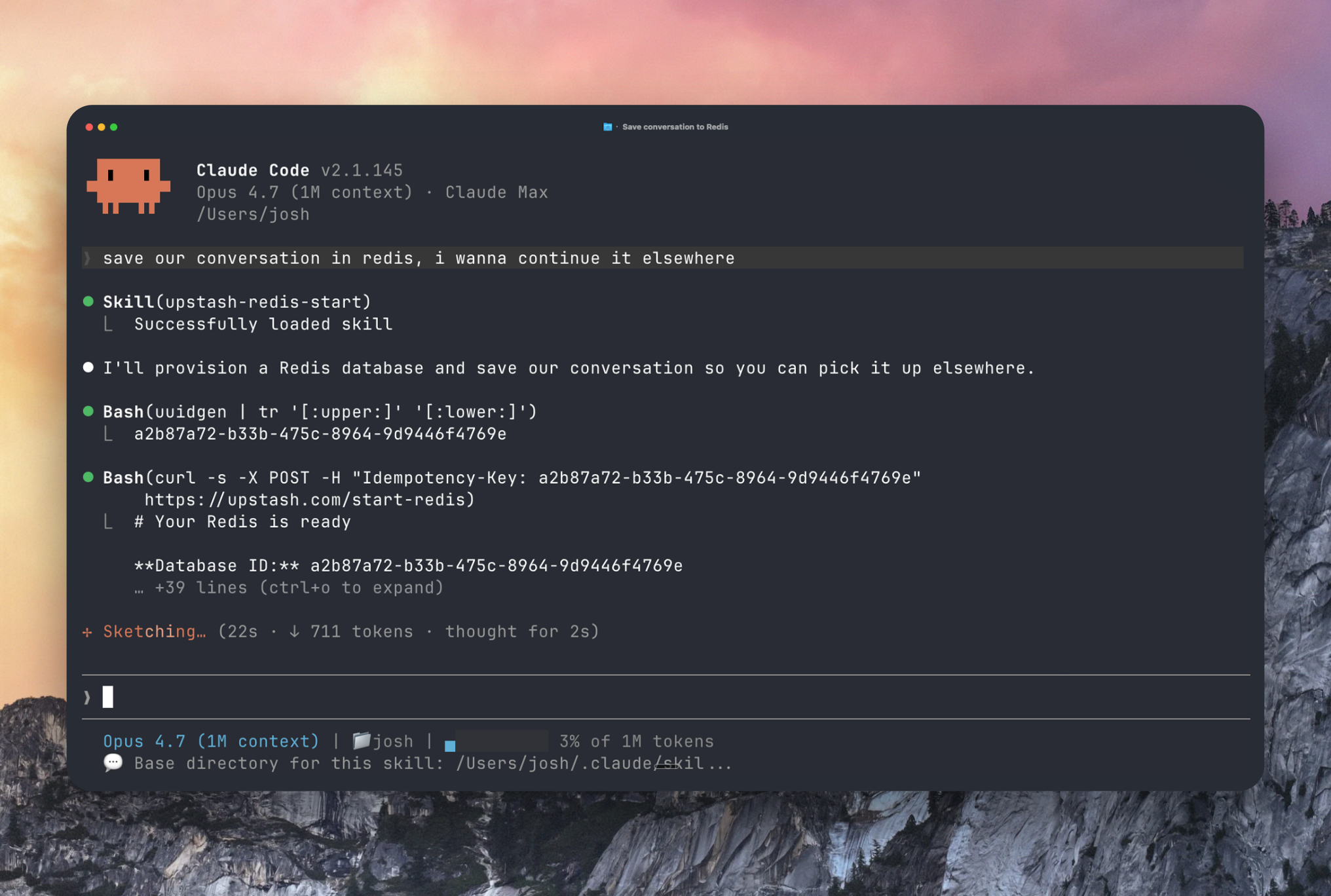
The response is a small markdown document with a fresh Redis endpoint, a token, and a quickstart your agent can read and follow on its own. The same call that creates the database also tells the agent how to use it.
Get a Redis database in 2 seconds
Here is an example response from the endpoint (I trimmed it a bit for length):
# Your Redis is ready

**Database ID:** 2a550d60-a387-43b3-8f99-5e361a7b4881
**Endpoint:** https://glad-crayfish-131416.upstash.io
**Token:** gQAAAAAAAgFYAQIgcDExNmM0NTY0NTM2...
**Metrics:** https://upstash.com/start-redis/metrics/2a550d60-...
**Expires:** 2026-05-23 (3 days from creation).

To keep this database alive, share the console URL with the user
(they can view usage and click Claim to take ownership):
https://upstash.com/start-redis/console/2a550d60-a387-43b3-8f99-5e361a7b4881
We also shipped an agent skill for this
If you're building with agents and don't want to teach them the endpoint by hand, we ship a skill that does it for you. It's a markdown spec (Claude/Codex-style) that tells the agent when to call start-redis, how to parse the markdown response, which body-style REST commands to use for memory/queue/recall patterns, and that the console URL needs to be surfaced back to you.
Drop the skill into your agent's project and the next time it needs Redis, it'll provision its own database, write to it, and hand you back the console URL.
Testing the new database
Tell your agent to hit the endpoint with a SET and GET over the body-style REST API:
curl https://glad-crayfish-131416.upstash.io \
  -H "Authorization: Bearer gQAAAAAA..." \
  -d '["SET","hello","world","EX","60"]'
# {"result":"OK"}

curl https://glad-crayfish-131416.upstash.io \
  -H "Authorization: Bearer gQAAAAAA..." \
  -d '["GET","hello"]'
# {"result":"world"}
With the body-style format (-d '["CMD","arg1","arg2"]') we avoid URL-encoding the payload, which matters when the value is a JSON blob with quotes and braces in it (this is the form an agent will use 90% of the time).
Using it from the TypeScript SDK
If the agent is writing code instead of curl, the @upstash/redis client takes the same URL and token:
import { Redis } from "@upstash/redis";

// url and token from the POST response above
const redis = new Redis({
  url: "https://glad-crayfish-131416.upstash.io",
  token: "gQAAAAAAAgFYAQIgcDExNmM0NTY0NTM2...",
});

await redis.set("hello", "world");
console.log(await redis.get("hello"));
It's the same way you'd use any other Upstash Redis database. The only thing different is how you got the URL and token.
What it's for
This is storage an agent can give itself in the middle of a tool call, so you don't have to stop and provision a database before the agent can do its job. A few of the patterns it's meant for:
- Short-term memory across tool calls.
SET session:abc '{...}' EX 3600to save state between steps without bloating a prompt with it. - Chat history (e.g. with AI SDK).
LPUSH chat:user123 '{...}'per turn,LRANGE chat:user123 0 20to recall the last 20. - Sub-agent work queues. Producer agent
LPUSHes tasks, worker agentsRPOPthem. A queue that works perfectly even in serverless. - Ranked recall.
ZADD memories <timestamp> <event>to log,ZREVRANGE memories 0 9to get the ten most recent. Swap the score for a relevance score and you have a small recent-first memory store for the agent.
When the agent is done, you get a console URL you can claim to keep the database. If you don't, it's gone in three days. Either way the agent didn't block on a signup flow to get started.
Every DB includes metrics and a way to claim
A few details that might be useful once an agent runs this in a loop, not as a one-off:
- Idempotent re-fetch. If the agent loses the token mid-run, POST again with
Idempotency-Key: <database-id>and you get the same database back. The endpoint returns the existing credentials instead of provisioning a new one. - A metrics endpoint.
GET /start-redis/metrics/<id>returns a small JSON doc withuptime_seconds,commands_total,keys,memory_bytes, andbytes_in/bytes_out. Useful both for the agent (to check whether its writes succeeded) and for you running the agent (to see what it's been doing). - A console URL. The response includes
upstash.com/start-redis/console/<id>. We tell your agent to give this URL to you. You can open it, watch the keys appear in real time, and click Claim to attach the database to your Upstash account. After claiming, it's a normal Upstash Redis database with no expiration and the full free-tier quota. - 3-day expiry by default. Unclaimed databases auto-delete after three days. Claim anything worth keeping!
A note on data
There is no user account behind the database until it's claimed, so while a database is unclaimed, anyone with it's ID can claim, view or edit its data. Keep personal information, production secrets, and customer data out of it. Please claim a database before writing anything sensitive.
Try it
The endpoint is live now. We'd love to hear what you build! Cheers
https://upstash.com/start-redis - no signup required.Upstash runs Redis as a serverless database - create one in seconds and pay only per request. Explore Upstash Redis →