What an Idle Agent Sandbox Actually Costs
 Ali Tarık Şahin
Your coding agent sends a prompt. It waits. It then runs a test for a few seconds. Then, it waits some more. It’s even worse for scheduled agents. They’ll wake up, check their queue, find nothing, and then go back to sleep for 15 minutes. In the meantime, most sandboxes charge you for two vCPUs and four gigabytes of memory, just as if your agent had been compiling something the whole time.
We priced out the cost for two agent workloads for six sandbox providers. You can run the short script with your own numbers. The hourly rates on the pricing pages look close. The usage charges are not. All figures here are modeled usage charges for compute, memory and storage. They leave out plan fees, credits, model tokens and network charges. On that basis, one coding hour that uses 10 core-minutes of CPU costs $0.0167 on Upstash Box and $0.106 to $0.238 on the other providers.
Where agent time goes
A coding agent spends much of its wall-clock time on LLM API calls. Across three coding benchmarks (SWE-bench, BigCodeBench and APPS), local Bash tool execution was 39% of coding-agent latency on average, and LLM API calls took most of the rest. In the 39% of time, the CPU is often idle, waiting on network installs or disk reads.
In the case of Vercel, the sandbox pricing examples assume 10% CPU utilization, "reflecting time spent waiting for LLM calls". In our calculation, we assume 10 core-minutes of CPU in an hour on a 2 vCPU sandbox, which is 8.3% average use of the CPU it reserved. That number describes CPU use. It does not say how long the agent spends waiting. CPU use depends on the agent, so the script takes it as an input.
In the case of a scheduled agent, the idle time is even more lopsided. For example, if the agent runs every 15 minutes, and executes for 20 seconds, it’s only active for 2% of the day.
With CPU use this low, how the sandbox gets billed matters more than the rate. Sandboxes that charge for wall-clock time charge for the idle time too, while sandboxes that charge for active CPU charge for the work.
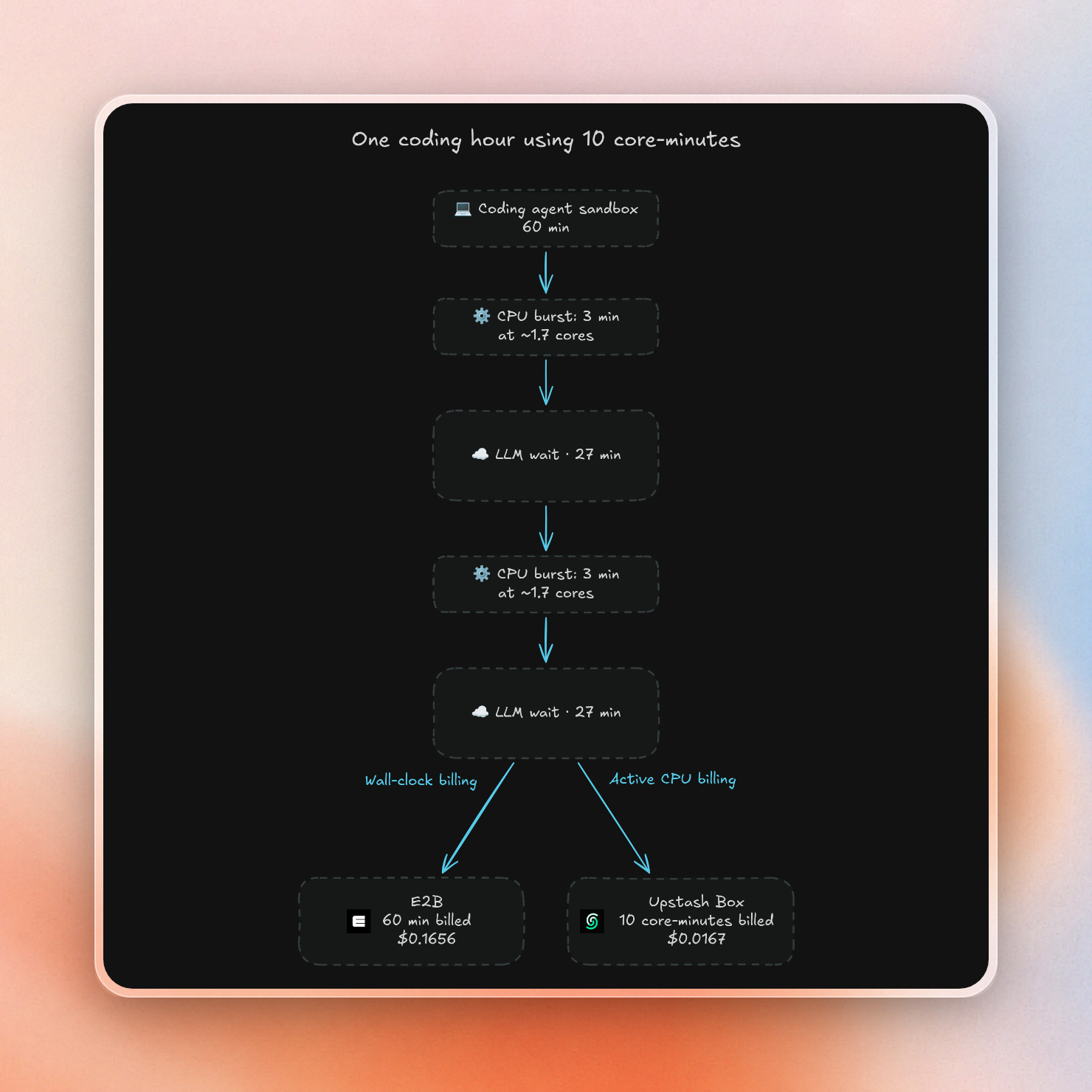
Here is the cost of the coding agent for the same coding hour on both meters:
How each provider bills a waiting sandbox
The rate cards below come from each provider's pricing page, for a 2 vCPU, 4 GB sandbox where sizes are fixed. The column that decides an idle bill is the second one:
| Provider | Billed while the agent waits | CPU | Memory | Pause and resume |
|---|---|---|---|---|
| Upstash Box | Nothing | $0.10 per active core-hour | Free | Auto-pauses after 6 h idle on paid plans, keeps the filesystem, ~0.4 s resume |
| E2B | CPU and memory, per second | $0.0504 per vCPU-hour | $0.0162 per GiB-hour | Pause keeps files and memory, ~1 s resume |
| Daytona | CPU and memory, per second | $0.0504 per vCPU-hour | $0.0162 per GiB-hour | Container sandboxes stop instead of pausing and lose memory |
| Modal | CPU and memory, the higher of requested or used | $0.142 per physical core-hour (2 vCPU) | $0.024 per GiB-hour | No pause state |
| Vercel Sandbox | Memory | $0.128 per active CPU-hour | $0.0212 per GB-hour, 1-minute minimum | Stop and resume from a snapshot |
| Blaxel | Allocated memory while active | Included, scales with memory | $0.0414 per GB-hour | Suspends after ~15 s of inactivity, ~25 ms resume |
Box is the only provider that doesn’t charge for memory or for idle CPU time. 10% of a CPU core costs $0.01 per hour for Box, and idle CPU time doesn’t cost anything. The ~0.4s resume time is our own measurement from Europe, and there is no session cap that would force a restart.
Like Box, Vercel only charges for CPU time while the CPU is active, but Vercel also charges for provisioned memory for every minute the sandbox is running. For our coding scenario, memory usage is 80% of Vercel’s bill.
Blaxel sandboxes suspend after about 15 seconds of inactivity, which can make the sandbox much cheaper between short tasks. Blaxel doesn’t say whether an agent process with an open LLM connection is considered active, but the script charges Blaxel for the full awake time, so a Blaxel sandbox that is suspended during waiting would cost less.
With E2B and Daytona, you can also stop the meter, but only by stopping the sandbox. E2B sandboxes are killed on timeout by default unless you set them to pause, while Daytona auto-stops a sandbox after 15 minutes with no outside interaction, even if there are processes running inside.
A coding hour using 10 core-minutes
The first workload is one hour of a coding agent on a 2 vCPU, 4 GB sandbox. It uses 10 core-minutes of CPU in that hour.
On Box, the bill is the CPU it used:
600 core-seconds / 3600 × $0.10 per core-hour = $0.0167On E2B and Daytona, the bill is the whole hour of everything provisioned:
(2 vCPU × $0.0504 + 4 GiB × $0.0162) × 1 hour = $0.1656The script at the end of this article prints the modeled usage charge for all six:
A: coding agent, one hour
Provider                  USD   x Box
Upstash Box            0.0167     1.0
E2B                    0.1656     9.9
Daytona                0.1656     9.9
Modal Sandboxes        0.2380    14.3
Vercel Sandbox         0.1061     6.4
Blaxel                 0.1663    10.0
This coding hour costs $0.017 on Box and 6.4x to 14.3x that on the other 5 providers. Modal's $0.238 assumes the sandbox reserves one physical core and 4 GiB for the whole hour. Modal bills the higher of the request or actual use, so a smaller request that bursts when needed costs less. When comparing 15 providers, the agent costs can be between 2.6x and 19x higher than Box.
The difference in cost is less when the CPU is running. For example, the cost of running two cores at 100% for an hour on Box is $0.20, which is higher than the costs of E2B, Daytona, and Blaxel ($0.1656 each). Therefore, Box costs less than the other three providers until the agent is running at about 83% CPU for the hour (1.656 core-hours out of 2). Because of the memory charge of Vercel and the higher cost of Modal, they are more expensive than Box at any CPU level for this size.
A scheduled agent that wakes every 15 minutes
The second workload runs every 15 minutes, 96 times a day. Each run takes 20 seconds and the sandbox CPU is used for 5 core-seconds to check for new work. The sandbox stores 2 GB on disk between runs to persist state like a "last seen" cursor.
For the wall-clock providers we assume the best case: something starts or resumes the sandbox for each run and stops it right after. That can be your own scheduler, a Modal scheduled Function, or a Blaxel sandbox schedule. Either way, your code has to handle the start, stop and pause steps. Keeping the sandbox running for the whole month to catch the cron would cost about $119 on E2B/Daytona (720 hours * $0.1656).
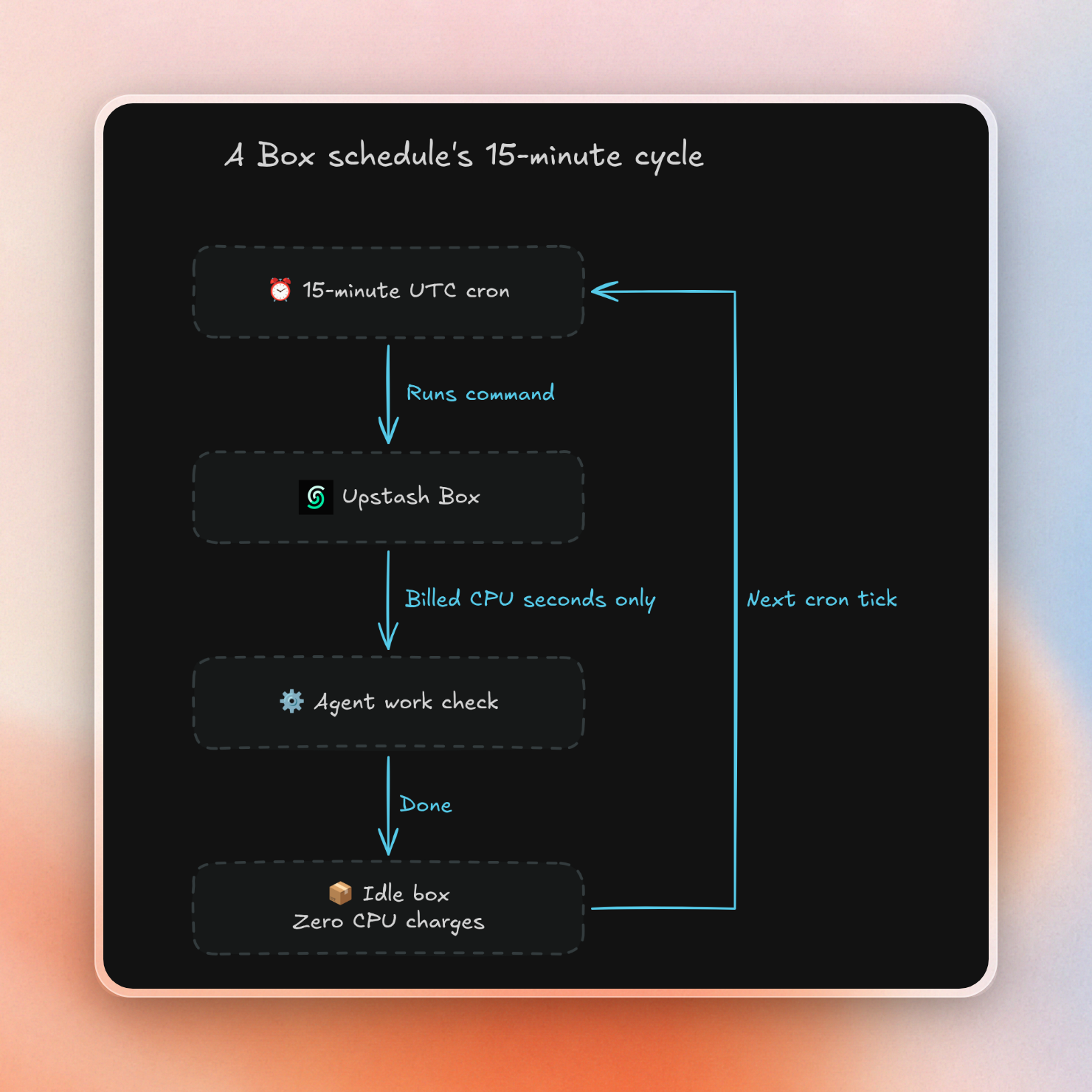
Box can run the cron itself. A schedule on a box runs a command or an agent prompt on a cron expression in UTC, and the box keeps its filesystem between runs. Here is the whole setup:
import { Box } from '@upstash/box'

const box = await Box.create({ runtime: 'node' })
const schedule = await box.schedule.exec({
  cron: '*/15 * * * *',
  command: ['sh', '-c', 'date >> /tmp/checks.log; echo checked'],
})

console.log(schedule.id, schedule.cron, schedule.status)
Running it prints the new schedule:
03b0ff79-e3bb-4066-8027-1e3a583c2e47 */15 * * * * activeTo run an agent instead of a shell command, we can use box.schedule.agent with a prompt and a maximum spending limit. The box doesn’t use any CPU between runs, and we only charge for CPU that is active, so the 14 minutes and 40 seconds between checks is free.
One cycle of the schedule looks like this:
The modeled monthly usage charge for 2,880 runs:
B: cron agent, every 15 min for 30 days
Provider                  USD   x Box
Upstash Box              0.60     1.0
E2B                      2.65     4.4
Daytona                  2.65     4.4
Modal Sandboxes          3.81     6.3
Vercel Sandbox           4.74     7.9
Blaxel                   5.04     8.4
Box charges $0.60 for the month ($0.40 of CPU, $0.20 of disk), while the other five charge for every awake second of memory. Vercel rounds up each 20-second run to a full minute of memory, and Blaxel adds its 15-second suspend delay to every run. Blaxel snapshots hold memory as well as files, so charging it for the same 2 GB as a disk-only provider likely understates its storage.
The real runs that find work will use more CPU. On Box, this cost increases only with CPU used by the agent; on wall-clock providers, it increases with every second the sandbox stays up, including seconds spent waiting on the model.
Rerun it with your own numbers
The script models each provider with a few numbers: how it bills CPU (wall-clock, active, or not at all), its memory rate, any minimum billed time per run, and storage beyond any free allowance. A workload is a number of runs, how long each run is awake, how much CPU each run uses, and how much disk stays around for the month.
Save it as sandbox-cost.ts and run it with npx tsx sandbox-cost.ts:
const vcpu = 2
const memGiB = 4

type Workload = {
  runs: number
  awakeSeconds: number
  cpuCoreSeconds: number
  storageGB: number
}

type Provider = {
  name: string
  cpuMode: 'wall' | 'active' | 'none'
  cpuPerHour: number
  vcpusPerCpuUnit?: number
  memPerGiBHour: number
  memMinSeconds?: number
  tailSeconds?: number
  storageFreeGB?: number
  storagePerGBMonth: number
}

const providers: Provider[] = [
  // https://upstash.com/pricing/box
  // Small size. Medium is $0.20 and Large $0.40 per active CPU hour.
  { name: 'Upstash Box', cpuMode: 'active', cpuPerHour: 0.10,
    memPerGiBHour: 0, storagePerGBMonth: 0.10 },
  // https://e2b.dev/pricing, 10 GiB disk included
  { name: 'E2B', cpuMode: 'wall', cpuPerHour: 0.0504,
    memPerGiBHour: 0.0162, storageFreeGB: 10, storagePerGBMonth: 0 },
  // https://www.daytona.io/pricing, $0.000108 per GiB-hour after the first 5 GiB
  { name: 'Daytona', cpuMode: 'wall', cpuPerHour: 0.0504,
    memPerGiBHour: 0.0162, storageFreeGB: 5, storagePerGBMonth: 0.000108 * 730 },
  // https://modal.com/pricing
  // Reserves 1 physical core (2 vCPU) and 4 GiB for the whole run.
  // Modal bills max(request, actual), so smaller requests cost less.
  { name: 'Modal Sandboxes', cpuMode: 'wall', cpuPerHour: 0.00003942 * 3600,
    vcpusPerCpuUnit: 2, memPerGiBHour: 0.00000667 * 3600, storagePerGBMonth: 0 },
  // https://vercel.com/docs/vercel-sandbox/pricing, snapshot storage
  { name: 'Vercel Sandbox', cpuMode: 'active', cpuPerHour: 0.128,
    memPerGiBHour: 0.0212, memMinSeconds: 60, storagePerGBMonth: 0.08 },
  // https://blaxel.ai/pricing
  // docs.blaxel.ai/Sandboxes/Overview, auto-suspends after ~15 s of inactivity;
  // snapshots cover memory and filesystem.
  { name: 'Blaxel', cpuMode: 'none', cpuPerHour: 0,
    memPerGiBHour: 0.0000115 * 3600, tailSeconds: 15, storagePerGBMonth: 0.20 },
]

function cost(provider: Provider, workload: Workload): number {
  let cpu = 0
  if (provider.cpuMode === 'wall') {
    cpu = (vcpu / (provider.vcpusPerCpuUnit ?? 1)) * workload.awakeSeconds / 3600 * provider.cpuPerHour
  } else if (provider.cpuMode === 'active') {
    cpu = workload.cpuCoreSeconds / 3600 * provider.cpuPerHour
  }
  const minimum = provider.memMinSeconds ?? 0
  let billedSeconds = Math.max(minimum, workload.awakeSeconds + (provider.tailSeconds ?? 0))
  if (minimum > 0) billedSeconds = Math.ceil(billedSeconds / minimum) * minimum
  const memory = memGiB * billedSeconds / 3600 * provider.memPerGiBHour
  const storage = Math.max(0, workload.storageGB - (provider.storageFreeGB ?? 0)) * provider.storagePerGBMonth
  return workload.runs * (cpu + memory) + storage
}

function printWorkload(title: string, workload: Workload, decimals: number): void {
  const boxCost = cost(providers[0], workload)
  console.log(title)
  console.log(`${'Provider'.padEnd(18)} ${'USD'.padStart(10)} ${'x Box'.padStart(7)}`)
  for (const provider of providers) {
    const total = cost(provider, workload)
    const price = total.toFixed(decimals).padStart(10)
    const multiple = (total / boxCost).toFixed(1).padStart(7)
    console.log(`${provider.name.padEnd(18)} ${price} ${multiple}`)
  }
}

printWorkload('A: coding agent, one hour', {
  runs: 1, awakeSeconds: 3600, cpuCoreSeconds: 600, storageGB: 0,
}, 4)
console.log()
printWorkload('B: cron agent, every 15 min for 30 days', {
  runs: 96 * 30, awakeSeconds: 20, cpuCoreSeconds: 5, storageGB: 2,
}, 2)
These two calls at the bottom are the workloads: edit the cpuCoreSeconds parameter to match the CPU usage of your agent. If you edit the vcpu and memGiB parameters then you also need to update Box’s cpuPerHour parameter to the rate for that size box; Medium and Large size boxes cost more per CPU hour. Note that rates change, so make sure to double check the pricing pages provided in comments before you rely on a result.
What does "$X/month" actually cover?
The "$X/month" on a pricing page for sandboxes is usually a fee for the plan itself or a usage credit, not the actual cost of compute usage. A plan fee gets you limits like more concurrent sandboxes and longer sessions, with compute usage being charged on top. A usage credit is usage paid in advance, after which you are charged at the specified rates.
Here is what the monthly number means on each of the six:
| Provider | Monthly price | What it covers | Limits that affect agents |
|---|---|---|---|
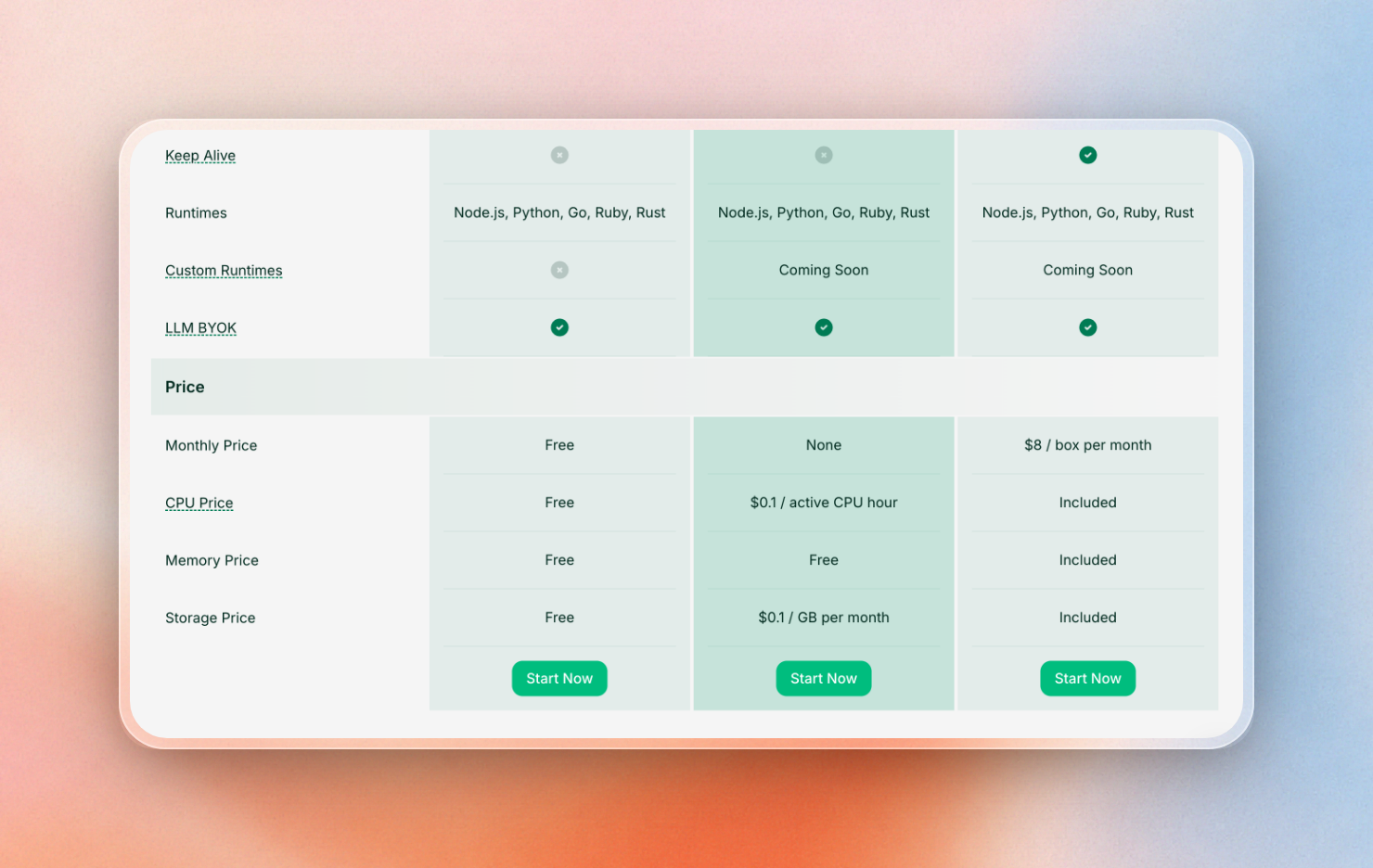
| Upstash Box | Free: $0. Pay as you go: no monthly fee. Keep-alive: $8 per small box | Free includes 5 CPU-hours a month. Keep-alive is a flat price for a box that never pauses | Free: 10 boxes. Pay as you go: 1,000 boxes |
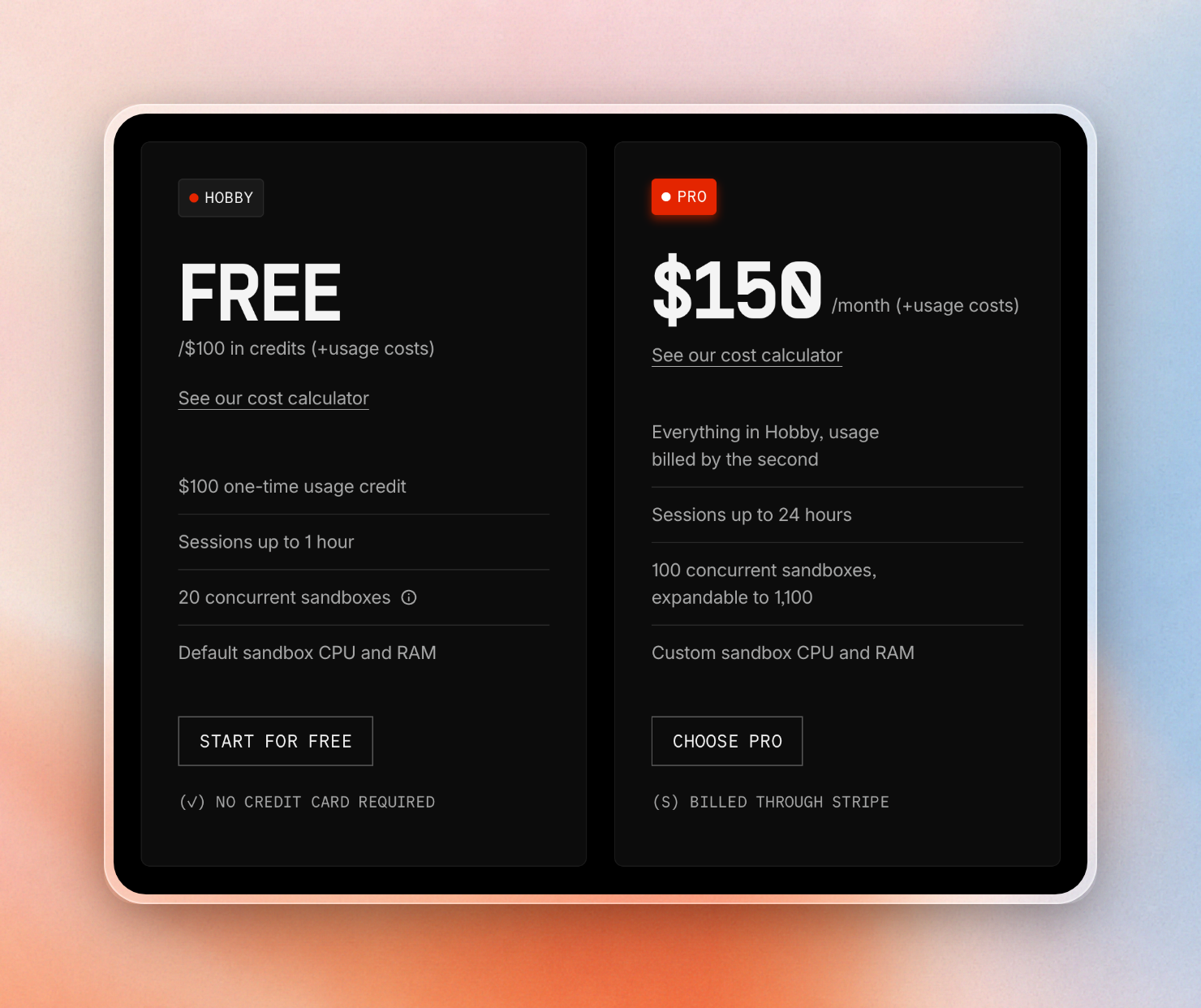
| E2B | Hobby: $0 plus a $100 one-time credit. Pro: $150 | Pro is a platform fee, and usage is billed on top | Hobby: 1-hour sessions, 20 concurrent. Pro: 24-hour sessions, 100 concurrent |
| Daytona | No platform fee shown | $200 of free compute | Auto-stop after 15 minutes without interaction, by default |
| Modal | Starter: $0. Team: $250 | Starter includes $30 of compute a month, Team includes $100 | Starter: 100 containers |
| Vercel Sandbox | Hobby: $0. Pro: $20 | Pro usage draws from a $20 monthly credit, then bills at the listed rates | Hobby: 45-minute sessions, 10 concurrent. Pro: 24-hour sessions |
| Blaxel | $0 plus usage | Up to $200 of free credits | Higher sandbox counts come with monthly top-ups |
The fixed cost of the plan can exceed the usage-based cost. For example, if we’re running a coding agent that requires sessions longer than an hour on E2B, we need to be on Pro. The $150 platform fee alone equals the usage cost of about 906 sandbox-hours at this size ($0.1656 per hour).
The recurring $30 credit with Modal is sufficient to run about 126 hours of the above coding agent at $0.238 an hour. It also covers the cron agent's $3.81. Box Free includes 5 CPU-hours per month (about 30 hours of the coding agent at 10 core-minutes per hour). The cron agent would cost 4 CPU-hours per month (2,880 runs x 5 core-seconds), which is covered by Box Free's allowance.
If we need to keep an agent up all the time, a Box keep-alive box costs $8 per month flat. By comparison, 720 hours of a 2 vCPU, 4 GB sandbox at wall-clock rates on E2B or Daytona would cost about $119 per month.
When another sandbox is the better pick
Active-CPU billing works best for agents that spend most of their time waiting for a model or a clock to fire. Other workloads might prefer:
- A separate kernel per tenant: E2B, Vercel Sandbox and Blaxel use microVMs that run each sandbox in its own kernel. Boxes are containers that provide a separate filesystem, process tree and network namespace, but no separate kernel.
- Memory that is kept when paused: E2B pause keeps running processes and memory and can be resumed in about a second. Blaxel standby resumes in about 25 ms with memory still intact. A box's filesystem is kept and processes are restarted when paused.
- GPUs: Modal and Daytona sandboxes are available with GPUs, whereas Box sizes are CPU-only.
- Your own cloud: Northflank offers self-serve bring-your-own-cloud, and E2B can be self-hosted.
- CPU that is busy all hour: Above about 83% utilization, E2B and Daytona are cheaper than Box. Northflank has the lowest wall-clock rate of about $0.067 an hour for 2 vCPU and 4 GB.
- A region outside the US: Boxes are currently in AWS us-east-1.
Coding agents and scheduled agents that spend most of their time waiting on a model or a clock can use Box to only pay for the seconds of actual work. To see if Box is cheaper for your agent, copy the script, change the workloads to match your agent, and compare the totals.
