Vercel AI SDK vs TanStack AI: A Detailed Comparison
 Ali Tarık Şahin
If you want to add AI chat or an agent to your TypeScript application, the two main options are Vercel AI SDK and TanStack AI. The Vercel AI SDK provides a complete toolkit that is stable, with about 18.5 million npm downloads a week, has many providers, and offers pre-built agents. TanStack AI, on the other hand, consists of pluggable pieces and is a younger, strictly-typed tool with pieces you can swap out.
We’ve compared Vercel and TanStack AI on the topics most discussed in other comparisons and developer threads, and we’ve run our own benchmarks because we couldn’t find any published. Finally, we discuss the pieces that both SDKs lack and how Upstash fills the gap.
TanStack AI vs Vercel AI SDK: which is better?
If you need a more stable library with a broader set of providers and features for agents, go with AI SDK. If you want strict per-model typing, a smaller server bundle size, and replaceable parts, go with TanStack AI as a release candidate.
Here is the short version:
| Topic | Vercel AI SDK | TanStack AI | Better fit |
|---|---|---|---|
| Maturity | Stable v7 | Release candidate | AI SDK |
| Type safety | Types per provider | Types per model | TanStack AI |
| Tool calling | Server tools, client tools through a callback | One tool definition for server and client | TanStack AI |
| Providers | About 38 provider packages plus AI Gateway | 16 official LLM adapters | AI SDK |
| Frameworks | React, Vue, Svelte, Angular, React Native (Expo) | Adds official Solid and Preact hooks | TanStack AI |
| Streaming and persistence | You build storage and resume logic | Persistence and durability slots; you plug in a store | TanStack AI |
| Agents | Tool loops plus ready-made agent classes | Tool loops; workflows and orchestration planned after v1 | AI SDK |
| Performance | Smaller client bundle, faster import | Smaller server bundle, faster in our load test | Close |
Maturity and adoption
The two SDKs have very different teams behind them. The numbers below are from npm and GitHub on October 19, 2026:
| Vercel AI SDK | TanStack AI | |
|---|---|---|
| Latest version | ai 7.0.143 | @tanstack/ai 0.69.0 |
| Status | Stable since June 25, 2026 | Release candidate since August 21, 2026 |
| GitHub stars | 27,395 | 3,202 |
| Weekly npm downloads | 18,472,668 | 553,088 |
| Who maintains it | Vercel core team plus 190+ contributors | Volunteers plus community |
| License | Apache-2.0 | MIT |
The TanStack AI team of “three people working on TanStack AI in our free time” managed to go from four providers to 24 in a year, and reach a release candidate.
AI SDK 7 costs something else: Node.js 22, no CommonJS, older projects have to be migrated. Vercel ships a codemod for this (npx @ai-sdk/codemod v7).
Type safety
The topic of type safety comes up most often. TanStack AI provides types for options on a per-model basis. On the other hand, AI SDK provides types for options on a per-provider basis, which then can be passed through a loose options object.
Here we pass two wrong options to TanStack AI: a number where Anthropic expects a string, and a temperature to a model that does not accept one:
import { chat } from '@tanstack/ai'
import { anthropicText } from '@tanstack/ai-anthropic'

export function answer(prompt: string) {
  return chat({
    adapter: anthropicText('claude-haiku-4-5'),
    messages: [{ role: 'user', content: prompt }],
    modelOptions: {
      // @ts-expect-error Anthropic service_tier requires a string literal
      service_tier: 123,
    },
  })
}

export function answerWithUnsupportedSampling(prompt: string) {
  return chat({
    adapter: anthropicText('claude-opus-4-7'),
    messages: [{ role: 'user', content: prompt }],
    modelOptions: {
      // @ts-expect-error This model's options omit temperature
      temperature: 0.5,
    },
  })
}
Without the @ts-expect-error lines, TypeScript rejects both:
error TS2322: Type 'number' is not assignable to type '"auto" | "standard_only" | undefined'.
error TS2353: Object literal may only specify known properties, and 'temperature' does not exist in type 'AnthropicCacheControlOptions & AnthropicContainerOptions & ... & AnthropicMaxTokensOptions'.
The same two mistakes in AI SDK compile with no errors:
import { anthropic } from '@ai-sdk/anthropic'
import { streamText } from 'ai'

export function answer(prompt: string) {
  return streamText({
    model: anthropic('claude-haiku-4-5'),
    prompt,
    providerOptions: {
      anthropic: { serviceTier: 123 },
    },
  })
}

export function answerWithUnsupportedSampling(prompt: string) {
  return streamText({
    model: anthropic('claude-opus-4-7'),
    prompt,
    temperature: 0.5,
  })
}
You can get the first check back in AI SDK by typing the options yourself:
import type { AnthropicLanguageModelOptions } from '@ai-sdk/anthropic'

export const options = { serviceTier: 123 } satisfies AnthropicLanguageModelOptions
That fails with the same TS2322 error. The temperature error cannot be fixed in this manner because the AI SDK does not know which options the models support.
Tool calling
Both SDKs let the model call your functions but there is a slight difference in where the tool is being executed.
In AI SDK, a tool is an object with a description, an input schema, and an execute function. You pass tools as an object, and you set how many steps the loop may take:
import { anthropic } from '@ai-sdk/anthropic'
import { isStepCount, streamText, tool } from 'ai'
import { z } from 'zod'

function add({ a, b }: { a: number, b: number }) {
  return a + b
}

const addTool = tool({
  description: 'Add two numbers',
  inputSchema: z.object({ a: z.number(), b: z.number() }),
  execute: add,
})

export function answer(prompt: string) {
  return streamText({
    model: anthropic('claude-haiku-4-5'),
    prompt,
    tools: { add: addTool },
    stopWhen: isStepCount(5),
  })
}
In TanStack AI, you define the tool once, then attach a server or a client implementation to that definition. The browser and the server share one schema:
import { chat, toolDefinition } from '@tanstack/ai'
import { anthropicText } from '@tanstack/ai-anthropic'
import { z } from 'zod'

export const addDefinition = toolDefinition({
  name: 'add',
  description: 'Add two numbers',
  inputSchema: z.object({ a: z.number(), b: z.number() }),
  outputSchema: z.number(),
})

function add({ a, b }: { a: number, b: number }) {
  return a + b
}

const addTool = addDefinition.server(add)

export function answer(prompt: string) {
  return chat({
    adapter: anthropicText('claude-haiku-4-5'),
    messages: [{ role: 'user', content: prompt }],
    tools: [addTool],
  })
}
The best way to see the difference between AI SDK and TanStack AI is with client tools. In AI SDK, the browser can make tool calls with onToolCall and can add the results of those tool calls to the response with addToolOutput. TanStack AI lets you provide .client() tools to useChat and doesn’t need an onToolCall handler. TanStack AI also halts the loop after five iterations by default.
Providers and lock-in
AI SDK supports more model providers, with about 38 first-party provider packages and over 100 models available via AI Gateway, whereas TanStack AI has 16 official LLM adapters and 5 harness adapters. If you use a less popular model provider, there is a good chance that AI SDK is already set up to use it.
AI SDK can be used in any environment, such as Express, Hono, AWS Lambda, or Cloudflare Workers. However, if no provider is specified, AI SDK defaults to Vercel AI Gateway, and its guides for sandboxes and long agent runs recommend Vercel products. TanStack AI, on the other hand, is a library without a platform or billing, and its documentation lists several sandbox providers next to each other.
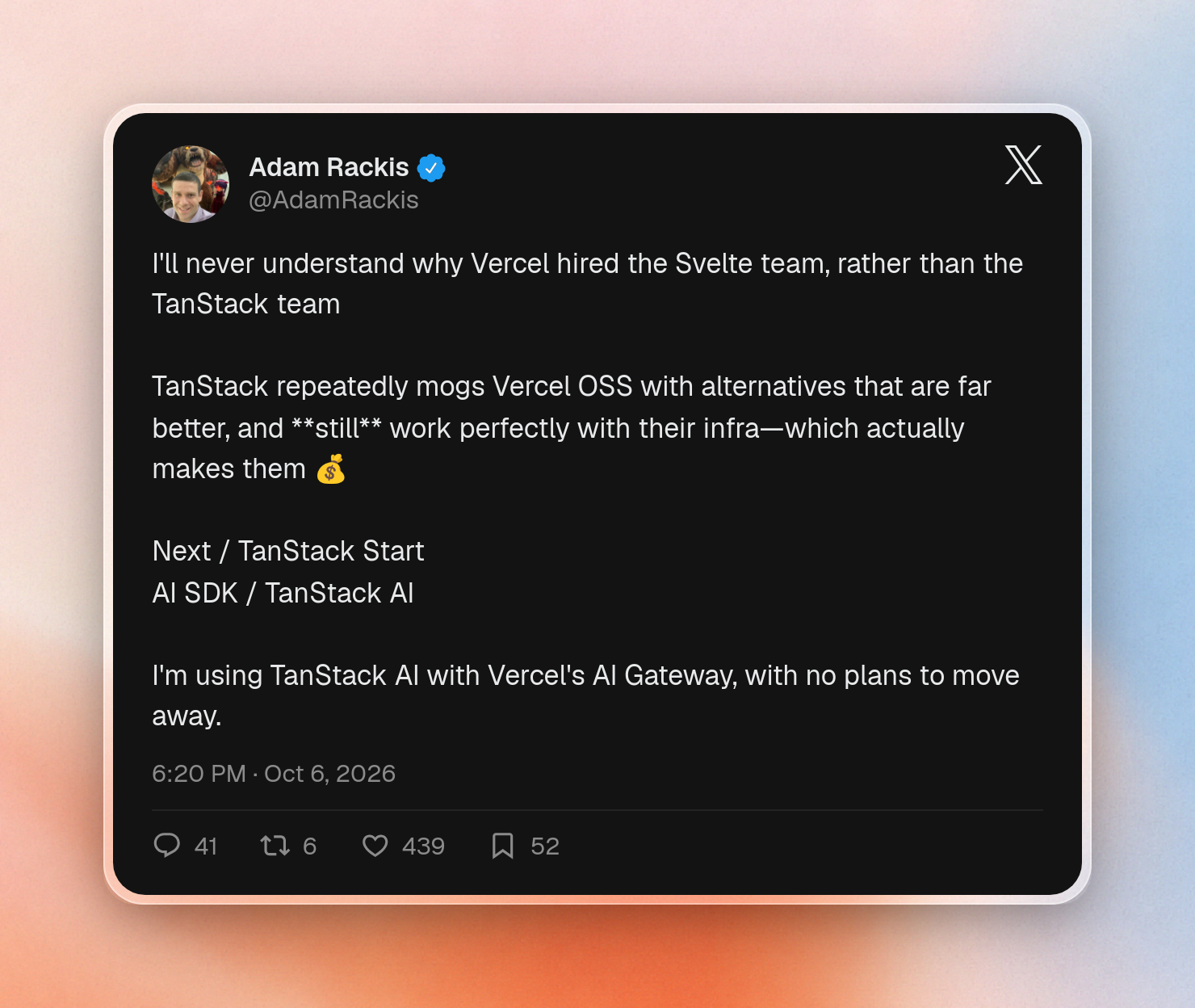
You can also use both. Some developers, for example, use TanStack AI with Vercel's AI Gateway:
Frameworks and UI
They both offer hooks for React, Vue, Svelte, and Angular, as well as React Native support. AI SDK has an Expo guide while TanStack AI has a React Native transport. Solid and Preact are covered as well: TanStack AI has hooks for them, and AI SDK has hooks for Solid via a community package.
The useChat hook is similar in both, these are the differences you need to be aware of when you migrate:
- Connection: AI SDK uses a transport object to connect, TanStack AI uses a connection like
fetchServerSentEvents('/api/chat'). - Loading state: AI SDK returns a status with four values (submitted, streaming, ready, error), TanStack AI returns a boolean loading.
- UI components: AI SDK provides AI Elements, pre-built chat UI components with a shadcn-inspired design. TanStack AI added typesafe headless UI components in September 2026, after users asked for an alternative to AI Elements.
- Protocol: TanStack AI uses the AG-UI event stream, an open protocol for agent UIs, so that the client can connect to other backends that use the AG-UI protocol. AI SDK uses its own stream protocol.
Streaming, persistence, and resumable streams
Both SDKs do a great job of streaming tokens, but they take very different approaches to how things behave when a user reloads the page or the connection gets lost.
AI SDK provides you with the hooks but leaves storage for you to implement. If you want to resume a stream you need to set up Redis, the resumable-stream package, a way to keep track of the active stream for each chat, and create two API routes – one to start a stream and one to resume it. Storing the chat history is your responsibility too.
TanStack AI gives you more of the wiring, but you still connect three parts:
- On the server, the
withPersistencemiddleware saves the transcript to a store you provide. - To restore the chat after a reload, the client sets
persistence: true, and you add a GET route that callsreconstructChatand checks that the user owns the thread. - To resume an answer that is still streaming, you add a durability adapter to the response.
There is still one area where AI SDK streams better, and that’s streaming partial objects while the model is building up structured output. This is not yet supported in TanStack AI. You will also have to add your own retries and timeouts, as TanStack AI has none built in.
Agents and middleware
Today, both SDKs can run tool loops for agents. AI SDK implements limits through the stopWhen option, while TanStack AI has a maxIterations option. AI SDK also provides ready-to-use agent classes, including a durable agent class that can be used on Vercel Workflows. TanStack AI supports durable runs for sandboxed coding agents, enabling agents to run uninterrupted even after the connection drops. The result can then be picked up on a subsequent request. General agent workflows and orchestration (e.g. parallel agents, scheduled jobs) are planned after the v1 release.
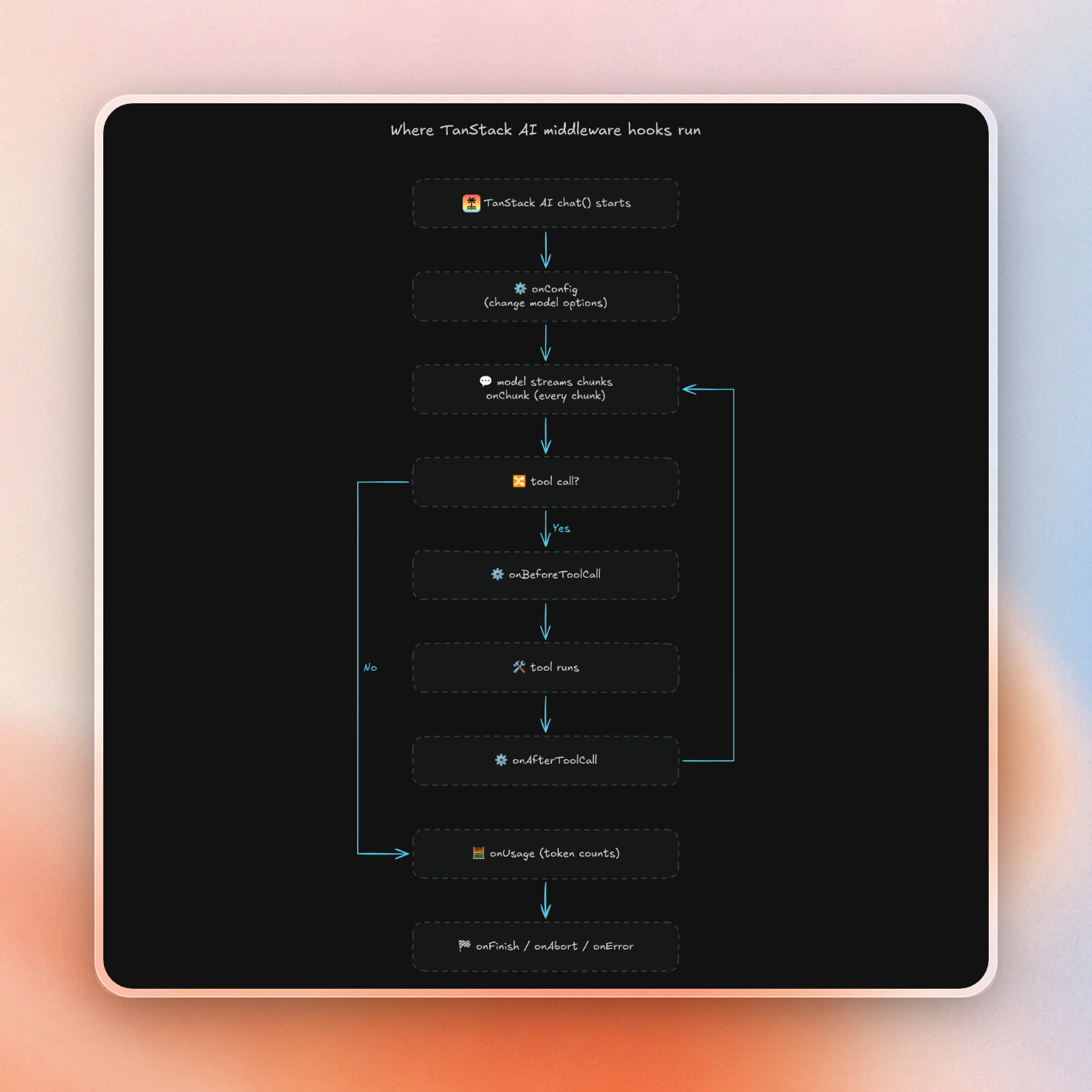
As for middleware, TanStack AI uses a middleware list as argument to the chat method, and each middleware object is hooked to various points of the request flow, including config, chunks, tool calls, usage, and end of the run. AI SDK uses a model wrapper instead, and it explicitly says "doesn't have a unified application-level middleware chain."
Each TanStack AI hook runs at the following points:
Performance benchmarks
We couldn't find a published benchmark of the two SDKs, but both vendors claim that TanStack AI is smaller than its competitor, though neither offers any numbers. We decided to run our own benchmark to find out.
This is how we set it up:
- Versions:
ai7.0.143 and@tanstack/ai0.69.0, each with its Anthropic provider, installed from one lockfile. - Model: a local mock of the Anthropic streaming API, so the model adds no variance. It sends the first token 50 ms after the request, then 100 tokens 5 ms apart.
- Processes: the mock, each SDK server, and the load generator ran as separate Node.js processes. Each SDK server ran in a fresh process, one SDK at a time.
- Runs: 20 warmup requests, then 200 sequential requests per SDK for latency, then 3 rounds of 100 concurrent streams. Round times moved a lot (TanStack AI ranged from 689 to 1,274 ms), so the table shows the median round.
- Memory: we read the server process's resident memory every 10 ms during each concurrent round and kept the peak.
- Machine: Node.js 25.9 on an ARM machine limited to 2 CPUs, shared by all processes.
- Bundles: esbuild, minified, gzip level 9. React was left out of the client bundles.
| Test | Vercel AI SDK | TanStack AI |
|---|---|---|
| Server bundle, gzipped | 199 KB | 112 KB |
Client useChat bundle, gzipped | 54.5 KB | 57.9 KB |
| Cold import of the server route (median) | 112 ms | 156 ms |
| First text token, p50 (mock alone: 51.0 ms) | 52.9 ms | 52.4 ms |
| Full stream, p50 (mock alone: 546.5 ms) | 549.0 ms | 548.1 ms |
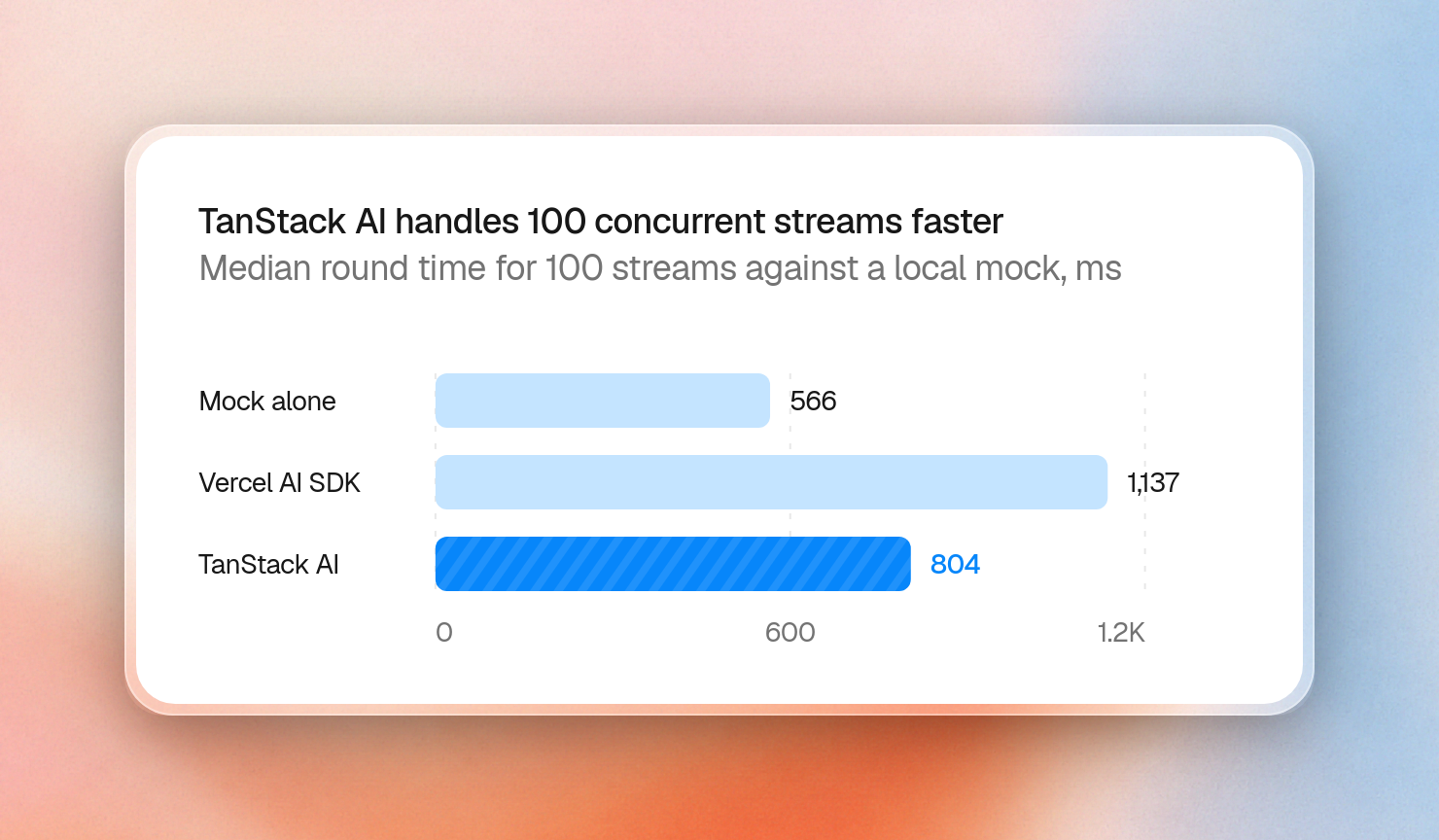
| 100 concurrent streams, median round (mock alone: 566 ms) | 1,137 ms | 804 ms |
| Peak server memory, 100 concurrent streams | 398 MB | 309 MB |
When looking at a single request, there’s no difference between the SDKs. Both add about 2 ms to the first token and about 3 ms to the entire stream.
Under load and in bundle size, the differences are more pronounced. With 100 streams at a time, TanStack AI had a 29% lower completion time in our test and used less memory. Its server bundle is 44% smaller than the AI SDK bundle. These load numbers come from one mock workload on one machine, so treat them as a direction, and test your own traffic before you choose on speed.
The client side bundle, on the other hand, is slightly larger for TanStack AI’s useChat page than the equivalent page in AI SDK. Thus, the “TanStack is smaller” claim only applies to the server, not the browser. AI SDK also imports faster on a cold start, despite the larger bundle size.
The infrastructure you still provision, and how Upstash fills it
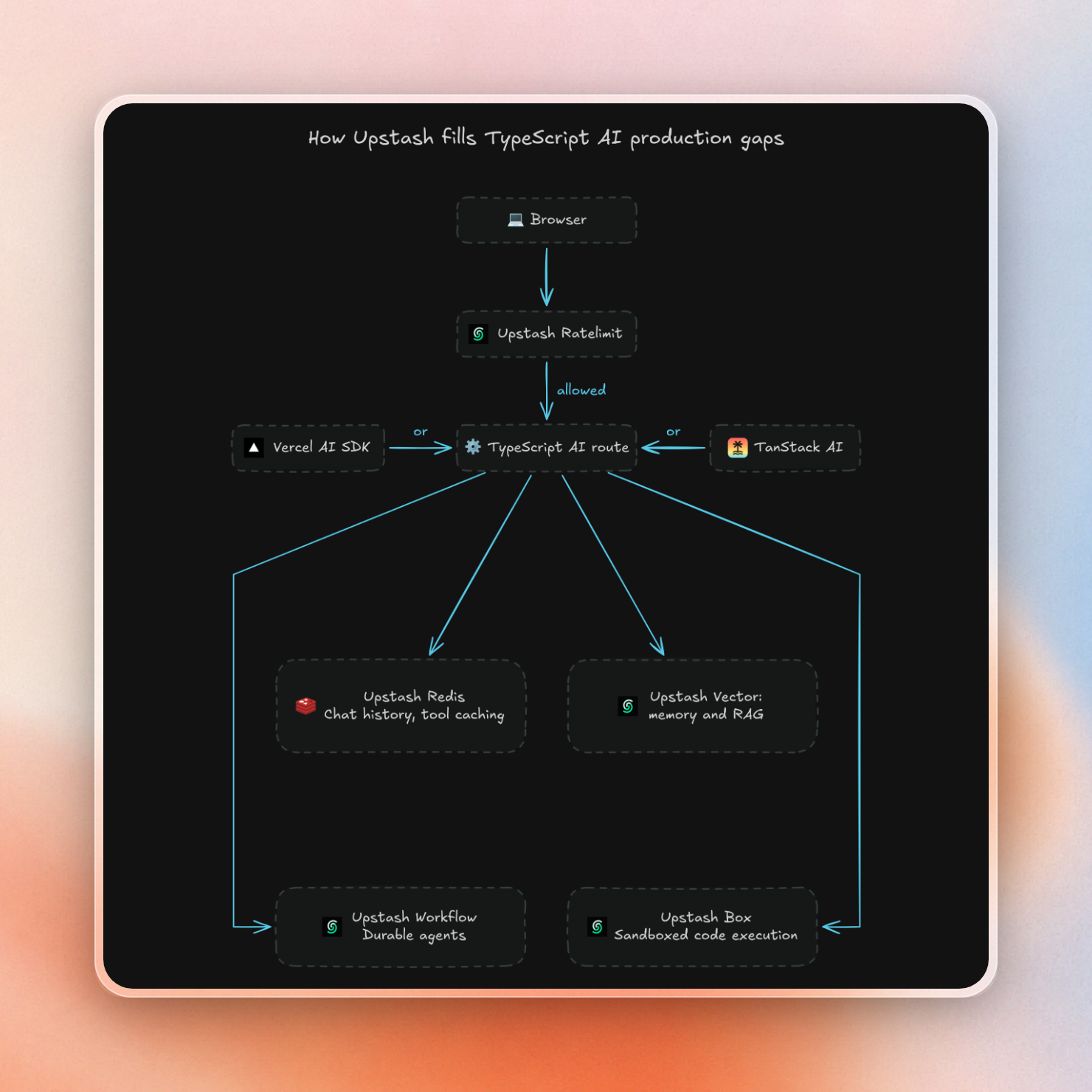
Both SDKs offer code-level access to state. However, neither provides the backend servers required for storing chat history and stream state, rate limiting, memory and RAG storage, workflow management for long-running agent tasks, and a sandbox environment for executing agent code.
Upstash has a product for each of these, with an integration for both SDKs:
| Infrastructure | Upstash product | With AI SDK | With TanStack AI |
|---|---|---|---|
| Chat history | Redis | AgentKit for AI SDK createChatHistory | AgentKit for TanStack AI upstashPersistence |
| Resumable streams | Redis | Redis for the resumable-stream setup | AgentKit upstashStream durability adapter |
| Rate limiting | Ratelimit | AgentKit createRateLimit | AgentKit createRateLimit or rateLimit middleware |
| Memory and RAG | Redis Search, Vector | AgentKit memory and search tools | AgentKit upstashMemory and createSearchTools |
| Long agent workflows | Workflow | Each model call and tool runs as a workflow step | No integration yet |
| Code sandbox | Box | Box tools guide | Native Box sandbox provider |
For AI SDK, AgentKit adds rate limiting and chat history in a few lines. This route allows each user 20 requests a minute and saves the chat when the stream ends:
import { anthropic } from '@ai-sdk/anthropic'
import { createChatHistory, createRateLimit, Ratelimit } from '@upstash/agentkit-ai-sdk'
import { convertToModelMessages, streamText, type UIMessage, type UIMessageStreamOnEndCallback } from 'ai'

const keyPrefix = process.env.KEY_PREFIX ?? 'chat:'
const history = createChatHistory({ prefix: `${keyPrefix}history` })
const rateLimit = createRateLimit({
  prefix: `${keyPrefix}rate-limit`,
  limiter: Ratelimit.slidingWindow(20, '1 m'),
})

async function saveMessages(userId: string, sessionId: string, event: Parameters<UIMessageStreamOnEndCallback<UIMessage>>[0]) {
  await history.saveChat({ userId, sessionId, messages: event.messages })
}

export async function POST(req: Request) {
  // The authentication layer supplies this trusted identity header.
  const userId = req.headers.get('x-user-id')
  if (!userId) return new Response('Unauthorized', { status: 401 })

  let body: { id?: unknown, messages: UIMessage[] } | null
  try {
    body = await req.json()
  } catch {
    return new Response('Invalid JSON', { status: 400 })
  }
  if (!body || typeof body.id !== 'string' || !body.id.trim()) {
    return new Response('id is required', { status: 400 })
  }
  const { id, messages } = body

  const limit = await rateLimit.limit(userId)
  await limit.pending
  const headers = { 'X-RateLimit-Remaining': String(limit.remaining) }
  if (!limit.success) return new Response('Too many requests', { status: 429, headers })

  const result = streamText({
    model: anthropic('claude-haiku-4-5'),
    messages: await convertToModelMessages(messages),
  })

  return result.toUIMessageStreamResponse({
    headers,
    originalMessages: messages,
    onEnd: saveMessages.bind(undefined, userId, id),
  })
}
For TanStack AI, AgentKit has its own package, @upstash/agentkit-tanstack-ai. Its persistence store plugs into TanStack's withPersistence slot. Ratelimit runs first, and the persistence middleware wraps the model call:
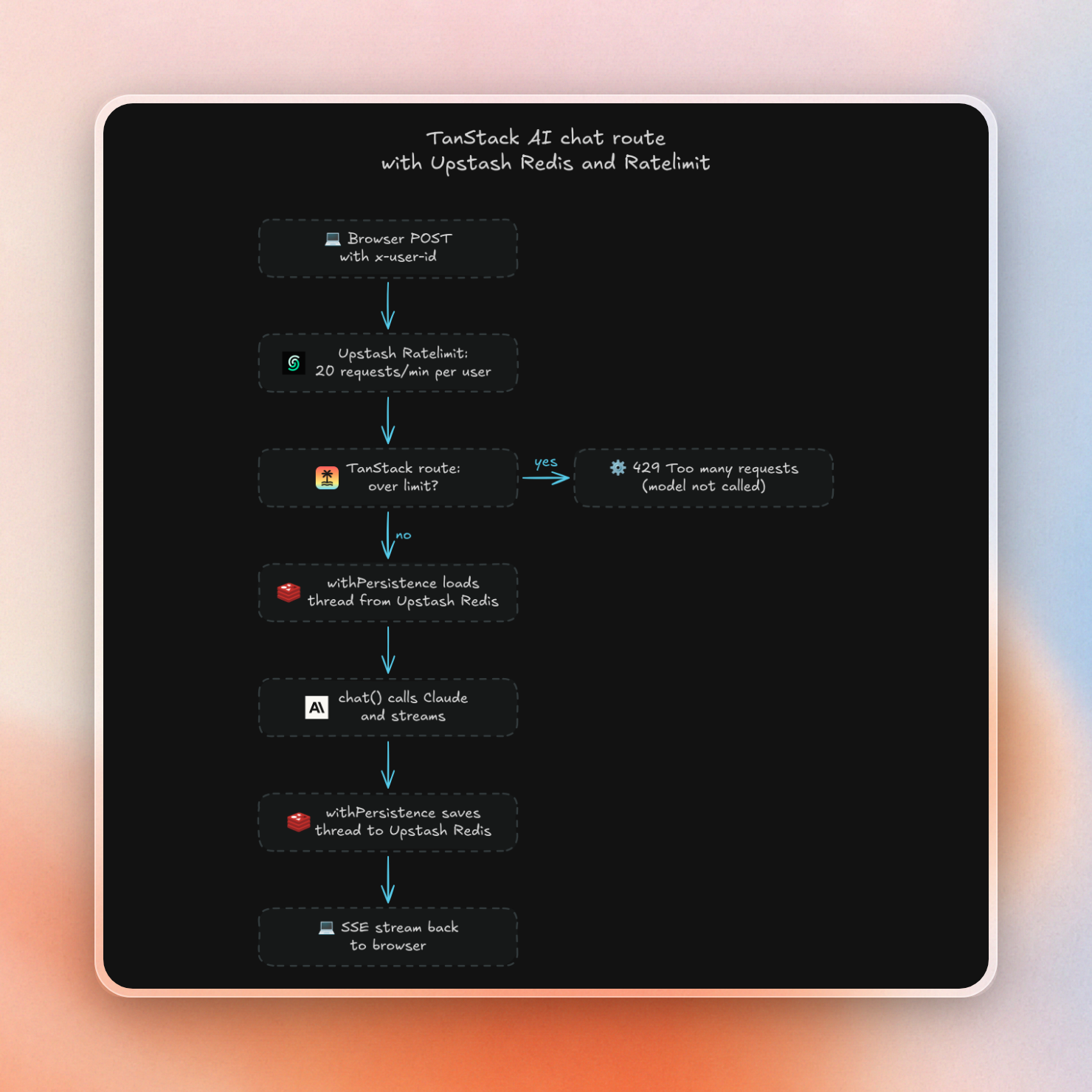
The route reads the standard TanStack client request, which sends a threadId, and rejects a request without one:
import { chat, chatParamsFromRequest, toServerSentEventsResponse } from '@tanstack/ai'
import { anthropicText } from '@tanstack/ai-anthropic'
import { withPersistence } from '@tanstack/ai-persistence'
import { createRateLimit, Ratelimit } from '@upstash/agentkit-tanstack-ai'
import { upstashPersistence } from '@upstash/agentkit-tanstack-ai/persistence'

const keyPrefix = process.env.KEY_PREFIX ?? 'chat:'
const rateLimit = createRateLimit({
  prefix: `${keyPrefix}rate-limit`,
  limiter: Ratelimit.slidingWindow(20, '1 m'),
})

export async function POST(req: Request) {
  // The authentication layer supplies this trusted identity header.
  const userId = req.headers.get('x-user-id')
  if (!userId) return new Response('Unauthorized', { status: 401 })

  let params
  try {
    params = await chatParamsFromRequest(req)
  } catch {
    return new Response('Invalid chat request', { status: 400 })
  }
  if (!params.threadId.trim()) return new Response('threadId is required', { status: 400 })

  const limit = await rateLimit.limit(userId)
  await limit.pending
  const headers = { 'X-RateLimit-Remaining': String(limit.remaining) }
  if (!limit.success) return new Response('Too many requests', { status: 429, headers })

  const persistence = upstashPersistence({
    prefix: `${keyPrefix}history:${encodeURIComponent(userId)}`,
  })
  const stream = chat({
    adapter: anthropicText('claude-haiku-4-5'),
    threadId: params.threadId,
    runId: params.runId,
    parentRunId: params.parentRunId,
    messages: params.messages,
    ...(params.resume ? { resume: params.resume } : {}),
    middleware: [withPersistence(persistence)],
  })

  return toServerSentEventsResponse(stream, { headers })
}
We sent the route the same body that TanStack's fetchServerSentEvents client sends, read the stream to the end, then read the stored thread back from Redis (trimmed):
status: 200
rate-limit remaining header: 19
stream text: OK
stored messages: [{"content":"Reply with exactly: OK","id":"c8af32c7-530e-4f3f-95e8-4665c6bac33a","role":"user"},{"content":"OK","createdAt":"2026-10-19T14:30:38.742Z", ...}]
Requests with a missing or blank threadId got a 400, and the route returns 429 before it calls the model once the limit is used up.
The route above only persists the transcript. For reloading to be able to restore the chat, the client needs persistence: true and a GET route that implements reconstructChat. And for returning to the partially streamed answer, you should add AgentKit's upstashStream durability adapter. But if you're not in the mood for adding a package, you can just write your own MessageStore with @upstash/redis in about ten lines.
Sandboxes work with both SDKs. For AI SDK, the Box guide gives the model tools to run code and shell commands and to read and write files, with one box per chat that pauses when idle and resumes on the next call. TanStack AI ships a native Upstash Box provider, so a coding agent runs inside a box through chat() middleware, and TanStack's durable runs keep it working if the connection drops.
Longer multi-step agent workflows: Upstash Workflow models each AI SDK model call and tool as a step and then continues from the last completed step if a run fails. TanStack AI does not have a general workflow engine yet, and Upstash Workflow does not have a TanStack integration.
Which one should you pick?
Pick Vercel AI SDK for a production app you need to ship soon, a niche model provider, or ready-made agents. Pick TanStack AI for strict types per model, Solid or Preact, or a smaller server bundle. If your servers handle many streams at once, TanStack AI was faster in our load test, but run that test on your own traffic first.
Whichever you pick, you still provision the same infrastructure: