Thundering Herd Problem: How Cache Stampedes Happen and 5 Ways to Stop Them
 Cahid Arda Oz
Of course, a cache only protects your database as long as the key is present. If you have a highly-accessed key expire during a high traffic period, you’ll have a stampede of requests that miss all at once in the subsequent few hundred milliseconds. All of those requests will then fall back to the database, exposing the database to the load the cache was meant to prevent.
What is the thundering herd problem?
The thundering herd problem occurs when a lot of processes or requests wake up for the same event, but only one of them needs to do the actual work. In the case of cache, this is known as a cache stampede. A lot of concurrent requests try to rebuild a hot key, which has expired.
This can happen in different scenarios, for example, operating systems (the kernel wakes up a lot of threads waiting for a single connection and all but one go back to sleep), or in retries (clients retry on a schedule and hit a recovering server at the same time). For the thundering herd problem in retries, random jitter added to the retry delay can solve the problem by spreading out the retries.
This guide focuses on the cache case, where the thundering herd problem can be solved in different ways. In the following examples, Redis is used as the cache and the code is written against Upstash Redis.
How a cache stampede happens
The most common implementation of a cache is cache-aside; read the key, and if it’s a miss, read the database and write the result back into the cache.
import { Redis } from "@upstash/redis";

const redis = Redis.fromEnv();
const sleep = (ms: number) => new Promise((r) => setTimeout(r, ms));

// Stands in for a slow database query.
async function loadFromDb(id: string) {
  await sleep(300);
  return { id, name: `Product ${id}` };
}

async function getNaive(key: string) {
  const hit = await redis.get(key);
  if (hit) return hit;
  const value = await loadFromDb(key);
  await redis.set(key, value, { ex: 60 });
  return value;
}
This is fine if you only occasionally and randomly miss. However if many requests miss at the same time none of them knows that the other requests are already re-loading the same value. This load window will last as long as the database query, so if it’s slow it can stay open for a while. If you have 10 requests per second and a 3 second query then 30 requests will re-build the page after expiration.
With a 300ms database query and 50 concurrent requests on an empty key, the database loads 50 times:
no lock: 50 concurrent requests, database loads: 50The database can slow down, so those queries can take a long time to complete. In fact, more requests can be queued up behind those, so the key may never be written back.
You can watch for this in the Upstash console. The Usage tab of a database charts hits and misses per second, so a dip in hits and a rise in misses after a hot key expires or the cache is cleared shows up without any custom metrics:
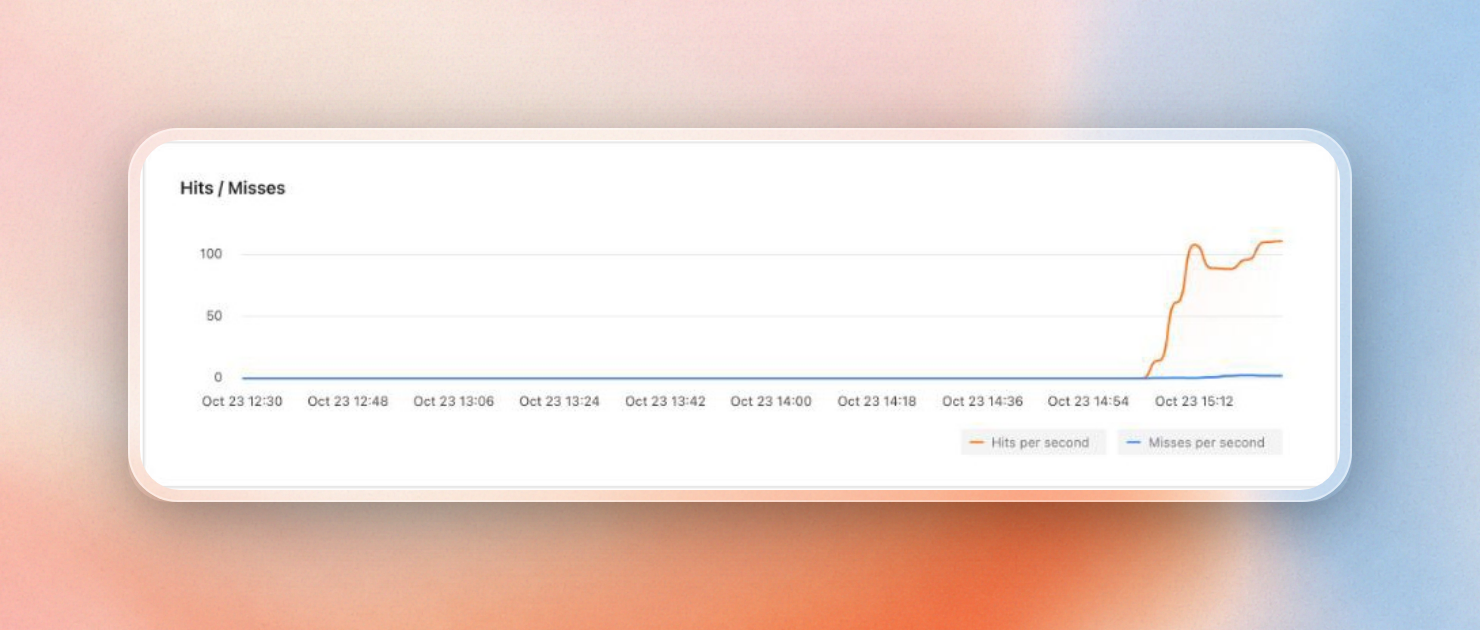 Hits per second dip when the cache is cleared and then recover, while misses rise slightly.
1. Let one request rebuild with a lock
The lock will ensure that only the first request to hit the cache will regenerate the value, and other requests will wait until it fills the cache. We can implement a lock in Redis using the NX option, which only sets the value if it doesn’t exist yet. Thus, only one request will succeed. We also need to set an expiry on the lock so that if a request crashes, it won’t hold the lock forever. We can do that with the PX option.
async function getWithLock(key: string) {
  const hit = await redis.get(key);
  if (hit) return hit;

  const token = crypto.randomUUID();
  const won = await redis.set(`lock:${key}`, token, { nx: true, px: 5000 });
  if (won) {
    try {
      const value = await loadFromDb(key);
      await redis.set(key, value, { ex: 60 });
      return value;
    } finally {
      // Delete the lock only if this request still owns it.
      await redis.eval(
        `if redis.call("GET", KEYS[1]) == ARGV[1] then return redis.call("DEL", KEYS[1]) end return 0`,
        [`lock:${key}`],
        [token],
      );
    }
  }

  // Everyone else waits for the winner to fill the cache.
  for (let i = 0; i < 50; i++) {
    await sleep(50);
    const value = await redis.get(key);
    if (value) return value;
  }
  return loadFromDb(key); // the winner died; fall back
}
The token matters because if a request takes so long to load that the lock’s 5 second timeout is reached, another request may take the lock. If we used a regular delete command, we would delete the second request’s lock. The Lua script allows us to check the token and then delete the key in a single step.
Upstash Redis supports NX and PX on SET and runs Lua scripts with EVAL. Because the HTTP client sends both, this lock also works from serverless and edge functions.
With the same 50 concurrent requests, the database loads once:
with lock: 50 concurrent requests, database loads: 1Of course, this comes with a cost: each of the 49 requests will need to wait for the slowest query to finish, plus possibly up to one polling interval. For more details on lock-based caching, see Redis caching patterns.
2. Coalesce requests inside each process
Request coalescing guarantees that there’s at most one load per key within a process. The first request that misses triggers a load and stores its promise in a map. All subsequent misses for the same key await on that promise instead of issuing a new query.
const inFlight = new Map<string, Promise<unknown>>();

async function getCoalesced(key: string) {
  const hit = await redis.get(key);
  if (hit) return hit;

  let pending = inFlight.get(key);
  if (!pending) {
    pending = loadFromDb(key)
      .then(async (value) => {
        await redis.set(key, value, { ex: 60 });
        return value;
      })
      .finally(() => inFlight.delete(key));
    inFlight.set(key, pending);
  }
  return pending;
}
With 50 concurrent requests in one process:
coalescing: 50 concurrent requests, database loads: 1Coalescing can be done without a Redis round trip, and without a lock key, but it’s limited to one process. Twenty servers can still make twenty queries, but coalescing is a good complement to the lock; coalescing reduces the requests in each process to one, while the lock reduces the servers to one.
In serverless and edge functions, each instance only has its own map and there are many instances running at the same time. The lock in Redis is doing most of the work in that case.
3. Add jitter to TTLs
You can also trigger a stampede with many keys at once. For example, if you warm your cache as a single job, or fill it during a traffic spike, you’ll write many thousands of keys at the same time, with the same TTL (time to live, after which Redis deletes the key). These will all expire at the same time too.
Jitter adds a small random amount to each TTL so the expirations spread out:
function jitteredTtl(baseSeconds: number, spread = 0.1) {
  return Math.round(baseSeconds * (1 + (Math.random() * 2 - 1) * spread));
}

await redis.set(key, value, { ex: jitteredTtl(300) });
Ten TTLs around a 300 second base:
jitter: 10 TTLs around 300s -> 312 324 301 289 317 290 277 315 309 285And we can check the spread on real keys by looking at the Data Browser in the Upstash console. The Data Browser displays the TTL left on each key beside its value.
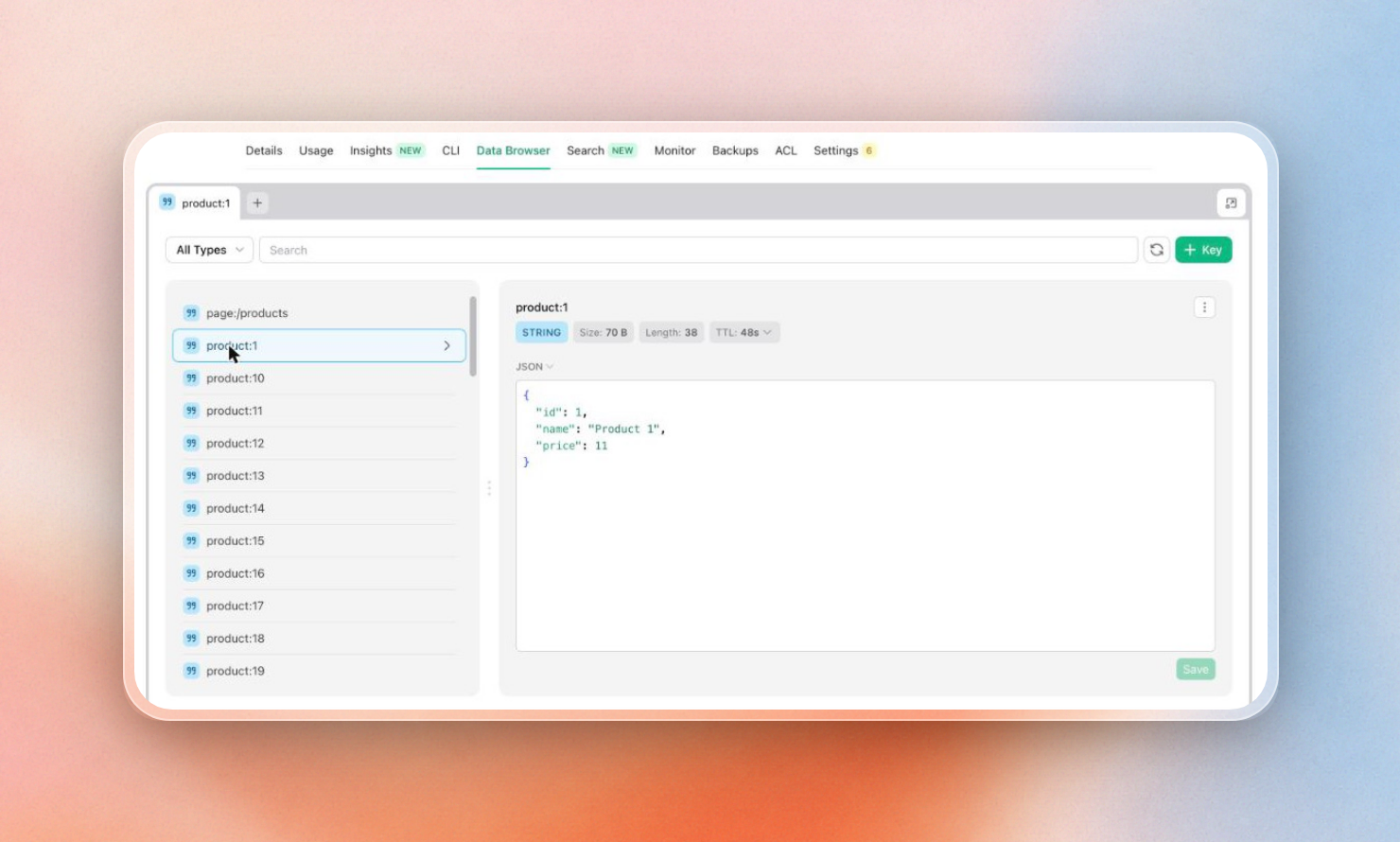
By itself, jitter does nothing for a single hot key, which still expires at one point in time. It must be combined with one of the other fixes.
4. Refresh early with probabilistic expiration
Probabilistic early expiration refreshes the key shortly before it expires to prevent it from expiring while the application is under load. Each request generates a random number and is more likely to refresh the key as the expiration time approaches. Because each request generates a random number, on average one of the requests will refresh the key shortly before it expires, while the other requests will read the value from the cache.
The XFetch algorithm refreshes the cache value when now - delta * beta * log(random()) >= expiry. delta represents the time it took to generate the cache value on the previous refresh. If generating the cache value is slow, then the cache value is refreshed earlier. beta is a tuning parameter that controls the freshness of the cache value. A value of 1 for beta is a good default.
type Entry<T> = { value: T; delta: number; expiry: number };

async function getXFetch<T>(
  key: string,
  ttlMs: number,
  load: () => Promise<T>,
  beta = 1,
) {
  const entry = await redis.get<Entry<T>>(key);
  const now = Date.now();
  if (entry && now - entry.delta * beta * Math.log(Math.random()) < entry.expiry) {
    return entry.value;
  }
  const start = Date.now();
  const value = await load();
  const delta = Date.now() - start;
  await redis.set(key, { value, delta, expiry: Date.now() + ttlMs }, { px: ttlMs });
  return value;
}
The value is stored with its rebuild time and expiry, so this costs a few extra bytes per key. Reading a key with a 2 second TTL every 45ms, the refreshes all happen before the key expires, so no read ever misses:
xfetch: 40 reads over ~2s with a 2s TTL, recomputes: 4Since XFetch doesn't have a lock, it’s still possible to have multiple requests re-fetching in parallel. Only the few requests that roll an early re-fetch will load the value, though, rather than every request that fetches the value.
5. Serve stale data while one request refreshes
Stale-while-revalidate means we provide two lifetimes for any value. After the soft lifetime is exceeded, the value is considered stale but we serve it anyway and then kick off a refresh on one request, in the background. We don't delete the key from Redis until the hard TTL, which is significantly longer.
type Swr<T> = { value: T; freshUntil: number };

async function getSwr<T>(key: string, freshMs: number, load: () => Promise<T>) {
  const entry = await redis.get<Swr<T>>(key);
  const refresh = async () => {
    const value = await load();
    await redis.set(key, { value, freshUntil: Date.now() + freshMs }, { px: freshMs * 10 });
    return value;
  };

  if (!entry) return refresh();
  if (Date.now() > entry.freshUntil) {
    const won = await redis.set(`refresh:${key}`, 1, { nx: true, px: 5000 });
    if (won) void refresh(); // one request refreshes, nobody waits
  }
  return entry.value;
}
The NX key makes sure only one request starts the refresh. The rest get the stale value right away. With 50 requests on a stale key and a 300ms load, all of them return before the load finishes, and the database loads once:
swr: 50 requests on a stale key answered in 191ms, background refreshes: 1The 191ms is the network time to Redis; no request waits 300ms for the load to complete. This is suitable for use cases where a few seconds of staleness is acceptable, such as product listings, counts and feeds. It’s not suitable for use cases where up to date data is needed for each read, such as balances or stock levels at checkout.
Note that in serverless functions, background refreshes may be truncated when the response is sent. Refresh using the platform’s wait-until or after-response hook if available.
Which fix to use
The fixes solve different parts of the problem, and they combine well:
| Fix | Stops | Requests wait? | Serves stale data? | Extra cost |
|---|---|---|---|---|
| Lock | Duplicate rebuilds across all servers | Yes, for one rebuild | No | A lock key and release per miss |
| Coalescing | Duplicate rebuilds in one process | Yes, for one rebuild | No | None, in memory only |
| TTL jitter | Many keys expiring together | No | No | None |
| Probabilistic early expiration | Hot keys reaching their hard expiry | Rarely | No | Rebuild time and expiry stored with each value |
| Stale-while-revalidate | Any wait on a hot key | No | Yes, briefly | A second TTL and a refresh key |
Use the lock with coalescing if you have a hot key that must be current. Use stale-while-revalidate if the key can be several seconds out of date. Add jitter if you’re writing many keys at the same time.
