How to Add Memory to an AI Agent with Redis
 Cahid Arda Oz
In order to add memory to an AI agent, you need to store things outside the model and load them into the prompt with every turn. When the model responds to your message, you need to write new things back to memory. For most agents, short-term memory (what you talked about most recently) and long-term memory (what you know about the user) are the most important.
Redis is a great choice for both short-term memory and long-term memory because the agent is reading from memory on every turn, and Redis stores data in memory. Redis has lists and hashes built in. It can also automatically delete a key after it’s been around for some amount of time.
What memory means for an AI agent
A call to a language model is a function that takes some text and returns more text. It doesn’t store any state between calls. Everything the agent “remembers” is text that the agent passes to subsequent calls. Thus, memory is just a store of data plus the code that decides what to retrieve on each turn.
The two kinds differ in what they hold and how long they last:
| Memory | What it holds | Redis type | How long it lasts |
|---|---|---|---|
| Short-term | The last messages of one conversation | List | Until the session goes quiet for an hour |
| Long-term | Facts about the user: name, preferences, decisions | Hash | Until the user or the app deletes them |
The hour is the TTL (time to live), which is the number of seconds until Redis automatically deletes the key.
Step 1: Keep the recent conversation
Redis lists work well for short term memory (i.e. conversation). We can append new messages, and then trim the list so that we only have the most recent messages. Keeping the size of the list small is important because we want the prompt to be small.
The code below uses @upstash/redis which is a library for sending commands over HTTP to Redis. The library is great for serverless functions and edge functions since there's no connection to manage. It uses the UPSTASH_REDIS_REST_URL and UPSTASH_REDIS_REST_TOKEN environment variables to connect to a Redis instance. To get them, sign up for Upstash and create a free Redis database; both values are on the database page.
// history.ts
import { Redis } from "@upstash/redis";

const redis = Redis.fromEnv();

export type Message = { role: "user" | "assistant"; content: string };

export async function loadHistory(userId: string, sessionId: string) {
  return redis.lrange<Message>(`chat:${userId}:${sessionId}`, 0, -1);
}

export async function appendHistory(userId: string, sessionId: string, ...messages: Message[]) {
  const key = `chat:${userId}:${sessionId}`;
  await redis
    .pipeline()
    .rpush(key, ...messages)
    .ltrim(key, -20, -1) // keep the last 20 messages
    .expire(key, 60 * 60) // delete after 1 hour without a new message
    .exec();
}
When we append messages to a session, we do three things in a single request: push the new messages, trim the list down to the last 20 messages, and reset the expiration to 1 hour. If a session is left inactive for 1 hour, it will expire on its own.
Step 2: Save lasting facts about the user
Long-term memory is anything you want to survive beyond the end of a session: the user’s name, their diet, where they live, a decision they’ve made. A Redis hash per user is an ideal data structure for long-term memory: each piece of information can be stored as a different field, so that when a new value is set for diet it overwrites the old value, rather than adding to it.
// facts.ts
import { Redis } from "@upstash/redis";

const redis = Redis.fromEnv();

export async function loadFacts(userId: string) {
  return (await redis.hgetall<Record<string, string>>(`facts:${userId}`)) ?? {};
}

export async function saveFacts(userId: string, facts: Record<string, string>) {
  if (Object.keys(facts).length > 0) await redis.hset(`facts:${userId}`, facts);
}
The whole hash gets loaded by the agent each turn, which means it’s one command no matter the number of fields.
Step 3: Read and write memory on every turn
So during each turn we need to load both memories, call the model, and then store any newly produced messages and facts.
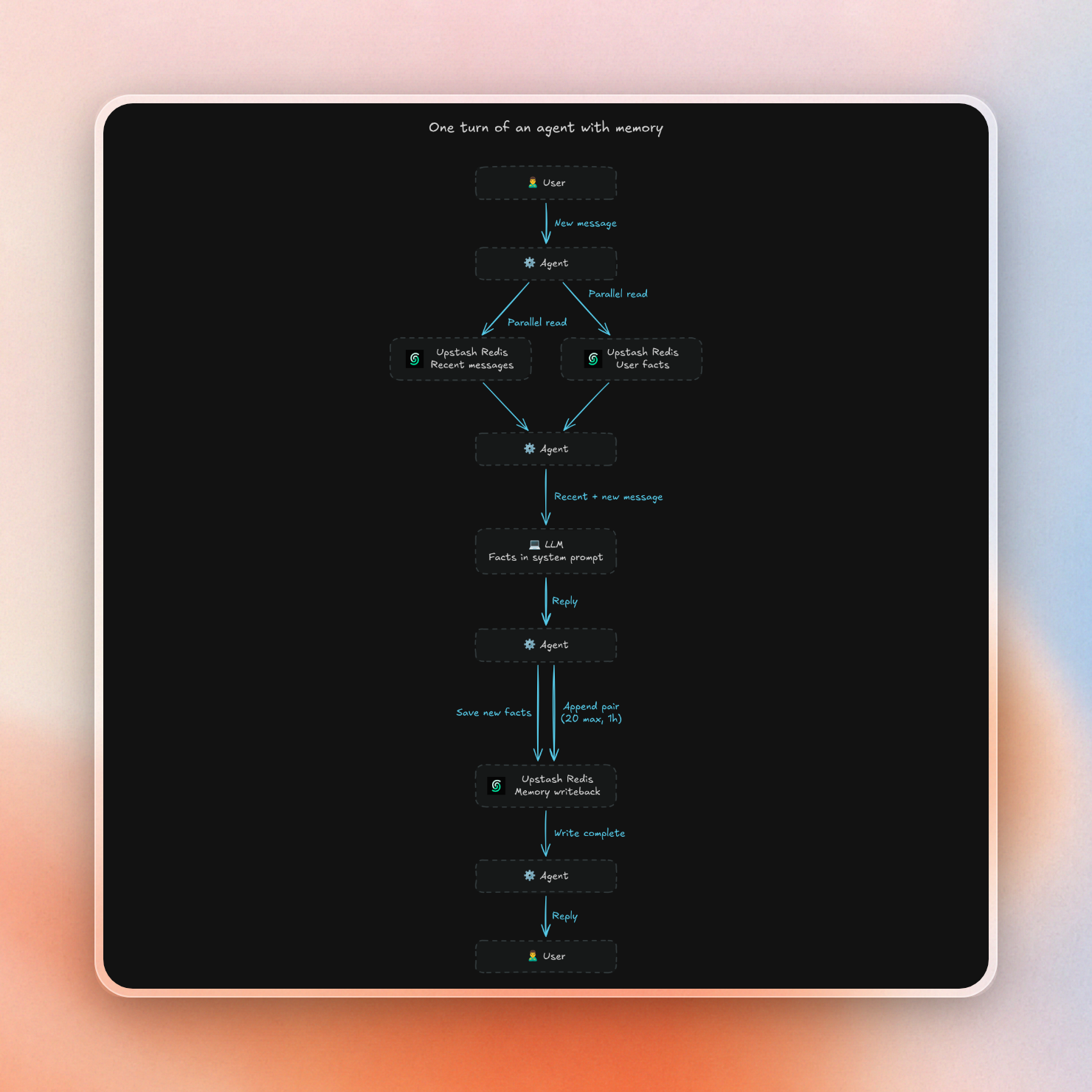
// agent.ts
import { loadFacts, saveFacts } from "./facts";
import { appendHistory, loadHistory, type Message } from "./history";
import { ask } from "./llm";

export async function turn(userId: string, sessionId: string, input: string) {
  // 1. Read both kinds of memory.
  const [history, facts] = await Promise.all([loadHistory(userId, sessionId), loadFacts(userId)]);

  // 2. Call the model with the facts in the system prompt and the history as messages.
  const userMessage: Message = { role: "user", content: input };
  const reply = await ask(
    `You are a helpful assistant. Known facts about the user: ${JSON.stringify(facts)}`,
    [...history, userMessage],
  );

  // 3. Write back the new messages and any lasting facts in them.
  await appendHistory(userId, sessionId, userMessage, { role: "assistant", content: reply });
  const extracted = await ask(
    'Extract lasting facts about the user (name, preferences, decisions) from this message. Reply with only a flat JSON object, no code fences, like {"diet":"vegetarian"}, or {} if there are none.',
    [userMessage],
  );
  await saveFacts(userId, JSON.parse(extracted));

  return reply;
}
We can use a second small call to determine if something is a fact, without altering the response. This means that a production agent can do this in the background after answering.
ask is the only part tied to a model provider, and any LLM SDK works. With the Anthropic SDK it looks like this:
// llm.ts
import Anthropic from "@anthropic-ai/sdk";
import type { Message } from "./history";

const client = new Anthropic();

export async function ask(system: string, messages: Message[]) {
  const res = await client.messages.create({ model: "claude-haiku-5-5", max_tokens: 1000, system, messages });
  return res.content.find((block) => block.type === "text")?.text ?? "";
}
Ada introduces herself in one session, then asks for dinner ideas in a new one:
// demo.ts
import { turn } from "./agent";
import { loadFacts } from "./facts";

await turn("ada", "session-1", "Hi, I'm Ada. I'm vegetarian and I live in Lisbon.");
console.log(await loadFacts("ada"));
console.log(await turn("ada", "session-2", "Suggest a dinner place for me tonight."));
The second session starts with an empty history, and the reply still uses her facts:
{ diet: 'vegetarian', location: 'Lisbon', name: 'Ada' }
Good evening, Ada! I can't check live hours or availability, so please verify before you go. Here's a suggestion:

**Cantinho Vegetariano**, a long-running vegetarian restaurant in central Lisbon, ...
When the facts no longer fit in the prompt
The above approach works well as long as all the facts can fit into the prompt. If the user has a lot of facts, the agent needs to implement some recall mechanism to search through long-term memory with the current message and load only the top few matching facts. There are two common ways to implement the search over facts:
- Full-text search over facts: The agent searches stored facts using the words in the current message. In the agent memory tutorial, this approach is used with Redis Search. Facts are stored as JSON documents and no embeddings are involved.
- Embedding search over facts: The agent stores a vector for each fact and then searches the facts vector database with the vector of the current message. This approach can be implemented with any vector database, for example with Upstash Vector.
For TypeScript agents, Upstash AgentKit provides this out of the box for the Vercel AI SDK, TanStack AI and Vercel Eve. It stores chat history per user and gives the model recall and save tools that it calls on its own.
Keep memory safe in production
Since memory contains personal data and is accessed on every turn of the agent, there are a few things to keep in mind before you ship:
- Do not use the user id from the request body as it is the only thing keeping different users' memory separate, as all keys use it. Get the user id from your auth session.
- To quickly see everything that's stored about a user, put the user id immediately after the prefix in the key name, like so:
chat:ada:session-1. - You can check what's stored using the Data Browser in the Upstash console. It shows the value of the key and the remaining TTL.
- If you build the agent with a coding agent such as Claude Code, Cursor or Codex, connect it to the Upstash MCP server. It can then create the database, read a user's memory keys and run commands for you while you debug.
- The cost per turn can be calculated as follows: Each turn in the above example will use six Redis commands (two reads, three for history, and one to store facts). On pay-as-you-go pricing ($0.20 per 100K commands), 1,000 turns will use 6,000 commands, or $0.012. The free tier gives you 500K commands per month, which is enough for about 83,000 turns.
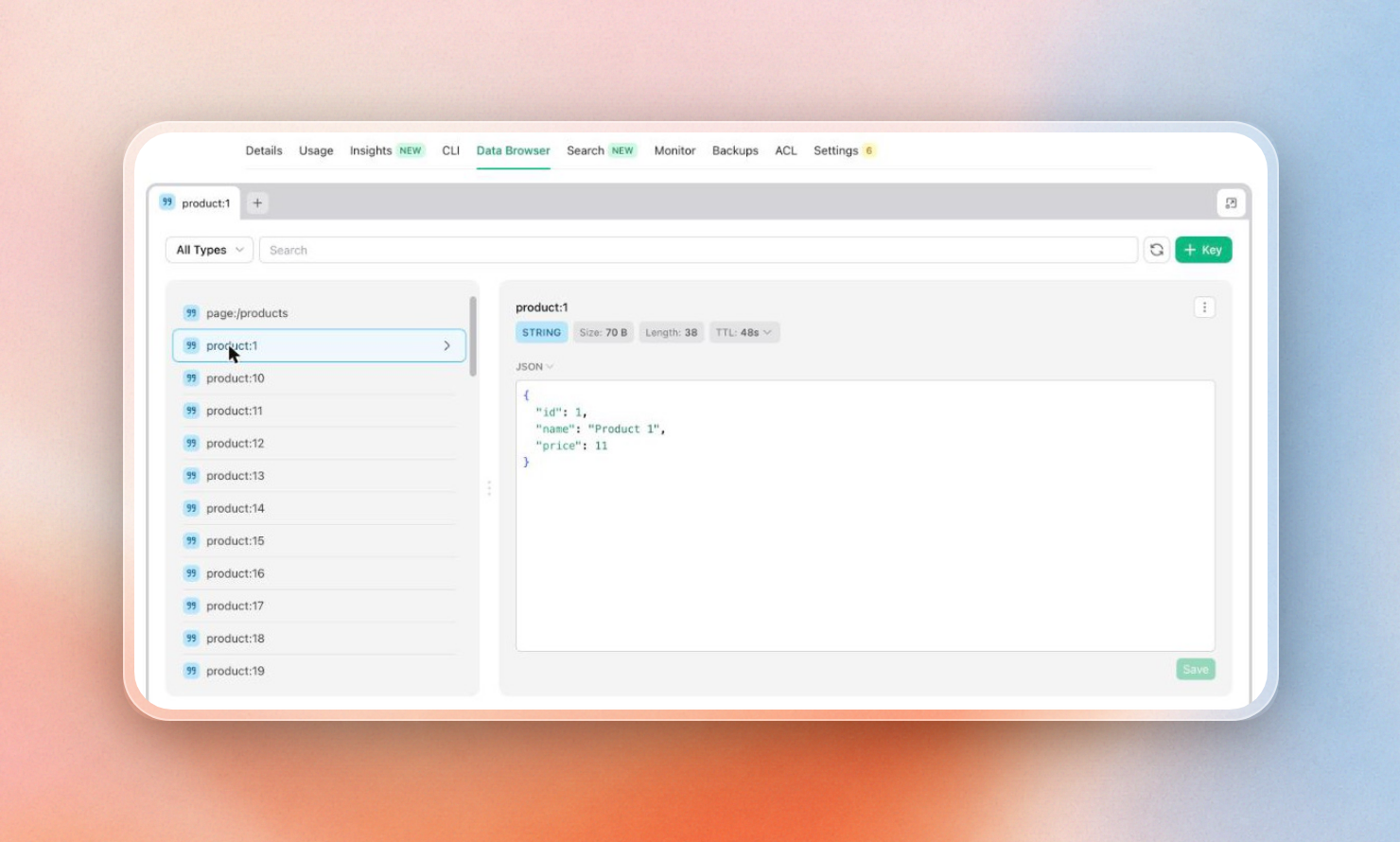 The Data Browser in the Upstash console displays the value of the key and its remaining TTL.
When a user asks to be forgotten, the agent deletes their facts and every session they had:
// forget.ts
import { Redis } from "@upstash/redis";

const redis = Redis.fromEnv();

export async function forgetUser(userId: string) {
  const keys = [`facts:${userId}`];
  let cursor = "0";
  do {
    const [next, found] = await redis.scan(cursor, { match: `chat:${userId}:*`, count: 100 });
    keys.push(...found);
    cursor = next;
  } while (cursor !== "0");
  return redis.del(...keys);
}
In the above demo, forgetUser("ada") returns 3 for the facts hash and the two session lists.
Putting it together
An agent with memory comes down to three things:
- A Redis list per session for the recent conversation, trimmed to the last messages and expired when the session goes quiet.
- A Redis hash per user for lasting facts, loaded into the system prompt on every turn.
- A turn function that reads both, calls the model, and writes the new messages and facts back.
To try it, create a free Upstash Redis database and run the code above with any model. If a coding agent is building it for you, it can also get a scratch database with one POST to start-redis, which you claim in your account to keep. When the agent remembers more than fits in a prompt, add recall with the agent memory tutorial. If you build on the Vercel AI SDK, TanStack AI or Vercel Eve, Upstash AgentKit gives you the same history and memory as ready-made tools.
