

A workflow run can be waiting for two reasons: a step is sleeping because of
context.sleep or context.sleepUntil, or a step failed and is waiting out its
retry delay before the next attempt. Both can be released early from the console,
so the run continues immediately instead of at the scheduled time.
From the console#
Open the run in the Logs tab of the Upstash Console.
Every waiting step shows a button next to its label: Run now on a sleeping
step and Retry now on a step in retry backoff. In a parallel block, each
branch has its own button.
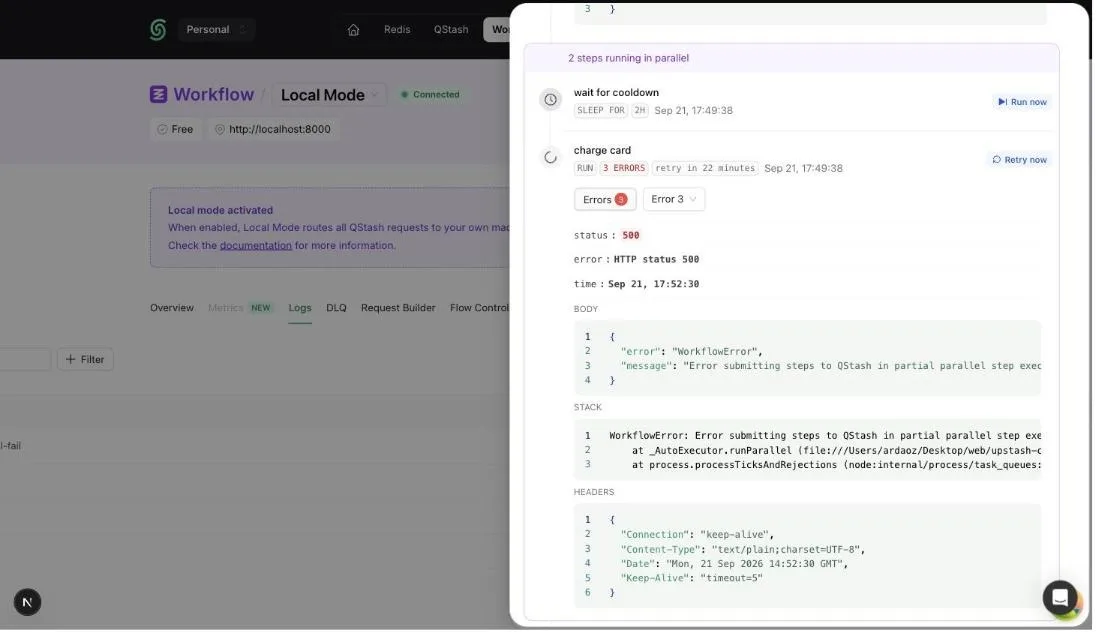
The buttons are only offered while the run is still running and the step is genuinely waiting. Once QStash picks the step up, the button disappears and the run continues as if the sleep or delay had ended on its own.
Releasing a retrying step does not add an attempt. If the step was on its last retry and fails again, the run fails and the failure function is called as usual.
From the API#
Under the hood, a sleeping or retrying step is a delayed QStash message. The console calls the retry a step now endpoint with the step’s message ID, which you can find in the run’s event logs.