T3 Code vs herdr vs Conductor vs Cloudroom: Which Coding Agent App to Use
 Ali Tarık Şahin
Developers are currently running many coding agents at the same time: one creating a new feature, one reviewing it, one fixing the tests. The speed of the coding agents makes us the slow part. When you use Claude Code or Codex, you can open a new terminal tab for each of the coding agents, then open up each of those tabs and check if they’re done, or even if they’re waiting on your approval.
This has inspired a new crop of apps that let you run multiple agents in a single window: T3 Code, herdr, Conductor, and Cloudroom. T3 Code has more than 28k GitHub stars and herdr more than 44k. Conductor claims to have 100k+ builders, and Cloudroom launched in October 2026.
While the four apps look similar, there are actually four main differences between them: where the agents run, how well the agents are isolated from each other, which OSes are supported, and cost.
Why use these apps instead of Claude Code or Codex alone?
They are used to watch many agents at once in one window or from a phone. Inside these apps, the actual agent is still the official one (e.g. Claude Code, Codex, etc.). T3 Code, herdr, Conductor, Cloudroom etc. use the official agents for you and you continue paying for your own subscriptions.
Here’s an overview of how the various components interact with each other.
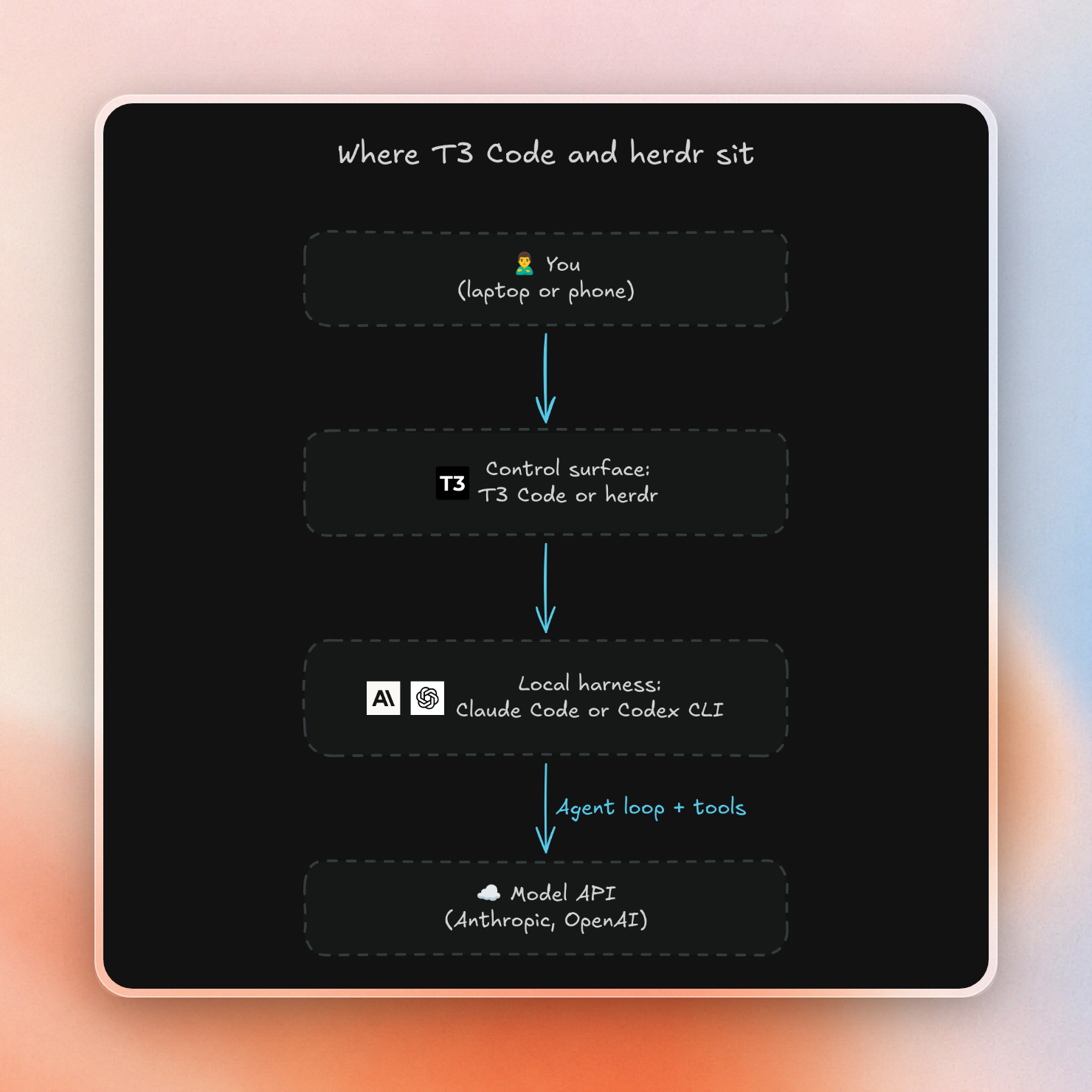
Why people are making the move:
- Visibility into which agent needs attention. herdr shows each agent as working, blocked or idle in one sidebar, so you don't have to open every tab to check.
- Control agents from your phone. Most of these apps have a phone or web app, so you can check on agents away from your desk.
- Mix agents. You can run Claude Code, Codex and other agents side by side, and give each one a different job, such as writing code or reviewing it.
And since they use your existing Claude or Codex subscription, trying them out locally is free.
The four apps at a glance
T3 Code is a desktop, web and mobile app. herdr is a terminal app. Conductor and Cloudroom are desktop apps with their own cloud. The main differences:
| App | Where agents run | How agents are kept apart | Computers | License | Price |
|---|---|---|---|---|---|
| T3 Code | Your computer (or a server you own) | Git worktree per thread | Mac, Windows, Linux, web, iOS, Android | MIT | Free |
| herdr | Your computer or a server over SSH | Nothing built in | Mac, Windows, Linux | Apache-2.0 | Free |
| Conductor | Your Mac, or Conductor's cloud | Worktree locally, sandbox in the cloud | Mac, plus an iOS app | Closed source | Free locally, Pro $50/month, Teams $60/user/month |
| Cloudroom | Your computer, or Cloudroom's cloud | Own cloud sandbox per thread | Mac and Linux | Apache-2.0 | Free (100 cloud agents per 30 days, 25 hours of cloud compute), Pro $50/month, Ultra $500/month |
A git worktree creates a separate working directory for another branch of the same repository. This reduces the chances that two agents are working on the same file but doesn't isolate things like processes, ports, or credentials.
How they compare, point by point
Where the agents run
This difference is the largest among the four apps.
T3 Code and herdr run agents on your computer or on a server you set up yourself. herdr can save several SSH machines and switch between them in one window. Neither app creates cloud machines for you. On a laptop, the agents stop when it sleeps. herdr can keep terminals running after you close its window, but restarting the computer kills the agents. To keep agents running all the time, you need a machine that stays on.
Conductor and Cloudroom let you run agents in the cloud. Conductor's cloud machines have 8 CPUs and 16 GB of memory and can run after you turn your Mac off. Cloudroom says cloud agents "keep working and its history is saved", whereas its local agents stop working after your Mac sleeps.
How well agents are kept apart
When multiple agents are running on the same computer, they can easily conflict with each other. If two agents are trying to start dev servers, they’ll fight for the same port. If two agents are both running database migrations, they’ll overwrite the same database. And since all agents are running as you, each one can read your .env files and your keys.
- herdr provides zero isolation between agents. If there are two panes on the same folder, they can edit the same files.
- T3 Code and Conductor (local) give each agent its own worktree. Ports, databases and secrets are still shared.
- Conductor (cloud) runs each workspace in a cloud sandbox.
- Cloudroom (cloud) runs each thread in its own sandbox. Subagents in one thread can share that sandbox and change each other's files.
Computers and license
One limitation of Conductor is that it only runs on Mac, which is the most common reason Windows and Linux users choose alternative platforms. Cloudroom runs on Mac and Linux; T3 Code and herdr also run on Windows.
With three of the four platforms open source, Conductor is the only closed product here. This may be an issue if your company needs to read the source code or run the product yourself.
Price
T3 Code and herdr are free. You only pay for your Claude or Codex subscription.
Conductor and Cloudroom are free on your own computer. Cloud use costs money:
- Conductor puts cloud workspaces in Pro at $50 a month. Cloud computing has no extra fee right now, but usage pricing is planned.
- Cloudroom gives 100 cloud agents and 25 hours of cloud compute for free, with the agent count reset every 30 days. Pro is $50 a month and Ultra is $500 a month.
Watching and reviewing agent work
- Seeing status: herdr shows each pane as working, blocked or idle.
- Phone: T3 Code has iOS and Android apps. Conductor has an iOS app that works with its cloud workspaces. Cloudroom has a mobile app. herdr has only third-party phone clients.
- Reviewing changes: T3 Code shows diffs and can commit, push and open a pull request. herdr has no diff view, so you use your own tools.
- Approvals: Cloudroom agents run without approval prompts. The sandbox limits what a bad command can break, but the agent can still read the keys Cloudroom keeps there. If you turn on Mac access, cloud agents can also read files and run commands on your Mac.
Speed and memory use
We haven’t done any benchmarks for these apps, and didn’t find any independent benchmarks. The existing comparison pages call themselves “a documentation comparison, not a hands-on benchmark”. Treat any speed claim as unproven until proven.
Which one to pick
- T3 Code - best if you want a desktop or web app on any system and want to control agents from your phone. It is still early.
- herdr - best if you live in the terminal and want agent status for many panes, locally or over SSH.
- Conductor - best if you use a Mac, want a polished app, and don't mind closed source software with a monthly price for cloud hosting.
- Cloudroom - best if you want each agent on its own cloud machine, and the code to be open source. It is still very new, so there are some rough edges.
Run agents in the cloud with Upstash Box
Both Conductor and Cloudroom create isolated sandboxes in the cloud for agents, but only if you use their app. T3 Code and herdr are flexible enough to use any interface you want, but you have to provision remote machines yourself.
Upstash Box bridges the gap by letting you create the sandboxes yourself via code or a plugin. You can create as many sandboxes as you need, and you can fill them with whatever you want. You keep the app you already like.
Each Upstash Box is a separate cloud container with files, shell, git and Node or Python. It even has built-in Claude Code and Codex. Each box has its own filesystem, process tree and network stack. Five agents in five boxes get five sets of ports, databases and folders. Agents that share one box also share all of that.
When you give each agent its own box, this helps with the three laptop problems:
- Conflicts: agents in separate boxes share nothing.
- Safety: a bad command stays inside the box instead of reaching your home folder. That is why skipping Claude Code's permission prompts is reasonable in a throwaway box with a limited key. Keys you put in the box can still reach outside services, because all code in the box can read its environment variables. For sensitive keys, Attach Headers adds secret headers to outgoing HTTPS requests without putting the secret inside the box.
- Laptop closed: the agent still runs in the box. Boxes go to sleep if idle and wake up later with all files.
You pay only for CPU time while a box is active. The pricing:
| Plan | Price | Boxes at once | Pauses after idle |
|---|---|---|---|
| Free | $0, 5 CPU hours a month | 10 | 1 hour |
| Pay as you go | $0.10 per active CPU hour (small box), $0.20 (medium), $0.40 (large), plus $0.1/GB a month storage | 1,000 | 6 hours |
| Keep-alive | $8 a month (small), $16 (medium), $32 (large) per box | Same as plan | Never |
Small box: 2 CPUs and 4GB memory, large box: 8 CPUs and 16GB memory.
The code example below needs the SDK (npm install @upstash/box) and two environment variables: UPSTASH_BOX_API_KEY, which the SDK reads, and ANTHROPIC_API_KEY for Claude Code. It starts a box, runs Claude Code on a repo, and prints the new file:
import { Agent, Box, ClaudeCode } from "@upstash/box"

const box = await Box.create({
  runtime: "node",
  agent: {
    harness: Agent.ClaudeCode,
    model: ClaudeCode.Sonnet_4_6,
    apiKey: process.env.ANTHROPIC_API_KEY!,
  },
})

try {
  await box.git.clone({ repo: "https://github.com/octocat/Hello-World", depth: 1 })
  await box.cd("Hello-World")

  const run = await box.agent.run({
    prompt: "Add a CONTRIBUTING.md with three short rules for contributors. Leave it uncommitted and reply with one short sentence.",
  })
  if (run.status !== "completed") throw new Error(`Agent run ${run.status}`)
  console.log(run.result)

  const changes = await box.exec.command("git status --short && cat CONTRIBUTING.md")
  if (changes.exitCode !== 0) throw new Error(changes.stderr || changes.result)
  console.log(changes.stdout.trimEnd())
} finally {
  await box.delete()
  console.log("Box deleted")
}
The output:
`CONTRIBUTING.md` created with three rules and left unstaged.
?? CONTRIBUTING.md
# Contributing

1. Open an issue before starting significant work so effort isn't duplicated.
2. Keep pull requests focused — one concern per PR.
3. Ensure all tests pass before requesting a review.
Box deleted
The whole run, from creating the box to deleting it, took about 14 seconds. What’s more, none of the agent’s actions were on the computer that ran the script. In practice, you would keep the box around, and then use box.git.createPR to open a pull request.
Use a box from herdr or T3 Code
By the way, you don't have to give up herdr or T3 Code. The app is still on your laptop or phone. Just the agent moves to the box.
herdr
To use the herdr plugin you will need herdr 0.8.0 or newer and Node.js 22 or newer.
- Install the plugin:
herdr plugin install upstash/herdr-upstash-box- Save your Box API key once:
herdr plugin action invoke setup --plugin upstash.box- Start an agent from the worktree you are in:
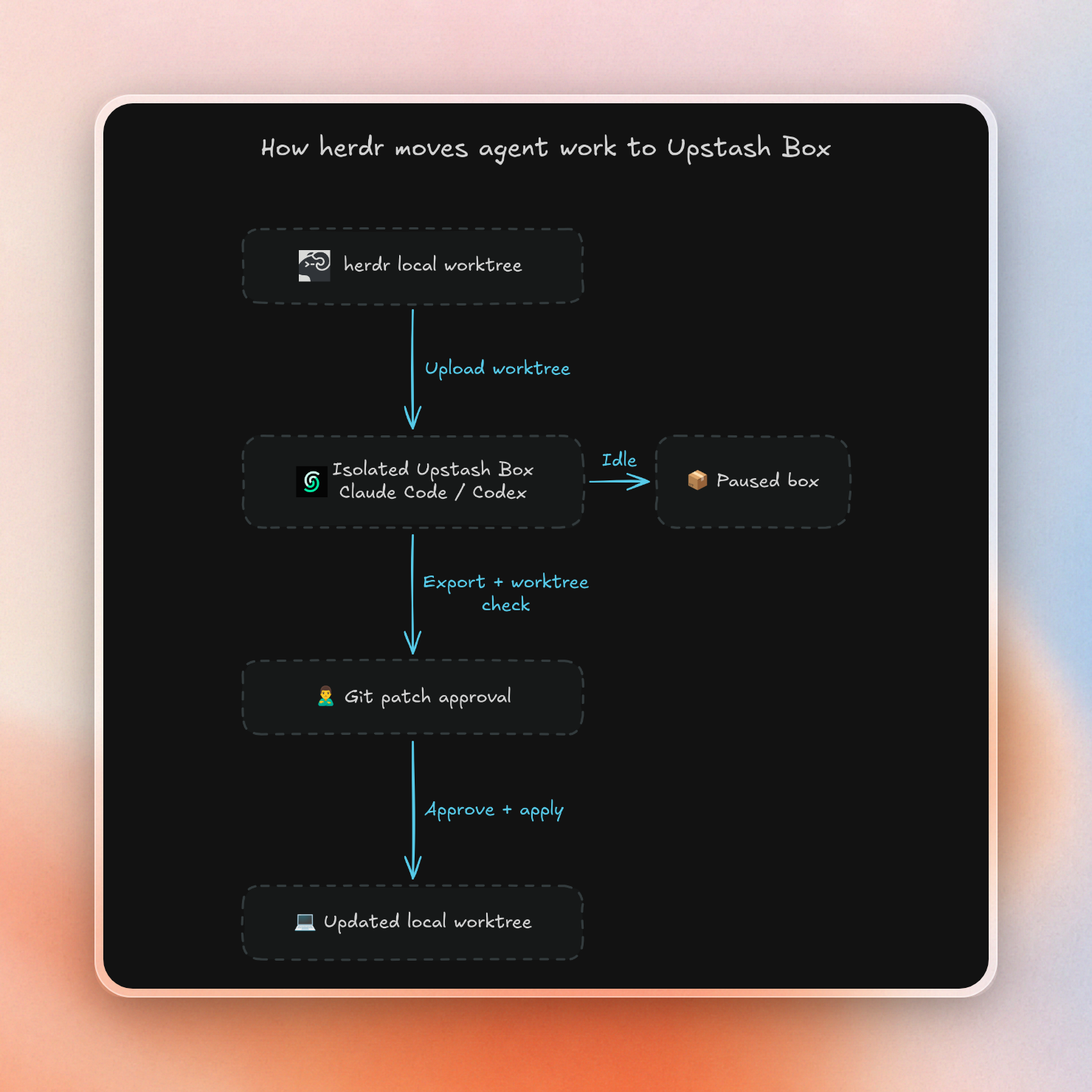
herdr plugin action invoke start-agent --plugin upstash.boxThis herdr plugin allows you to run Claude Code, Codex, or OpenCode in a new box with your worktree copied over, without your .env files. This box is like any other herdr pane, and if you close it, the agent will continue working on your behalf. While the agent is working, your local files will remain unchanged. Once the agent is done, you can click on “Apply changes” and the plugin will send the results of the agent back to your machine as a git patch, which is then checked for conflicts.
This is the full round trip:
This plugin also supports your Claude Pro or Max plan via claude setup-token (and thus you don’t need to pay for a separate API key for the agent).
T3 Code
T3 Code is split into a server and a client. The T3 Code guide hosts the server in a box and the client in the browser. This hosts T3 Code remotely. All of the threads on that server are hosted in the same box, so they share the same ports, processes and databases. To have them be fully separated, run each agent in its own box, as the herdr plugin does.
- Create a box with the Node.js runtime and default settings.
- Connect over SSH, using your Box API key as the password:
ssh <box-id>@us-east-1.box.upstash.com- Install T3 Code:
sudo npm install -g t3- Log in to your agent with
claude auth loginorcodex login. T3 Code uses Codex to name threads, so log in to Codex too, or switch the title provider to Claude. - Start the server in the background and print the pairing link:
setsid nohup t3 serve --host 0.0.0.0 --port 3773 --base-dir /workspace/home/.t3 > /tmp/t3.log 2>&1 < /dev/null &
   sleep 5 && grep "Pairing URL" /tmp/t3.log
The output looks like this:
Pairing URL: http://172.18.0.11:3773/pair#token=LTTPGQ8SAX39- In the Upstash Console, create a public URL for port 3773. It looks like
https://<box-id>-3773.preview.box.upstash.com. - Take the pairing link, swap its internal address for your public URL, keep the token, and open it in your browser:
https://<box-id>-3773.preview.box.upstash.com/pair#token=LTTPGQ8SAX39The link works once and expires after 5 minutes. Run t3 pair --base-dir /workspace/home/.t3 for a new one. Your browser stays signed in for 30 days.
- In the Console, go to Settings, then Init Command, and save the same
setsid nohup t3 serve ...line, so the server starts again when the box wakes up.
Now you can close the browser and SSH session, and the agent keeps running. Open the URL on your phone later and your threads are still there.
When to keep agents local
Each box adds a new account and some network roundtrips. Here are the things to keep in mind:
- The herdr plugin will upload up to 100 MiB of files in total with a maximum size of 10 MiB per file.
- The results of the agent are not immediately applied and require you to merge them at the end.
- Pausing the agent means you can continue the conversation at a later time but long-running processes on the box (or terminal) must be restarted.
- Boxes can only be deployed to AWS us-east-1 so latency depends on how far you are from it.
- Secrets on a box can be accessed by any code running on it. Also, treat the preview URL for T3 Code as a secret.
If you just need to run one agent for a small task or you are offline then it is probably easier to use herdr or T3 Code on your own machine. If you want to run multiple agents and skip some of the approval prompts safely or have the work continue after you close your laptop then one box per agent works better.

