OpenCode vs Pi vs Gemini CLI vs CrewAI vs Goose: 9 agent harnesses compared
 Ali Tarık Şahin
OpenCode, Pi, Gemini CLI, Copilot CLI, Aider, Goose, Amp, Pydantic AI and CrewAI all promise the same thing: give a model a prompt and some tools, and it does the work. One-line summaries like "multi-provider coding agent", "git-aware code editor" or "type-safe agent framework" make them look like nine ways to do the same job. They behave very differently.
While some of these tools are similar to Claude Code or Codex, there are some differences. Claude Code is closed source and only runs Claude models. Codex is built around OpenAI models and needs extra config for custom providers or local models. Most of these tools let you pick the model, and the two frameworks let you write the agent yourself.
We then ran five of them against the same small task using the Upstash Box. They were different in terms of the tools available to them, the way sessions were preserved, the events streamed, and whether they reported LLM costs.
The nine harnesses fall into two families
Seven of the nine are coding agents, which already ship as a command-line tool (CLI). These coding agents can be started up in headless mode, with a prompt, and are already able to create files, and run shell commands:
- OpenCode: an open source coding agent that works with 75+ model providers and local models. It is the most starred project in this comparison.
- Pi: an open source coding agent with support for Anthropic, Google and OpenAI models. It also has an SDK you can run in-process.
- Gemini CLI: Google’s CLI agent, which runs with a Gemini API key.
- Copilot CLI: GitHub’s CLI agent, which runs with a Copilot subscription or your own Anthropic, OpenAI or Azure key.
- Aider: a Python-based pair-programming tool that can make file changes based on a single message.
- Goose: a Rust-based agent with a single binary. It supports named sessions, and built-in MCP (Model Context Protocol) support for connecting external tools to an agent.
- Amp: Sourcegraph’s agent, which keeps each conversation as a thread.
The other two are Python-based frameworks where you have to write the agent and provide all the tools:
- Pydantic AI: a typed agent framework supporting streaming, multi-turn history and structured output.
- CrewAI: a framework for teams of role-playing agents.
This distinction is important, since a CLI-based agent can write and execute code right away. A framework-based agent can only do that if you provide a tool, which is why the Pydantic AI example can’t create the hello.py file.
CLI coding agents: OpenCode, Pi, Gemini CLI, Copilot CLI, Aider, Goose, Amp
All seven CLI agents are able to directly edit files in the box. They differ primarily on the models you can use, MCP support, session management, and whether they report LLM cost in the done event.
Goose was the fastest agent in our one-run test. It takes 4.8 seconds to setup and then 3.0 seconds to create and run hello.py. Then Goose takes another 1.0 seconds to remember the filename. Goose itself is just a single Rust binary and doesn’t need Node or Python. However, the Box example harness that wraps Goose is written in Node. Goose also comes with native support for local and HTTP MCP servers, see here for more information.
Session data is stored on the workspace volume so that conversations are preserved even if the box pauses and resumes. It defaults to Anthropic and can be changed to use other providers with GOOSE_PROVIDER and GOOSE_MODEL. The cost reported in the second done event is the cumulative cost of the session, so adding up both turns would double count the cost of the first turn.
OpenCode is the most popular tool on our list with 216,111 stars on GitHub. It also offers the most models of any tool we’ve listed here with 75+ providers, and you can even run local models using Ollama, LM Studio or llama.cpp. opencode run runs a prompt without the interactive UI, opencode serve starts a headless server, and you can continue a session by its ID. OpenCode also supports both local and remote MCP servers. It took 2.1 seconds to set up, 10.2 seconds to run the first turn, and 4.5 seconds to recall the filename. It also reported a cost of $0.0149. The file was there afterwards and OpenCode said it ran it. In our Box integration the stream showed only text, so we could not see the run happen. OpenCode's --format json mode does print raw JSON events.
Pi lets you embed the agent in your own process through its SDK. One harness can be used with Anthropic, Google, or OpenAI API keys and the model is chosen as provider/model-id. It streams the most events in our trial, including thinking. It also reports LLM cost. It was the slowest though, taking 14.8 seconds to setup and 29.9 seconds for the first turn. Part of the delay is because Pi tries to run python hello.py and gets a "command not found" error before trying with python3. Each session gets its own folder and MCP servers can be loaded from the session's configuration file.
Gemini CLI only needs the Gemini API key. It is launched in "yolo" mode so that it doesn't prompt for confirmation before using a tool. The Box example harness defines MCP servers in a system-wide defaults file. Gemini CLI also reads them from user and project settings and can add them with gemini mcp add. The harness reports a cost of 0 on each turn because Gemini CLI only provides token counts and not price.
Copilot CLI: This option makes sense if you’re already a GitHub Copilot customer. To get Copilot CLI working, you need a fine-grained GitHub token with the “Copilot Requests” permission (you can also use your own Anthropic, OpenAI, or Azure key if you don’t have a subscription). MCP is supported, as well as sessions, and cost comes back as 0. The license listed on the GitHub repo is “Other”, so make sure to check the license agreement if you’re planning to build a product on top of Copilot CLI.
Amp: Amp uses an Amp access token, and the “model” you provide is one of the Amp modes: low, medium, high, or ultra. Box sessions are mapped to Amp threads, and MCP is supported via a configuration flag. Amp uses its own credits for billing, so the harness returns a cost of 0; you can use amp threads usage to see the cost of a thread.
Aider: Aider was cheap and quick for this example: 6.2 seconds and $0.00066 for the first turn. This harness invocation wrote hello.py but did not run it. Aider itself can run shell commands with /run and run tests automatically with --auto-test. The example has no MCP support, and Aider only returns the plain text lines of the response, so there are no tool events that your application can use to show which files Aider has touched as they change. Aider has no notion of sessions, so the harness maintains a separate chat history file for each session. The Box docs refer to Aider as a “git-aware code editor”, yet the example turns git off using the --no-git and --no-auto-commits flags. Aider also has the oldest last push of any of the options: May 22, 2026.
When is a framework like Pydantic AI or CrewAI the better choice?
A framework is better if the agent is a feature of your product, and you want to provide typed answers, your own tools, and control how each model call is made. Pydantic AI and CrewAI are the only two example harnesses that support a response schema and return JSON rather than text.
Pydantic AI has the Box example with the most features. The example harness supports:
- Text, thinking, tool calls, and tool results streaming.
- Response schema, returned as JSON.
- MCP servers.
- Multi-turn chat, with each session's history saved as JSON file in the box.
- Model settings such as temperature, max tokens, and seed.
The model string is provider:model-id, such as anthropic:claude-sonnet-4-5 or openai:gpt-4o. The example agent only defines one tool for listing the contents of a directory. In our test, the agent responded with "I don't have the ability to create files or run Python scripts directly." This is the tradeoff of using a framework—it's up to you to add tools for file writing, shell access, etc. It does not report dollar costs, but does report tokens.
CrewAI is designed for crews of agents with roles, but that shape comes at a cost when running in Box. The Box example harness sends only the final answer as one text event and handles a single turn. CrewAI itself can stream output with Crew(stream=True), but the example does not use it. It also only supports MCP servers that are accessible over a URL, as local servers require Node to be installed in the box. It does, however, support response schema, tool events, and any model provider via LiteLLM.
Use CrewAI if you have a single request that fans out to multiple agents with set roles and you only need the final answer. If you need a streaming, conversational experience with a single agent, Pydantic AI does more.
Side-by-side comparison
This table compares what each example harness supports. GitHub stars and licenses come from the GitHub API on October 19, 2026. Amp's license and stars were not checked:
| Harness | Family | Language | License | Models | MCP | Multi-turn sessions | Response schema | LLM cost reported | GitHub stars |
|---|---|---|---|---|---|---|---|---|---|
| OpenCode | CLI agent | TypeScript | MIT | 75+ providers and local models | Yes, local and remote | Yes | Not in the CLI | Yes | 216,111 |
| Pi | CLI agent | TypeScript | MIT | Anthropic, Google, OpenAI | Yes | Yes | No | Yes | 116,148 |
| Gemini CLI | CLI agent | TypeScript | Apache-2.0 | Gemini only | Yes | Yes | No | Unreported (emits 0) | 107,450 |
| Copilot CLI | CLI agent | TypeScript | Other | Copilot, or your Anthropic, OpenAI or Azure key | Yes | Yes | No | Unreported (emits 0) | 11,271 |
| Aider | CLI agent | Python | Apache-2.0 | Anthropic, OpenAI | No | Through history files | No | Yes, per turn | 49,610 |
| Goose | CLI agent | Rust | Apache-2.0 | Anthropic by default, others by setting | Yes, native | Yes, survives pause | No | Yes (running total) | 55,419 |
| Amp | CLI agent | TypeScript | Not checked | Amp modes | Yes | Yes, as threads | No | Unreported (emits 0, billed in credits) | Not checked |
| Pydantic AI | Framework | Python | MIT | Any Pydantic AI provider | Yes | Yes | Yes | No (tokens only) | 20,726 |
| CrewAI | Framework | Python | MIT | Any LiteLLM provider | URL servers only | No, single turn | Yes | No (tokens only) | 59,859 |
We also ran five of the harnesses on small Upstash Boxes with the model claude-haiku-4-5-20251001, @upstash/box 0.7.9 (upstash-box 0.4.0 for Pydantic AI), and the example harnesses from upstash/box commit f22b295. Each harness got the same two prompts in one session, with its own name in the first:
Turn 1: Create a file named hello.py that prints 'hi from <harness>' and then run it.
Turn 2: What was the filename you created in the last turn? Answer with just the filename.
Setup covers creating the box, installing the agent and writing the harness file. OpenCode comes built into Box, so its setup is only creating the box. Each number is one run on October 19, 2026. That makes this a smoke test, not a performance ranking, and Pydantic AI's times are for a reply, not a finished task:
| Harness | Setup | Turn 1 | Turn 2 | Wrote hello.py | Ran it | Turn 1 LLM cost reported |
|---|---|---|---|---|---|---|
| Goose | 4.8 s | 3.0 s | 1.0 s | Yes | Yes | $0.0078 |
| OpenCode | 2.1 s | 10.2 s | 4.5 s | Yes | Said so, no tool output shown | $0.0149 |
| Aider | 6.3 s | 6.2 s | 3.3 s | Yes | No | $0.00066 |
| Pi | 14.8 s | 29.9 s | 2.4 s | Yes | Yes, on the second try | $0.0090 |
| Pydantic AI | 18.6 s | 4.7 s | 3.6 s | No | No | Not reported |
Every fresh box pays the setup time again. Goose only downloads one binary, which takes about a third as long as Pi’s npm install. But if you take a snapshot (explained below), setup time is greatly reduced for all of them.
Which agent harness should you pick?
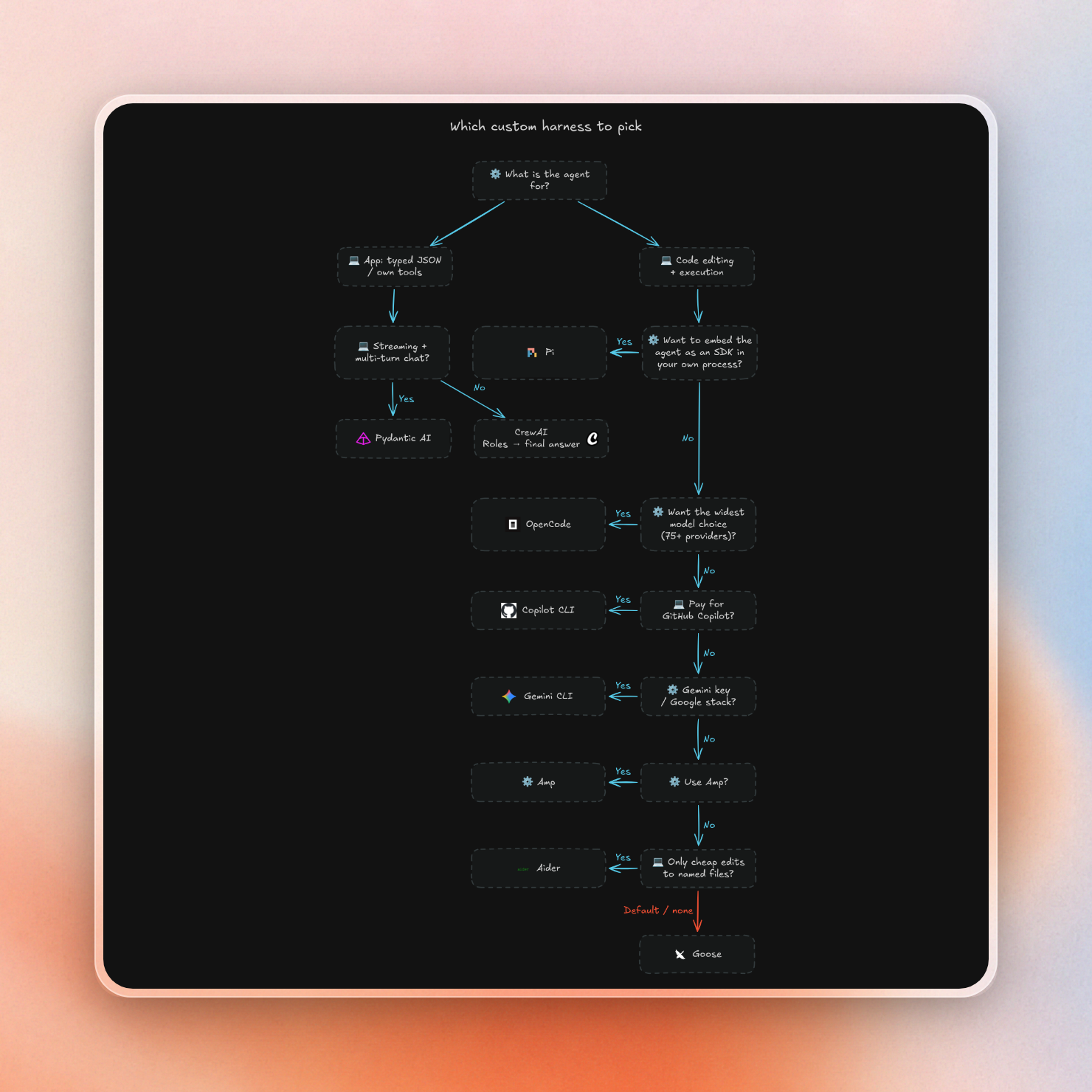
Goose is a good default for a coding agent in a box. It was the fastest in our small test, supports MCP natively, and keeps its sessions across pauses. One run is not a ranking, so try the top two or three on your own tasks. Pydantic AI is better if you’re building an agent into your application and need typed output. The rest are good for specific use cases.
- The widest model choice, including local models: OpenCode.
- An agent you can embed as an SDK in your own process: Pi.
- You already have a Gemini key or a Google-first stack: Gemini CLI.
- Your team pays for GitHub Copilot: Copilot CLI.
- You use Amp and want its modes and threads: Amp.
- Cheap, targeted edits to named files, with no tool calls or MCP: Aider.
- Strict JSON back from every run, plus your own tools: Pydantic AI.
- Several role-based agents that return one final answer: CrewAI.
- LLM cost per run in your app: OpenCode, Pi, Goose or Aider, the four that report it. Goose reports a running total for the session.
The same choices as a flow:
Run any of them in the cloud with Upstash Box
All nine run on Upstash Box. OpenCode is one of Box's built-in agents, next to Claude Code and Codex, and there’s a custom agent that lets you plug in any agent process, as long as it fits inside the Box. Each Box has a private sandbox, a file system, a shell, a git repository, and then there’s a place for logs, and a streaming interface. The Box repo has a harness file for each of the other eight.
The contract is small:
- You create the box with the harness set to
Agent.Custom, plus a command, its arguments and the protocolbox-sse-v1. - On every
box.agent.run()orbox.agent.stream(), Box runs that command inside the box with the prompt, model and session ID as arguments. - The harness writes server-sent events (SSE) to stdout: text, thinking, tool calls, tool results, and a final
doneevent with the output, tokens, cost and session ID. - Box streams those events back to your app.
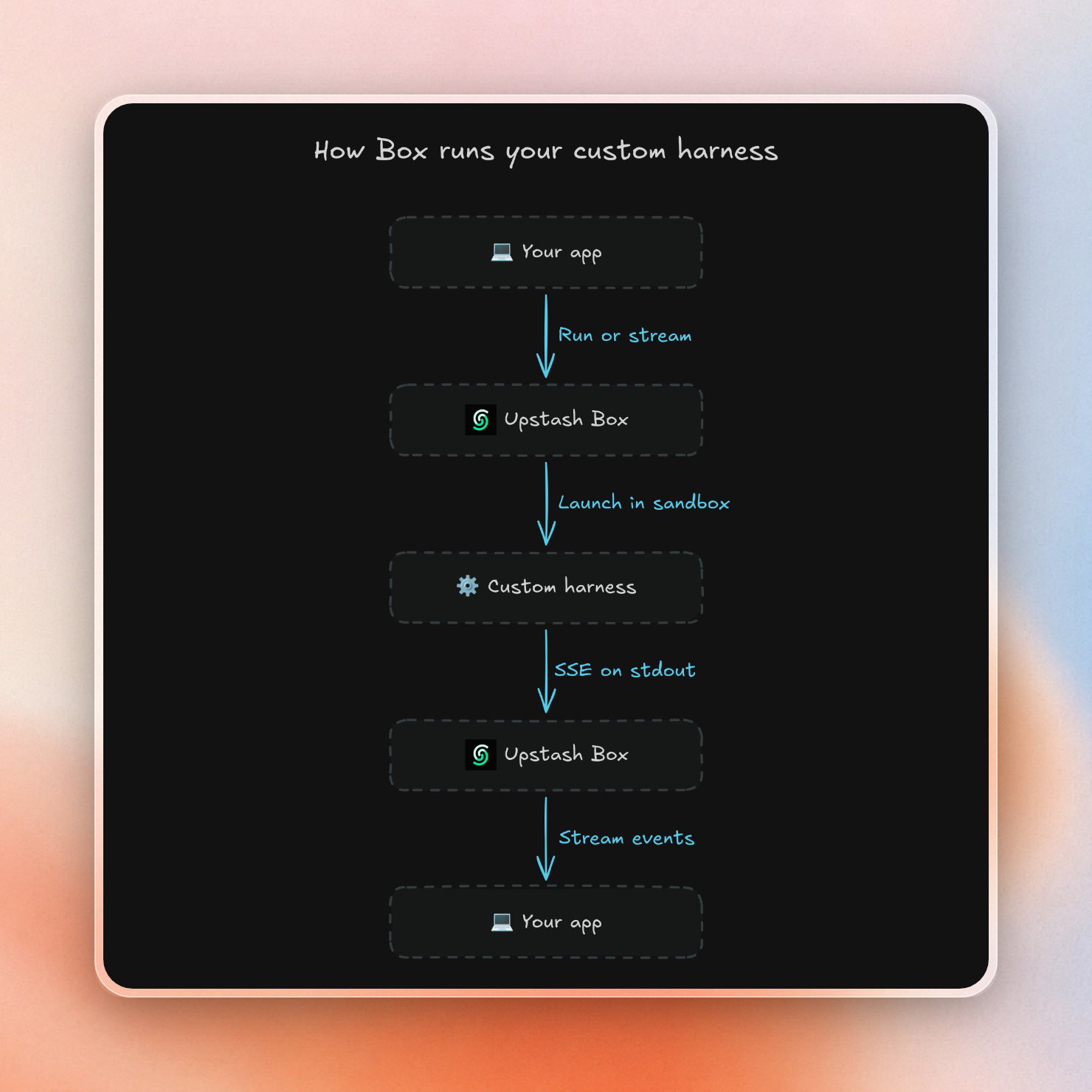
For each harness, we’re following the same basic recipe: create a box, install the agent, write the harness file to the box, and then run a prompt. The install command and harness file are the only things that change between Goose, Pi, and Aider. For the custom agent, we’re using our own provider keys that we pass in the env of Box.create().
Each example is one TypeScript or Python file. The Goose example keeps the in-box harness program in a string, installs Goose, writes the harness into the box, runs two turns and deletes the box. You need Node.js 18 or later, an Upstash Box API key and an Anthropic key:
export UPSTASH_BOX_API_KEY=your-box-key
export ANTHROPIC_API_KEY=your-anthropic-key

git clone https://github.com/upstash/box.git box
cd box
git checkout f22b295732f5e4c32593d6a4b24becd62ea20b41
cd packages/sdk
npm install
npm run build
npx tsx examples/custom-goose-agent.ts
The build step is there because the example imports @upstash/box from this package's build output. Our run printed:
Created box: flexible-mole-37920
Installing Goose...

=== Turn 1 ===
Perfect! I've created the file `hello.txt` with the content "Hello from Goose!" in your current working directory (`/workspace/home`).

=== Turn 2 (follow-up) ===
Perfect! The file contains exactly what we wrote: "Hello from Goose!"

Box deleted.
Some aspects of how Box works are more important for these harnesses than for chat bots because the agents use shell commands and maintain state on disk.
- Isolation: Each Box runs as a Docker container with its own file system, process tree, and network stack. Thus, each Box is isolated from the other Boxes, so if an agent uses
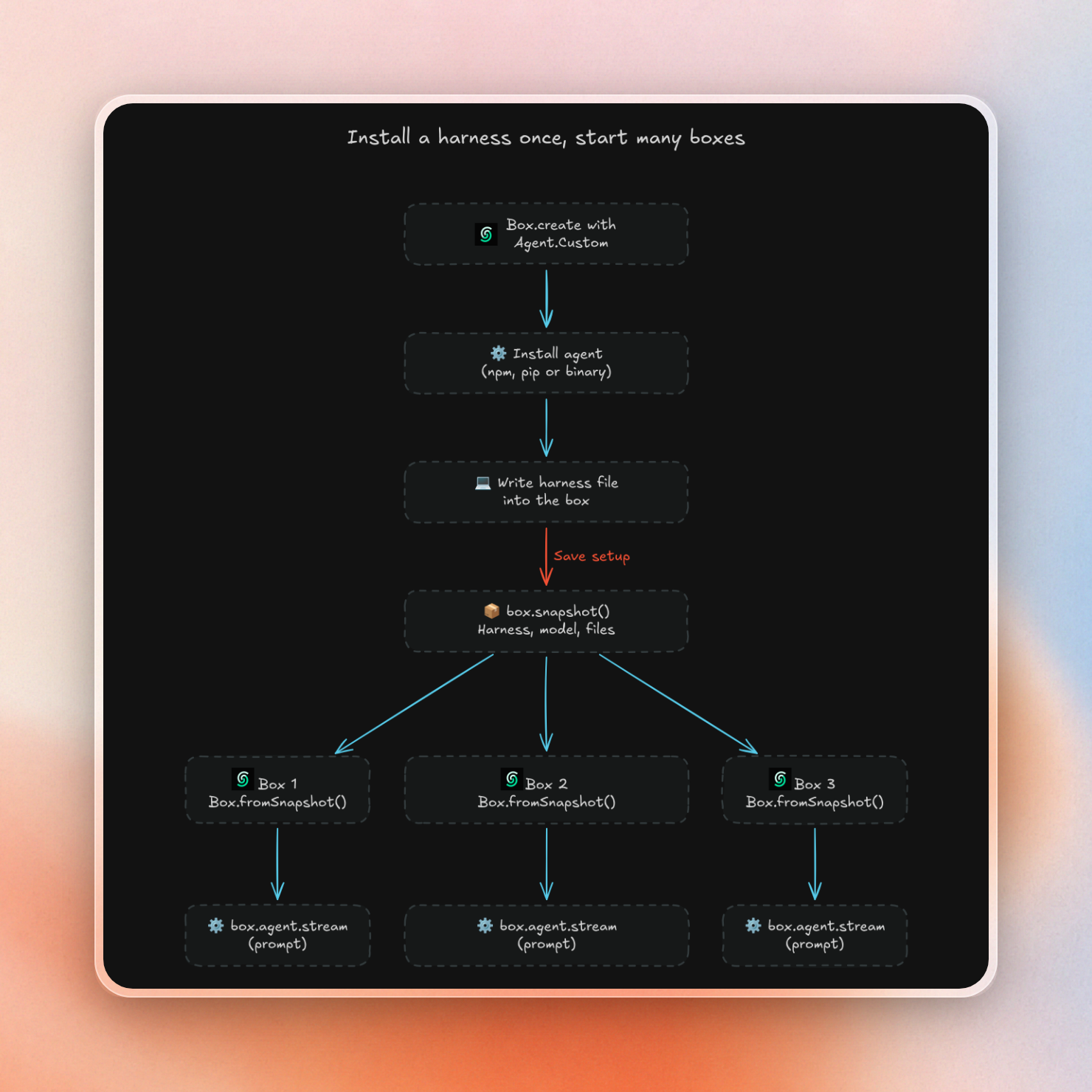
rm -rf, it can’t do any damage to other boxes. - Snapshots: A snapshot saves the file system and agent setup, including the harness and model. This lets you install Pi or Pydantic AI once, snapshot it, and then start new Boxes from that snapshot using
Box.fromSnapshot(). This avoids most of the 15-19 seconds we measured to set up those two environments. - State: A Box pauses when idle, and its state (including its file system) is preserved, so Goose sessions or Pydantic AI chat history will still be there when the Box resumes.
- Billing: boxes are charged based on active CPU time, so idle time is not charged. On a small Box, pay as you go costs $0.10/active CPU hour. The free plan includes 5 CPU hours per month. That covers Box compute; with your own keys, the model provider bills the LLM tokens.
This diagram shows how a snapshot turns one setup into multiple ready Boxes:
If Claude Code, Codex, or OpenCode are good enough for your needs, you can use the built-in agents and avoid writing a harness file at all. If you want to use a different agent, your own tools, or a different framework, you can use a custom harness. If you want to run several of them in parallel, you can use the same approach we used for coding agents in parallel.

