How to Handle File Uploads in Go: Multipart, Size Limits, and Storage with Upstash Blob, S3 or R2
 Yusuf
A basic file upload in Go's net/http calls r.FormFile("file") and saves the result. This works for a demo, but in production, r.FormFile parses the whole request body. If someone uploads a 5GB file, Go will happily use up temp files on your disk. Or what if they name the file ../../evil.png? Now your file path points outside your upload folder. What if they rename a text file to cat.png? You're treating it as an image just because the client said so.
First, we'll fix those three problems in a plain net/http handler. Then we'll move the bytes off your server: with Upstash Blob, whose Go SDK has an upload handler that runs the browser upload flow for you, or with S3 or R2 presigned URLs, where you build that flow yourself.
How do you handle a file upload in Go with net/http?
In short, use http.MaxBytesReader to limit the size of the request, r.ParseMultipartForm to parse it (or r.MultipartReader to stream), r.FormFile to get the file, http.DetectContentType to check the actual type, then write the file to the disk using a generated name.
These examples are written for Go 1.24 or later, which supports rand.Text and method patterns like "POST /upload".
Here is the whole program. It accepts PNG, JPEG and PDF files up to 10 MiB and saves them to ./uploads:
package main

import (
	"crypto/rand"
	"encoding/hex"
	"encoding/json"
	"errors"
	"io"
	"log"
	"net/http"
	"os"
	"path/filepath"
)

const maxBody = 10 << 20 // 10 MiB, including multipart overhead.
const maxMemory = 1 << 20

func upload(w http.ResponseWriter, r *http.Request) {
	r.Body = http.MaxBytesReader(w, r.Body, maxBody)
	if err := r.ParseMultipartForm(maxMemory); err != nil {
		var tooLarge *http.MaxBytesError
		status := http.StatusBadRequest
		if errors.As(err, &tooLarge) {
			status = http.StatusRequestEntityTooLarge
		}
		http.Error(w, err.Error(), status)
		return
	}
	file, _, err := r.FormFile("file")
	if err != nil {
		http.Error(w, "expected file", 400)
		return
	}
	defer file.Close()
	var header [512]byte
	n, err := io.ReadFull(file, header[:])
	if err != nil && err != io.EOF && err != io.ErrUnexpectedEOF {
		http.Error(w, "read failed", 500)
		return
	}
	contentType := http.DetectContentType(header[:n])
	extension := map[string]string{"image/png": ".png", "image/jpeg": ".jpg", "application/pdf": ".pdf"}[contentType]
	if extension == "" {
		http.Error(w, "unsupported type: "+contentType, 415)
		return
	}
	if _, err := file.Seek(0, io.SeekStart); err != nil {
		http.Error(w, "seek failed", 500)
		return
	}
	var id [16]byte
	if _, err := rand.Read(id[:]); err != nil {
		http.Error(w, "random name failed", 500)
		return
	}
	name := hex.EncodeToString(id[:]) + extension
	destination := filepath.Join("uploads", name)
	stored, err := os.OpenFile(destination, os.O_WRONLY|os.O_CREATE|os.O_EXCL, 0600)
	if err != nil {
		http.Error(w, "create failed", 500)
		return
	}
	_, copyErr := io.Copy(stored, file)
	closeErr := stored.Close()
	if copyErr != nil || closeErr != nil {
		_ = os.Remove(destination)
		http.Error(w, "save failed", 500)
		return
	}
	w.Header().Set("Content-Type", "application/json")
	_ = json.NewEncoder(w).Encode(map[string]string{"name": name, "type": contentType})
}

func main() {
	if err := os.MkdirAll("uploads", 0700); err != nil {
		log.Fatal(err)
	}
	http.HandleFunc("POST /upload", upload)
	log.Fatal(http.ListenAndServe(":8081", nil))
}
There’s a lot going on there, but every line solves a problem.
http.MaxBytesReaderprevents a body size attack. Reads fail with a*http.MaxBytesErrorif the client uploads more than 10 MiB, and Go signals the server to close the connection.errors.Aslooks for that error, and the handler returns a 413.ParseMultipartForm(maxMemory)limits RAM usage. Go stores up tomaxMemorybytes of file data in RAM, and writes everything beyond that to temporary files on disk. After the handler runs, the server deletes the temp files automatically, so you don’t need to clean up yourself.
If you don’t call ParseMultipartForm before r.FormFile, Go calls it for you with defaultMaxMemory = 32 << 20, allowing 32 MiB of RAM usage per request. defaultMaxMemory is a memory threshold, though. It’s not a body limit, so without MaxBytesReader clients can upload gigabytes into your temp directory.
r.FormFilereads the first file for a form key. It returns amultipart.File, which implementsio.ReadSeeker. This means the handler can read the first few bytes, then seek back to the beginning.http.DetectContentTypeinspects the bytes. It reads at most the first 512 bytes and returnsapplication/octet-streamif it can’t detect the type. This is safer than reading the client’sContent-Typeheader.- The handler creates a file name. It uses 16 random bytes, encoded as hex, followed by an extension matching the detected content type. It uses
O_EXCLto refuse to overwrite files if they already exist, and it never uses the client’s file name in the path.
We ran the server and sent it four requests: a real PNG, a 20 MiB random file, a text file renamed to cat.png with a fake image/png type, and a PNG with the file name ../../evil.png:
curl -F 'file=@pixel.png' http://localhost:8081/upload
curl -F 'file=@random.bin' http://localhost:8081/upload
curl -F 'file=@cat.png;type=image/png' http://localhost:8081/upload
curl -F 'file=@pixel.png;filename=../../evil.png' http://localhost:8081/upload
The server answered:
{"name":"bb1c15698815840aff9de73606ebccae.png","type":"image/png"}     HTTP 200
http: request body too large                                           HTTP 413
unsupported type: text/plain; charset=utf-8                            HTTP 415
{"name":"8ff5ffc9e00ff99923dddef02c051158.png","type":"image/png"}     HTTP 200
The directory traversal name had no effect. The sniffer thought the renamed file was text/plain, while the file claimed to be image/png. The stored file name was generated by crypto/rand.
If you'd rather not maintain these checks yourself, the Upstash Blob upload handler further down does the size and type checks and picks safe paths for you.
Streaming with r.MultipartReader
ParseMultipartForm reads the whole body before your code sees the file. When you want to copy the file somewhere as it arrives, r.MultipartReader() hands you the parts as a stream. Go doesn't buffer the parts for you, so you decide where each byte goes. This version copies one file part to disk with io.Copy:
package main

import (
	"encoding/json"
	"errors"
	"io"
	"log"
	"net/http"
	"os"
	"path/filepath"
)

const maxBody = 10 << 20

func upload(w http.ResponseWriter, r *http.Request) {
	r.Body = http.MaxBytesReader(w, r.Body, maxBody)
	reader, err := r.MultipartReader()
	if err != nil {
		http.Error(w, "expected multipart form", 400)
		return
	}
	for {
		part, err := reader.NextPart()
		if err != nil {
			uploadError(w, err)
			return
		}
		if part.FormName() != "file" || part.FileName() == "" {
			continue
		}
		stored, err := os.CreateTemp("uploads", "upload-*")
		if err != nil {
			http.Error(w, "create failed", 500)
			return
		}
		_, copyErr := io.Copy(stored, part)
		closeErr := stored.Close()
		if copyErr != nil || closeErr != nil {
			_ = os.Remove(stored.Name())
			uploadError(w, errors.Join(copyErr, closeErr))
			return
		}
		// Consume the remaining request so the limit covers every part and boundary.
		_, err = io.Copy(io.Discard, r.Body)
		if err != nil {
			_ = os.Remove(stored.Name())
			uploadError(w, err)
			return
		}
		w.Header().Set("Content-Type", "application/json")
		_ = json.NewEncoder(w).Encode(map[string]string{"name": filepath.Base(stored.Name())})
		return
	}
}

func uploadError(w http.ResponseWriter, err error) {
	var tooLarge *http.MaxBytesError
	status := http.StatusBadRequest
	if errors.As(err, &tooLarge) {
		status = http.StatusRequestEntityTooLarge
	}
	http.Error(w, "upload failed", status)
}

func main() {
	if err := os.MkdirAll("uploads", 0700); err != nil {
		log.Fatal(err)
	}
	http.HandleFunc("POST /upload", upload)
	log.Fatal(http.ListenAndServe(":8082", nil))
}
There are limitations on the multipart parsing itself as well. ParseMultipartForm will parse at most 1000 parts and 10000 headers per form, which can be configured with GODEBUG=multipartmaxparts= and GODEBUG=multipartmaxheaders=.
On the server side, you can replace the io.Copy target with a storage writer, and wrap the part in the same 512-byte type check as the first program. This server returned 200 for the PNG and 413 for the 20 MiB file.
Where should a Go API keep uploaded files?
You can store files locally if you have one server and it is not a container, but if your Go API is running on multiple servers you should use object storage instead. The files on one server's disk are not on the other server.
- Load balancing If you are running multiple servers, with a load balancer in front, the file uploaded to server A is not available for downloading from server B.
- Containers If you are running inside a container, restarting or replacing the container will start with a fresh filesystem unless you mount a volume.
- Serverless If you are running on serverless, the local file is gone after the function invocation.
Those are the three problems the ./uploads folder in the handler above has when you try to scale.
Object storage like Upstash Blob, S3, R2, Google Cloud Storage or Azure Blob Storage handles this by storing the files in a bucket that can be read and written by all instances over HTTP. See where to store user-uploaded files for more on the choice of storage.
You can abstract this by using gocloud.dev/blob, which offers a single *blob.Bucket type that can use S3, Google Cloud Storage, Azure, local files or memory as its backend. It opens buckets using a URL, such as file:///var/uploads in development and s3://my-bucket?region=us-east-1 in production.
This version streams the upload from r.MultipartReader straight into the bucket writer, so the file never goes to a temp file:
package main

import (
	"context"
	"crypto/rand"
	"encoding/json"
	"errors"
	"io"
	"log"
	"net/http"
	"os"

	"gocloud.dev/blob"
	_ "gocloud.dev/blob/fileblob"
	_ "gocloud.dev/blob/s3blob"
)

var bucket *blob.Bucket

func upload(w http.ResponseWriter, r *http.Request) {
	ctx, cancel := context.WithCancel(r.Context())
	defer cancel()
	r.Body = http.MaxBytesReader(w, r.Body, 10<<20)
	reader, err := r.MultipartReader()
	if err != nil {
		http.Error(w, "expected multipart form", 400)
		return
	}
	part, err := reader.NextPart()
	if err != nil || part.FormName() != "file" || part.FileName() == "" {
		http.Error(w, "expected file as first part", 400)
		return
	}
	defer part.Close()
	key := rand.Text()
	writer, err := bucket.NewWriter(ctx, key, &blob.WriterOptions{ContentType: part.Header.Get("Content-Type")})
	if err != nil {
		http.Error(w, "create failed", 500)
		return
	}
	_, err = io.Copy(writer, part)
	if err == nil {
		_, err = io.Copy(io.Discard, r.Body)
	}
	if err != nil {
		cancel() // Abort the partial write before closing.
	}
	err = errors.Join(err, writer.Close())
	if err != nil {
		http.Error(w, "upload failed", 400)
		return
	}
	w.Header().Set("Content-Type", "application/json")
	_ = json.NewEncoder(w).Encode(map[string]string{"key": key})
}

func main() {
	var err error
	bucket, err = blob.OpenBucket(context.Background(), os.Getenv("BUCKET_URL"))
	if err != nil {
		log.Fatal(err)
	}
	defer bucket.Close()
	http.HandleFunc("POST /upload", upload)
	log.Print(http.ListenAndServe(os.Getenv("LISTEN_ADDR"), nil))
}
For brevity, this code assumes the part’s declared type is correct. To use it yourself, add the first program’s 512-byte sniff. This handler also cancels on any copy error. Canceling context is how you abort writing, and you still have to call Close.
We ran this server with BUCKET_URL='file:///tmp/kb-gocloud?create_dir=true', and uploaded a 70-byte PNG. This yielded a 200 response and bit-identical file. The file driver also stores a small .attrs file alongside every object, with its metadata.
Uploading via Go still streams every byte through your server. If your users upload big files, send them direct from browser to bucket instead.
Upload to Upstash Blob from a Go API
Big files shouldn't pass through your Go server at all. In a direct upload, the browser sends the bytes straight to the bucket, and your server only answers a few small JSON requests: who is uploading, where the file goes, and what to record once it lands. With Upstash Blob, all of that is one http.Handler from the Go SDK.
The order of requests for a single upload looks like this:
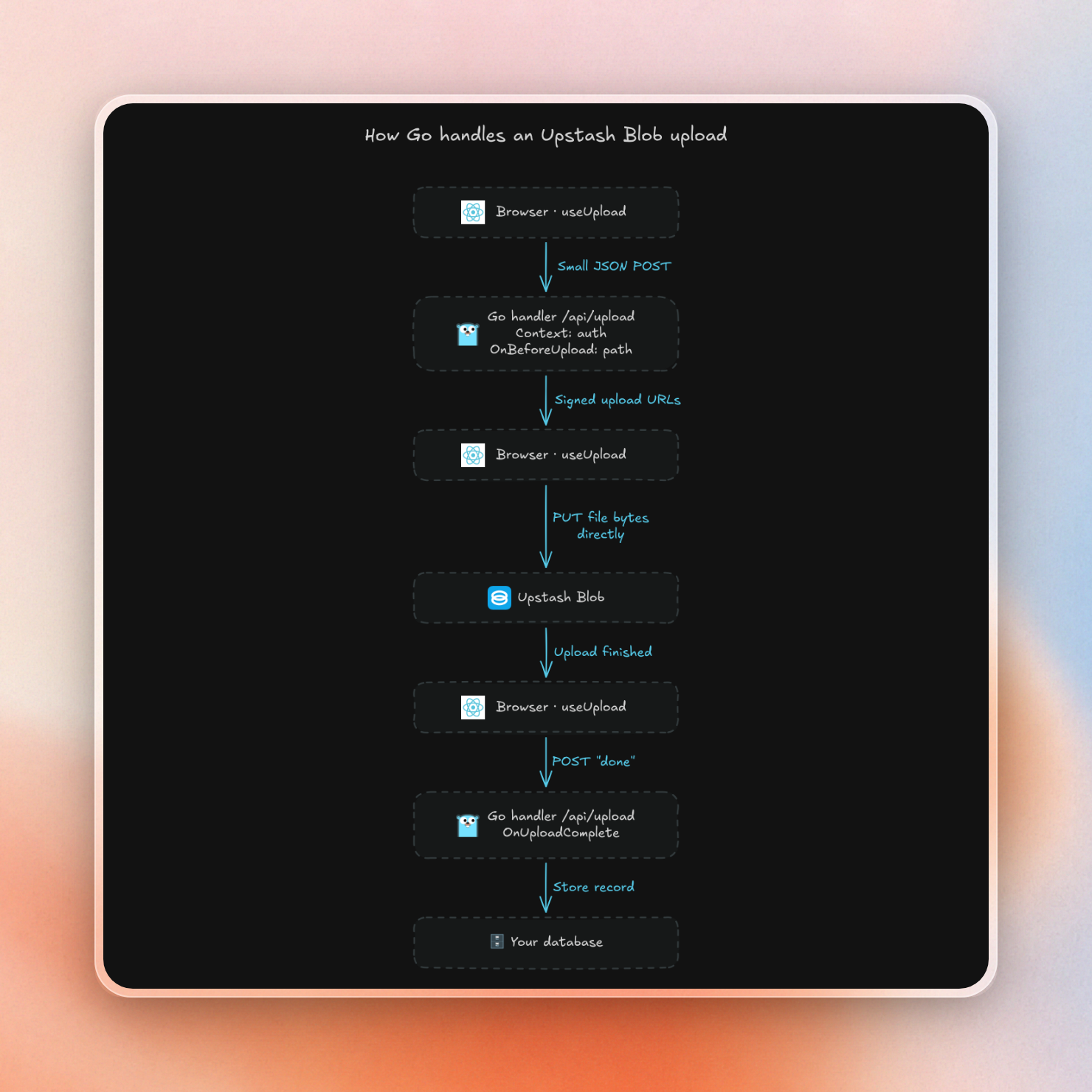
The SDK only uses the standard library, can be installed with go get github.com/upstash/blob-go, and it will pick up the token from UPSTASH_BLOB_TOKEN.
This program mounts the upload handler at /api/upload:
package main

import (
	"crypto/subtle"
	"log"
	"net/http"
	"os"
	"sync"

	blob "github.com/upstash/blob-go"
)

type User struct{ ID string }

var records sync.Map // A durable table keyed by UploadID in production.

func sessionUser(r *http.Request) (*User, error) {
	token := os.Getenv("SESSION_TOKEN")
	if token == "" || subtle.ConstantTimeCompare([]byte(r.Header.Get("Authorization")), []byte("Bearer "+token)) != 1 {
		return nil, blob.NewError(blob.CodeUnauthorized, blob.ErrorOptions{})
	}
	return &User{ID: os.Getenv("SESSION_USER_ID")}, nil
}

func beforeUpload(a blob.BeforeUploadArgs[*User]) (blob.BeforeUploadResult, error) {
	return blob.BeforeUploadResult{Path: blob.UniquePath("uploads/" + a.Ctx.ID + "/file")}, nil
}

func recordUpload(a blob.UploadCompleteArgs[*User]) (any, error) {
	if _, loaded := records.LoadOrStore(a.UploadID, a.CompletedBlob); !loaded {
		log.Printf("OnUploadComplete upload_id=%s path=%s", a.UploadID, a.Path)
	}
	return map[string]string{"path": a.Path}, nil
}

func main() {
	bucket, err := blob.NewBucketFromEnv()
	if err != nil {
		log.Fatal(err)
	}
	uploads, err := blob.NewUploadHandler(blob.UploadHandlerOptions[*User]{
		Bucket: bucket, ContentTypes: []string{"image/*", "application/pdf"}, MaxSize: 20 * blob.MB,
		Context: sessionUser, OnBeforeUpload: beforeUpload, OnUploadComplete: recordUpload,
	})
	if err != nil {
		log.Fatal(err)
	}
	http.Handle("/api/upload", uploads)
	log.Fatal(http.ListenAndServe(os.Getenv("LISTEN_ADDR"), nil))
}
Let’s look at what each of these do:
Contextis called per-request, and should return your user. If it returnsblob.NewError(blob.CodeUnauthorized, ...), the handler returns a 401 response and declines to sign the upload. The returned type is used for the type parameter;a.Ctxis a*Userin the callback types.ContentTypeschecks the declared type and the file's first bytes, which the browser sends with the begin request. A mislabeled file is refused before the upload starts. This is a convenience, not a security control: a client could send an honest sample and then upload something else, so treat stored files as untrusted.MaxSizewill reject files exceeding the specified size. The declared size is checked before anything is signed, and it is pinned in the signed upload, so the browser can't send a bigger body.OnBeforeUploadlets you specify the destination path for the upload. You should never let the browser pick the name;blob.UniquePathappends a random suffix. The handler already prevents you from storing files with paths that contain.or..path segments.OnUploadCompleteis invoked after the upload completes and returns the path, URL, size, and anUploadIDthat stays the same across retries for the uploaded file. Note that it may be called more than once. The example shows how to write it onUploadIDand deduplicate if you've already seen theUploadID. If it returns an error, the handler will delete the object.
Since this endpoint can handle both GET and POST requests, you'll want to mount it with http.Handle("/api/upload", uploads) instead of registering it for a POST /api/upload pattern. The handler responds with a 405 for other methods.
There is no Go browser client. The browser uses the useUpload hook from @upstash/blob/react, which uses the same protocol with a Go server as with a TypeScript one. Called with no type parameter, uploadHooks() returns a hook that takes your endpoint's URL:
"use client"

import { uploadHooks } from "@upstash/blob/react"

const { useUpload } = uploadHooks()

export default function Upload({ token }: { token: string }) {
  const { start, uploads } = useUpload("/api/upload", {
    headers: () => ({ Authorization: `Bearer ${token}` }),
  })

  return (
    <div>
      <input
        type="file"
        multiple
        onChange={e => start({ files: e.currentTarget.files })}
      />
      {uploads.map(upload => (
        <div key={upload.id}>
          {upload.file.name}: {upload.status} ({Math.round(upload.percent)}%)
          {upload.status === "done" && <a href={upload.blob.url}>Open</a>}
        </div>
      ))}
    </div>
  )
}
We ran the Go handler against a real bucket and drove it with the same browser client from a Node script. A request with no token got a 401:
$ curl -d '{}' -H 'Content-Type: application/json' http://localhost:8093/api/upload
{"code":"unauthorized","message":"Unauthorized","status":401}
The handler takes care of these parts of a browser upload for you:
- CORS: CORS works out of the box because buckets allow all origins by default.
- Size and type: checked before anything is signed, and the declared size and type are pinned in the signed upload.
- Completion:
OnUploadCompleteis called on your server, with the stored size and path. - Multipart: Large files are automatically split and uploaded in parts. If the user closes the tab and picks the same file, it resumes.
Saving bytes your server already has
Sometimes the file is small and already in your handler, like an avatar from a form post. For that, bucket.Put takes any io.Reader, so the multipart.File from r.FormFile works as is:
package main

import (
	"encoding/json"
	"io"
	"log"
	"net/http"
	"os"
	"strings"

	blob "github.com/upstash/blob-go"
)

var bucket *blob.Bucket

func avatar(w http.ResponseWriter, r *http.Request) {
	r.Body = http.MaxBytesReader(w, r.Body, 6*blob.MB)
	file, _, err := r.FormFile("file")
	if err != nil {
		http.Error(w, "expected file", 400)
		return
	}
	defer file.Close()
	var header [512]byte
	n, err := io.ReadFull(file, header[:])
	if err != nil && err != io.EOF && err != io.ErrUnexpectedEOF {
		http.Error(w, "read failed", 400)
		return
	}
	contentType := http.DetectContentType(header[:n])
	if !strings.HasPrefix(contentType, "image/") {
		http.Error(w, "expected image", 415)
		return
	}
	if _, err := file.Seek(0, io.SeekStart); err != nil {
		http.Error(w, "seek failed", 500)
		return
	}
	completed, err := bucket.Put(r.Context(), blob.UniquePath("avatars/file"), file, &blob.PutOptions{
		ContentType: contentType, ContentTypes: []string{"image/*"}, MaxSize: 5 * blob.MB,
	})
	if err != nil {
		http.Error(w, "upload failed", 500)
		return
	}
	w.Header().Set("Content-Type", "application/json")
	_ = json.NewEncoder(w).Encode(map[string]string{"url": completed.URL})
}

func main() {
	var err error
	bucket, err = blob.NewBucketFromEnv()
	if err != nil {
		log.Fatal(err)
	}
	http.HandleFunc("POST /api/avatar", avatar)
	log.Fatal(http.ListenAndServe(os.Getenv("LISTEN_ADDR"), nil))
}
A curl with a small PNG returned the public URL of the stored file:
$ curl -F 'file=@pixel.png;type=image/png' http://localhost:8094/api/avatar
{"url":"https://<your-bucket>.blob.upstash.io/avatars/file-G5WMcAVW"}
This method requires the bytes to pass through your Go server, so only use Put for small files, and use the upload handler for files that users are uploading in the browser.
Doing it yourself: presigned URLs with S3 or R2
This is the same browser-to-bucket flow, built by hand. Your Go server signs a short-lived URL for one object key, the browser PUTs the file to it, and the file goes straight to S3 or R2 without passing through your server.
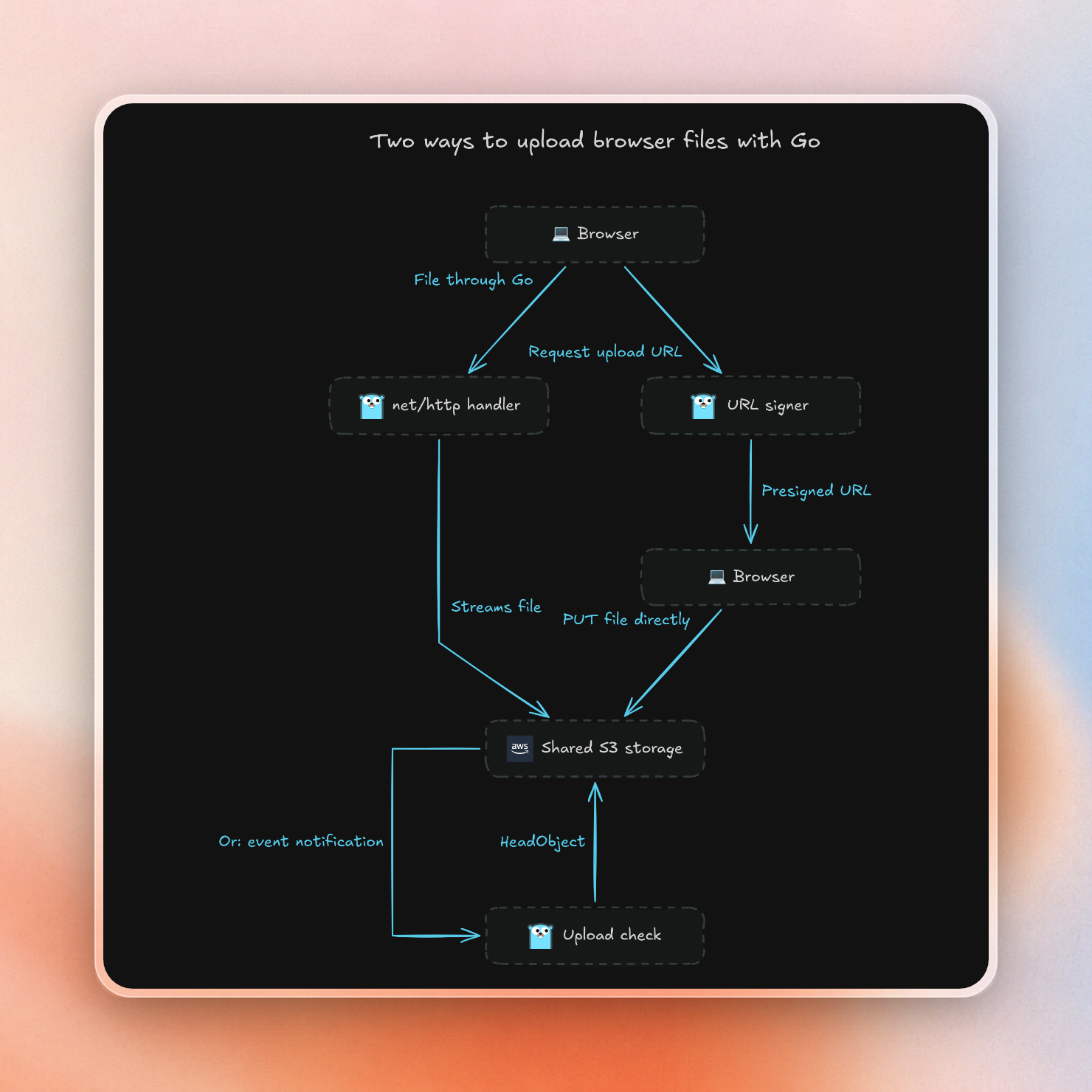
The server below has one endpoint. The browser asks for a URL and tells it the file's size and type. The server checks both, picks the key, and signs a PUT that is valid for 15 minutes:
package main

import (
	"context"
	"crypto/rand"
	"encoding/json"
	"log"
	"net/http"
	"os"
	"slices"
	"strconv"
	"time"

	"github.com/aws/aws-sdk-go-v2/aws"
	"github.com/aws/aws-sdk-go-v2/config"
	"github.com/aws/aws-sdk-go-v2/service/s3"
)

var client *s3.Client

func endpoint(options *s3.Options) {
	if account := os.Getenv("R2_ACCOUNT_ID"); account != "" {
		options.BaseEndpoint = aws.String("https://" + account + ".r2.cloudflarestorage.com")
	}
}

func presign(w http.ResponseWriter, r *http.Request) {
	size, err := strconv.ParseInt(r.URL.Query().Get("size"), 10, 64)
	contentType := r.URL.Query().Get("type")
	if err != nil || size < 0 || size > 10<<20 || !slices.Contains([]string{"image/png", "image/jpeg", "application/pdf"}, contentType) {
		http.Error(w, "invalid size or type", 400)
		return
	}
	key := rand.Text()
	result, err := s3.NewPresignClient(client).PresignPutObject(r.Context(), &s3.PutObjectInput{
		Bucket: aws.String(os.Getenv("BUCKET")), Key: &key, ContentType: &contentType, ContentLength: &size,
	}, s3.WithPresignExpires(15*time.Minute))
	if err != nil {
		http.Error(w, "presign failed", 500)
		return
	}
	w.Header().Set("Content-Type", "application/json")
	_ = json.NewEncoder(w).Encode(map[string]any{"url": result.URL, "key": key, "headers": result.SignedHeader})
}

func main() {
	cfg, err := config.LoadDefaultConfig(context.Background())
	if err != nil {
		log.Fatal(err)
	}
	if os.Getenv("R2_ACCOUNT_ID") != "" {
		cfg.Region = "auto"
	}
	client = s3.NewFromConfig(cfg, endpoint)
	http.HandleFunc("GET /presign", presign)
	http.HandleFunc("POST /uploads/complete", complete)
	log.Fatal(http.ListenAndServe(os.Getenv("LISTEN_ADDR"), nil))
}
This code will also work with Cloudflare R2, which supports the S3 API. When R2_ACCOUNT_ID is set, the client will configure BaseEndpoint to point to your R2 account, and use the auto region.
We ran it with fake credentials, since signing happens locally and needs no network. A request for a 70-byte PNG returned this (signature shortened):
$ curl 'http://localhost:8091/presign?size=70&type=image/png'
{"headers":{"Content-Length":["70"],"Content-Type":["image/png"],"Host":["article-uploads.s3.us-east-1.amazonaws.com"]},
 "key":"5JCKQ2HXXBL6GBKDDD4C2FPW2K",
 "url":"https://article-uploads.s3.us-east-1.amazonaws.com/5JCKQ2HXXBL6GBKDDD4C2FPW2K?X-Amz-Algorithm=AWS4-HMAC-SHA256&...&X-Amz-Expires=900&X-Amz-SignedHeaders=content-length%3Bcontent-type%3Bhost&x-id=PutObject&X-Amz-Signature=6dfd..."}
Because we passed ContentLength in, the content-length header is included in the signature: note the X-Amz-SignedHeaders param. If the browser tries to send a different amount of data, S3 will return a signature error. Without this, the URL can be used with any body, regardless of your size check.
While presigning allows you to move the bytes around, you still have to build out the upload process yourself:
- Configuring CORS on the bucket. Because the browser is PUTing to a different origin, you'll need to configure a CORS rule on the bucket that allows PUT requests from your site, as well as the
Content-Typeheader. - Restricting the upload size. Sign
ContentLength, as we did above, otherwise the max size in your handler is just a suggestion. - Verifying the upload completed. S3 doesn't automatically call your server when an upload is done. You can either require the browser to call you back after the PUT is completed (and then check the object yourself with
HeadObject), or set up S3 event notifications to a queue or Lambda. - Using multipart for large files. One PUT request uploads the whole file as a single request. If you want large file support, you'll have to use
CreateMultipartUpload, presign each individual part withPresignUploadPart, and finish up withCompleteMultipartUpload. This is tricky as each part except the last must be at least 5 MB, and S3 charges you for stored parts until the upload is completed or aborted.
Here is the completion check from step 3. It lives in a second file of the same package and compares the stored size with the size you signed:
package main

import (
	"context"
	"encoding/json"
	"errors"
	"net/http"
	"os"

	"github.com/aws/aws-sdk-go-v2/service/s3"
)

func confirmUpload(ctx context.Context, client *s3.Client, bucket, key string, size int64) error {
	object, err := client.HeadObject(ctx, &s3.HeadObjectInput{Bucket: &bucket, Key: &key})
	if err != nil {
		return err
	}
	if object.ContentLength == nil || *object.ContentLength != size {
		return errors.New("uploaded size does not match")
	}
	return nil
}

func complete(w http.ResponseWriter, r *http.Request) {
	var input struct {
		Key  string
		Size int64
	}
	if json.NewDecoder(http.MaxBytesReader(w, r.Body, 4096)).Decode(&input) != nil || input.Key == "" || input.Size < 0 || input.Size > 10<<20 {
		http.Error(w, "invalid key or size", 400)
		return
	}
	if err := confirmUpload(r.Context(), client, os.Getenv("BUCKET"), input.Key, input.Size); err != nil {
		http.Error(w, "confirmation failed", 409)
		return
	}
	w.WriteHeader(http.StatusNoContent)
}
complete would also need to do things like check if the key is owned by the user, and obviously record this to your database in a real app.
Upstash Blob vs S3 vs R2: price and work
Storage prices are close. Download (egress) prices and the amount of upload code you write are where the three differ:
| Service | Storage | Egress (downloads) | What you write for browser uploads |
|---|---|---|---|
| Upstash Blob | $0.02 per GB-month | Free up to 1 TB a month, then $0.02 per GB | NewUploadHandler options and two callbacks, plus the useUpload hook |
| AWS S3 Standard | $0.023 per GB-month | First 100 GB a month free, then $0.09 per GB | Presign endpoint, bucket CORS rule, signed size, completion check, multipart flow |
| Cloudflare R2 | $0.015 per GB-month | Free | Same as S3, since you use the same aws-sdk-go-v2 code |
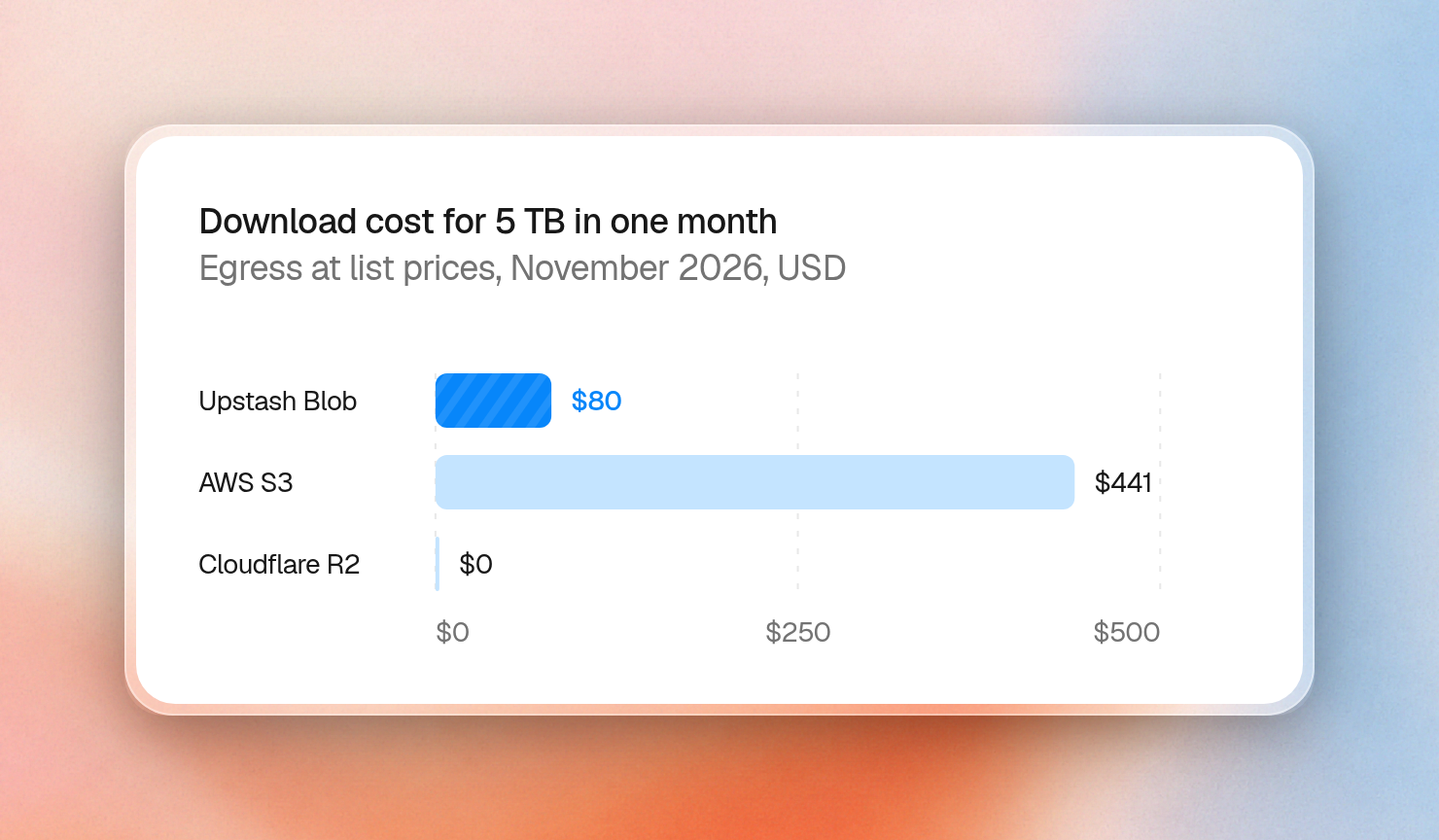
(Prices are list prices in November 2026. For S3, US East.)
If your users download 5 TB (5,000 GB) in a month, egress alone costs:
- Upstash Blob: (5,000 - 1,000) × $0.02 = $80
- S3: (5,000 - 100) × $0.09 = $441
- R2: $0
(They all also charge for requests.)
Which one should you use?
- A Go API whose users upload files from a web app: Upstash Blob. The upload handler, the browser hook, resumable multipart and the completion callback are already written, so your code is the auth check, the path and the database write.
- Already on AWS: S3. Your IAM, billing and other services are there, and the presign code above is all the SDK work you need.
- Many terabytes of downloads a month: R2. Egress is free, and the same aws-sdk-go-v2 code runs with one
BaseEndpointchange. - One small server you run yourself: local disk with the first handler in this guide. Move to a bucket when you add a second instance.
- You need to switch clouds later: gocloud.dev/blob for the server-side reads and writes.

