Best Vercel Blob Alternatives in 2026
 Yusuf
The best Vercel Blob alternative for most Next.js apps is Upstash Blob. Upstash Blob has the same upload model as Vercel Blob (a server put(), an upload handler route and React hooks for browser uploads), so moving off Vercel Blob is mostly renaming. Upstash Blob storage costs $0.02/GB and egress is free up to 1 TB a month on pay-as-you-go. For media apps serving many terabytes a month, Cloudflare R2 is cheaper on egress, but you write the upload flow yourself. Use Cloudinary for image transforms and S3 if the rest of your stack is on AWS.
Why do developers leave Vercel Blob?
Most developers leave Vercel Blob because of the price: downloads cost $0.05 per GB, and every cache miss adds Fast Origin Transfer and an operation on top.
Two other reasons come up:
- Upload callbacks don't run locally. The
onUploadCompletedcallback for browser uploads does not work on localhost because Vercel Blob can't reach your dev server, so Vercel suggests a tunnel like ngrok in development. - It is tied to Vercel hosting. The SDK prefers Vercel's rotating OIDC (OpenID Connect) tokens. Outside Vercel you can use a long-lived read-write token, but image optimization with
putImage()needs OIDC.
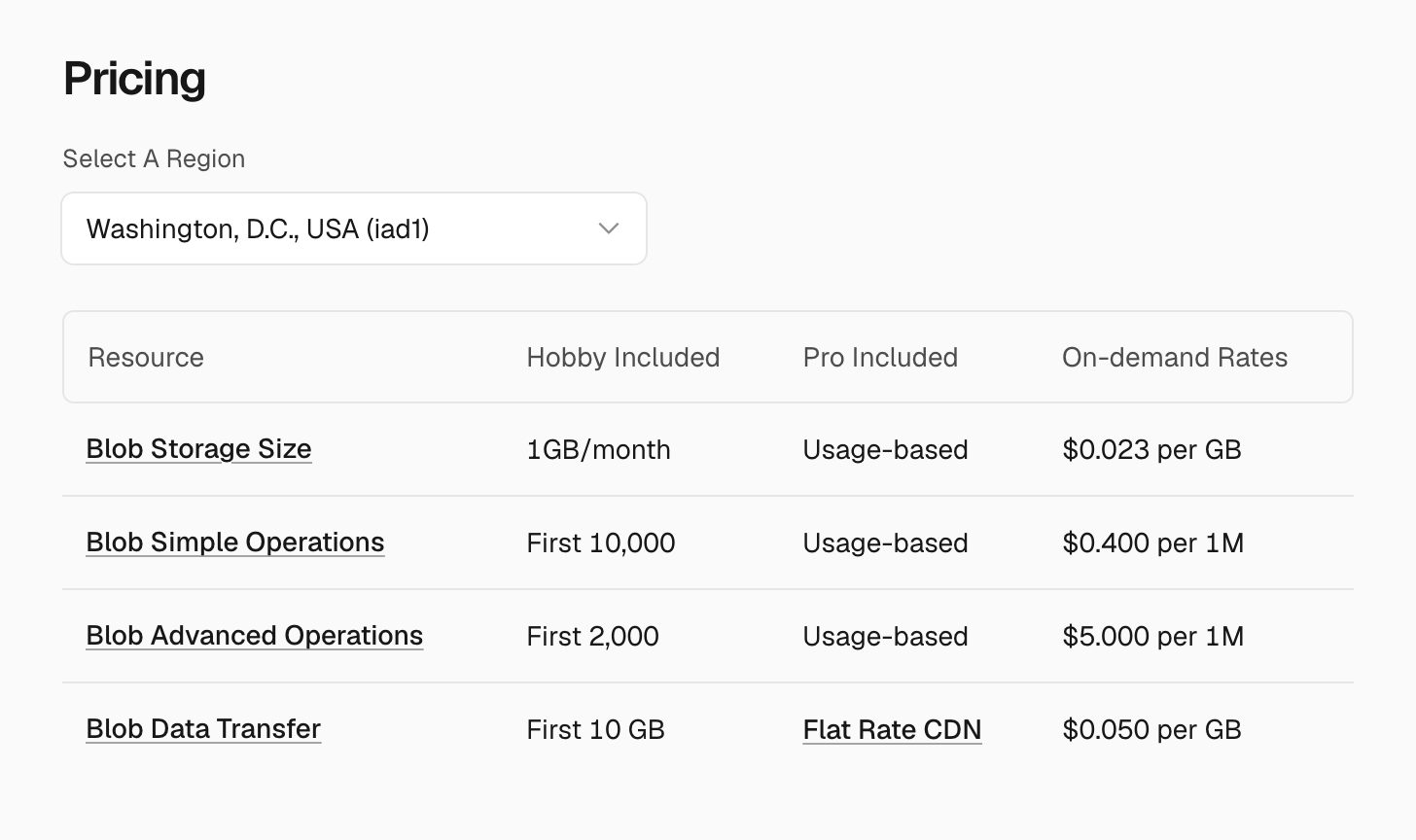
A Vercel Blob bill has six lines. Four belong to Blob and two come from Vercel's CDN:
| Meter | What triggers it | On-demand price (iad1) |
|---|---|---|
| Storage | Monthly average of the store size | $0.023 per GB-month |
| Simple operations | A read by URL that misses the cache, or a metadata lookup | $0.40 per 1M |
| Advanced operations | Upload, copy, list, or creating a store | $5.00 per 1M |
| Blob Data Transfer | Every download or view | $0.05 per GB |
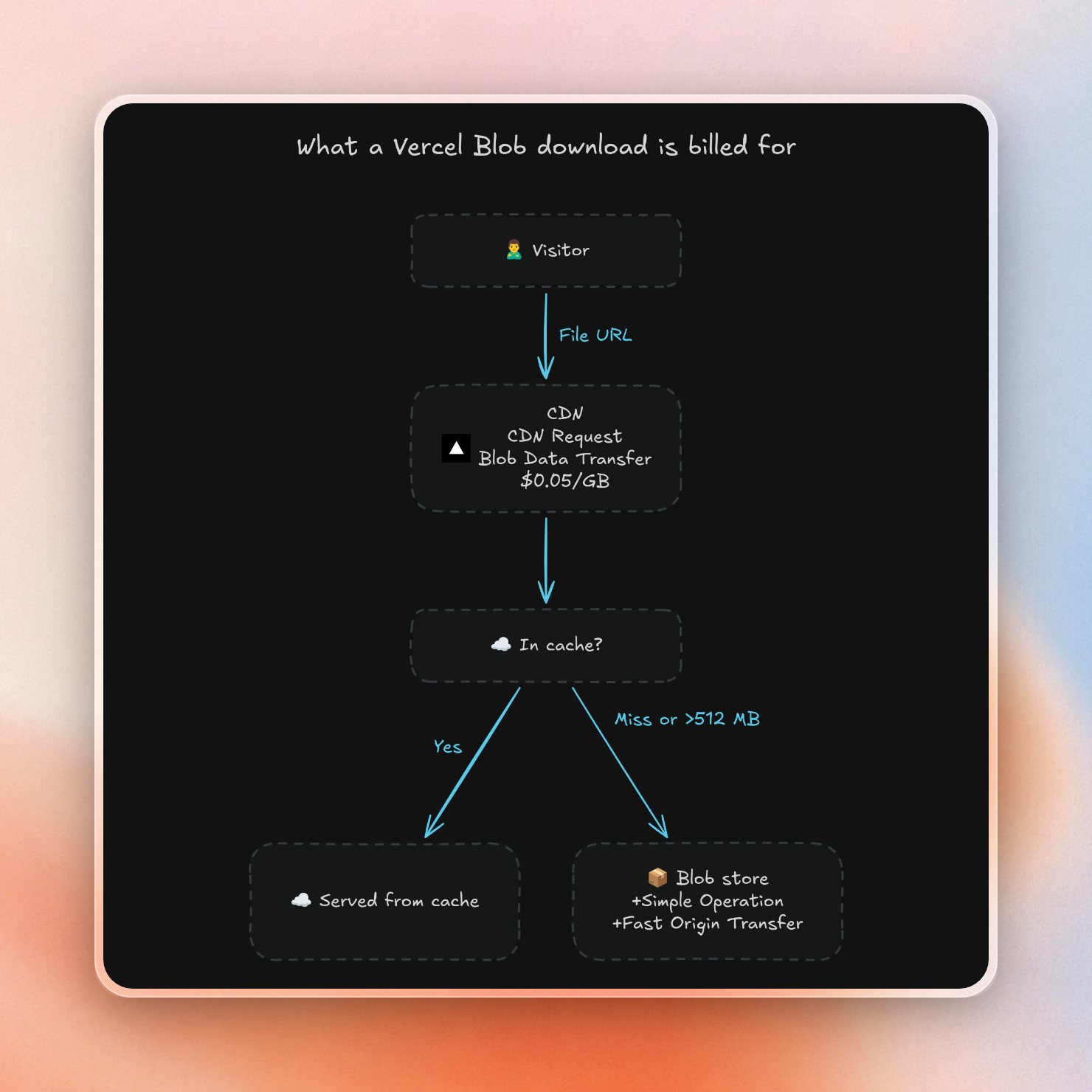
| CDN Requests | Every access by URL, hit or miss | Standard CDN rates |
| Fast Origin Transfer | Only cache misses | Standard CDN rates ($0.06/GB in Vercel's own example) |
Here is the pricing table on Vercel's page:
With Vercel Blob, you are charged per CDN request and data transfer for any downloads. If the object is not cached, you'll also be charged for a simple operation and Fast Origin Transfer.
If we take the example Vercel provides on their site, with 50 GB of storage, 350 GB of data transfer and a 70% cache hit rate, it'll cost $26.93 a month. Of that, $17.50 is data transfer costs.
It gets worse if you serve large files, such as videos. Vercel only caches blobs up to 512 MB. This means any file larger than 512 MB is a cache miss on every access, so you will always be charged for Fast Origin Transfer and CDN requests for every access. So, if you serve a 600 MB video, you are always paying more the more it gets accessed.
You can lower data transfer costs on Pro plans by moving transfer to Flat Rate CDN, which includes 1 TB of bandwidth. However, this isn't possible if you run a media application. On their Flat Rate CDN page, Vercel writes that "large-scale delivery of media or files where such delivery constitutes a majority of bandwidth usage" is out of scope.
Vercel Blob alternatives compared
Notes on numbers: all prices in USD, per vendor pricing page, on pay-as-you-go / lowest paid plan. Price for operations is per million requests. Writes are uploads (Class A for R2 and Tigris, PUT for S3), reads are downloads (Class B, GET).
| Service | Storage per GB-month | Egress per GB | Writes / reads per 1M | Free tier | Best at |
|---|---|---|---|---|---|
| Vercel Blob | $0.023 | $0.05, plus Fast Origin Transfer on misses | $5.00 / $0.40 (misses only) | Hobby: 1 GB, 10 GB transfer | Staying on Vercel |
| Upstash Blob | $0.02 | Free up to 1 TB, then $0.02 | $4.50 / $0.30 | 1 GB, 10 GB egress | Next.js uploads under 1 TB egress |
| Cloudflare R2 | $0.015 | Free | $4.50 / $0.36 | 10 GB, 1M writes, 10M reads | Egress-heavy media |
| Tigris | $0.02 | Free | $5.00 / $0.50 | 5 GB, 10k writes, 100k reads | Zero egress, same price in every region |
| Backblaze B2 | $6.95 per TB (about $0.007) | Free up to 3x stored, then $0.01 | Free | First 10 GB | Cheapest storage |
| AWS S3 Standard | $0.023 (us-east-1) | $0.09 (first 100 GB/month free) | $5.00 / $0.40 | Up to $200 in credits for new accounts | Apps already on AWS |
| Supabase Storage | $0.0213 after 100 GB on Pro | $0.03 cached / $0.09 uncached after 250 GB each | Not listed | 1 GB on Free | Apps on Supabase auth and Postgres |
| UploadThing | $10/month for 100 GB, $0.08/GB past 250 GB on $25 plan | Not listed | Not listed | 2 GB | Hosted upload flow with flat plans |
| Cloudinary | 1 credit = 1 GB | 1 credit = 1 GB of image bandwidth | 1 credit = 1,000 transforms | 25 credits a month | Image and video transforms |
Supabase Pro is $25 a month and Cloudinary Plus is $99 a month for 225 credits, so those bills start above zero.
What the same app costs on each one
The traffic numbers for these two example apps are our assumptions, so swap in your own.
For Vercel Blob we assumed a 30% cache miss rate and used $0.06/GB as the Fast Origin Transfer rate, per Vercel’s example.
We didn’t include the base cost of paid plans, except for Supabase, UploadThing and Cloudinary, where the plan is the price.
Prices are list prices from the table.
App A: a small SaaS. 20 GB stored, 200 GB downloaded, 100,000 uploads and 2 million reads a month.
| Service | Math | Monthly bill |
|---|---|---|
| Cloudflare R2 | (20 − 10 free GB) × $0.015; ops inside the free tier | $0.15 |
| Upstash Blob | 20 × $0.02 + 0.1M × $4.50 + 2M × $0.30; egress under 1 TB | $1.45 |
| Backblaze B2 | (20 − 10 free GB) × $0.00695 + (200 − 60 free GB) × $0.01 | $1.47 |
| Tigris | (20 − 5) × $0.02 + 90k writes × $0.005/1k + 1.9M reads × $0.0005/1k | $1.70 |
| UploadThing | $10 plan covers 100 GB | $10.00 |
| AWS S3 | 20 × $0.023 + (200 − 100) × $0.09 + $0.50 PUTs + $0.80 GETs | $10.76 |
| Vercel Blob | $0.46 storage + $0.24 misses + $0.50 uploads + 200 × $0.05 + 60 GB × $0.06 | $14.80 (2M CDN requests fit the included 10M) |
| Supabase Storage | Inside Pro's 100 GB and 250 GB cached egress | $25.00 (Pro plan) |
| Cloudinary | 20 + 200 = 220 credits, fits Plus | $99.00 (Plus plan) |
At this size Upstash Blob, R2, B2 and Tigris all come in under $2, and the real choice is about the upload code, not the price. Vercel Blob's $14.80 is mostly the $10 of transfer.
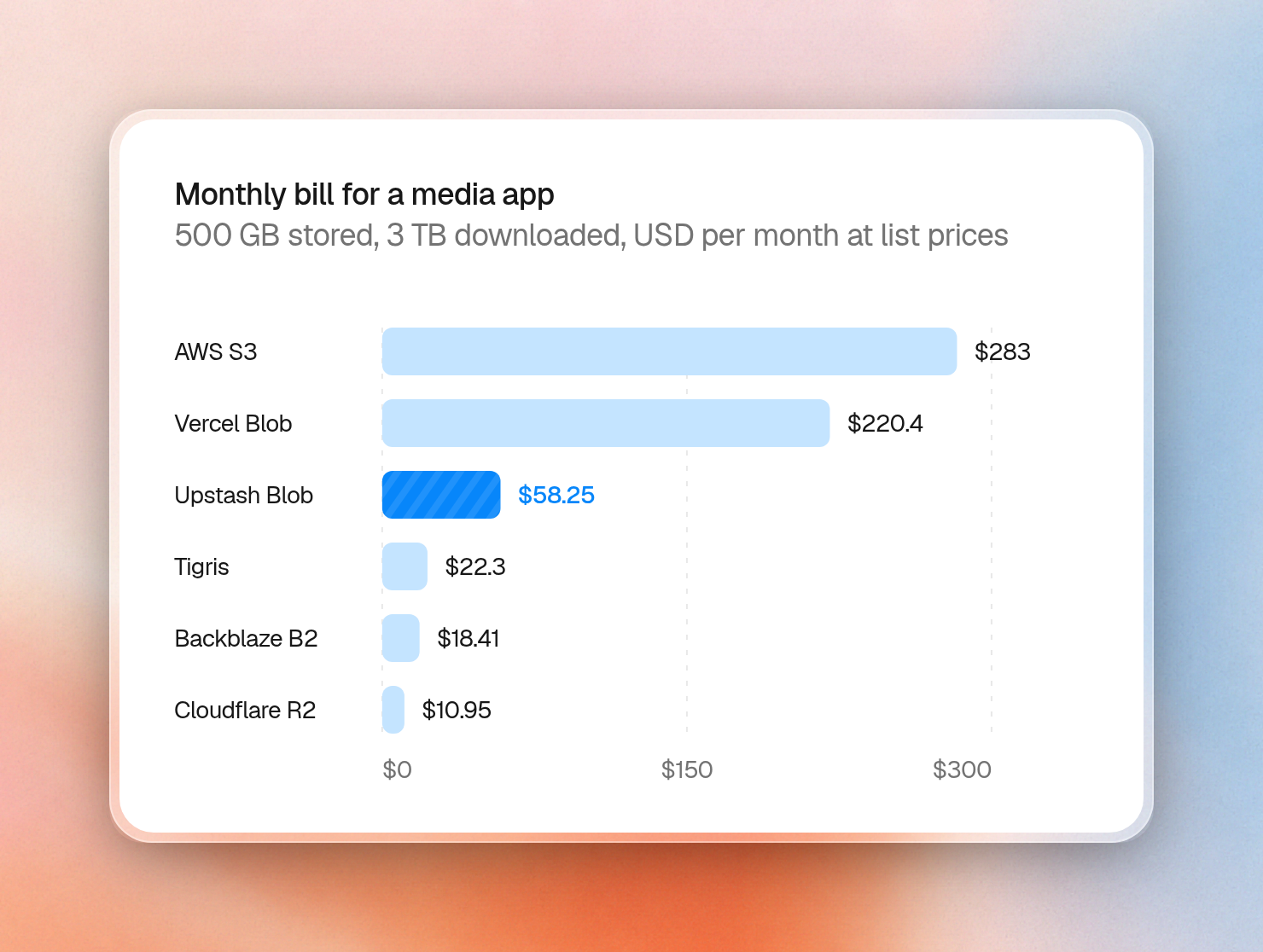
App B: a media app. 500 GB stored, 3 TB (3,000 GB) downloaded, 500,000 uploads and 20 million reads a month.
| Service | Math | Monthly bill |
|---|---|---|
| Cloudflare R2 | 490 × $0.015 + (20M − 10M free) × $0.36/1M | $10.95 |
| Backblaze B2 | 490 × $0.00695 + (3,000 − 1,500 free GB) × $0.01 | $18.41 |
| Tigris | 495 × $0.02 + 490k × $0.005/1k + 19.9M × $0.0005/1k | $22.30 |
| UploadThing | $25 plan + (500 − 250) × $0.08 | $45.00 |
| Upstash Blob | 500 × $0.02 + (3,000 − 1,000) × $0.02 + 0.5M × $4.50 + 20M × $0.30 | $58.25 |
| Supabase Storage | $25 + (500 − 100) × $0.0213 + (3,000 − 250) × $0.03 cached | $116.02 |
| Vercel Blob | $11.50 + $2.40 misses + $2.50 uploads + 3,000 × $0.05 + 900 GB × $0.06 | $220.40 + CDN requests past the included 10M |
| AWS S3 | 500 × $0.023 + 2,900 × $0.09 + $2.50 PUTs + $8.00 GETs | $283.00 |
| Cloudinary | 500 + 3,000 = 3,500 credits, past Advanced's 600 | Custom plan |
Past 1 TB of downloads a month, the zero-egress stores cost less than Upstash Blob. Upstash Blob still costs about a quarter of Vercel Blob for the same traffic, with the same upload code.
Here are the App B bills side by side:
Upstash Blob
Here are Upstash Blob's plans:
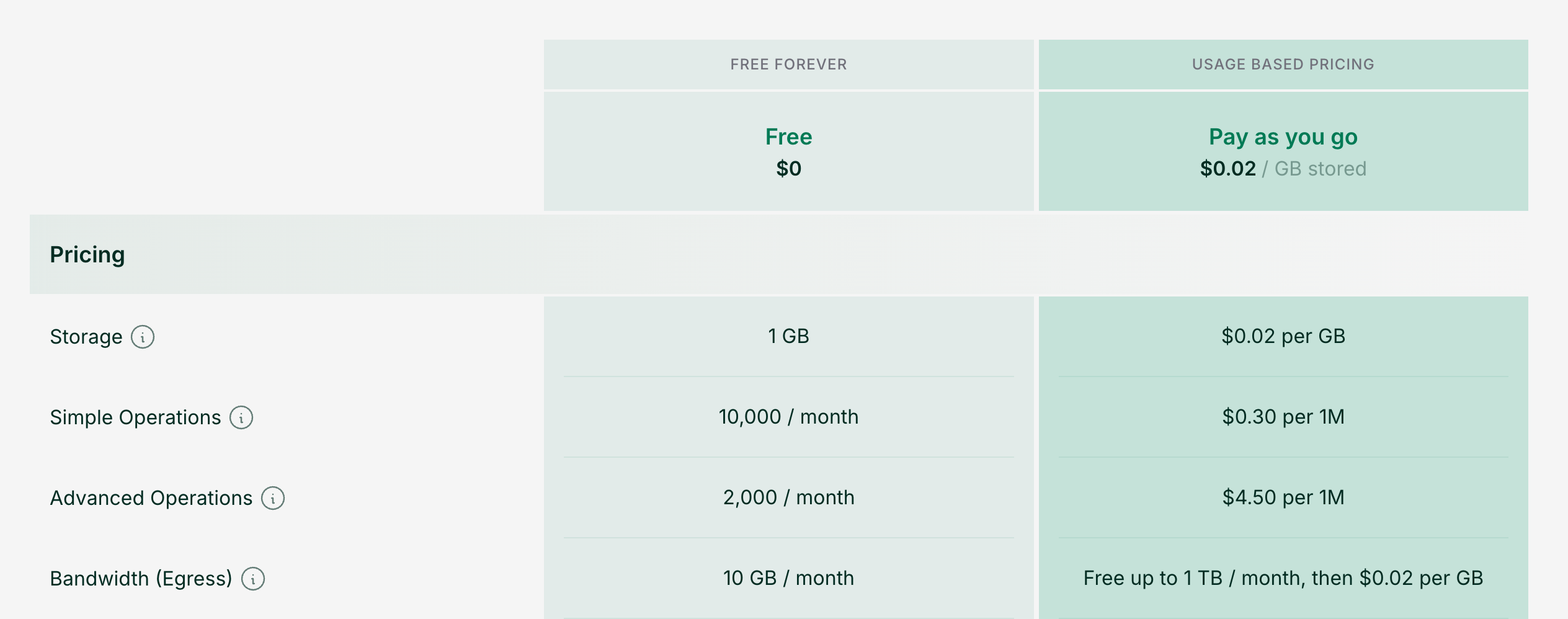
On pay-as-you-go, storage costs $0.02 per GB-month. Egress is free up to 1 TB per month, and then $0.02 per GB after that. Uploads and deletes do not count as bandwidth. (We wrote more about the change in pricing in Upstash Blob now includes 1 TB of free egress every month.)
Each bucket is global, so you don't choose a region for it, and you don't pay anything extra for replication.
Upstash Blob's programming model is closer to Vercel Blob than anyone else's, especially for a Next.js app. Its TypeScript SDK has a server put(), an upload handler that corresponds to handleUpload, and React hooks to use in the browser. Uploads do not go through the 4.5 MB request body limit on Vercel functions because the browser sends files directly to storage.
The upload handler calls a completion callback. With Upstash Blob, the callback runs in your own route, and the browser calls the route to complete the upload. When we tested the browser-side upload against a route on a local Node server, the callback ran without setting up a tunnel or a public URL.
Upstash also lets you swap the bucket token for temporary S3 credentials with bucket.s3(), so you can use the AWS SDK, the AWS CLI, and other S3-compatible tools on the same bucket. If you already use Upstash Redis or QStash, then Upstash Blob is also one more product on the same account.
For an app like App A, Upstash Blob is the cheapest of the stores that ship a Next.js upload flow. Our guide to file storage for Next.js goes deeper on that setup.
Cloudflare R2
For media apps whose downloads go into terabytes, Cloudflare R2 has the lowest egress cost in this list. For App B above, 3 TB downloads cost $10.95 on R2, and $220.40 on Vercel Blob.
Both storage classes offer free egress. R2's pricing table is:
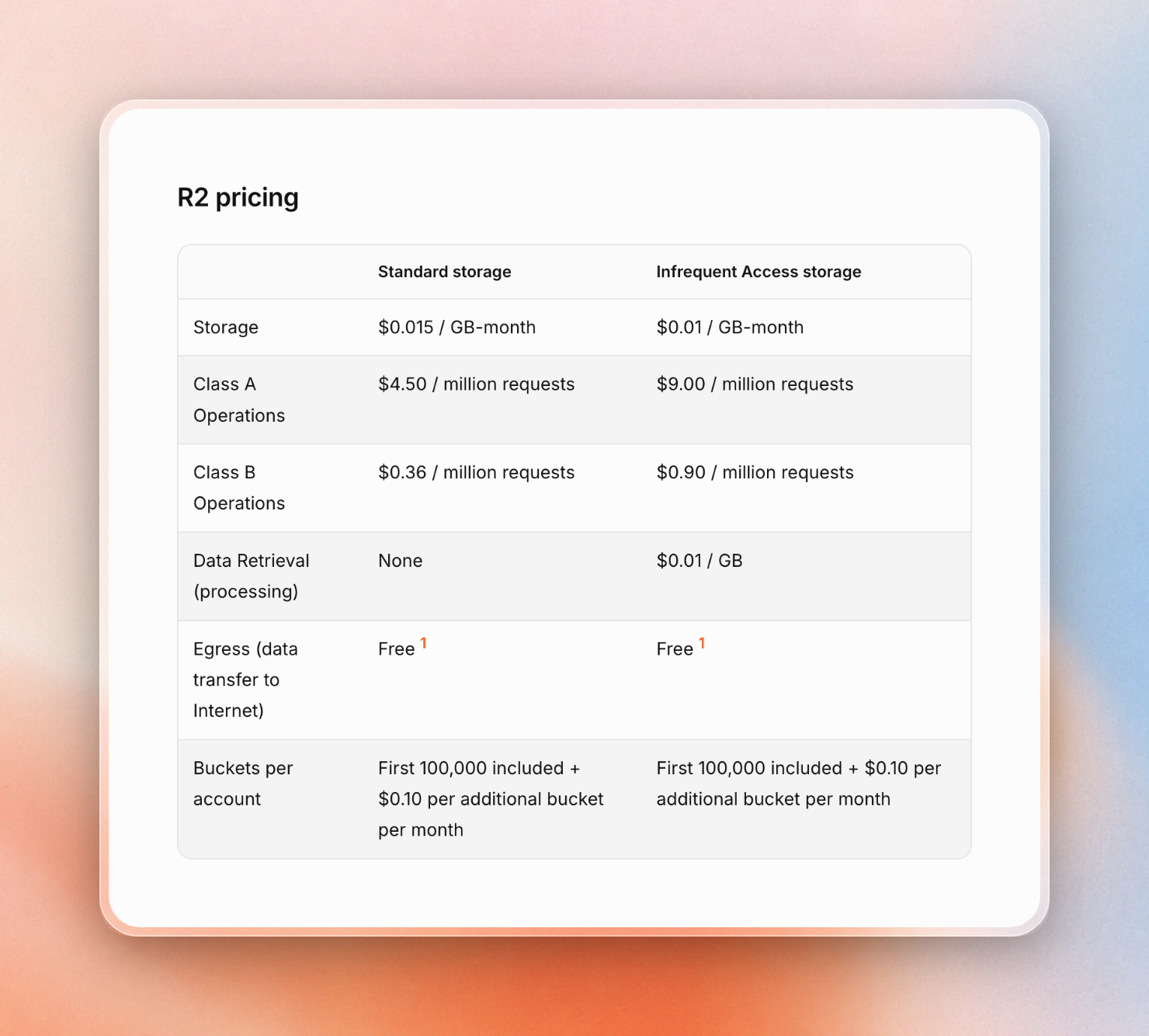
R2 charges nothing for egress on any storage class. Storage is $0.015 per GB-month, and the free tier is 10 GB, 1 million writes, and 10 million reads every month.
The tradeoff is you need to do more work to set uploads up: there is no Next.js upload handler, so you generate presigned URLs with an S3 client and write the upload route yourself.
With egress free, reads dominate the bill at high traffic. Cloudflare's own example of 100,000 small files read 10 million times a day costs $104.40 a month on R2, all of it in Class B reads.
Choose R2 for: Video, podcasts, game assets, public datasets, or any app where download traffic dominates the bill.
UploadThing
UploadThing offers a hosted upload flow, as well as a range of flat plans: free up to 2 GB of storage, with unlimited uploads and downloads; $10/month for up to 100 GB; and a $25 usage plan, which includes 250 GB of storage, with each additional GB of storage costing $0.08.
Because UploadThing prices based on storage, and not downloads, it's attractive for apps with small storage requirements but larger volumes of downloads. In App B, UploadThing worked out to $45/month for 3 TB of downloads.
The tradeoff is price of per-GB storage, which is the highest of the plain file stores we looked at. For stores with more than 250 GB, UploadThing's $0.08 per-GB storage price makes it 4x the price of storage on Upstash Blob or Tigris for 1 TB of files, and the $10 plan is limited to 100 GB.
Supabase Storage
Your Supabase Storage files are located in the same project as your database rows. If your application already uses Supabase for Postgres and auth, Supabase Storage is a good fit.
Supabase Storage also comes with image transforms: the Pro plan includes 100 origin images, then $5 per 1,000.
Supabase’s pricing page says this about storage:
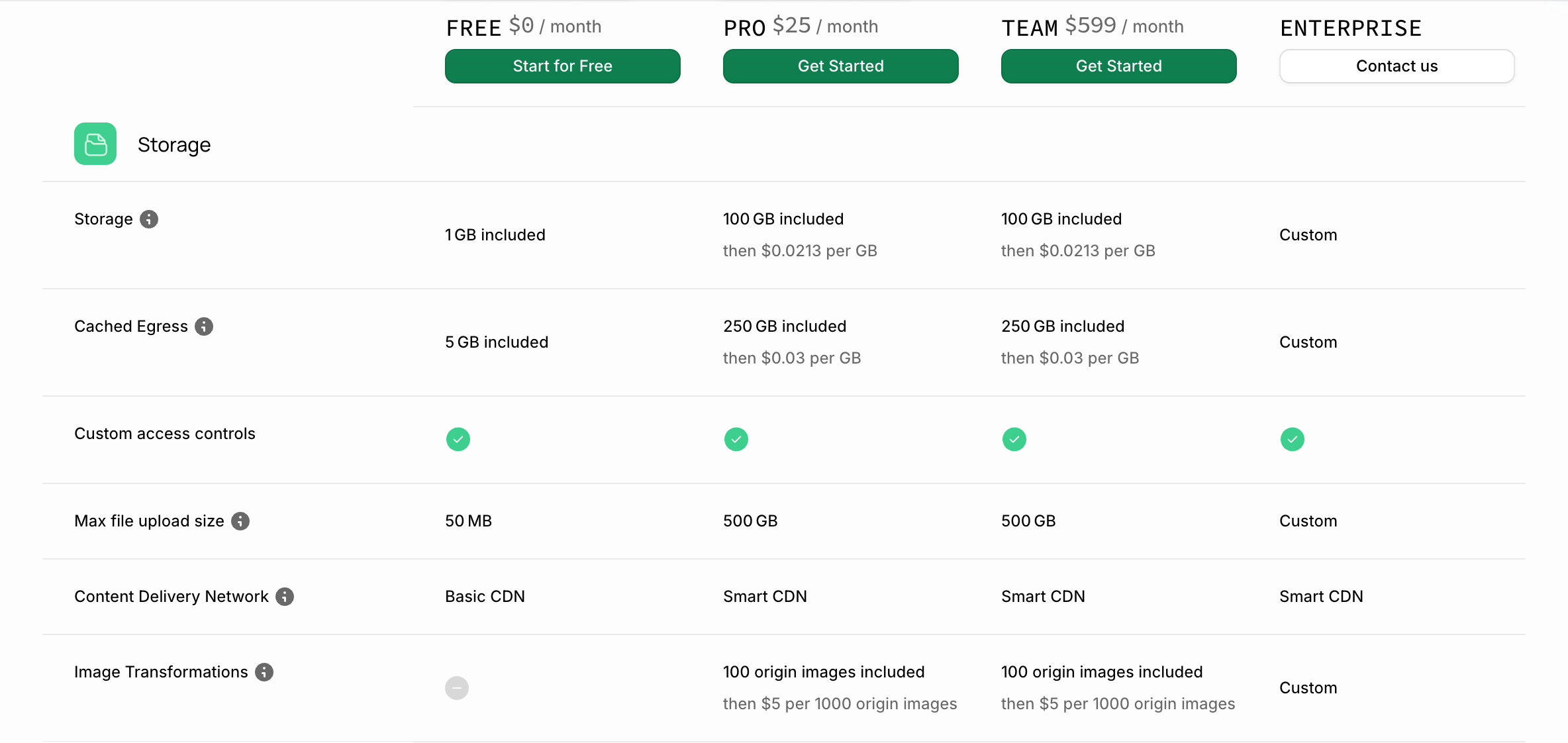
Pro ($25 per month) gets 100 GB storage and 250 GB cached egress. Overage is $0.0213 per GB storage and $0.03 per GB cached egress.
But watch out for the uncached egress line item: downloads that miss Supabase’s CDN incur a higher $0.09 per GB overage past the 250 GB included. That’s nearly twice as expensive as Vercel Blob’s transfer rate. If you have a media application with a long tail of files, you’ll find more downloads on that uncached line item.
AWS S3
S3 costs the most in this list for public downloads. They charge egress costs for downloads to the internet. It starts at $0.09 per GB for the first 10 TB after a free 100 GB a month shared across AWS services. This means App B is more expensive with S3 ($283.00) than it is with Vercel Blob.
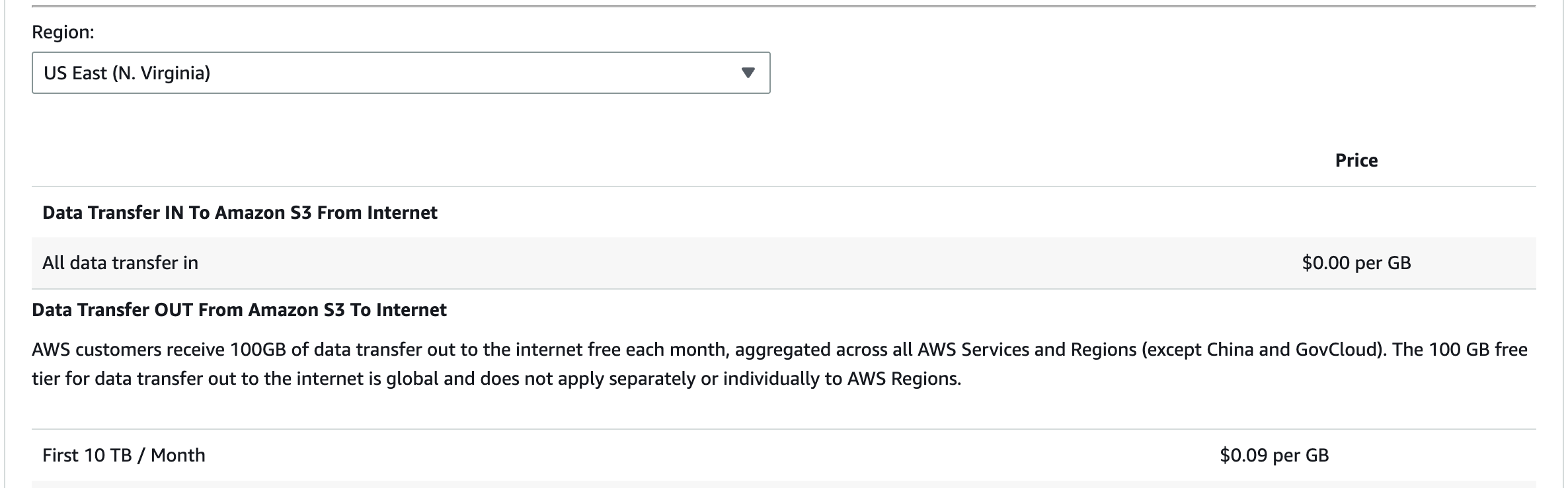
This can be worked around by placing CloudFront in front of S3, as data transfer from S3 to CloudFront is free, allowing you to use CloudFront’s rates instead. This means more services to set up and bill. For a more detailed look at cost, check out our S3 vs Upstash Blob comparison.
AWS has the most advanced ecosystem with IAM policies, storage classes for cold data, and support for objects up to 50 TB. S3 is a sensible option when the rest of your app is on AWS. New AWS accounts can receive up to $200 in Free Tier credits that can be used within 12 months.
Tigris
Tigris is globally distributed, S3-compatible object storage with zero egress fees. It costs $0.02 per GB-month in any region, and defaults to global placement, meaning Tigris moves data closer to where it's being read.
Tigris costs more per operation than R2: $5.00 per million writes and $0.50 per million reads. Its free tier is also lower, offering 5 GB, 10,000 writes and 100,000 reads per month. Like R2, Tigris has no Next.js upload handler, so you'll be building presigned uploads with an S3 client.
Tigris is a good fit for apps serving users globally and want R2-style free egress without a fixed region. Tigris costs $22.30 per month in App B.
Cloudinary
Cloudinary is file storage specifically for images and video. Cloudinary offers resizing, cropping, format conversion, and transcoding on-the-fly. Supabase Storage also resizes images, but none of the other stores here transform files, and Vercel Blob's putImage() needs Vercel's OIDC auth. Cloudinary is the only one in this list that also handles video.
Cloudinary charges using "credits", with each credit equalling 1,000 transformations, 1 GB of storage, or 1 GB of image bandwidth. The free tier includes 25 credits per month, Plus is $99/mo for 225, Advanced is $249 for 600.
Cloudinary is very expensive for just file storage. Storing App A's 20 GB of files and 200 GB of downloads would take 220 credits, bumping you up to the $99/mo plan. App B's 3,500 credits exceeds Advanced. Cloudinary also requires Advanced for custom domains (CNAME). Use Cloudinary when you need its file transformation features.
Backblaze B2
B2 is the most inexpensive option on the list, at $6.95 per TB per month, which is about $0.007 per GB. The first 10 GB of storage is free, and API calls are free on pay-as-you-go pricing.
This is the pay-as-you-go card:
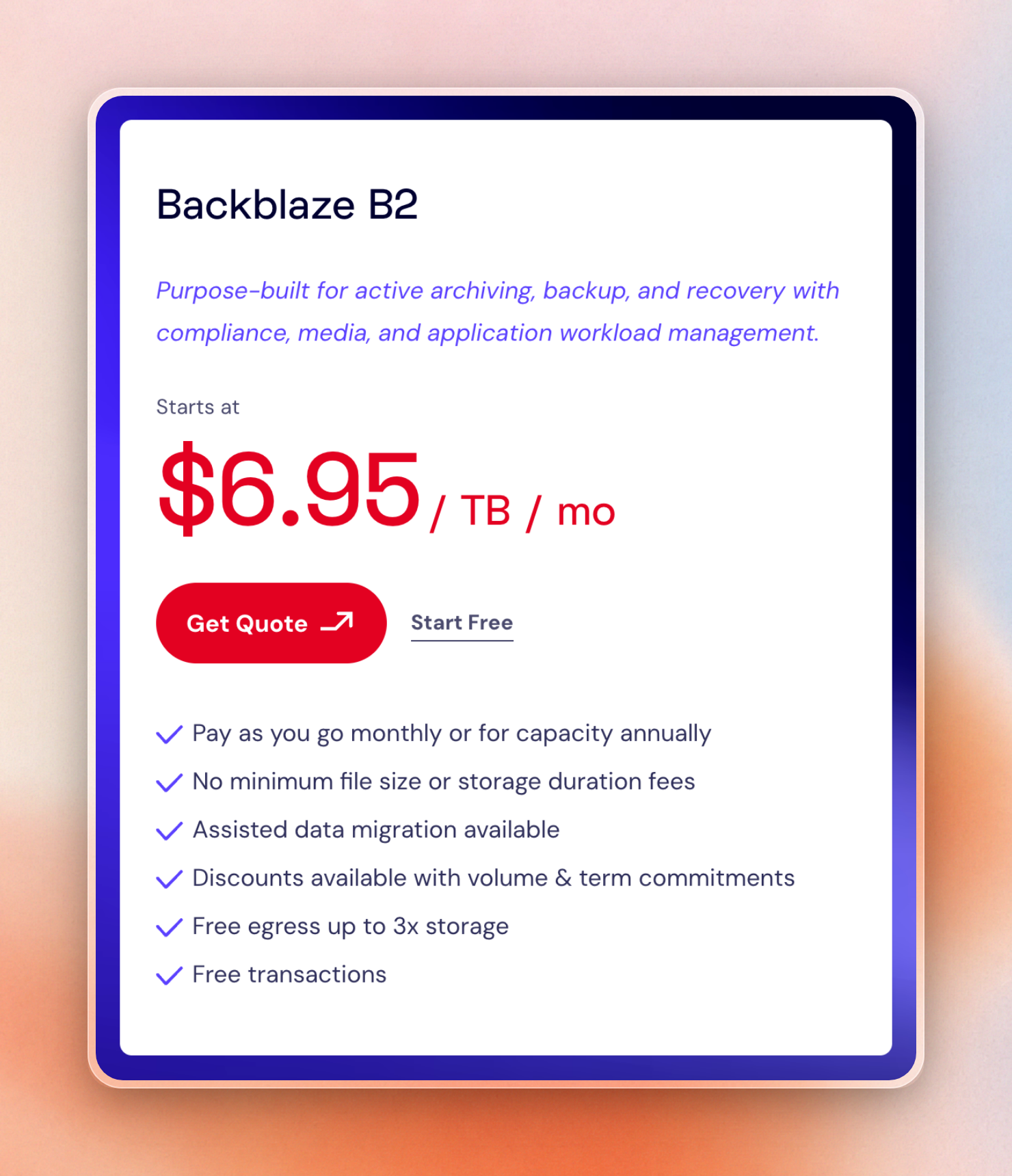
The egress is free up to 3 times your average amount stored, after which it’s $0.01 per GB. Egress through any of its partner CDNs, including Cloudflare, Fastly and bunny.net is free even after that point, though.
Like R2 and Tigris, there’s no Next.js upload flow.
The free egress on B2 is dependent on the amount of storage. This means it’ll cost more if you have a small storage size with more traffic. In app B, the storage is 500 GB, which means only 1,500 GB of the 3 TB of downloads are free.
The pricing makes B2 a great choice if you have any big archives, backups, or user libraries where you’ll store a lot of data and download a share of it.
Migrating from @vercel/blob to @upstash/blob
Most of the move is renaming. The two SDKs map like this:
Vercel Blob (@vercel/blob) | Upstash Blob (@upstash/blob) |
|---|---|
BLOB_READ_WRITE_TOKEN | UPSTASH_BLOB_TOKEN, read by Bucket.fromEnv() |
put(path, body, { access }) | bucket.put(path, body); public or private is a bucket setting |
addRandomSuffix: true | uniquePath(name) or allowOverwrite: false |
handleUpload() in a POST route | uploadHandler(), exported as GET and POST |
onBeforeGenerateToken | onBeforeUpload |
onUploadCompleted({ blob }) | onUploadComplete({ path, url, size, ... }) |
upload() from @vercel/blob/client | useUpload() from @upstash/blob/react |
Server upload
This route takes a file from a form post and stores it. On Vercel Blob:
import { put } from '@vercel/blob'

export async function POST(request: Request) {
  const form = await request.formData()
  const file = form.get('file')
  if (!(file instanceof File)) {
    return Response.json({ error: 'A file is required' }, { status: 400 })
  }

  const blob = await put(file.name, file, {
    access: 'public',
    addRandomSuffix: true,
  })
  return Response.json(blob)
}
The same route on Upstash Blob:
import { Bucket } from '@upstash/blob'

const bucket = Bucket.fromEnv()

export async function POST(request: Request) {
  const form = await request.formData()
  const file = form.get('file')
  if (!(file instanceof File)) {
    return Response.json({ error: 'A file is required' }, { status: 400 })
  }

  const blob = await bucket.put(file.name, file, { allowOverwrite: false })
  return Response.json(blob)
}
We ran the Upstash route against a real bucket with a small text file. It returned:
{
  "path": "article-test-1793617187-route/route.txt",
  "url": "https://b27353de2921.blob.upstash.io/article-test-1793617187-route/route.txt",
  "versionedUrl": "https://b27353de2921.blob.upstash.io/article-test-1793617187-route/route.txt?v=%22007d1cfeac55615ca753010402965b23%22",
  "size": 20,
  "etag": "\"007d1cfeac55615ca753010402965b23\"",
  "uploadedAt": "2026-11-02T10:59:48.337Z",
  "contentType": "text/plain"
}
Note that the uploaded File provides the content type. For a simple string where the content type is missing, the content type application/octet-stream is used.
Browser upload
For files bigger than a function body allows, the browser uploads directly. The Vercel version has a token route and a client component:
import {
  handleUpload,
  type HandleUploadBody,
  type HandleUploadOptions,
} from '@vercel/blob/client'

async function onBeforeGenerateToken() {
  // Check the user's session and permission to upload here.
  return {
    allowedContentTypes: ['image/jpeg', 'image/png', 'image/webp'],
    maximumSizeInBytes: 5_000_000,
    addRandomSuffix: true,
  }
}

async function onUploadCompleted({ blob }: Parameters<
  NonNullable<HandleUploadOptions['onUploadCompleted']>
>[0]) {
  console.log('Upload completed:', blob)
}

export async function POST(request: Request) {
  const body = (await request.json()) as HandleUploadBody
  const result = await handleUpload({
    request,
    body,
    onBeforeGenerateToken,
    onUploadCompleted,
  })
  return Response.json(result)
}
'use client'
import { upload } from '@vercel/blob/client'
import type { ChangeEvent } from 'react'
async function uploadAvatar(event: ChangeEvent<HTMLInputElement>) {
const file = event.currentTarget.files?.[0]
if (!file) return
const blob = await upload(file.name, file, {
access: 'public',
handleUploadUrl: '/api/avatar/upload',
})
console.log('Uploaded:', blob)
}
export default function AvatarUpload() {
return (
<input
type="file"
accept="image/jpeg,image/png,image/webp"
onChange={uploadAvatar}
/>
)
}Here's how this looks on Upstash Blob, where the browser requests permission from your route, then sends the bytes directly up to the bucket, then notifies your route of completion:
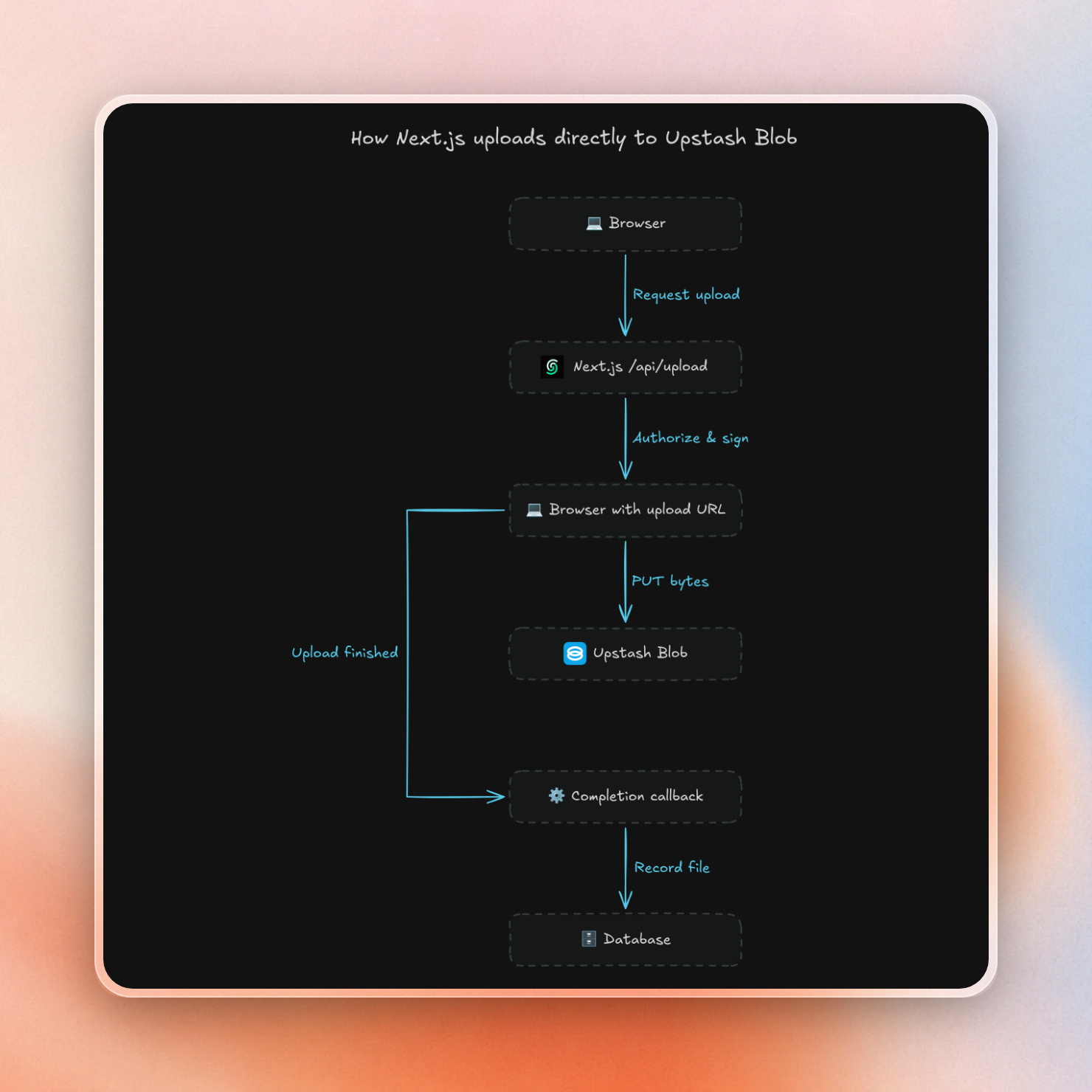
The route in app/api/upload/route.ts declares the limits once and exports the handler:
import {
  uniquePath,
  uploadHandler,
  type BeforeUploadArgs,
  type UploadCompleteArgs,
} from '@upstash/blob'

function onBeforeUpload({ file }: BeforeUploadArgs) {
  // Check the user's session and permission to upload here.
  return { path: uniquePath(file.name) }
}

function onUploadComplete({ path, url, size, contentType }: UploadCompleteArgs) {
  console.log('Upload completed:', { path, url, size, contentType })
  return { path }
}

const uploads = uploadHandler({
  constraints: { maxSize: '5mb', contentTypes: ['image/*'] },
  onBeforeUpload,
  onUploadComplete,
})

export type Uploads = typeof uploads

export const { GET, POST } = uploads
The client component reads those limits from the route, so the file picker's accept value and the size check stay in sync with the server:
'use client'

import { uploadHooks } from '@upstash/blob/react'
import type { ChangeEvent } from 'react'
import type { Uploads } from './api/upload/route'

const { useUpload } = uploadHooks<Uploads>()

type StartUpload = ReturnType<typeof useUpload>['start']

function uploadAvatar(start: StartUpload, event: ChangeEvent<HTMLInputElement>) {
  start({ file: event.currentTarget.files?.[0] })
}

export default function AvatarUpload() {
  const { start, upload, accept } = useUpload()

  return (
    <div>
      <input
        type="file"
        accept={accept}
        onChange={uploadAvatar.bind(null, start)}
      />
      {upload?.pending && <progress value={upload.percent} max={100} />}
      {upload?.status === 'done' && <p>Uploaded: {upload.blob.data.path}</p>}
      {upload?.status === 'error' && <p>{upload.error.message}</p>}
    </div>
  )
}
We uploaded a small PNG from Chromium to this route running on a local Node server. The route logged both phases, and the callback ran on the local machine:
handler phase: begin
handler phase: end
Upload completed: {
  path: 'article-test-1793617201-browser/avatar-RDtvZwGx.png',
  url: 'https://b27353de2921.blob.upstash.io/article-test-1793617201-browser/avatar-RDtvZwGx.png',
  size: 68,
  contentType: 'image/png'
}
public URL: HTTP 200, 68 bytes
In between those phases, the browser had uploaded the file bytes straight to storage. Whatever onUploadComplete returned, the browser got back under data, which is how the component displayed upload.blob.data.path. Finally we cleaned up the test objects by prefix and listed the prefix to make sure it was empty.
One thing to watch out for as you port this is that onUploadComplete can run more than once if the browser retries its finishing request after a network error, so you want to upsert your database row on the upload id rather than always inserting.
Which Vercel Blob alternative should you pick?
For most Next.js apps leaving Vercel Blob, the best alternative is Upstash Blob. The exceptions depend on how much you serve:
- If you have a Next.js app, upload from the browser, and serve under 1 TB of downloads a month: Upstash Blob. You can port your upload code almost line for line, and you get App A for $1.45 a month.
- If you serve video or other large public files, many terabytes a month: Cloudflare R2. App B costs $10.95, but you write the upload route yourself.
- If you want free egress and users worldwide without choosing a region: Tigris.
- If you host large archives or backups with modest downloads: Backblaze B2.
- If you host images and want on-the-fly resizing or format changes: Cloudinary, or Supabase Storage if you already use Supabase.
- If you already use Supabase for auth and Postgres: Supabase Storage.
- If you want a hosted upload flow, flat plans, and low storage: UploadThing.
- If your other systems are already on AWS: S3, with CloudFront in front for public downloads.
We have a separate guide to cloud storage APIs for side projects.

