Ahi: A Framework to Run Independent Agents

Ahi is an open-source framework for running each agent in its own isolated container with tools, skills, durable data, and a schedule. No orchestration. No deployment.
The Ahi name comes from the Ahilik tradition in 13th-century Anatolia (modern-day Turkey). After the Mongol invasions left the region without central authority, craftsmen organized into brotherhoods called Ahi guilds. Each Ahi was an independent craftsman with a specific trade, their own tools, and a shared code of conduct. They provided order through skill and structure, not top-down control. An Ahi agent works the same way — independent, skilled, self-governing.
The Problem
If you're running AI agents for your users today, you're probably building an app server. You write routes, handlers, and orchestration code. You store agent state in a database. You build tenant isolation yourself. You deploy everything as one unit.
It works — until you have 100 agents, each needing its own memory, its own tools, its own schedule. At that point, you're not building an app anymore. You're building infrastructure to run agents.
Agent Server: A Different Architecture
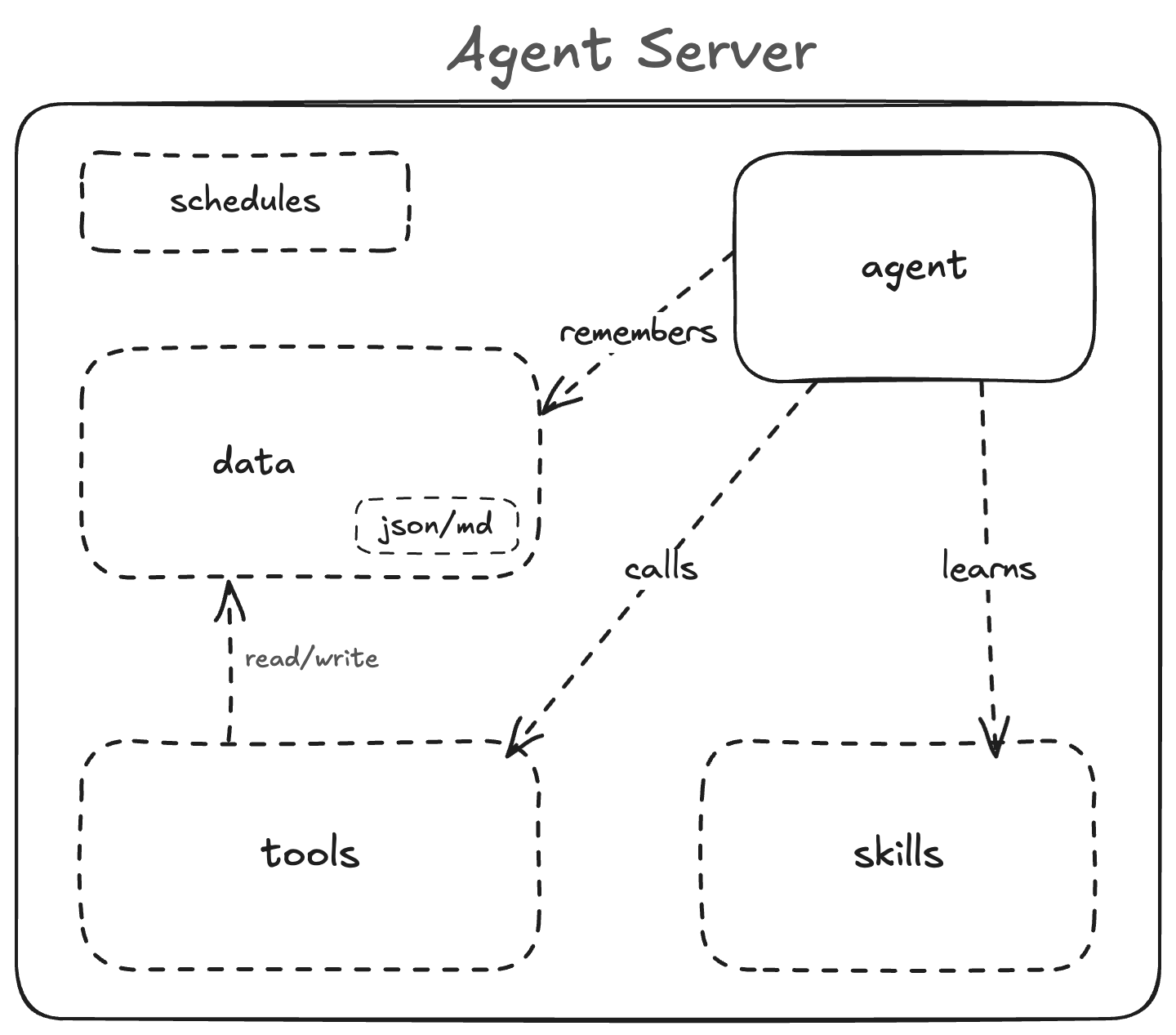
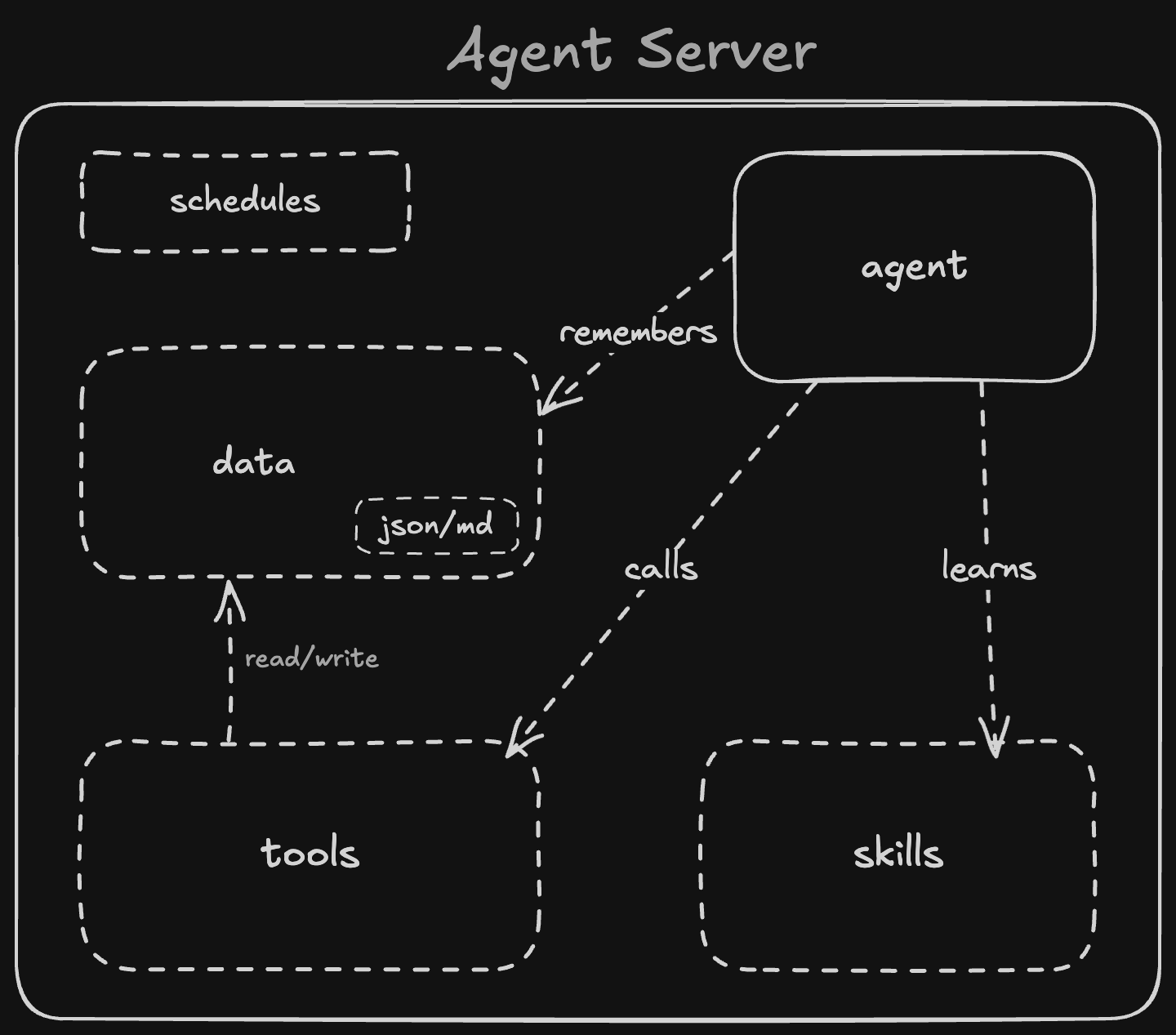
Ahi implements an architecture we call an agent server. It replaces application servers with five primitives:
- Agent — the LLM. It reasons, decides, and acts.
- Tools — code that does work for the agent.
- Skills — instructions that teach the agent how to use tools.
- Data — durable MD/JSON. The agent's memory. Persists across runs.
- Schedules — cron for prompts, not code.
Why Not Just Use an App Server?
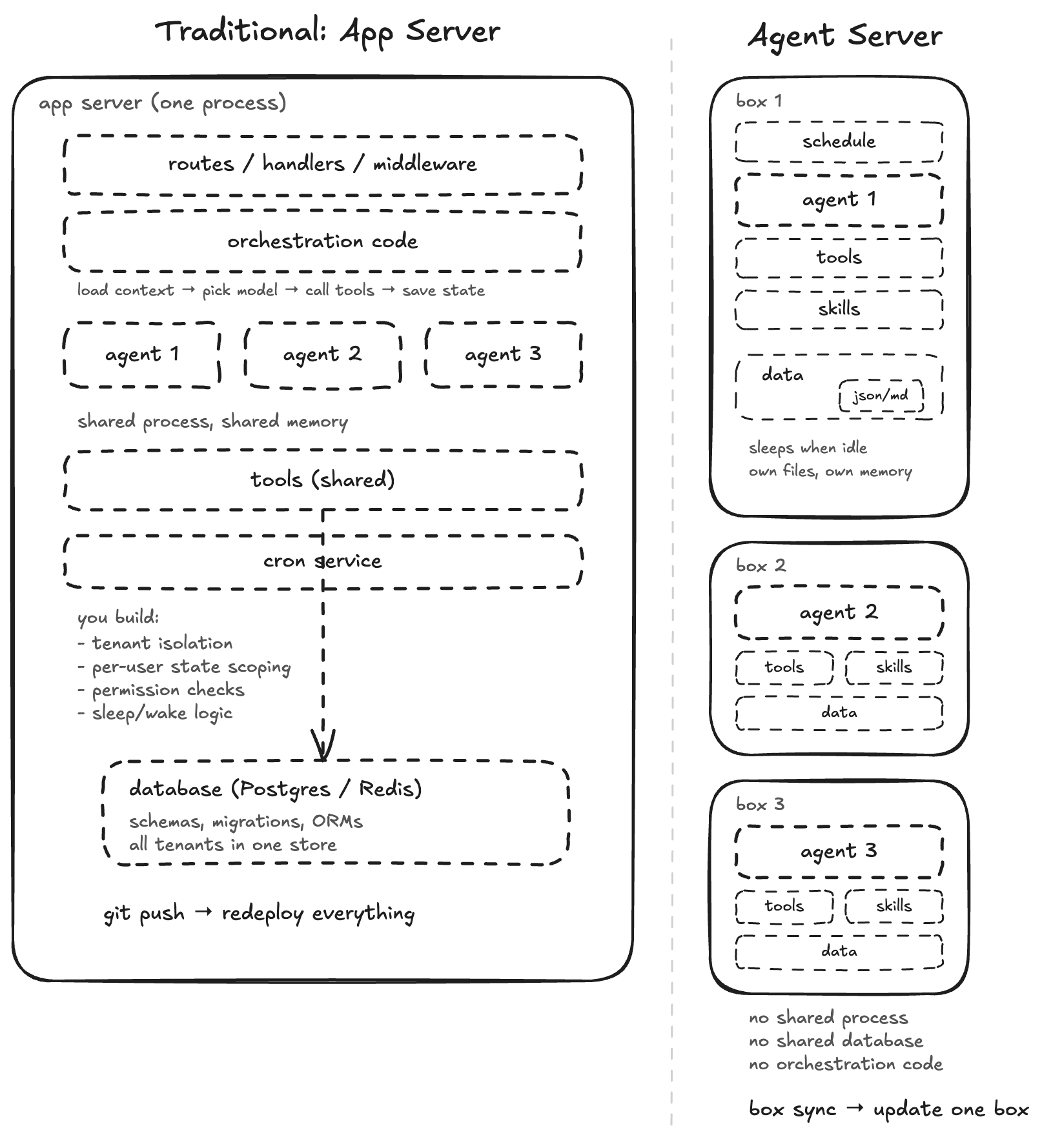
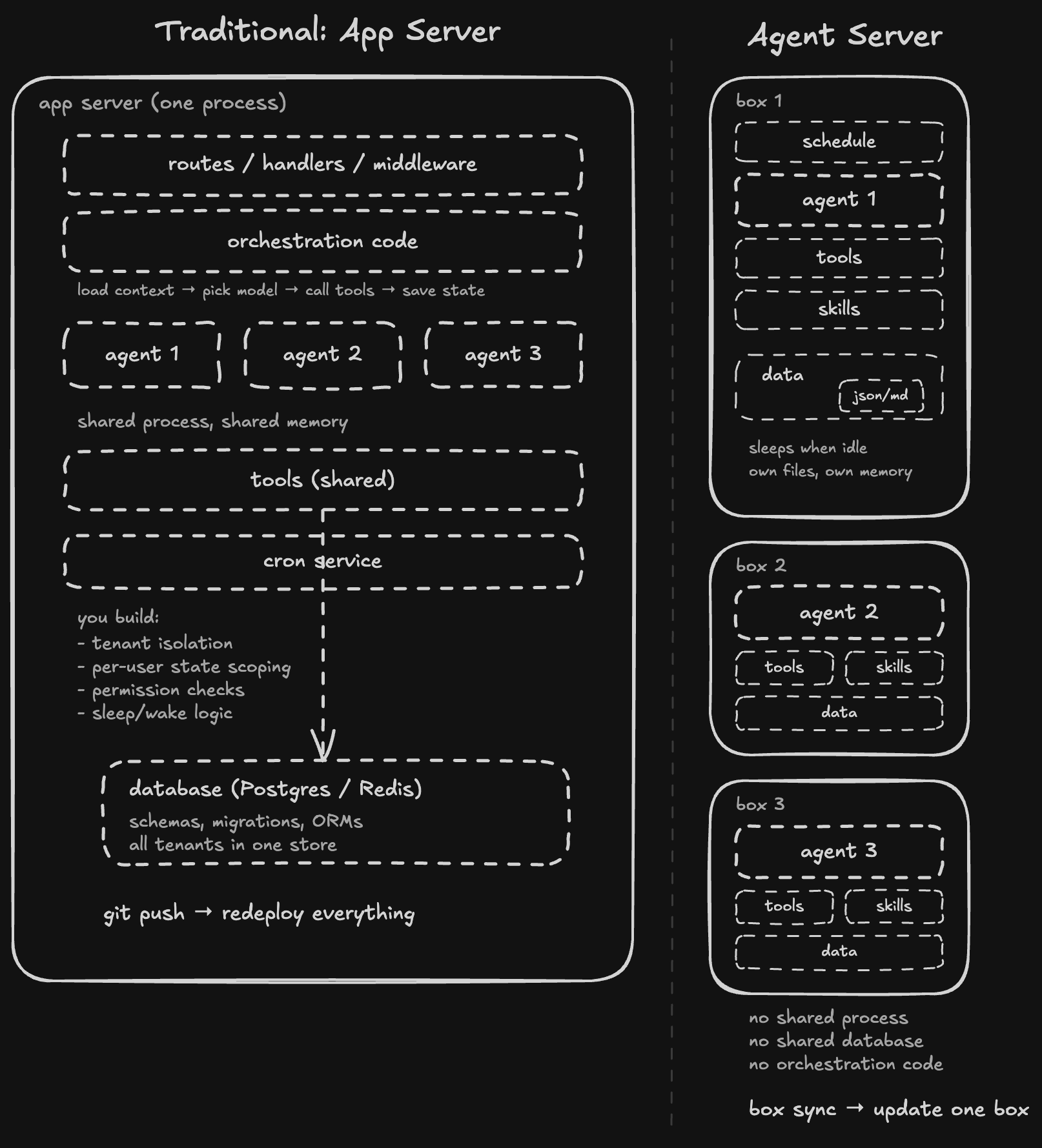
You could build all of this on a traditional app server. But here's what you'd actually be building on top of your agent logic — and what an agent server gives you for free:
- Isolated by default. An app server shares one process across all users. You build isolation yourself — scoped queries, permission checks, tenant separation. An agent server gives you one container per tenant. Isolation isn't a permission layer you build — it's a container boundary that already exists.
- State is a filesystem. An app server stores agent state in Postgres or Redis. You write schemas, migrations, serialization. An agent server stores state as JSON/MD files on disk. The agent reads and writes files. No ORM, no driver, no schema.
- Sleep/wake — pay only when active. An app server is a running process — you pay whether agents are active or not. An agent server sleeps when idle, wakes instantly, costs nothing in between. With 10,000 per-user agents, most are idle at any given time. You only pay for the ones working.
- No orchestration code. An app server needs glue code: receive request, load user context, pick model, call tools, save state, return response. An agent server removes all of that. The agent reads its skills, calls its tools, writes its data. Zero lines of orchestration.
- No deploys. An app server ships everything in one git push. Change a tool, redeploy the whole app. An agent server lets you sync one file. The rest keeps running untouched.
| App Server | Agent Server | |
|---|---|---|
| Isolation | Software-defined (RBAC, scoped queries) | Container-isolated (one container per agent) |
| State | External DB (Postgres, Redis) | Local filesystem (durable files) |
| Cost model | Pay for running processes | Sleep/wake — pay only when active |
| Orchestration | Hand-written glue code | Zero — agent reads skills, calls tools |
| Deployment | Full CI/CD for any change | File-based sync (update one file) |
Example: Botstreet
Botstreet is three agent servers competing as stock traders. Same tools, same skills, different models (Claude, OpenAI, Gemini). Each runs in its own Upstash Box. Here's the project structure:
botstreet/
├── ahi.yaml
├── tools/
│   ├── trade.ts
│   ├── portfolio.ts
│   ├── prices.ts
│   ├── snapshot.ts
│   └── search.ts
├── skills/
│   └── SKILL.md
└── data/
    ├── portfolio.json
    └── memory.md
Every weekday at 9:30 AM ET, each agent wakes up, reads the news, analyzes its portfolio, makes trades, writes a diary entry, and saves a snapshot. Between runs, the box sleeps. The data — portfolio state, trade history, diary entries — persists as JSON/MD files inside each box. No database, no app server, no orchestration code.
What Ahi Gives You
Ahi is the framework that makes this easy. It gives you three things:
Conventions. The folder structure (tools/, skills/, data/) and a config file (ahi.yaml) that maps to the five primitives. The folder structure is the convention.
The ahi.yaml for Botstreet defines three agents sharing the same tools and skills:
tools: ./tools/
skills: ./skills/SKILL.md

env:
  BRAVE_API_KEY:    # forwarded from local .env

setup:
  - npm install

agents:
  - name: botstreet-claude
    model: claude-opus-4.6
    schedules:
      - cron: "30 14 * * 1-5"
        prompt: "Run daily trading analysis, research market news, make trades, and save a snapshot"
        timeout: 600000

  - name: botstreet-gemini
    model: gemini-3.1-pro
    schedules:
      - cron: "30 14 * * 1-5"
        prompt: "Run daily trading analysis, research market news, make trades, and save a snapshot"
        timeout: 600000

  - name: botstreet-openai
    model: gpt-5.4
    schedules:
      - cron: "30 14 * * 1-5"
        prompt: "Run daily trading analysis, research market news, make trades, and save a snapshot"
        timeout: 600000
CLI. Six commands:
ahi init              # scaffold the folder structure
ahi dev "prompt"      # run an agent locally
ahi apply             # apply files, env, setup, and schedules to agent boxes
ahi run "prompt"      # run an agent remotely, stream output back
ahi pull-data         # download an agent's data/ to local
ahi push-data         # upload local data/ to the box
There's no deploy step. Each primitive has its own lifecycle:
- Fix a bug in a tool —
ahi apply. Only that file updates remotely. - Rewrite the agent's strategy — update SKILL.md, run
ahi apply. Same tools, same data, new behavior. - Switch from Claude to Gemini — change the model in
ahi.yaml, runahi apply. Tools, skills, and data stay untouched. - Inspect what the agent wrote —
ahi pull-data. The data folder downloads to your local project. - Seed initial state —
ahi push-data. Upload local data files to the box. - The agent writes its own data — you never touch it. It survives every update above.
No build step, no container image, no CI pipeline. Your local folder is the source of truth.
Get Started
| Layer | Name | What it is |
|---|---|---|
| Architecture | Agent server | The idea — five primitives, no app code |
| Framework | Ahi | Conventions, CLI |
| Infrastructure | Upstash Box | Containers, storage, scheduling |
| SDK | @upstash/box | Low-level programmatic access |
npm install -g @upstash/ahi
ahi init
cp .env.example .env          # add your API keys
ahi dev "do something useful"
ahi apply
ahi run "do something useful"