Why Lua Scripts Beat WATCH When Many Clients Update One Redis Key
 Josh
The basic transaction pattern in Redis is to read, decide, update. If some other client can slip in there and do the same, we lose updates. WATCH can recover from this by retrying. A Lua script can avoid it by doing everything at once.
To illustrate, we set up 100 clients each trying to add 1 to a counter, for 1,000 increments overall. Every client ran in its own TCP connection, about 1 ms from an Upstash Redis database (Pay as You Go, in AWS us-east-1).
A plain read then write, with no synchronization, finished very quickly. But it lost 984 of the 1,000 updates, without so much as an error message.
WATCH took 26 seconds and about 272,000 commands to do the job. 253 updates gave up. (Each WATCH transaction gave up after 100 attempts.)
Lua did it in 48 ms.
Should you use WATCH or a Lua script in Redis?
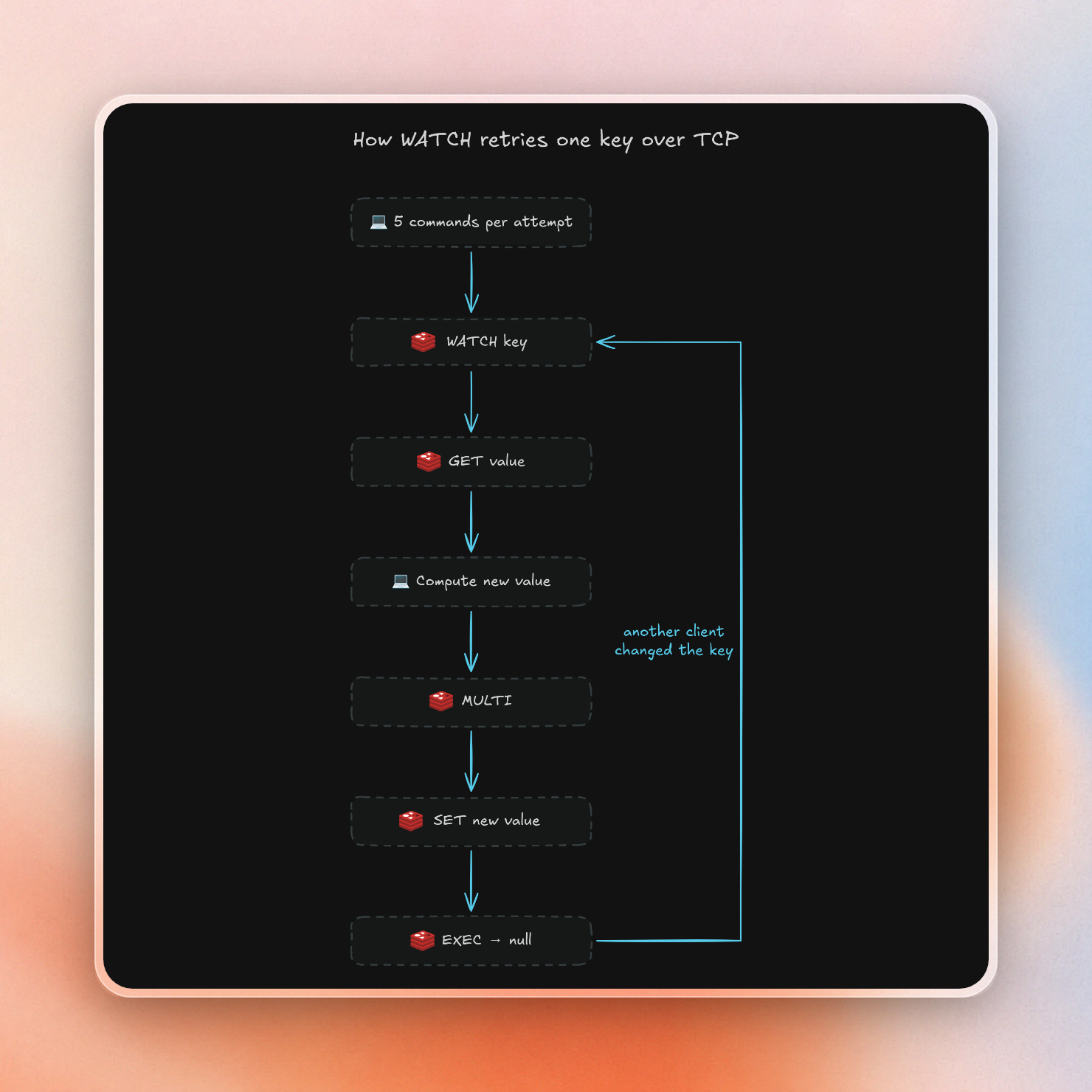
The overhead of WATCH is 5 commands per retry, with the number of retries increasing with the number of clients. If more than a few clients need to update the same key, then the best option is to use a Lua script instead, because they are evaluated atomically and avoid the need for retries.
This is the cost of 1,000 updates to one key:
| Clients | Plain read then write: updates lost | WATCH: commands per update | WATCH: total time | Lua: total time |
|---|---|---|---|---|
| 1 | 0 | 5 | 2.2 s | 717 ms |
| 5 | 761 | 22.8 | 7.1 s | 465 ms |
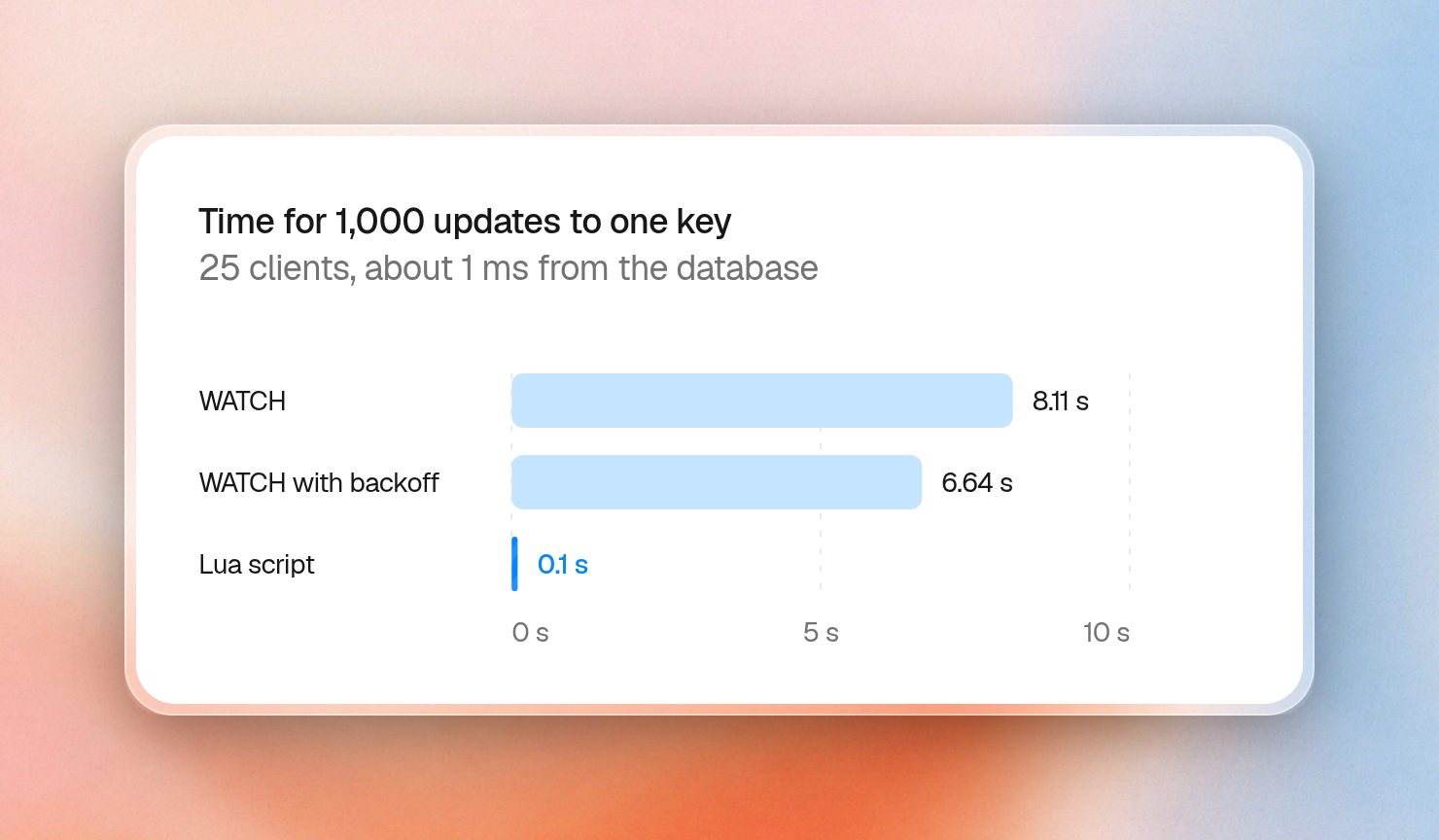
| 25 | 940 | 90.8 | 8.1 s, 10 gave up | 97 ms |
| 50 | 969 | 184 | 15.9 s, 86 gave up | 52 ms |
| 100 | 984 | 364 | 26.2 s, 253 gave up | 48 ms |
A script counts as one command plus one per call inside it, so this one counts as 3 on every row. WATCH counts as 364 at 100 clients.
Each attempt looks like this, and only the last step tells the client that another client got there first:
import Redis from "ioredis";

const redis = new Redis(process.env.REDIS_URL!);

async function addOne(key: string) {
  for (let attempt = 0; attempt < 100; attempt++) {
    await redis.watch(key);
    const value = Number(await redis.get(key));
    const result = await redis.multi().set(key, value + 1).exec();
    if (result !== null) return value + 1;
  }
  throw new Error("gave up after 100 attempts");
}

await redis.set("counter", 0);
console.log(await addOne("counter"));
redis.disconnect();1The Upstash REST API has no WATCH, so this pattern only works over TCP. Serverless and edge code that uses the HTTP client has to use a script or a transaction.
Backoff helps WATCH, but less than a script
Waiting a random time between attempts removes many of the conflicts. It doesn't remove the wait. With up to 100 ms of backoff between attempts:
| Clients | WATCH p99 update | WATCH with backoff: p99 update | Lua: p99 update |
|---|---|---|---|
| 5 | 190 ms | 466 ms | 3.0 ms |
| 25 | 1,010 ms | 1,464 ms | 3.5 ms |
| 100 | 4,875 ms | 4,421 ms | 5.5 ms |
While the number of commands decreased (32.3 per update at 25 clients and 87.3 at 100), the time the slowest updates took remained on the order of seconds. Backoff was able to reduce the number of commands, but it didn't keep the slowest updates below seconds. The p99 is the duration that 99% of updates beat.
Distance makes WATCH much worse
A WATCH attempt takes three round trips, so the gap where another client can get in grows with the distance to the database. A script takes one. We ran 200 updates from a client about 116 ms away:
| Clients | WATCH: total time | WATCH: p99 update | Lua: total time | Lua: p99 update |
|---|---|---|---|---|
| 1 | 72.7 s | 438 ms | 24.3 s | 157 ms |
| 5 | 71.3 s | 21.1 s | 5.0 s | 199 ms |
| 25 | 55.5 s | 35.8 s | 1.0 s | 140 ms |
At 25 clients, 1% of the updates took over 35 seconds.
What a slow Lua script does to everyone else
Upstash can run the script under a global lock by default, blocking other commands until it finishes. Writing to an unrelated key on the instance above (with a 98 ms script) took 97 ms.
We ran slow scripts back to back for 10 seconds, while a second client read and wrote unrelated keys as fast as it could:
| Each script runs for | Read and write pairs finished by the other client | Drop |
|---|---|---|
| No script | 2,007 | none |
| 10 ms | 936 | 53% |
| 50 ms | 262 | 87% |
| 200 ms | 108 | 95% |
Stock Redis behaves the same way. A 1 second script stalled another client for 1,033 ms on stock Redis 8. Past the default 5 second threshold, other clients start getting errors instead of waiting, and a script of about 8 seconds gave our other client 1,124 of them:
BUSY Redis is busy running a script. You can only call SCRIPT KILL or SHUTDOWN NOSAVE.Our support team has seen scenarios like this in production where scripts running on a database have held the lock for 58 percent of the day.
A killed script keeps the writes it already made
Upstash stopped our scripts at about 250 ms, on both a Pay as You Go database and a free scratch database, with this error:
ERR Error running script: execution timed outUpstash doesn't publish this number, and it may differ on other plans. The part that matters is what happens to the data. This script writes a key, runs past the limit, then writes a second key:
redis.call('SET', KEYS[1], 'first write')
local x = 0 for i = 1, 5000000 do x = x + i % 7 end
redis.call('SET', KEYS[2], 'second write')
The first write stayed and the second never ran:
elapsed: 253 ms
error:   ERR Error running script: execution timed out
key 1:   first write
key 2:   (nil)
The most straightforward way to exceed that limit in a script is to read an entire collection. Reading a hash of 300,000 fields and encoding them as JSON stalled an unrelated client for 376 ms before the script was killed at 384 ms. Splitting the same reads into 300 calls of 1,000 each stalled the client for 123 ms max, with a longer total run time of 18.8 seconds.
Scripts are also atomic, but in the sense that nothing runs between their steps. If a script raises an error midway, the partial execution is not undone, either on Upstash or stock Redis. This makes it worth checking inputs first and writing last, plus writing a script so that running it twice isn't unsafe.
How allow-key-locking keeps other clients running
Add #!lua flags=allow-key-locking as the first line of a script, and Upstash locks only the keys the script declares in place of the whole database. On our Pay as You Go database, this took the stall away from unrelated keys:
| Each script runs for | Other client's pairs, default | Other client's pairs, with the flag |
|---|---|---|
| 10 ms | 936 | 1,737 |
| 50 ms | 262 | 1,740 |
| 200 ms | 108 | 1,959 |
One write during a script tells the same story. A script killed at 253 ms made a write to an unrelated key take 251 ms by default and 2.7 ms with the flag. The flag doesn't change the time limit, so a killed script is still killed.
The flag helps other commands more than it helps other scripts. Two scripts of 94 ms each, on different keys, only partly overlapped, and two loops of INCR didn't overlap at all. The size of the database matters too, because the docs say this works "subject to the parallelism available to your database". On a free scratch database, the flag changed nothing:
| Time for both scripts | Pay as You Go | Free scratch database |
|---|---|---|
| One script alone | 94 ms | 96 ms |
| Two, no flag, different keys | 187 ms | 189 ms |
| Two, with the flag, different keys | 156 ms | 189 ms |
| Two, with the flag, same key | 195 ms | 190 ms |
With or without the allow-key-locking flag, a key that first shows up in the middle of a script can cause a read from disk during lock holding. Under the global lock, it also stalls the entire database. It’s always best to declare all keys.
This script keeps its work small, takes all its keys and values as arguments, and uses createScript so the SDK falls back to the full script when the server doesn't have it cached:
import { Redis } from "@upstash/redis";

const redis = Redis.fromEnv();

const addUpTo = redis.createScript<number>(`#!lua flags=allow-key-locking
local value = tonumber(redis.call('GET', KEYS[1]) or '0')
if value >= tonumber(ARGV[1]) then return -1 end
redis.call('SET', KEYS[1], value + 1)
return value + 1`);

await redis.set("quota:42", 0);
console.log(await addUpTo.exec(["quota:42"], ["2"]));
console.log(await addUpTo.exec(["quota:42"], ["2"]));
console.log(await addUpTo.exec(["quota:42"], ["2"]));
1
2
-1What to use
- When there's a simple command built into redis: use it. The above workload, 1,000 updates at 100 clients, with
INCRwas 48 ms. 1 command each. - When there's a more complex, read-decide-update workload: use a short script with the
allow-key-lockingoption. - When there's very few clients on a key, and it must be done in the app: use
WATCH - When you don't care if you lose updates: use simple read then write
- When you have a long job: make many calls to short scripts, instead of one long script call.
