Why MGET Is Faster Than a Redis Pipeline for Reading Many Keys
 Josh
The scenario is a request handler that needs 1,000 cached values. Our options are:
- Await 1,000
GETcommands, one at a time. This took 1,023 ms on a real Upstash Redis database. - Pipeline 1,000
GETcommands. This took 6.7 ms. - Send one
MGETfor 1,000 keys. This took 3.8 ms.
The difference between the pipeline and the MGET is small with 1,000 keys, but dramatic with 100,000. It took 9.4 seconds to pipeline 100,000 commands and 528 ms to MGET the keys in 1,000-key chunks (100 commands). One MGET of all 100,000 keys failed, because the reply was over the size limit.
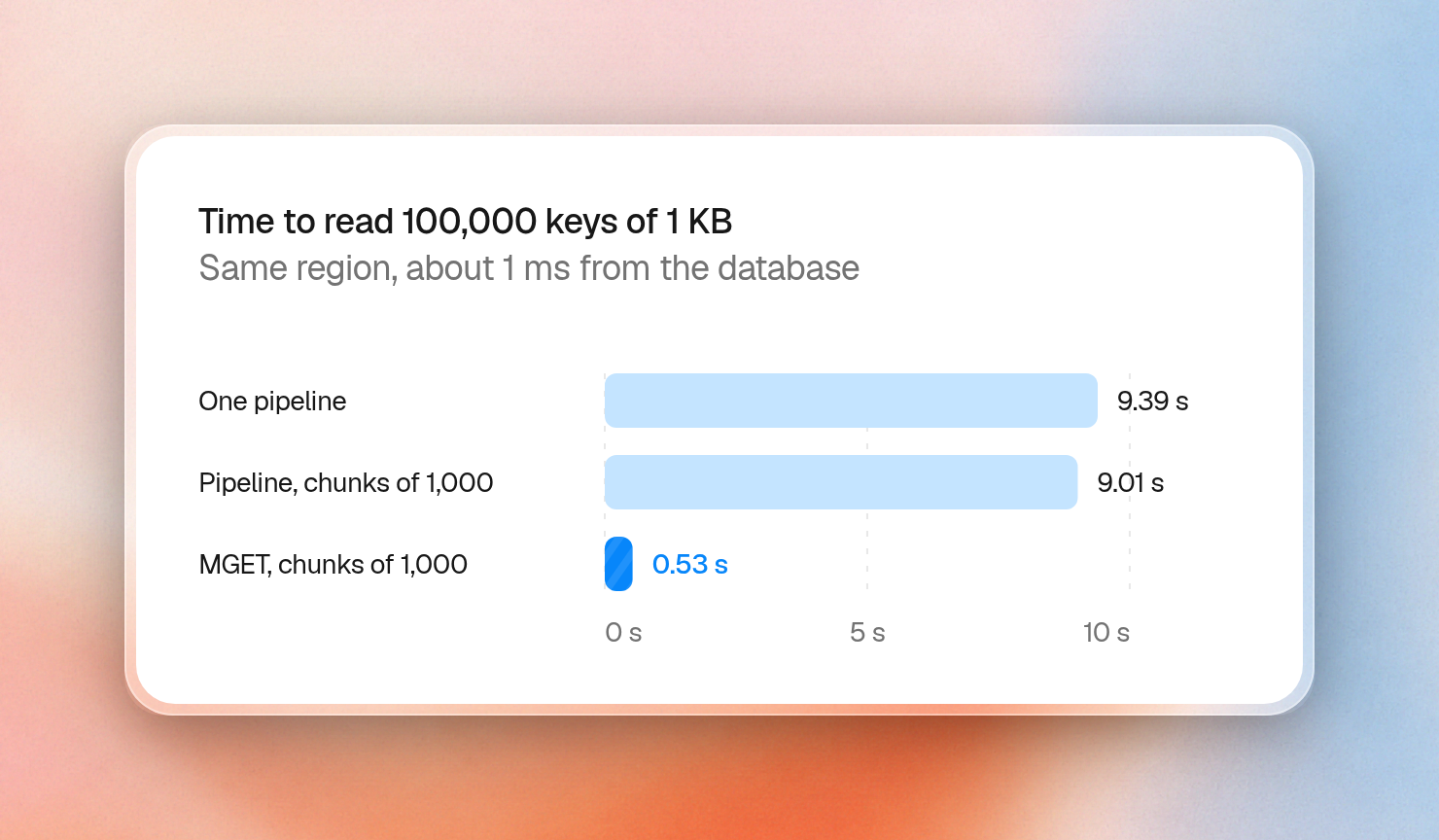
These tests ran against a Pay as You Go database in AWS us-east-1 from a client in the same region, approximately 1 ms away. We’ve also included the results from a client about 116 ms away to show the effect of distance, and from a free scratch database where the plan changes the result.
When should you use a Redis pipeline vs MGET?
While MGET is just one command, a pipeline is multiple commands sent at the same time. This is more flexible as you can send commands other than GET. Use MGET for cases where you only read plain keys and pipelines for cases where you have other commands that you need to batch together. Pipelines reduce roundtrips but don't reduce commands.
The Redis docs put them in the same order: aggregated commands first, then pipelines, then one round trip per command. This is the time to read 1,000 values of 100 bytes each:
| Method | Commands | 1 ms away | 116 ms away |
|---|---|---|---|
Await each GET | 1,000 | 1,023 ms | 118,016 ms |
| Pipeline | 1,000 | 6.7 ms | 172 ms |
MGET | 1 | 3.8 ms | 140 ms |
The awaited loop pays for every round trip, so its time grows with distance, while the two batched options pay for about one. A similar result was obtained using the REST API from 1 ms away: 1,408 ms, 5.2 ms and 3.5 ms, respectively.
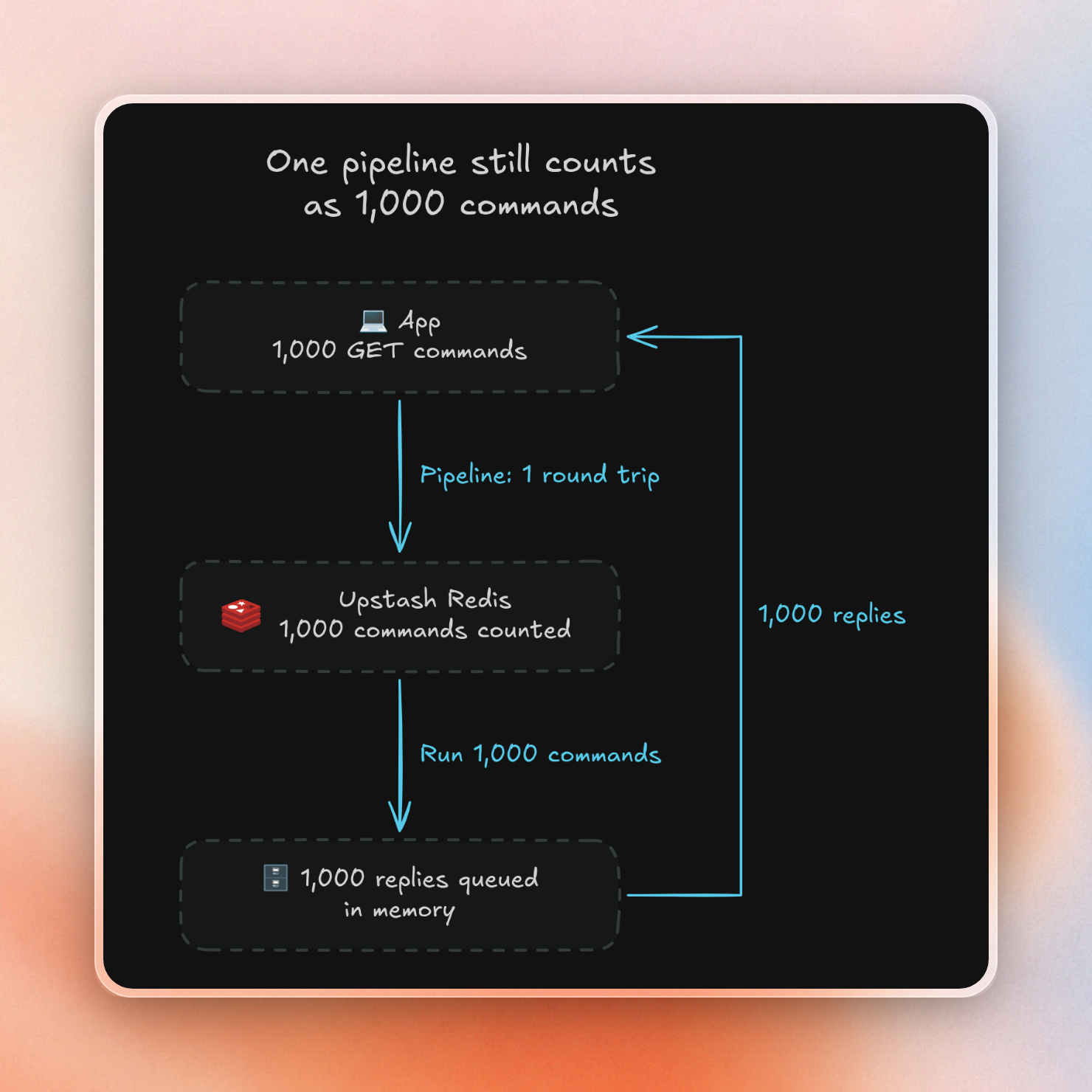
A pipeline of 1,000 commands still counts as 1,000
Upstash counts each command as one request. A pipeline of N commands counts as N, and a transaction counts as N + 2. The counter on our database showed the same thing when we read 1,000 keys:
MGET of 1,000 keys:      1 command
pipeline of 1,000 GETs:  1,000 commands
MULTI of 1,000 GETs:     1,002 commands
That gap costs money on a plan that charges per command, which is $0.2 per 100K commands on Pay as You Go. A job that reads 100,000 keys once an hour runs 720 times in 30 days:
pipeline:        100,000 x 720 = 72,000,000 commands = $144.00
MGET in chunks:      100 x 720 =     72,000 commands =   $0.14
If you have a batch of operations where the order matters, use an explicit pipeline. This is especially true if you are reading and writing in the same batch, as since version 1.38.0 of the TypeScript SDK, different commands in one Promise.all may be split into multiple requests so a read may not see the preceding write. By default, the TypeScript SDK pipelines Promise.all calls, so they still count as one command each.
Where each one breaks at scale
Both options have a limit, and they fail in different ways. This table shows reads of 1 KB values:
| Keys | One pipeline | Pipeline in chunks of 1,000 | One MGET | MGET in chunks of 1,000 |
|---|---|---|---|---|
| 1,000 | 48 ms | same as one pipeline | 6 ms | same as one MGET |
| 10,000 | 158 ms | 87 ms | 45 ms | not run |
| 100,000 | 9,394 ms | 9,009 ms | failed after 122 ms | 528 ms |
| 200,000 | 19,858 ms | 19,273 ms | failed after 290 ms | 923 ms |
MGET fails on size. Upstash limits one command to 10 MB on Free and Pay as You Go, and the largest Fixed plan allows 100 MB. The reply counts too, so 100,000 values of 1 KB failed:
ERR max request size exceeded. Limit: 10485760 bytes, Actual: 103300009 bytes.The refusal came quickly here, at 122 ms for 100,000 keys and 290 ms for 200,000. On a free scratch database, which has a 64 MB memory limit, the same refusals took 5.5 and 26.7 seconds.
A pipeline gets past the size limit because each command in it is small. Instead, it runs into two other limits.
- The rate limit. Most plans allow 10,000 commands per second. At that rate, 100,000 commands need about 10 seconds, and ours took 9.4. The pipeline of 200,000 took 19.9 seconds.
- The monthly quota. The Free plan allows 500K commands a month, while Pay as You Go has no monthly limit. A free scratch database that had already used most of its quota ran into the limit during a pipeline of 200,000, and the server closed the connection partway.
This is what the client saw on that scratch database:
ERR max requests limit exceeded. Limit: 500000, Usage: 500000.
Command aborted due to connection close   (188,853 of 200,000 commands)
Because a pipeline is ordered but not atomic, if these commands had been writes we would have ended up with the first 11,147 of those writes applied, and the rest unapplied. Since these were reads, we only lost time.
How big should a Redis pipeline be?
Redis buffers command replies in memory until they are read by the client. The documentation recommends batching "a reasonable number, for instance 10k commands." However, by default there is no output buffer limit for normal clients, so the impact of a batch depends on the size of the replies. If there are 10,000 replies of 1 KB, the total size is 10 MB. If there are 10,000 replies of 1 MB, the total size is 10 GB.
The total reply size for a single batch should be well below 10 MB. Send approximately 1,000 commands per pipeline or 1,000 keys per MGET (and less if values are large).
We use 1,000 because the SDK's own auto-pipeline stops at the same size, and because it held up in our runs. Reading 200,000 keys of 1 KB each:
| Method | Time | Commands | Client memory growth | Another client's p99 read |
|---|---|---|---|---|
| Idle database | none | none | none | 2.4 ms |
| One pipeline | 19,858 ms | 200,000 | 404 MB | 3.9 ms |
| Pipeline in chunks of 1,000 | 19,273 ms | 200,000 | 4 MB | 3.3 ms |
MGET in chunks of 1,000 | 923 ms | 200 | 2 MB | 3.9 ms |
Chunking didn’t change the total time to run the pipeline much, but it kept the client’s memory flat, at 4 MB against 404 MB. Other clients barely noticed either way; p99 is the time that 99% of reads are faster than.
Stock Redis has no rate limit and runs commands on one main thread, so there the gap between a pipeline and MGET is smaller, and chunking matters more to other clients. This is the same read on stock Redis 8 with default settings, with the client on the same machine:
| Method | Time | Another client's slowest read |
|---|---|---|
| Idle database | none | 0.23 ms |
| One pipeline | 917 ms | 48.8 ms |
| Pipeline in chunks of 1,000 | 611 ms | 0.84 ms |
One MGET | 416 ms | 73.9 ms |
MGET in chunks of 1,000 | 294 ms | 0.51 ms |
This helper keeps every MGET to one chunk:
import { Redis } from "@upstash/redis";

const redis = Redis.fromEnv();

async function mgetInChunks<T>(keys: string[], chunkSize = 1000): Promise<(T | null)[]> {
  const values: (T | null)[] = [];
  for (let i = 0; i < keys.length; i += chunkSize) {
    values.push(...(await redis.mget<(T | null)[]>(keys.slice(i, i + chunkSize))));
  }
  return values;
}

const keys = Array.from({ length: 5000 }, (_, i) => `snippet:${i}`);
await redis.mset(Object.fromEntries(keys.map((key, i) => [key, i])));

const values = await mgetInChunks<number>(keys);
console.log(values.length, values[0], values[4999]);
5000 0 4999Use a pipeline when the commands differ
MGET only reads strings, so a batch that bumps a counter, updates a hash and sets an expiry still needs a pipeline. It saves the same round trips here:
import { Redis } from "@upstash/redis";

const redis = Redis.fromEnv();

const pipeline = redis.pipeline();
pipeline.incr("page:home:views");
pipeline.hset("user:42", { lastSeen: 1793639435 });
pipeline.expire("user:42", 3600);
pipeline.zadd("recent", { score: 1793639435, member: "user:42" });

console.log(await pipeline.exec());
[ 1, 1, 1, 1 ]Sometimes a batch of commands needs to execute either entirely or not at all, and a transaction does that for two more commands. In a pipeline, if one command fails, the others still ran; though note that, in the SDK, exec() will throw on the first failed command unless you use { keepErrors: true }.
What to use
- Batching reads on plain keys -
MGET(in chunks of 1000) - Batching writes on plain keys -
MSET(in chunks of 1000) - Batching reads on many fields within a hash -
HMGET - Batching mixed commands - pipeline (in chunks of 1000)
- All or nothing - transactions
The above are just recommendations. In practice, MSET was very effective for bulk-loading 200,000 keys of 1 KB, taking only 200 MSET calls in 5.7 seconds.
