How to List Keys in Redis Safely With SCAN
 Josh
KEYS user:* works fine on a small database. We grew a real Upstash Redis database a few thousand keys at a time, and just past 90,000 keys the same call stopped working:
ERR KEYS command is disabled because total number of keys is too large, please use SCANThe commands were executed against an Upstash Redis Pay as You Go database and a free scratch database, from a client that was 1 ms away. Stock Redis tests used a Redis server with default settings, running on the same machine as the client.
A stock Redis 8 instance running ten concurrent KEYS commands caused a read command from another client to take 823 ms (normal read: 0.08 ms) when there were 1 million keys. Stock Redis doesn’t reject that command; it just runs it while other clients have to wait.
Why should you use SCAN instead of KEYS?
Use SCAN instead of KEYS. KEYS scans all the keyspace with a single command. On stock Redis, this blocks all clients. On Upstash, this command fails as the database grows.
The Redis docs say it plainly: don't use KEYS in regular application code. This is what a second client saw on stock Redis while KEYS ran:
| Keys in database | Call | KEYS took | Slowest read by the other client |
|---|---|---|---|
| 100,000 | Narrow pattern, 10 matches | 7 ms | 6 ms |
| 1,000,000 | Narrow pattern, 100 matches | 84 ms | 82 ms |
| 1,000,000 | KEYS * | 690 ms | 203 ms |
| 1,000,000 | 10 narrow calls at once | 825 ms | 823 ms |
This isn’t just theoretical — our support team has seen databases that scan their whole keyspace 525 times a day, or even once a second from edge functions.
Even with a narrow pattern, scanning all those keys is still expensive, so Redis runs almost as slowly. That cost compounds, too — we end up with multiple concurrent requests running KEYS, which means they block on each other while also blocking everybody else.
How KEYS fails on Upstash
Upstash Redis fails in two stages. We grew the database and tried two calls at each size:
| Keys in database | Call that matches every key | Call that matches one key |
|---|---|---|
| 5,001 | returned 5,000 keys | 2.2 ms |
| 6,001 | too many keys to fetch | 2.3 ms |
| 90,001 | too many keys to fetch | 15.2 ms |
| 100,001 | KEYS command is disabled | KEYS command is disabled |
This table comes from the scratch database, which held nothing else, and the Pay as You Go database hit the same two limits. Other plans may differ, so it's a good practice to keep KEYS out of application code across all plans. It's also something that's not obvious on a test database with only a few thousand keys.
And also that even though the pattern in the narrow KEYS call only matched one key, the call itself still takes more time as the number of keys increases: from 1.7 ms for 1,000 keys to 15.2 ms for 90,000 keys. It is iterating the whole keyspace, and finally fails around 100,000 keys.
What COUNT should you use with SCAN?
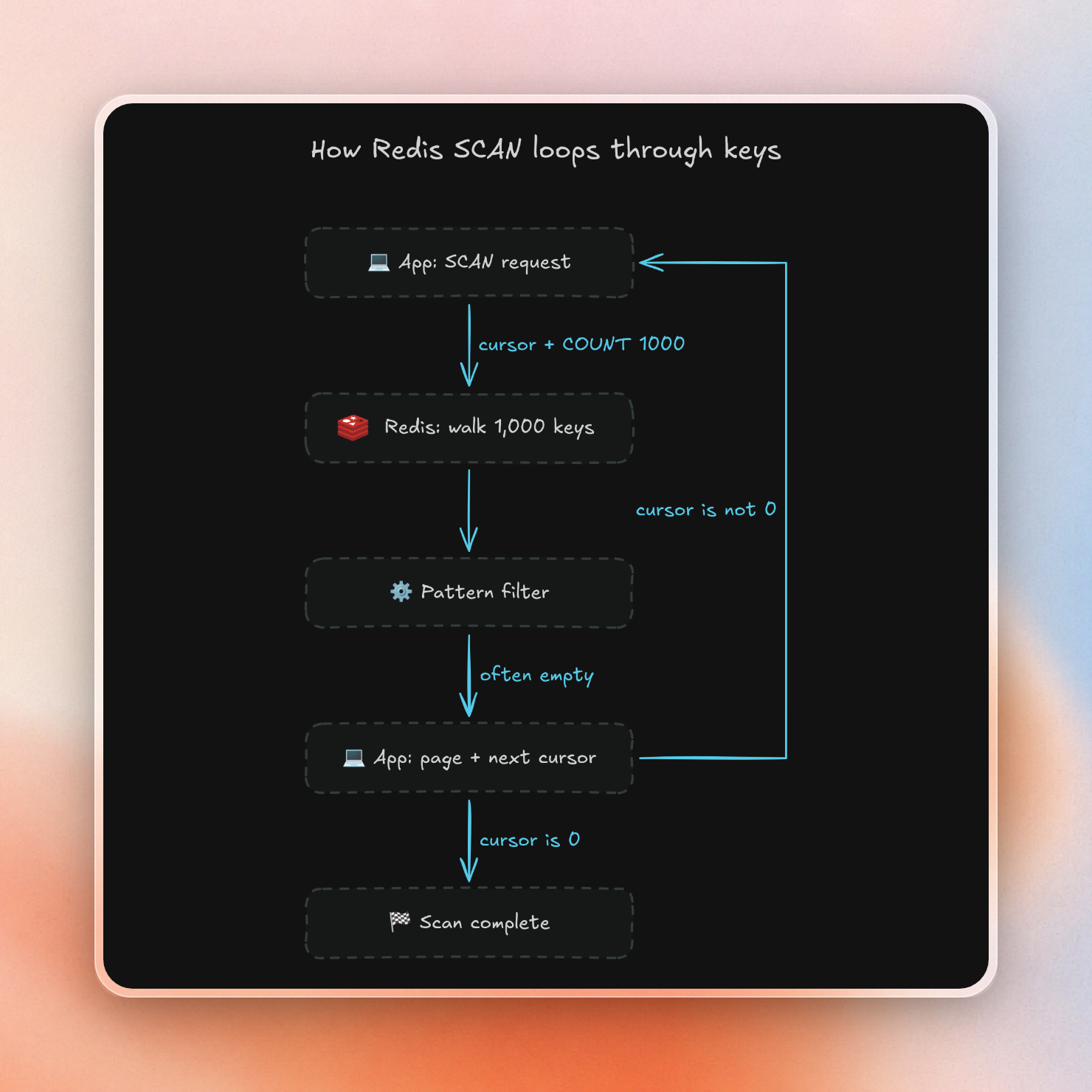
You will want to set the COUNT to 1000. This is the parameter to tell Redis how much work it can do per call. The default is 10, which can make this take very long and require many round trips.
Each page is also one billed command on Upstash. Walking all 1 million keys with no pattern:
COUNT | Pages | Time |
|---|---|---|
| 100 | 10,102 | 9.9 s |
| 1000 | 1,011 | 1.7 s |
| 10000 | 1,011 | 1.7 s |
On this database, there were at most 1,000 keys per page, so going higher than 1000 had no effect.
A key prefix matters more than COUNT on Upstash
At least on Upstash, things worked differently if the pattern had a fixed prefix. On stock Redis, this doesn’t optimize anything, because Redis applies the pattern after it reads the keys. If the pattern is rare, there will be many empty pages.
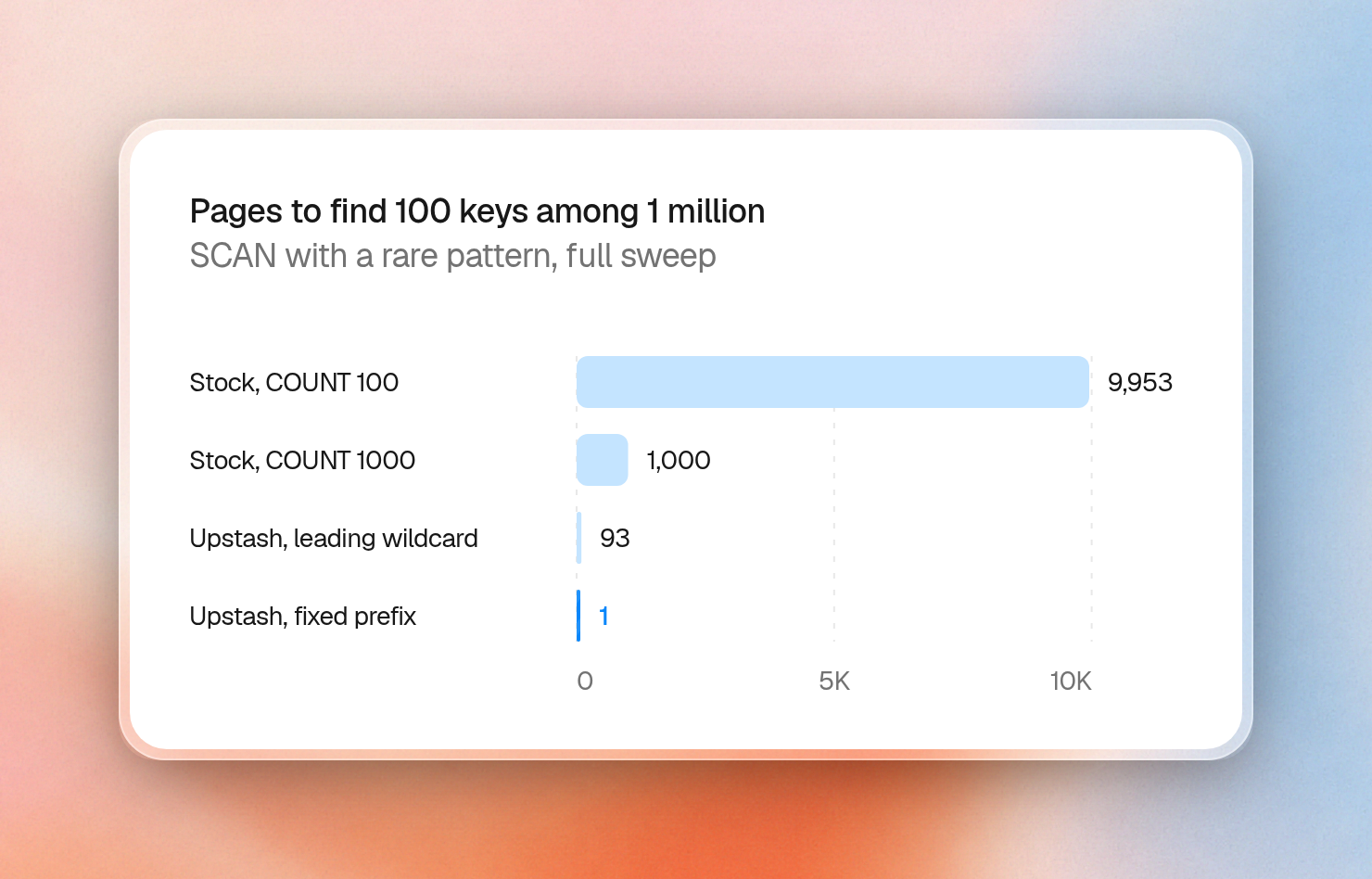
This is the cost of finding 100 keys among 1 million:
| Engine | Pattern | COUNT | Pages | Empty pages | Time |
|---|---|---|---|---|---|
| Stock Redis | app:rare:* | 100 | 9,953 | 9,853 | 625 ms |
| Stock Redis | app:rare:* | 1000 | 1,000 | 905 | 180 ms |
| Stock Redis | app:rare:* | 10000 | 100 | 32 | 143 ms |
| Upstash | app:rare:* | 1000 | 1 | 0 | 2 ms |
| Upstash | *:rare:* | 1000 | 93 | 91 | 607 ms |
The stock Redis times have no network in them, because the client ran on the same machine. Over a real network, each of those pages also pays a round trip. The page count is the number to compare.
On Upstash, the same 100 keys took one page with a fixed prefix and 93 pages with a leading wildcard. That is 2 ms against 607 ms. These numbers suggest the engine can jump straight to a fixed prefix, while a leading wildcard has to walk the keys.
This loop handles either case. Empty pages are normal, so only a cursor of "0" ends it:
import { Redis } from "@upstash/redis";

const redis = Redis.fromEnv();

async function keysByPrefix(prefix: string) {
  const found: string[] = [];
  let cursor = "0";
  do {
    const [next, keys] = await redis.scan(cursor, { match: `${prefix}*`, count: 1000 });
    found.push(...keys);
    cursor = next;
  } while (cursor !== "0");
  return found;
}

async function deleteByPrefix(prefix: string) {
  let cursor = "0";
  let deleted = 0;
  do {
    const [next, keys] = await redis.scan(cursor, { match: `${prefix}*`, count: 1000 });
    if (keys.length > 0) deleted += await redis.unlink(...keys);
    cursor = next;
  } while (cursor !== "0");
  return deleted;
}

await redis.mset(Object.fromEntries(Array.from({ length: 2500 }, (_, i) => [`tenant:42:item:${i}`, i])));

console.log((await keysByPrefix("tenant:42:")).length);
console.log(await deleteByPrefix("tenant:42:"));
console.log((await keysByPrefix("tenant:42:")).length);
2500
2500
0Also, SCAN can return the same key twice. When performing any action on each key, this needs to be accounted for.
Keep an index when you ask the same question often
This sweep technique is good for a one-off. Apps that query the same set of keys, on a schedule or per request, can store the key names in a set and retrieve them with a single command. That’s how the same 100 keys were found out of 1 million, with one SMEMBERS call that took 1.4 ms on Upstash.
Each write now also updates the set, and this code keeps the set from outliving its keys:
import { Redis } from "@upstash/redis";

const redis = Redis.fromEnv();

async function saveItem(tenant: string, id: string, value: string) {
  const key = `tenant:${tenant}:item:${id}`;
  const pipeline = redis.pipeline();
  pipeline.set(key, value, { ex: 3600 });
  pipeline.sadd(`tenant:${tenant}:items`, key);
  pipeline.expire(`tenant:${tenant}:items`, 3600);
  await pipeline.exec();
}

await saveItem("42", "a", "first");
await saveItem("42", "b", "second");

console.log((await redis.smembers("tenant:42:items")).sort());
[ 'tenant:42:item:a', 'tenant:42:item:b' ]The set can get large as well. When it gets to many thousands of keys, then read it in pages with SSCAN because a reply size is capped to 10 MB on Free and Pay as You Go.
What to use
- Use
KEYSonly manually, for debugging, on a small database. - Use
SCANwithCOUNT1000 in application code. - If deleting by prefix, combine
SCANwithUNLINK. - If prefixing keys, use a fixed prefix like
tenant:42:item:to make it possible to use it in the pattern. - If you need to list the same group of keys often, consider storing the keys in a set.
