How Big Should a Redis Key Be?
 Josh
A hash with 200,000 fields answered HGETALL in 217 ms on a real Upstash Redis database. At 205,000 fields, the same call failed:
ERR max request size exceeded. Limit: 10485760 bytes, Actual: 10548899 bytes.There are published hard limits on Redis, but none on practical size. Redis's guide says keys hundreds of kilobytes or larger are considered big. Different vendors also place different limits on what is big. So we set out to find what size of key is too big to use.
We scaled up values and hashes on a Pay as You Go database and a free scratch database in AWS us-east-1, from a client with around 1 ms latency, to find what breaks. We use data from the Pay as You Go database unless stated otherwise.
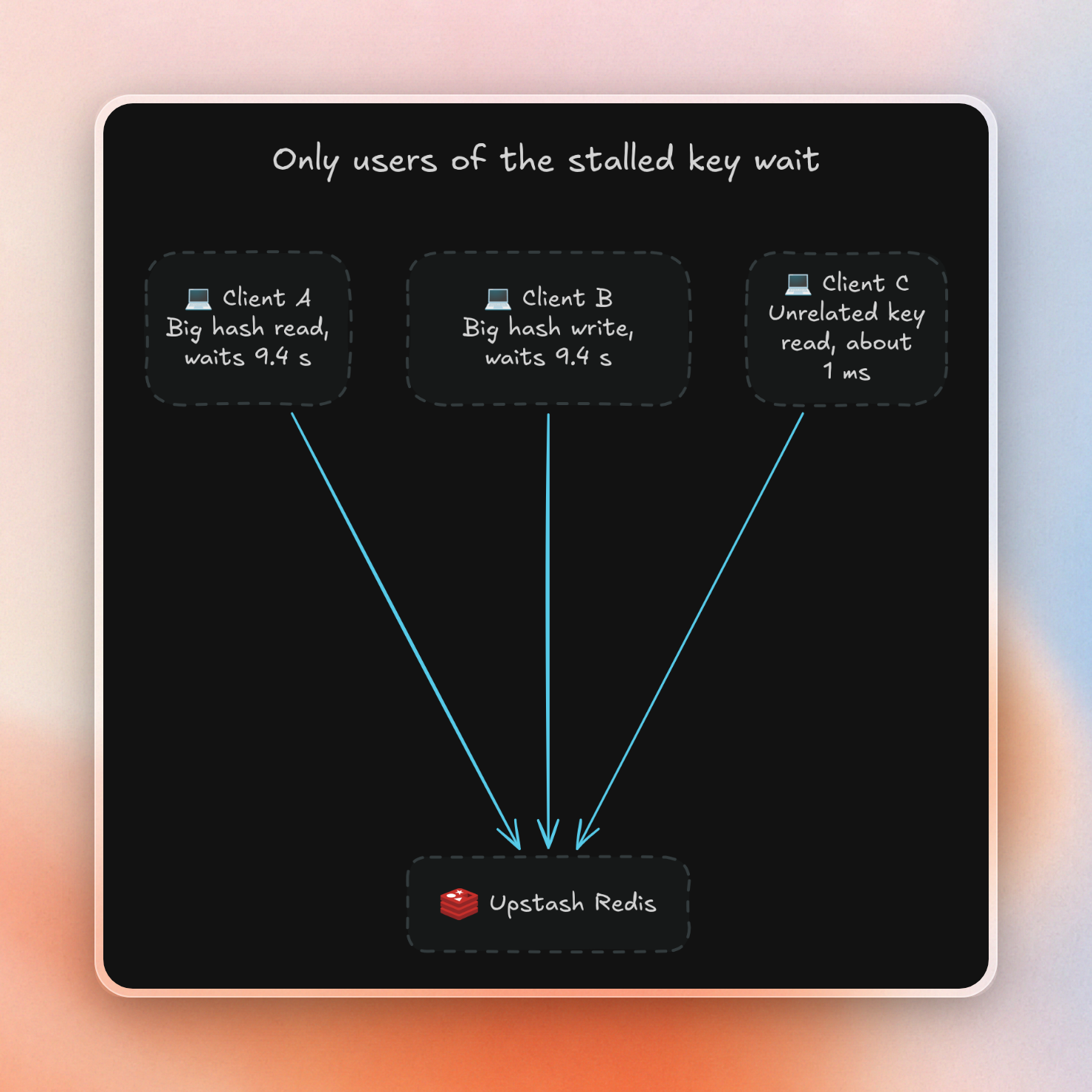
At 1 million fields, a simple HLEN took 566 ms one minute after loading, instead of the usual 1 ms. That same access took 9.4 seconds repeatedly on a free database with a 64 MB memory limit. Clients for other keys still respond in about 1 ms, but any client accessing this key also waits.
How big is too big for a Redis key?
Keep values in the tens of kilobytes and collections under about 10,000 members. A full read of 100,000 fields took 109 ms, and more than 200,000 fields caused the full read to fail. On the other hand, collections with fewer than about 10,000 members and values in tens of kilobytes stayed close to 1 ms in our tests.
| Size | What we saw |
|---|---|
| Value up to 100 KB | Read in under 2 ms |
| Value of 1 MB | Read in 3.3 ms alone, 27 ms with 20 clients reading |
| Value over 10 MB | Rejected on write |
| Hash of 10,000 fields | HGETALL in 13 ms, slowest HLEN 4.2 ms |
| Hash of 100,000 fields | HGETALL in 109 ms, slowest HLEN 30 ms |
| Hash of 250,000 fields | HGETALL fails, slowest HLEN 108 ms |
| Hash of 1,000,000 fields | HGETALL fails, slowest HLEN 566 ms |
The 10 MB limit applies to Free and Pay as You Go, and the largest Fixed plan allows 100 MB. This is also a per-request limit, so you can build up a collection over 10 MB and then one read of the whole thing fails.
Big values cost little until traffic arrives
One client reading one big value barely notices the size:
| Value size | p50 read | p99 read |
|---|---|---|
| 1 KB | 1.0 ms | 1.8 ms |
| 10 KB | 1.2 ms | 1.9 ms |
| 100 KB | 1.6 ms | 4.9 ms |
| 400 KB | 2.2 ms | 4.6 ms |
| 1 MB | 3.3 ms | 4.8 ms |
| 9 MB | 23.8 ms | 63 ms |
Big objects mean big bandwidth usage. A thousand reads of a 1 MB value mean sending 1 GB of data. Our support team found a cache with 400 KiB sized values and 12 million reads a day, leading to over 100 TB bandwidth usage a month. At $0.03 per GB on Pay as You Go, 100 TB costs around $3,000.
An alternative is to save a large file in object storage, like Upstash Blob, and only save its path in Redis. Or use compression on the client side if the value needs to be stored in Redis.
Bandwidth is the major cost of large values, but there’s a performance cost too. 1,000 reads of a 1 MB value with 20 parallel clients took 1,542 ms, 27 ms median (p50) read. The same 1,000 reads of a 1 KB value took 79 ms, 1.2 ms median read. (p50 is the median read, p99 is the time that 99% of reads are faster than.)
Reading a whole collection is what grows
Reading a few fields stayed flat as the hash grew. Reading all of them grew with it, then failed:
| Fields | HGETALL | Reply size | HMGET of 10 fields | One HSCAN page of 100 |
|---|---|---|---|---|
| 1,000 | 2.8 ms | 36 KB | 1.2 ms | 1.6 ms |
| 10,000 | 13 ms | 369 KB | 1.2 ms | 2.8 ms |
| 100,000 | 109 ms | 3.8 MB | 1.1 ms | 18 ms |
| 200,000 | 217 ms | under 10 MB | 1.2 ms | 40 ms |
| 205,000 | failed | 10.5 MB | 1.1 ms | 42 ms |
| 1,000,000 | failed | 51.9 MB | 1.2 ms | 276 ms |
Lists had the same behavior. LRANGE 0 -1 took 8.5 ms at 10,000 items, and 66 ms at 100,000 items, and failed with a 14.1 MB reply at 300,000 items. Fetching the most recent 100 items remained under 3 ms at all of those sizes.
HSCAN is more surprising. When a hash is large, the advice is usually to page it. This works, but even with paging the cost was affected by the hash's size. At 1 million fields, one page of 100 fields took 276 ms. Paging the hash would take a very long time.
Splitting up the hash works better than paging it.
Streams are the one to watch, because they don't fail. On both databases, XRANGE key - + with no COUNT returned 1,000 entries from a stream of 5,000, and no error. Stock Redis returned all 5,000. So code that reads a whole stream has to pass COUNT and page by the last ID:
XLEN                        5000
XRANGE - +                  1000
XRANGE - + COUNT 3000       3000
5 pages of COUNT 1000       5000
A big hash can stall everyone who touches it
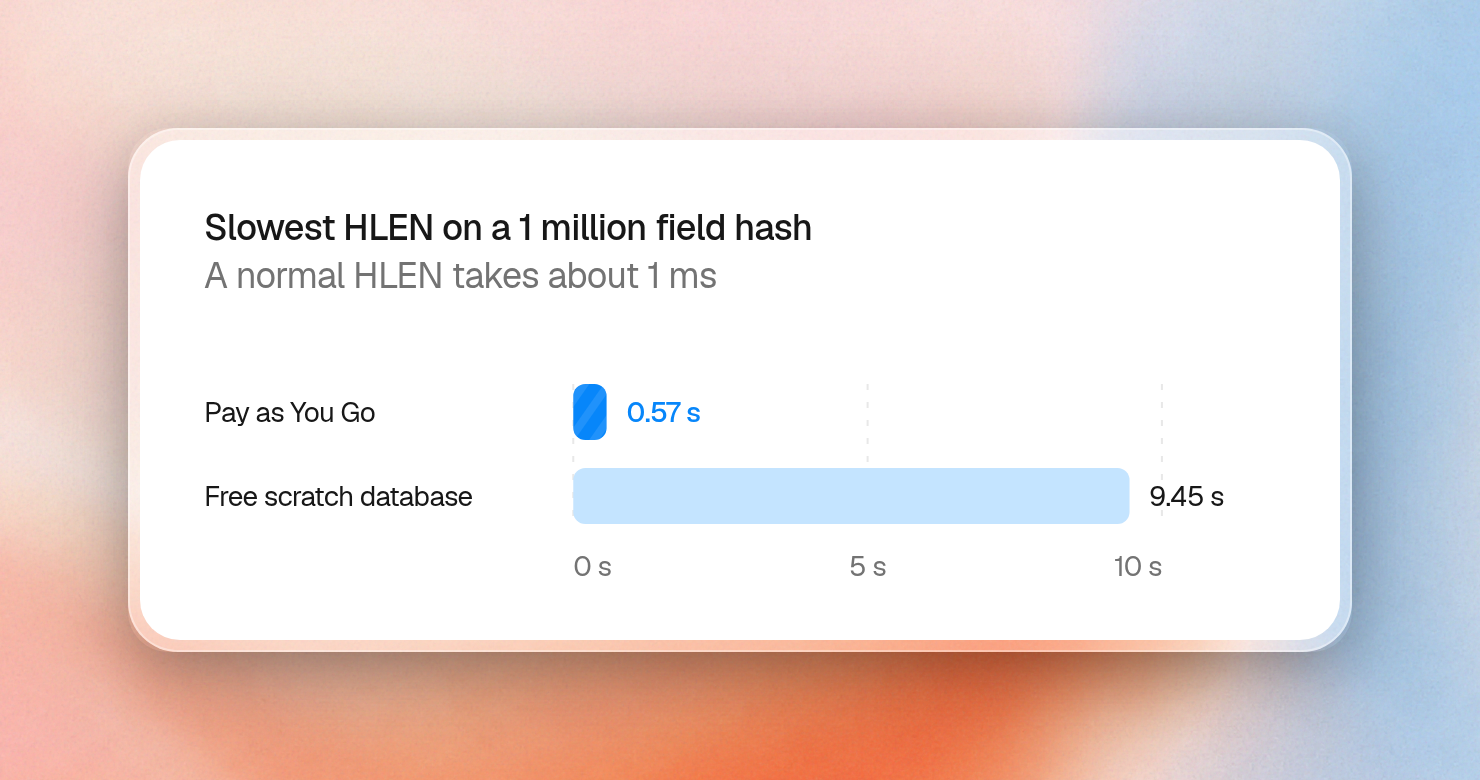
This stall was the most surprising result. We loaded hashes of each size, then ran a plain HLEN six times, 10 seconds apart. HLEN should take about 1 ms at any size. This is the slowest of the six:
| Hash fields | Pay as You Go, 3 GB memory | Free scratch database, 64 MB memory |
|---|---|---|
| 1,000 | 2.8 ms | 1.4 ms |
| 10,000 | 4.2 ms | 2.4 ms |
| 100,000 | 30 ms | 117 ms |
| 250,000 | 108 ms | 2,553 ms |
| 500,000 | 253 ms | 5,053 ms |
| 1,000,000 | 566 ms | 9,449 ms |
Strings up to 9 MB stayed under 5 ms on both. The two databases differed in how often this happened. On Pay as You Go, one read paid the cost and the rest stayed at about 1 ms. Its 1 million field row comes from a separate run, read one minute after loading, and reads of that hash at 2 and 5 minutes took 1.1 ms. A read of another 1 million field hash after 15 minutes idle took 0.7 ms. On the scratch database it kept coming back, as in these six reads of the 1 million field hash, two seconds apart:
1.1 ms, 1.3 ms, 1.3 ms, 1.3 ms, 9396 ms, 9436 msThe stall on the scratch database was long enough to check who waits, so we ran other clients during one:
| What the other client did | Time |
|---|---|
| Read the big hash | 9,449 ms |
| Wrote to the big hash | 9,449 ms |
| Read a small hash | 1.6 ms |
| Read an unrelated key, slowest of 1,316 reads | 2.3 ms |
| Wrote an unrelated key, slowest of 1,316 writes | 11 ms |
Upstash locks per key, so unrelated keys keep working. Every user of the big key waits, though. If that key holds all your sessions, then all your sessions wait with it.
We didn't confirm the cause. It fits how Upstash stores data, where an entry that leaves memory gets read back from disk on the next access. A big key that stays in memory would pay this once, and one that doesn't fit would keep paying it, which matches what we saw on these two databases.
Stock Redis fails differently. It has one main thread, so a big key can make every client wait, whichever key they use:
| Stock Redis, 1 million fields | Took | Slowest read by a client on another key |
|---|---|---|
HGETALL | 1,126 ms | 96 ms |
HMGET of 10 fields | 0.4 ms | 0.2 ms |
DEL | 319 ms | 314 ms |
UNLINK | 0.3 ms | 0.2 ms |
DEL and UNLINK of a 1 million field hash both returned quickly (0.9 ms) with Upstash. Deleting a big key is a known stall on stock Redis (lazy freeing is still off by default for DEL, so use UNLINK).
Split big keys, and limit what grows
One hash of 1 million fields can become 1,024 hashes of about 1,000 fields each, which puts every read back in the 1,000 field rows of the tables above. A field name always maps to the same hash, so reads and writes still need only one call:
import { Redis } from "@upstash/redis";

const redis = Redis.fromEnv();
const SHARDS = 1024;

function shardKey(base: string, id: string) {
  let hash = 0;
  for (const char of id) hash = (hash * 31 + char.charCodeAt(0)) >>> 0;
  return `${base}:${hash % SHARDS}`;
}

async function setSession(id: string, value: string) {
  await redis.hset(shardKey("sessions", id), { [id]: value });
}

async function getSession(id: string) {
  return redis.hget<string>(shardKey("sessions", id), id);
}

await setSession("user-42", "active");
console.log(shardKey("sessions", "user-42"), await getSession("user-42"));
sessions:960 activeA list or stream that only grows needs a limit from the first write. Trimming on every push keeps a list at a fixed size, and a stream with MAXLEN ~ 1000 stopped at 1,390 entries after 20,000 writes. The ~ lets Redis trim in larger steps, so it stays close to the limit:
import { Redis } from "@upstash/redis";

const redis = Redis.fromEnv();

async function addEvent(userId: string, event: string) {
  const key = `events:${userId}`;
  const pipeline = redis.pipeline();
  pipeline.lpush(key, event);
  pipeline.ltrim(key, 0, 99);
  pipeline.expire(key, 86400);
  await pipeline.exec();
}

for (let i = 0; i < 150; i++) await addEvent("42", `event-${i}`);

console.log(await redis.llen("events:42"));100Unacknowledged stream entries count too. A consumer that read 100 entries at a time and never acknowledged them was stopped at the limit of 1,000 pending entries. Calling XACK freed it:
ERR XReadGroup is cancelled. Pending Entries List limit per consumer is about to be reached.
Limit: 1000, Current PEL size: 900, Requested Read: 100
What to use
- To delete large keys on stock Redis use
UNLINK. - Keep values in the tens of kilobytes. Store large files in object storage, and keep the path in Redis.
- Keep collections under about 10,000 members.
- If you have collections over that size, split them up with a hash of the ID.
- Rather than
HGETALL, useHMGET. - Rather than
LRANGE 0 -1, useLRANGEwith a window. - Rather than
XRANGE - +, useXRANGEwithCOUNT. - If you use lists and streams, set a limit from the first write, with
LTRIMorMAXLEN ~. - If you use streams with consumer groups,
XACKafter every message.
