Cloudflare R2 Pricing in 2026: Storage, Operations, and Real Monthly Bills
 Yusuf
YusufCloudflare R2 is priced at $0.015 per GB per month for storage with no egress charges. That means if users download 20 TB of data from your R2 bucket in a month, that part of your bill will be $0. For S3, the same amount of data would be charged at $0.09 per GB after the first 100 GB.
The R2 pricing model doesn’t end there, though. In addition to storage and egress costs, uploads and lists cost $4.50 per million after the free tier, and reads cost $0.36 per million after the free tier. Reads can add up, too. For example, in Cloudflare’s own asset hosting example, 100,000 small files read 10 million times a day will cost $104.40 per month, with all of that coming from read charges.
In addition to storage costs, there’s some upfront setup with R2 before you can start serving files to users. First, public files in production require a custom domain on Cloudflare. Second, in order for users to upload files directly from the browser, you need to use presigned URLs from your backend and set up CORS rules on the R2 bucket.
With Upstash Blob, you can share public files through a CDN without a custom domain, and upload files from a browser with a single route handler and token, without S3 keys or CORS rules. On the pay-as-you-go plan, you get 1 TB of free egress every month, and reads are $0.30/million, less than R2's $0.36.
For apps serving less than 1 TB/month, the bills will be within a few dollars of each other for the worked examples below, so the time saved setting things up will be more important than the price. R2 is more cost-effective once downloads exceed 1 TB/month or you start storing hundreds of gigabytes.
How much does Cloudflare R2 cost?
Cloudflare R2 Standard storage pricing is $0.015 per GB-month, Class A operations (writes, lists) are priced at $4.50 per million, Class B operations (reads) are priced at $0.36 per million, and egress is free. Cloudflare provides 10 GB storage per month, 1 million Class A operations per month, and 10 million Class B operations per month for free.
Here is the full rate card from Cloudflare's R2 pricing page, last updated October 1, 2026:
| Standard | Infrequent Access | Free tier (Standard, per month) | |
|---|---|---|---|
| Storage | $0.015 / GB-month | $0.01 / GB-month | 10 GB-month |
| Class A operations (writes, lists) | $4.50 / million | $9.00 / million | 1 million |
| Class B operations (reads) | $0.36 / million | $0.90 / million | 10 million |
| Data retrieval | None | $0.01 / GB | n/a |
| Egress | Free | Free | Free |
| Minimum storage duration | None | 30 days | n/a |
A few rules change how these numbers add up:
- R2 storage is measured as the average of the peak storage used each day during a 30-day period. For example, storing 1 GB of data for 5 days, followed by 3 GB for 25 days, results in a storage bill of 2.66 GB-month.
- Operations such as deleting objects, deleting buckets, and aborting multipart uploads are free of charge.
- Requests resulting in 401 Unauthorized errors are not billed.
A 1 TB bucket of 1,000 files, each 1 GB in size, would cost (1,000 - 10) × $0.015 = $14.85 a month to store, regardless of whether its contents are downloaded 1 time or 1,000.
What does the Cloudflare R2 free tier include?
The Cloudflare R2 free tier includes 10 GB-month of Standard storage, 1 million Class A operations (writes and lists) and 10 million Class B operations (reads) every month, plus free egress. There is no free tier for Infrequent Access storage; Cloudflare’s own example for it starts billing from the first GB.
The free tier is an allowance and is always deducted from the total bill, regardless of its amount. All usage above the free tier is charged and the bucket remains accessible. There is no hard limit on the total cost.
An app hosted on R2 is completely free only if it stays within all three limits, i.e. 10 GB storage, 1 million Class A operations and 10 million Class B operations per month. For example, an app that stores 5 GB and does 15 million reads per month would pay for 5 million reads, which would cost 5 × $0.36 = $1.80.
What counts as a Class A or Class B operation
R2 sorts every S3 API call into one of three groups. To estimate a request bill, count how often your app makes each call:
| Group | Price (Standard) | Operations |
|---|---|---|
| Class A | $4.50 / million | PutObject, CopyObject, ListObjects, ListBuckets, PutBucket, CreateMultipartUpload, UploadPart, UploadPartCopy, CompleteMultipartUpload, ListMultipartUploads, ListParts, LifecycleStorageTierTransition, PutBucketEncryption, PutBucketCors, PutBucketLifecycleConfiguration |
| Class B | $0.36 / million | GetObject, HeadObject, HeadBucket, UsageSummary, GetBucketEncryption, GetBucketLocation, GetBucketCors, GetBucketLifecycleConfiguration |
| Free | $0 | DeleteObject, DeleteBucket, AbortMultipartUpload |
What this means for a typical app is:
- uploading a file to R2 is a Class A call, but if you upload it as a multipart upload, that’s at least three Class A calls (one to initiate, one per part, and one to complete)
- each file your users download straight from R2 counts as a Class B call; testing whether a file exists with a HEAD request is also a Class B call
- listing a folder to display a gallery of files is a Class A call; at $4.50 per million, listing is 12.5x more expensive than reading, so listing on every page load can add up
- moving objects to Infrequent Access via a lifecycle rule is a Class A call per object
Infrequent Access, minimum durations and migration costs
Infrequent Access saves $0.005 per GB-month on storage, but charges $0.01 per GB on retrieval, and has operation prices that are 2x to 2.5x higher than Standard.
The break-even point is easy to work out:
Storage saved per GB-month:   $0.015 - $0.010 = $0.005
Retrieval cost per GB read:   $0.010
Break-even:                   $0.005 / $0.010 = 0.5 reads per GB per month
If more than half of your Infrequent Access data is accessed within a month, it will cost more than if it were stored on Standard Storage, even before taking higher operation charges into account.
Short-lived files can be impacted by the 30-day minimum storage period too. In Cloudflare’s own example, writing 1,000 one-GB objects to Infrequent Access storage, keeping them there for 5 days and then deleting them, will incur storage charges of 1,000 GB-months ($10.00), rather than the 167 GB-months used by the files. This brings the monthly total to $29.90. Temporary files used for uploads, staging and other frequently replaced files are better suited to Standard Storage.
The process of moving files over to Cloudflare R2 will incur a small charge too. There are two tools available to assist with migrations; Super Slurper and Sippy. They both can be used free of charge but there will be charges associated with operations that occur on R2:
- Super Slurper moves objects from your old bucket to R2. Objects < 100 MiB will take one Class A call per object; larger objects will use multipart uploads, which take more than one call.
- Sippy moves objects over from your old bucket on the first request; objects < 200 MiB take one Class A call per object.
The cost to migrate a million small files will be approximately one million Class A calls. Within the free tier, this would be $0.00, or $4.50 otherwise. The biggest cost of migrating files will likely be egress costs from your old provider. On S3, this is $0.09 per GB after the first 100 GB.
The setup work free egress doesn't cover
New R2 buckets are private by default. You need to configure a public read endpoint and a signing route with CORS rules to upload files from browser.
R2 buckets can be exposed through:
- An r2.dev subdomain: managed by Cloudflare and can be enabled by typing
allowin the bucket’s dashboard. However, r2.dev subdomains are only meant for non-production use, since they don’t support caching, WAF rules, access controls or Bot Management. - A custom domain: must be a zone in the same Cloudflare account as your R2 bucket. If you’re not using Cloudflare for DNS management, you need to first add Cloudflare’s partial (CNAME) setup. Custom domains will take a few minutes to transition from Initializing to Active.
Uploading files directly from browser is more complicated. Since we can’t expose R2 keys to the browser, we need to create a signing route on our backend and make the browser upload files to that signed URL. This involves:
- Create an R2 API token and store account ID, access key ID and secret as environment variables in your app.
- Create a signing route for the PUT request URL, using AWS SDK to sign the request. Presigned URLs only work on the S3 API domain (
<ACCOUNT_ID>.r2.cloudflarestorage.com), not on your custom domain. R2 doesn’t support uploading files using HTML forms with POST requests. - Configure CORS policy for your bucket. Browser uploads won’t work even with presigned URLs without CORS policy.
- Add client-side logic to upload files, handle progress and retries, and implement multipart uploads for large files.
The following diagram illustrates the flow of files uploading and reading:
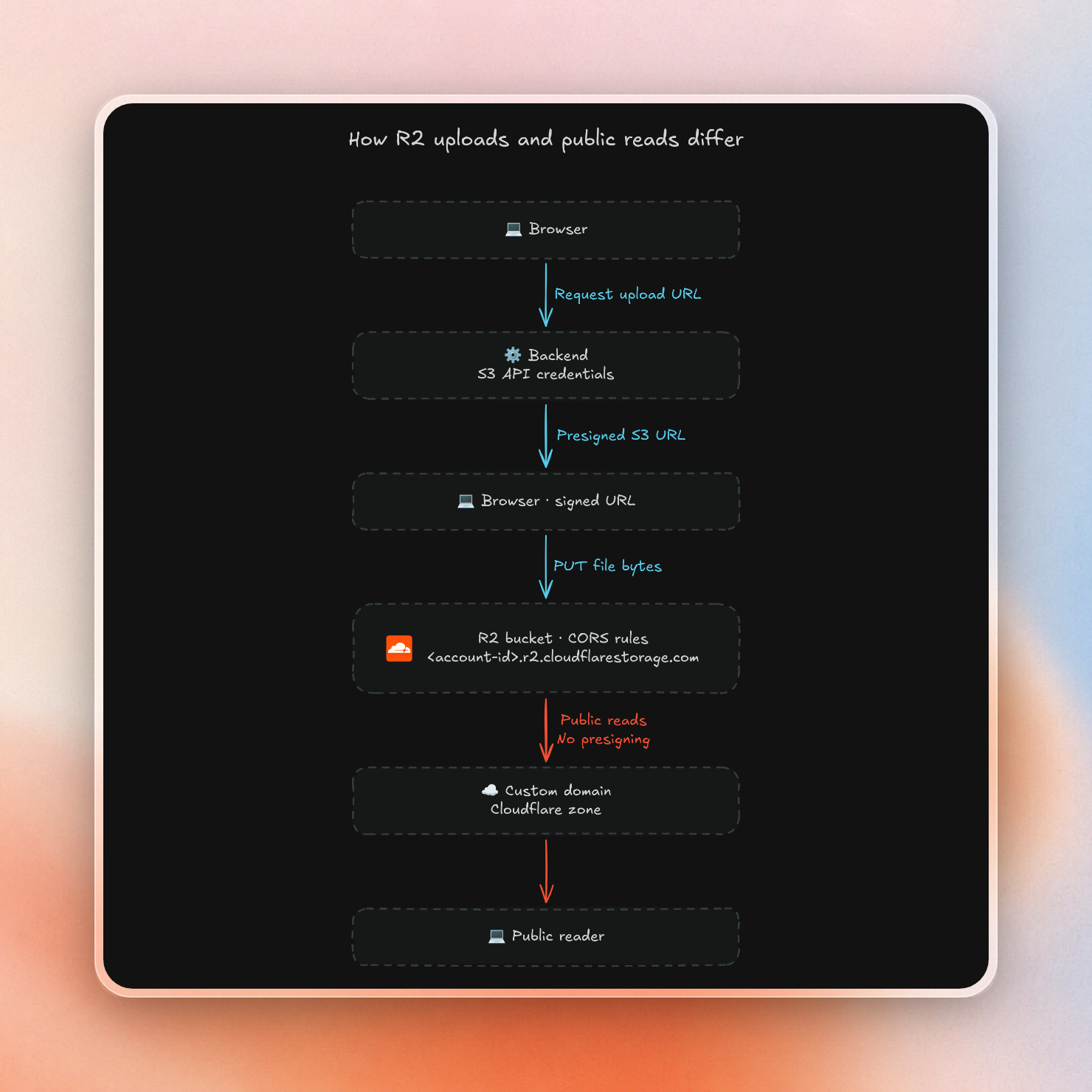
This is the signing route for a Next.js app:
import { PutObjectCommand, S3Client } from "@aws-sdk/client-s3"
import { getSignedUrl } from "@aws-sdk/s3-request-presigner"

const client = new S3Client({
  region: "auto",
  endpoint: `https://${process.env.R2_ACCOUNT_ID}.r2.cloudflarestorage.com`,
  credentials: {
    accessKeyId: process.env.R2_ACCESS_KEY_ID!,
    secretAccessKey: process.env.R2_SECRET_ACCESS_KEY!,
  },
  requestChecksumCalculation: "WHEN_REQUIRED",
})

export async function POST(request: Request) {
  const { filename, contentType } = await request.json() as {
    filename: string
    contentType: string
  }
  const command = new PutObjectCommand({
    Bucket: process.env.R2_BUCKET!,
    Key: filename,
    ContentType: contentType,
  })
  const url = await getSignedUrl(client, command, {
    expiresIn: 3600,
    signableHeaders: new Set(["content-type"]),
  })
  return Response.json({ url })
}
The browser side asks for the URL, then sends the file:
export async function uploadToR2(file: File) {
  const contentType = file.type || "application/octet-stream"
  const response = await fetch("/api/upload-url", {
    method: "POST",
    headers: { "Content-Type": "application/json" },
    body: JSON.stringify({ filename: file.name, contentType }),
  })
  if (!response.ok) throw new Error("Could not create upload URL")
  const { url } = await response.json() as { url: string }
  const upload = await fetch(url, {
    method: "PUT",
    headers: { "Content-Type": contentType },
    body: file,
  })
  if (!upload.ok) throw new Error("Upload failed")
}
The bucket also needs a CORS policy that allows PUT from your site:
[
  {
    "AllowedOrigins": ["https://example.com"],
    "AllowedMethods": ["PUT"],
    "AllowedHeaders": ["Content-Type"],
    "ExposeHeaders": ["ETag"],
    "MaxAgeSeconds": 3600
  }
]
You can paste it in the dashboard or apply it with Wrangler:
npx wrangler r2 bucket cors set <BUCKET_NAME> --file cors.jsonIn rare cases, CORS changes can take up to 30 seconds to apply. One error in particular is hard to diagnose – when a presigned URL expires, R2 returns a 403 error without CORS headers. As a result, your browser code won’t be able to inspect the error, instead it will just see a failed request.
On the positive side, all of the above doesn’t cost anything on the R2 bill. However, it takes time, and you need to implement a backend route that stores the R2 secret.
R2 vs Upstash Blob: four worked monthly bills
To understand how pricing compares, let's first look at the price sheets for both services.
- R2 Standard costs $0.015 per GB. Upstash Blob is $0.02 per GB.
- Uploads cost $4.50 per million for both services.
- Reads cost $0.36 per million for R2 Standard and $0.30 per million for Upstash Blob.
While pricing seems very similar, there are three main differences that decide how much you pay.
- R2 Egress is free with no limits. Upstash Blob egress is free up to 1 TB a month, then costs $0.02 per GB.
- R2’s free tier (10 GB storage, 1 million writes, 10 million reads) is always subtracted from your monthly bill, regardless of its size. For Upstash Blob pay-as-you-go, storage and operations are billed from the very first unit.
- Reads are 6 cents cheaper per million for Upstash Blob. So if you’re mostly reading, the bill can tip in its favor when reads aren't cached.
Cloudflare R2 pricing calculator
This short script runs four monthly bills through both rate cards. It treats 1 TB as 1,000 GB and assumes every read goes to storage, with no cache in front:
type Scenario = [name: string, storedGB: number, egressGB: number, writes: number, reads: number]

const scenarios: Scenario[] = [
  ["Small app", 5, 50, 100_000, 1_000_000],
  ["Medium app", 100, 2_000, 1_000_000, 20_000_000],
  ["Heavy egress", 1_000, 20_000, 5_000_000, 200_000_000],
  ["Tiny files, many reads", 2, 500, 10_000, 100_000_000],
]

function billable(usage: number, allowance: number) {
  return Math.max(usage - allowance, 0)
}

function dollars(amount: number) {
  return `$${(Math.round(amount * 100) / 100).toFixed(2)}`.padStart(8)
}

function printBill(name: string, provider: string, charges: number[]) {
  let total = 0
  const columns = [name.padEnd(22), provider.padEnd(12)]
  for (const charge of charges) {
    total += charge
    columns.push(dollars(charge))
  }
  columns.push(dollars(total))
  console.log(columns.join(" | "))
}

console.log("Monthly USD; storage, writes, reads, egress are individual charges")
console.log("Scenario               | Provider     |  Storage |   Writes |    Reads |   Egress |    Total")
for (const [name, storedGB, egressGB, writes, reads] of scenarios) {
  printBill(name, "R2 Standard", [
    billable(storedGB, 10) * 0.015,
    billable(writes, 1_000_000) / 1_000_000 * 4.5,
    billable(reads, 10_000_000) / 1_000_000 * 0.36,
    0,
  ])
  printBill(name, "Upstash Blob", [
    storedGB * 0.02, writes / 1_000_000 * 4.5, reads / 1_000_000 * 0.3,
    billable(egressGB, 1_000) * 0.02,
  ])
}
Running it with npx tsx costs.ts prints:
Monthly USD; storage, writes, reads, egress are individual charges
Scenario               | Provider     |  Storage |   Writes |    Reads |   Egress |    Total
Small app              | R2 Standard  |    $0.00 |    $0.00 |    $0.00 |    $0.00 |    $0.00
Small app              | Upstash Blob |    $0.10 |    $0.45 |    $0.30 |    $0.00 |    $0.85
Medium app             | R2 Standard  |    $1.35 |    $0.00 |    $3.60 |    $0.00 |    $4.95
Medium app             | Upstash Blob |    $2.00 |    $4.50 |    $6.00 |   $20.00 |   $32.50
Heavy egress           | R2 Standard  |   $14.85 |   $18.00 |   $68.40 |    $0.00 |  $101.25
Heavy egress           | Upstash Blob |   $20.00 |   $22.50 |   $60.00 |  $380.00 |  $482.50
Tiny files, many reads | R2 Standard  |    $0.00 |    $0.00 |   $32.40 |    $0.00 |   $32.40
Tiny files, many reads | Upstash Blob |    $0.04 |    $0.05 |   $30.00 |    $0.00 |   $30.09
Here is what each bill says:
| App | Usage per month | R2 | Upstash Blob | Cheaper |
|---|---|---|---|---|
| Small app | 5 GB stored, 50 GB egress, 100k uploads, 1M reads | $0.00 | $0.85 | R2 |
| Medium app | 100 GB stored, 2 TB egress, 1M uploads, 20M reads | $4.95 | $32.50 | R2 |
| Heavy egress | 1 TB stored, 20 TB egress, 5M uploads, 200M reads | $101.25 | $482.50 | R2 |
| Tiny files, many reads | 2 GB stored, 500 GB egress, 10k uploads, 100M reads | $32.40 | $30.09 | Upstash Blob without a cache, R2 with one |
The first case is small and fits into R2's free tier, so it's free. This app would cost 85 cents on Upstash Blob pay-as-you-go, because it goes past every free plan limit: 1 GB of storage, 10,000 reads, 2,000 uploads and 10 GB of egress.
The second case is a medium sized app where R2's free egress makes a big difference. The second terabyte of downloads costs $20.00 on Upstash Blob and nothing on R2. Past 1 TB of downloads a month, R2 is cheaper.
The third case is the heavy egress scenario. Of the $482.50 that the app would cost on Upstash Blob, $380.00 would be the cost of the 19 TB of downloads after the first free terabyte. At 20 TB of downloads per month, R2 is much cheaper than Upstash Blob.
The last case is an app with small files that are read very often. These could be icons or thumbnails of 5 KB each. Reads make up almost the whole bill on both sides. With every read going to storage, Upstash Blob's lower read price makes it $2.31 cheaper than R2.
The use of a cache changes the game here. On a custom domain, R2 files go through Cloudflare's cache, and images are cached by default. Cached reads don't make it to R2, so they aren't billed as Class B reads. Upstash Blob bills CDN reads at the same rate as uncached reads. Since the icons and thumbnails are cached, the R2 bill drops toward $0. R2 wins here as well.
Browser uploads with Upstash Blob
With Upstash Blob, files are sent straight from the browser to storage, with your server authorizing the file upload. The Upstash Blob SDK writes the signing, CORS and retry logic for you. An app on Upstash Blob holds one Upstash Blob token and no S3 keys.
The same path with Upstash Blob:
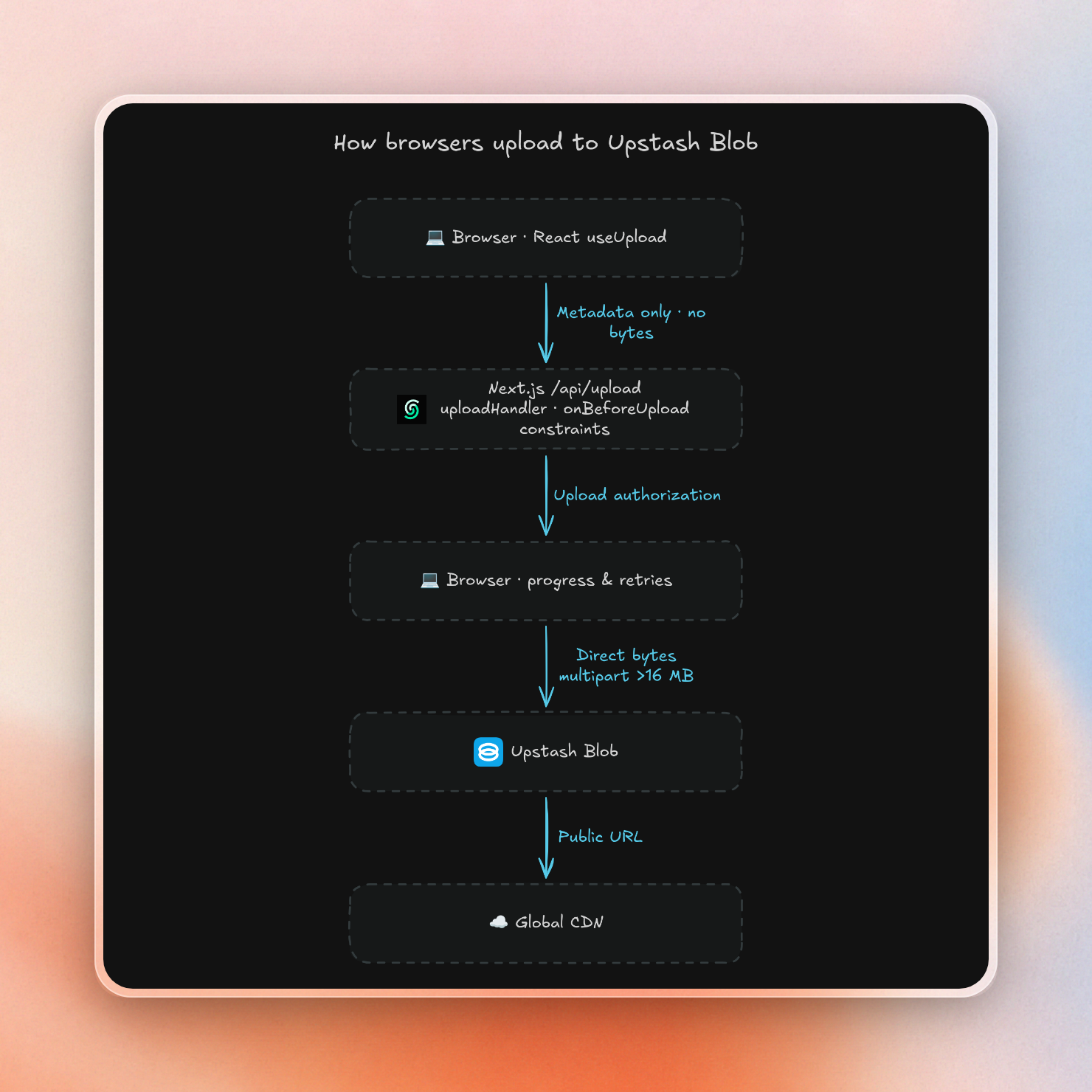
The setup is four short files in a Next.js app. First, the upload handler sets the rules for what users can upload and where it goes:
import "server-only"
import { uploadHandler, type BeforeUploadArgs, type UploadCompleteArgs } from "@upstash/blob"

function beforeUpload({ file }: BeforeUploadArgs) {
  return { path: `images/${file.name}` }
}

function uploadComplete({ path, url }: UploadCompleteArgs) {
  console.log("Uploaded", path, url)
}

export const uploads = uploadHandler({
  constraints: { maxSize: "20mb", contentTypes: ["image/*"] },
  onBeforeUpload: beforeUpload,
  onUploadComplete: uploadComplete,
})
The route mounts it:
import { uploads } from "@/lib/uploads"

export const { GET, POST } = uploads
A typed hook connects the browser to that route:
"use client"

import { uploadHooks } from "@upstash/blob/react"
import type { uploads } from "./uploads"

export const { useUpload } = uploadHooks<typeof uploads>()
And the component uses it, with a progress bar:
"use client"

import type { ChangeEvent } from "react"
import { useUpload } from "@/lib/upload-hooks"

function selectFile(
  start: ReturnType<typeof useUpload>["start"],
  event: ChangeEvent<HTMLInputElement>,
) {
  start({ file: event.currentTarget.files?.[0] })
}

export default function Uploader() {
  const { start, upload, accept } = useUpload()
  return (
    <main>
      <input type="file" accept={accept} onChange={selectFile.bind(null, start)} />
      {upload?.pending && <progress value={upload.percent} max={100} />}
      {upload?.status === "done" && <p>Uploaded {upload.blob.path}</p>}
      {upload?.status === "error" && <p>{upload.error.message}</p>}
    </main>
  )
}
The Upstash Blob upload handler and useUpload hook fill the blanks the R2 upload flow left open:
- Upstash Blob uploads files over 16 MB as multipart uploads, with pause, resume and retries for each part.
- Upstash Blob refreshes expired upload signatures instead of failing.
- Upstash Blob runs size and content type checks before any upload signature is generated, so a rejected upload leaves no signature behind.
- Upload data goes straight to Upstash Blob, never through your server, so your platform's request body limit (4.5 MB on Vercel, 6 MB on AWS Lambda) doesn't apply.
- Upstash Blob serves public files through a CDN with no custom domain needed.
Make sure the code in onUploadComplete is reliable. If an error is thrown, the upload handler will delete the uploaded file.
Does the Upstash Blob free plan pause?
Yes. When you reach any monthly limit on the free plan, your Blob bucket stops serving requests until the 30-day window passes. This is intentional and ensures you are never charged for anything on the free plan. To remove the limits, you can add a credit card and switch to pay-as-you-go.
These are the free plan limits:
| Resource | Free plan, per month |
|---|---|
| Storage | 1 GB |
| Simple operations (reads) | 10,000 |
| Advanced operations (uploads, copies, lists) | 2,000 |
| Egress | 10 GB |
On the free plan we have strict limits, while on pay-as-you-go we don’t. Storage and operations costs start from the first unit; egress costs up to 1 TB per month are on us.
Cloudflare R2 has a slightly different take on free. Its free tier is a monthly allowance. After 10 GB or 10 million reads, the bucket keeps on serving. You get billed for everything over the free tier. Vercel Blob’s Hobby plan is very similar to our free plan: After you hit the limits of Vercel Blob, you can't access Vercel Blob for 30 days.
So yes, as far as users are concerned, a paused bucket is an outage. For production use cases, it’s best to use pay-as-you-go. For prototypes and side projects, our free plan is perfect because it guarantees no surprises.
What are the best Cloudflare R2 alternatives?
Upstash Blob is the best Cloudflare R2 alternative if your Next.js application serves less than 1 TB of bandwidth per month. It allows uploads from browsers without any S3 keys or CORS rules and includes a CDN with no custom domain required. Backblaze B2 is the cheapest for storage. AWS S3 is a great option if your application is already running on AWS. Vercel Blob is the built-in option if your application is already running on Vercel.
Here is how their standard rates compare with R2:
| Service | Storage per GB-month | Egress | Reads per million | Uploads per million | Free tier |
|---|---|---|---|---|---|
| Cloudflare R2 | $0.015 | Free | $0.36 | $4.50 | 10 GB, 1M writes, 10M reads per month |
| Upstash Blob | $0.02 | Free up to 1 TB, then $0.02 / GB | $0.30 | $4.50 | Free plan: 1 GB, 10k reads, 2k writes, 10 GB egress |
| Backblaze B2 | $0.00695 | Free up to 3x stored data, then $0.01 / GB | Free | Free | 10 GB |
| AWS S3 Standard (us-east-1) | $0.023 | First 100 GB free, then $0.09 / GB | $0.40 | $5.00 | Up to $200 in credits for new accounts |
| Vercel Blob | $0.023 | First 10 GB on Hobby, then $0.05 / GB | $0.40 | $5.00 | Hobby: 1 GB, 10k reads, 2k writes |
Some highlights:
- Backblaze B2 is less than half the price of R2's storage and provides free uploads and most API calls. It's the cheapest place to store a large amount of data as long as monthly downloads are less than three times the stored amount.
- AWS S3 is more expensive than R2 on every paid rate. The difference gets even more pronounced once downloads exceed 100 GB per month. For a Next.js app, S3 and R2 both require the same presigned URL and CORS configuration, so R2 is the cheaper option.
- Vercel Blob is more expensive than Upstash Blob on every paid rate in the table above.
- Upstash Blob has cheaper reads than R2, S3, or Vercel Blob and 1 TB of free egress.
Which one to pick
Past 1 TB of downloads a month, R2 is cheaper. Under that, the setup and the free tier rules decide more than the price.
- You have a small or Next.js app, and you want browser uploads with no S3 keys, CORS rules, or retry code: Upstash Blob is better.
- You ettewant a free plan that can’t bill you while you prototype: Upstash Blob is br.
- Store hundreds of GB or more: R2 is better. At $0.015 per GB, it’s the cheapest storage on this list after B2.
- Users download more than 1 TB a month: R2 is better. Each terabyte after that costs $20 on Upstash Blob and $0 on R2.
- Your domain is already on Cloudflare, and you’re fine writing the signing route and CORS rules: R2 is better.
For a small app, both are nearly free. R2 is $0 up to 10 GB, 1M writes and 10M reads a month. Upstash Blob is free up to 1 GB, and costs cents a month thereafter, with less setup. For more options, see our object storage comparison for SaaS apps and file uploads guide for Next.js.

