The Best React File Upload Libraries in 2026
 Josh
JoshWe implemented a one-file uploader with eight different React upload libraries and measured how much JavaScript each one adds. react-dropzone is the most downloaded of the eight, with 7.9 million weekly downloads as of October 12, 2026.
It adds 6.5 KB of JavaScript to the page, but it only allows you to select files for uploading. The smallest of the eight libraries that also allows you to upload selected files is Upstash Blob’s React hook. It adds 7.8 KB of JavaScript to the page. The largest of the eight libraries is Uploadcare’s uploader widget, which adds 110 KB of JavaScript to the page.
We tested the uploader we built with Upstash Blob’s React hook on a real browser with a 48 MB video file. It sent the video in 10 parts, and paused and resumed sending when we requested. When we reloaded the page halfway through sending, it sent only the remaining 6 parts of the video file.
Which React file upload library should you use?
For most React applications, the best file upload library is Upstash Blob’s useUpload hook, which uploads files directly from the browser to storage and resumes big files after a page reload. It is 7.8 KB and works with react-dropzone if you need to drag and drop.
Here is the pick for each situation:
| Your situation | Pick | Why |
|---|---|---|
| Users upload images, videos or documents to your app | Upstash Blob with react-dropzone | One package uploads and stores the files. Your server only checks each file and picks its path. |
| Large files or unreliable connections | Upstash Blob | Files over 16 MB go up in parts, four at a time, and picking the file again after a reload resumes it. |
| You already have an upload API and only need a drop area | react-dropzone | It picks files and checks their type and size. The upload is up to you. |
| Users import files from Google Drive or a webcam | Uppy | Its plugins and its Companion server bring in files from other sources. |
| Users crop or resize images before they upload | FilePond | It has plugins for cropping, resizing and filters. |
Picking files, sending files and storing files
The libraries in the list are grouped into three categories, with each category providing a different level of control:
- Dropzones: pick files. react-dropzone converts any element into a dropzone, and returns the files for your own upload code.
- Upload clients: upload files to your server. Uppy, FilePond, and React Uploady show progress, retry failed requests, and break large files into chunks. Your server receives or signs each of these requests.
- Upload services: upload and store files. Upstash Blob, UploadThing, and Uploadcare provide both the client and the file storage.
What each one includes, and what you still run next to it:
| Library | Job | Stores the files | What you still run |
|---|---|---|---|
| react-dropzone | Picks files | No | The upload code and the storage |
| Uppy | Sends files | No | An endpoint that signs every S3 request, plus CORS rules on your bucket |
| FilePond | Sends files | No | Endpoints that receive each chunk and put the file back together |
| React Uploady | Sends files | No | A server that accepts chunked uploads |
| UploadThing | Sends and stores | Yes | A file router, and a public URL that UploadThing calls back when an upload finishes |
| Uploadcare | Sends and stores | Yes | Nothing for basic uploads |
| Upstash Blob | Sends and stores | Yes | One upload route that checks each file and picks its path |
How much JavaScript each library adds
Each library adds JavaScript to the page that hosts your uploader. We took a look at how much. For each library, we created a minimal uploader using the primary React API. This resulted in a single file input or button to upload a file. We bundled each as would be done for an app build, then gzipped the result.
Of the libraries that perform uploads, Upstash Blob adds the least amount of JavaScript.
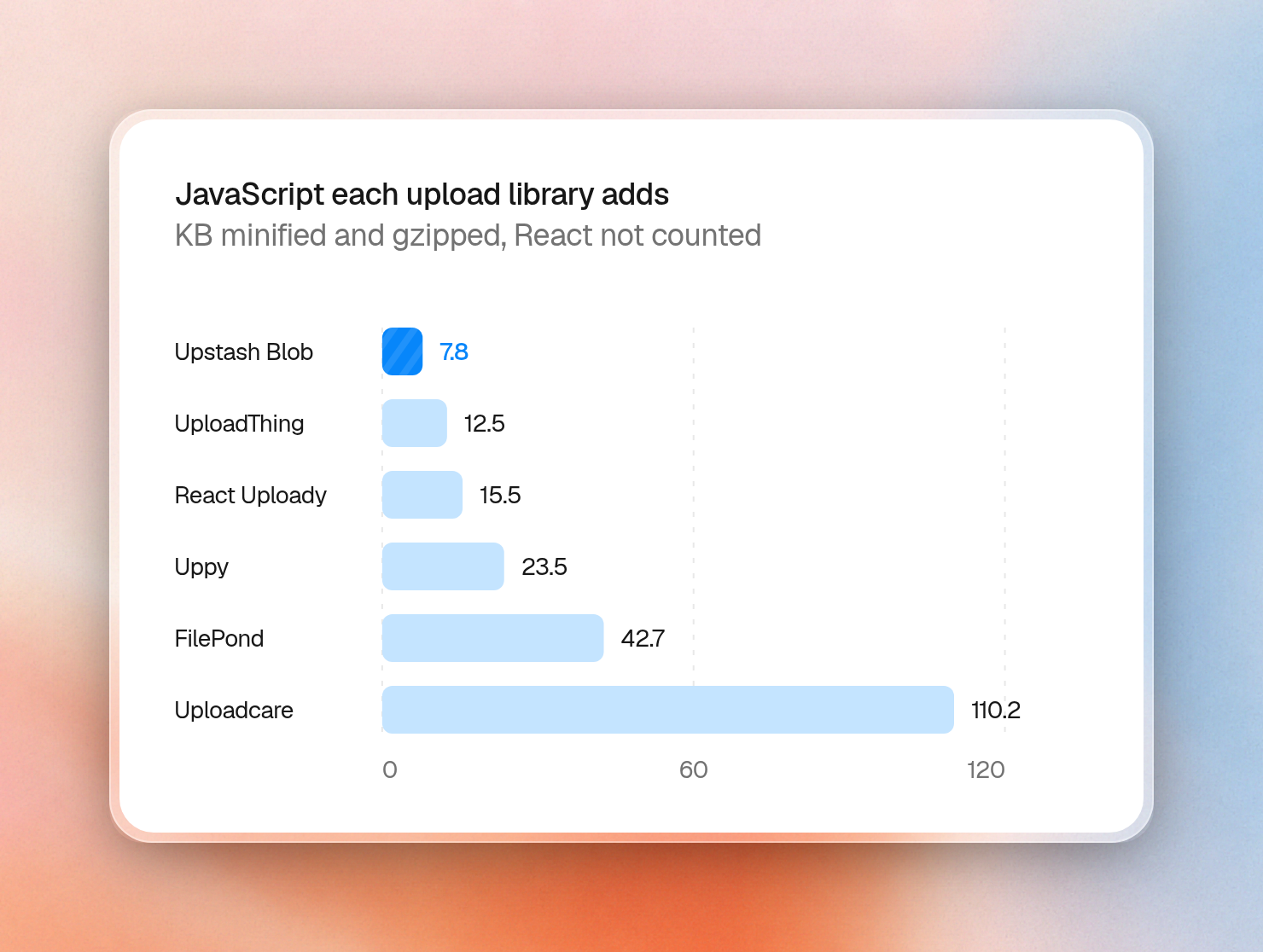
Blob’s 7.8 KB size includes the complete upload engine. This includes progress, multipart uploads, pause, resume and retries. Uploadcare’s 110 KB size includes the full widget with the various upload sources and its image editor. Uppy’s size increases from 23.5 KB to 82.9 KB when including its Dashboard UI.
All the numbers, in KB (1 KB is 1,000 bytes):
| Library | What we built | Minified | Gzipped |
|---|---|---|---|
| react-dropzone | A drop area, no upload | 16.9 | 6.5 |
| Upstash Blob | useUpload on a file input | 21.4 | 7.8 |
| UploadThing | useUploadThing on a file input | 34.1 | 12.5 |
| UploadThing | Its prebuilt upload button | 51.8 | 17.0 |
| React Uploady | Chunked Uploady with its upload button | 41.9 | 15.5 |
| Uppy | Core, the S3 plugin and the file input hook | 70.7 | 23.5 |
| Uppy | Core, the S3 plugin and the Dashboard | 264.7 | 82.9 |
| Vercel Blob | The client upload() function on a file input | 104.1 | 29.3 |
| FilePond | The FilePond component with chunk uploads | 143.5 | 42.7 |
| Uploadcare | The regular file uploader | 384.6 | 110.2 |
We used the latest version of each package on npm on October 23, 2026. React and React DOM are left out, because your app loads them anyway, and so are CSS files. This is the Upstash Blob entry file:
import { uploadHooks } from '@upstash/blob/react'

const { useUpload } = uploadHooks()

export function Picker() {
  const { start } = useUpload('/api/upload')
  return <input type="file" onChange={(e) => start({ file: e.currentTarget.files?.[0] })} />
}
This script bundles every entry file and prints its minified and gzipped size in bytes:
for f in entries/*.tsx; do
  name=$(basename "$f" .tsx)
  npx esbuild "$f" --bundle --minify --format=esm --platform=browser \
    --jsx=automatic --external:react --external:react-dom --external:react/jsx-runtime \
    --loader:.css=empty --define:process.env.NODE_ENV='"production"' \
    --outfile="out/$name.js" --log-level=error
  echo "$name $(wc -c < "out/$name.js") $(gzip -9 -c "out/$name.js" | wc -c)"
done
Upload clients need a server you build
All three libraries, Uppy, FilePond and React Uploady are free and MIT licensed. Large file uploads with each library will require some specific server code, though.
Uppy can send files directly to S3, but you will need to sign the S3 requests. You can either implement an endpoint that returns a pre-signed URL for each step of the upload, or one that returns temporary credentials to the browser, or use Uppy’s Companion server. The S3 bucket will also need CORS rules to allow the browser to make the requests.
FilePond’s server chunking is implemented with endpoints you must implement on your own server. Your server will receive a POST request to start the transfer, a PATCH request for each chunk, and a HEAD request in which FilePond asks which chunks have arrived. You then have to combine the chunks back into the file.
React Uploady’s chunked uploader will send each chunk in its own request, using the range header to indicate the chunk’s location. You will need a server that supports chunked uploads.
With FilePond and React Uploady, you will use a server you run to receive the chunks. Serverless hosts have limits on the size of the request body, which for Vercel is 4.5 MB, and AWS Lambda is 6 MB. Your chunk size will need to be smaller than these limits.
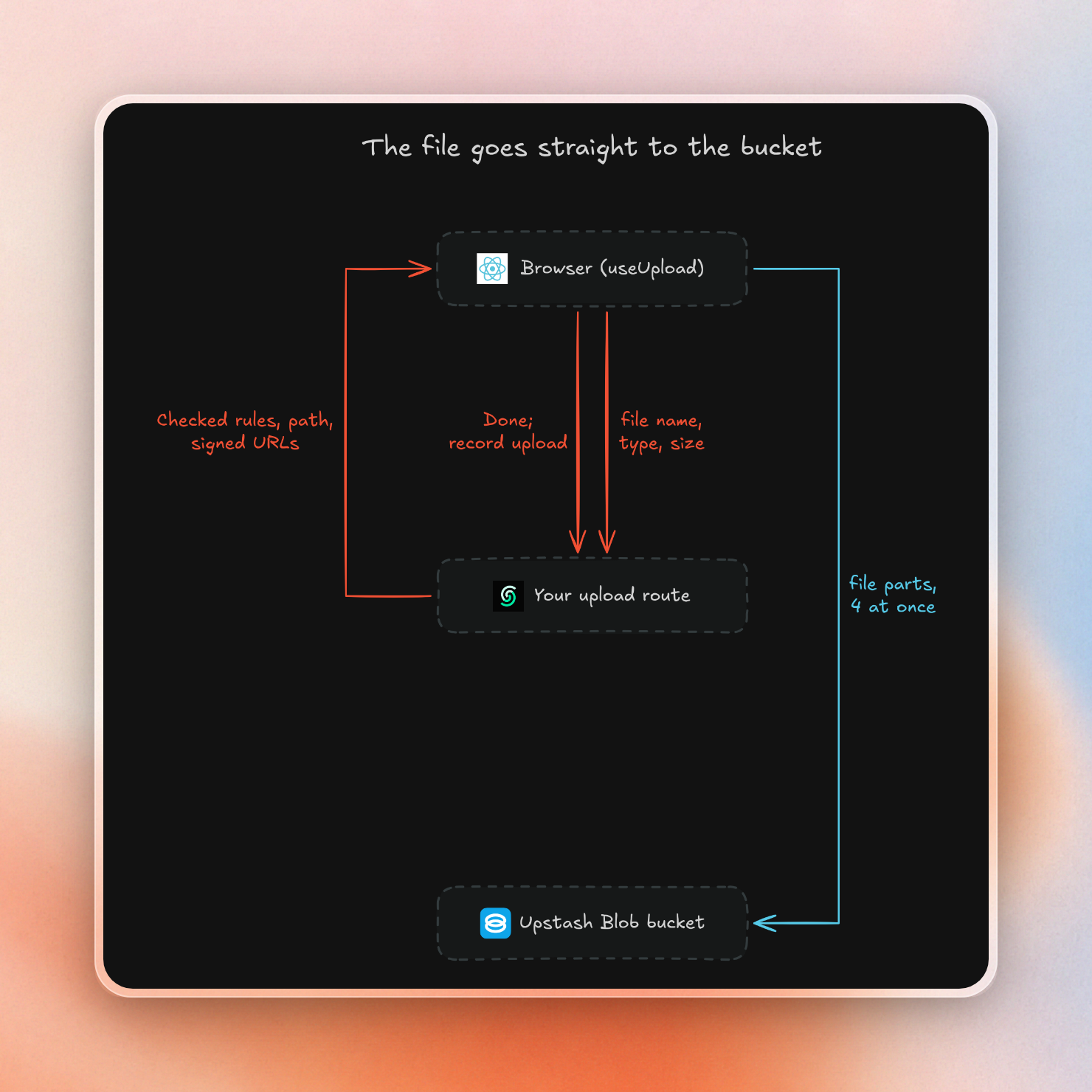
Upstash Blob does not use your server to receive the uploaded bytes. The browser sends each part directly to the bucket. Your route validates the file according to your rules and selects its path before upload starts, then writes a record of what arrived after the upload finishes. The same route will sign the part URLs as the browser requests them, without any additional code. Chunks are sized, retried and re-assembled in the SDK and on Upstash.
react-dropzone and Upstash Blob in one component
This is the uploader from our browser test below. It takes images and videos up to 500 MB, shows each file's progress, and lets the user pause big files. It needs both packages:
npm install @upstash/blob react-dropzoneThe SDK retrieves your bucket token from the UPSTASH_BLOB_TOKEN environment variable. You can copy the token from the Upstash Console when you create a bucket.
In lib/uploads.ts, the handler sets the rules and the path for each file:
import { uniquePath, uploadHandler } from '@upstash/blob'

export const uploads = uploadHandler({
  constraints: { maxSize: '500mb', contentTypes: ['image/*', 'video/*'] },
  onBeforeUpload: ({ file }) => ({ path: uniquePath(`uploads/${file.name}`) }),
  onUploadComplete: ({ path, url }) => ({ path, url }),
})
In a Next.js app, app/api/upload/route.ts mounts it with one line:
import { uploads } from '../../../lib/uploads'

export const { GET, POST } = uploads
In lib/upload-hooks.ts, uploadHooks ties the React hook to that handler's types:
'use client'

import { uploadHooks } from '@upstash/blob/react'
import type { uploads } from './uploads'

export const { useUpload } = uploadHooks<typeof uploads>()
The component hands every dropped file to the hook and shows one row per upload:
'use client'

import { useDropzone } from 'react-dropzone'
import { useUpload } from '../lib/upload-hooks'

export function Uploader() {
  const { start, uploads } = useUpload()
  const { getRootProps, getInputProps, isDragActive } = useDropzone({
    onDrop: (files) => start({ files }),
  })

  return (
    <div>
      <div {...getRootProps()}>
        <input {...getInputProps()} />
        <p>{isDragActive ? 'Drop the files here' : 'Drag files here, or click to pick them'}</p>
      </div>
      <ul>
        {uploads.map((upload) => (
          <li key={upload.id}>
            {upload.file.name}: {upload.status} {upload.percent}%
            {upload.canPause && upload.status === 'uploading' && <button onClick={() => upload.pause()}>Pause</button>}
            {upload.status === 'paused' && <button onClick={() => upload.resume()}>Resume</button>}
            {upload.status === 'done' && <a href={upload.blob.data.url}>Open</a>}
            {upload.status === 'error' && <span>{upload.error.message}</span>}
          </li>
        ))}
      </ul>
    </div>
  )
}
A few parts of this code use features of the SDK:
- The server checks the file size and type before signing the file. This means the upload of the file will not even start if the file doesn't match the constraints.
upload.blob.datahas the return type ofonUploadComplete, so theurlis typed at compile-time.- The Pause button is only visible if the file size is larger than 16 MB. This is because files below 16 MB will be uploaded as a single request and can't be paused.
- The
percentstays at 99 while the server is saving the upload. Only when the file is saved, the percent will change to 100. - The handler can be mounted on Hono, SvelteKit or Remix as its two functions receive a standard request and return a standard response.
A 48 MB upload, paused and reloaded
We ran the component above against a real bucket in Chrome and selected two files at once, a 48 MB video and a small text file. The route refused the text file right away with text/plain is not allowed followed by the list of allowed types, and did not send even one byte of it to storage. The video uploaded successfully and had a working Open link at the end of its row.
To log every step, we ran the video twice more with the SDK's plain upload() function for the browser, which reports the same fields as the hook. The video is over the 16 MB threshold, so the SDK cut it into ten parts of 5 MiB (5,242,880 bytes each). We paused it, waited three seconds and resumed it:
picked video.mp4 (48,000,000 bytes)
paused 43% (20,971,520 bytes) -> pause()
3 s later: paused 43% (20,971,520 bytes), 0 part uploads started while paused
resume()
done 100% (48,000,000 bytes), 10 part uploads in total
While the upload was paused, no part upload initiated, and resuming the upload continued the progress from 43%.
Then we reloaded the page in the middle of the upload and picked the same file again:
picked video.mp4 (48,000,000 bytes)
uploading 54% (26,214,400 bytes) after 6 part uploads started -> page reloaded
same file picked again: uploading 43% (20,971,520 bytes)
done 100% (48,000,000 bytes), 6 part uploads after the reload
It looks like this:
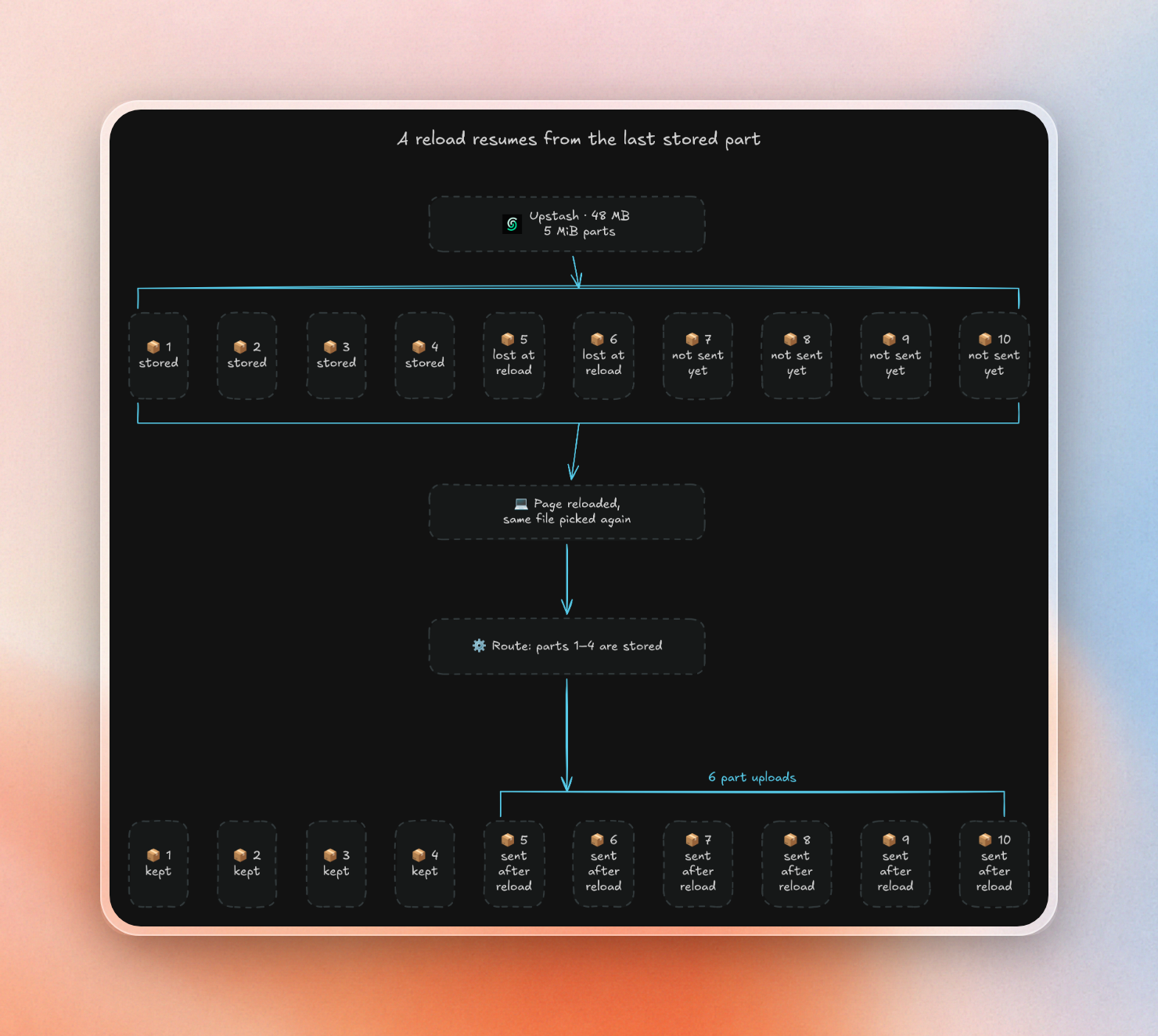
Before the reload, four of ten parts had been saved. Two in-flight parts were lost, so the upload fell back to 43% from 54% and uploaded the last six parts. We didn’t write any code in the app to implement this behavior. The SDK keeps track of uploads in localStorage, and when the same file is uploaded again, it queries your route to find out which parts have been saved. In a private window with no localStorage, the upload would have restarted from the beginning.

