> ## Documentation Index
> Fetch the complete documentation index at: https://upstash.com/docs/llms.txt
> Use this file to discover all available pages before exploring further.
# General
## Running Steps Inside try/catch Blocks
When running steps (run, sleep, call, or any other step) inside a try/catch block, you'll encounter the following error:
```
WorkflowAbort: This is an Upstash Workflow error thrown after
a step executes. It is expected to be raised. Make sure that
you await for each step. Also, if you are using try/catch
blocks, you should not wrap context.run/sleep/sleepUntil/call
methods with try/catch. Aborting workflow after executing
step 'some-step'.
```
The `WorkflowAbort` error is thrown by the Workflow SDK when a step executes successfully. When you run a step inside a try/catch block, you have two primary options:
1. **Re-throw WorkflowAbort**: If you need a try/catch block, re-throw the `WorkflowAbort` error:
2. **Avoid Running Steps in try/catch**: The simplest solution is to not wrap steps in try/catch blocks. If you have a `context.run` inside try/catch, you can try putting the try/catch inside the context.run.
```typescript TypeScript {1, 6-7} theme={"system"}
import { WorkflowAbort } from '@upstash/workflow';
try {
await context.run( ... );
} catch (error) {
if (error instanceof WorkflowAbort) {
throw error;
} else {
// handle other errors
}
}
```
```python Python {1, 6-7} theme={"system"}
from upstash_workflow import WorkflowAbort
try:
await context.run( ... )
except Exception as e:
if isinstance(e, WorkflowAbort):
raise e
else:
# handle other errors
```
## `context.requestPayload` Becoming Undefined
### Headers Considerations
In some frameworks, you may need to pass specific headers for the workflow to access `requestPayload`:
* Try passing `Content-type: text/plain` or `Content-type: application/json` headers when starting the workflow.
* Note that `publishJSON` can only publish `Content-type: application/json`.
### `context.call` Execution
[During a workflow run, the endpoint will be called multiple times](/workflow/basics/how). While executing `context.call`, the endpoint is called at least twice, with the SDK attempting to run the route function until the first step for custom authorization.
Accessing `context.requestPayload` before any step can result in it becoming undefined:
```typescript TypeScript {2-4, 8} theme={"system"}
export const { POST } = serve(async (context) => {
// Will print undefined while executing context.call
const payload = context.requestPayload
console.log(payload)
// ... steps or any other code
context.call( ... )
})
```
```python Python {3-5, 9} theme={"system"}
@serve.post("/api/example")
async def example(context: AsyncWorkflowContext[str]) -> None:
# Will print None while executing context.call
payload = context.request_payload
print(payload)
# ... steps or any other code
context.call( ... )
```
This behavior stems from the internal mechanics of `context.call`, and resolving this specific interaction is on our roadmap. Note that if you are passing `context.requestPayload` as a parameter to `context.call`, the payload remains intact. However, during the actual execution of `context.call`, the `context.requestPayload` becomes undefined due to the SDK's internal workflow processing steps.
To fix this issue, you can try adding a step which returns the payload:
```typescript TypeScript {2-4, 7} theme={"system"}
export const { POST } = serve(async (context) => {
// Payload will never be undefined
const payload = await context.run("get payload", () => context.requestPayload)
// ... steps or any other code
context.call( ... )
})
```
```python Python {4-8, 12} theme={"system"}
@serve.post("/api/example")
async def example(context: AsyncWorkflowContext[str]) -> None:
async def _get_payload() -> str:
return context.request_payload
# Payload will never be None
payload = await context.run("get payload", _get_payload)
# ... steps or any other code
context.call( ... )
```
You can find an example of this usage in [our documentation on usage with AI SDK](/workflow/integrations/aisdk).
## Verification Failed Scenarios
When [QStash signature verification](/workflow/howto/security#using-qstashs-built-in-request-verification-recommended) is enabled, you might encounter an error like:
```
Failed to verify that the Workflow request comes from QStash: some-error
If signature is missing, trigger the workflow endpoint by publishing your request to QStash instead of calling it directly.
If you want to disable QStash Verification, you should clear env variables QSTASH_CURRENT_SIGNING_KEY and QSTASH_NEXT_SIGNING_KEY
```
Troubleshooting verification errors:
* Ensure you [start the workflow using `client.trigger` or by publishing to QStash](/workflow/howto/start).
* Verify that `QSTASH_CURRENT_SIGNING_KEY` and `QSTASH_NEXT_SIGNING_KEY` environment variables are correct.
* Pass [appropriate `Content-type` headers](/workflow/troubleshooting/general#headers-considerations) when starting the workflow.
## Authorization Error Handling
Consider this workflow:
```typescript TypeScript {2-5} theme={"system"}
export const { POST } = serve(async (context) => {
if (someCondition()) => {
return;
}
// rest of the workflow
})
```
```python Python {3-4} theme={"system"}
@serve.post("/api/example")
async def example(context: AsyncWorkflowContext[str]) -> None:
if some_condition():
return
# rest of the workflow
```
Returning before running any steps will result in:
* HTTP status: 400
* Error message: `Failed to authenticate Workflow request.`
This behavior is a direct result of the [custom authorization mechanism](/workflow/howto/security#custom-authorization-method). The Workflow SDK interprets an early function return without executing any steps as an authentication failure.
If the function `someCondition()` is non-deterministic, the recommended approach is to transform this condition into an explicit workflow step. Here's the recommended pattern for handling such non-deterministic conditions:
```typescript TypeScript {3-6} theme={"system"}
export const { POST } = serve(async (context) => {
const shouldReturn = await context.run("check condition", () => someCondition())
if (shouldReturn) => {
return;
}
// rest of the workflow
})
```
```python Python {4-9} theme={"system"}
@serve.post("/api/example")
async def example(context: AsyncWorkflowContext[str]) -> None:
async def _check_condition() -> bool:
return some_condition()
should_return = await context.run("check condition", _check_condition)
if should_return:
return
# rest of the workflow
```
## Retry Configuration
Retry settings can be configured in two locations:
1. [**Workflow Start** (client.trigger)](/workflow/howto/start): For the triggered workflow run
* Default retries: 3
2. [**Context Call**](/workflow/basics/context#context-call): For third party requests
* Default retries: 0
## Verbose Mode Diagnostics
This feature is not yet available in
[workflow-py](https://github.com/upstash/workflow-py). See our
[Roadmap](/workflow/roadmap) for feature parity plans and
[Changelog](/workflow/changelog) for updates.
Use [verbose mode](/workflow/basics/serve#verbose) to diagnose workflow issues.
The logs in this section should be seen very rarely. If you observe these logs consistently, you can reach out to our support.
### Localhost in URL Warning
```
Workflow URL contains localhost. This can happen in local development,
but shouldn't happen in production unless you have a route which contains
localhost. Received: ...
```
This error indicates that the workflow URL has localhost. Publish requests will fail and workflow won't be able to run.
**Potential Solutions:**
* Verify [baseUrl](/workflow/basics/serve#baseurl)
* Check UPSTASH\_WORKFLOW\_URL
* Explicitly pass the full [url](/workflow/basics/serve#url)
### Deduplication Log
Since QStash has at least once delivery guarantee, there is a very small chance that a step will run twice. This is why we suggest [idempotancy](/workflow/basics/caveats#ensure-idempotency-in-context-run). When this happens, the duplicate step should print the following log and terminate:
```
Upstash Workflow: The step 'some-step' with id 'step-index' has run twice during workflow execution. Rest of the workflow will continue running as usual.
```
### Network Issue Warnings
In rare instances, the workflow endpoint may complete its task successfully but fail to send a proper response. The SDK is designed to detect such occurrences. When this happens, the workflow endpoint will return a `200` status code and log one of the following three warnings:
```
Workflow run wfr-*** already exists. A new one isn't created.
tried to append to a cancelled workflow. exiting without publishing.
Failed to remove workflow run wfr-*** as it doesn't exist.
```
A similar issue can occur if you have two parallel context.call steps at the end of your workflow. While the workflow will execute successfully, you may see this warnings:
```
Couldn't fetch workflow run steps. This can happen if the workflow run successfully ends before some callback is executed.
```
## HTTPS Protocol Issue
The Workflow SDK automatically infers the protocol (HTTP or HTTPS) based on the incoming request object in your application.
However, if your app is deployed behind a proxy (e.g., Railway or similar platforms), the proxy may terminate SSL and forward the request to your app using plain HTTP.
This can cause the SDK to mistakenly infer that the request is using HTTP instead of HTTPS.
To fix this, explicitly set the `UPSTASH_WORKFLOW_URL` environment variable to the base URL of your application.
This disables automatic protocol inference and uses the provided static URL instead.
If you’re using Express.js behind a front-facing proxy, an alternative solution is to enable [proxy trust](https://expressjs.com/en/api.html#app.set) so Express correctly identifies the original protocol from the X-Forwarded-Proto header:
```javascript theme={"system"}
app.set("trust proxy", true)
```
## Workflow Stuck in First Step
Imagine that you trigger your workflow with [client.trigger](/workflow/basics/client/trigger) and the workflow starts (you see the run in the dashboard), but it doesn't proceed beyond the first step.
If it appears like the initial step has failed:
* Expand the step in the dashboard to see detailed logs to check for any error messages or stack traces that can provide insights into what went wrong.
* Ensure that the workflow endpoint is accessible. You can test by sending a `curl` request to see if the request lands on the endpoint.
* Ensure that the URL you passed to the `client.trigger` method matches the workflow endpoint URL.
* Verify that you're using the latest SDK version both in the workflow endpoint definition and in the code that calls `client.trigger`.
If it appears like the initial step has completed but the workflow is still stuck:
* Workflow SDK could be unable to correctly infer the workflow URL due to a proxy or an issue in the request object. To check if this is the issue, try passing the [`baseUrl` parameter to the `serve` method](/workflow/basics/serve/advanced#param-base-url). This will override the automatic URL inference and use the provided base URL instead.
## Non-workflow Destination Error
Full error:
```
detected a non-workflow destination for trigger/invoke.
make sure you are sending the request to the correct endpoint
```
This error occurs when you call a non-workflow endpoint with `client.trigger` or via Request Builder on Upstash Console. If you check Upstash Console, you will see that the workflow run has started but failed before running any steps:
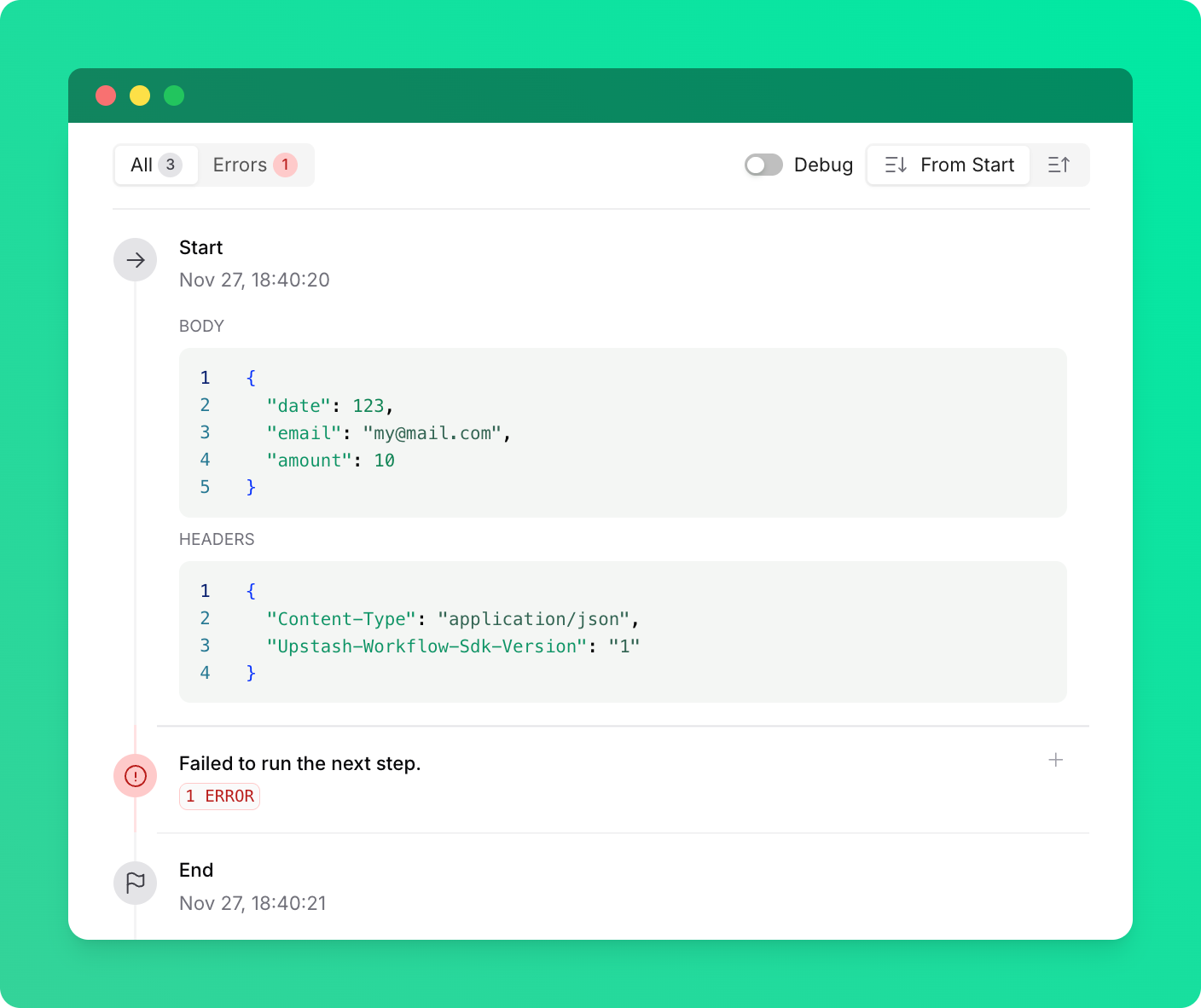 Another way you can encounter this error is if you are calling a workflow endpoint on an older SDK version (before 0.2.17 in TypeScript and 0.1.4 in Python) from a newer SDK version. If this happens, in the logs, you will see that the first step of the workflow run has completed successfully, but the workflow fails immediately after that with the same error.
To fix this error, ensure that:
* You are calling a valid workflow endpoint.
* Both the caller and the workflow endpoint are using the latest SDK versions.
Another way you can encounter this error is if you are calling a workflow endpoint on an older SDK version (before 0.2.17 in TypeScript and 0.1.4 in Python) from a newer SDK version. If this happens, in the logs, you will see that the first step of the workflow run has completed successfully, but the workflow fails immediately after that with the same error.
To fix this error, ensure that:
* You are calling a valid workflow endpoint.
* Both the caller and the workflow endpoint are using the latest SDK versions.