> ## Documentation Index
> Fetch the complete documentation index at: https://upstash.com/docs/llms.txt
> Use this file to discover all available pages before exploring further.
# Schedule a Workflow
You can schedule a workflow to run periodically using a cron definition.
For this feature, you would need to use Upstash QStash's Schedules feature.
## Scheduling a workflow
For example, let's suppose that you have a workflow that creates a backup of some important data daily. Our workflow endpoint might look like this:
To run this endpoint on a schedule, navigate to `Schedules` in your QStash dashboard and click `Create Schedule`:
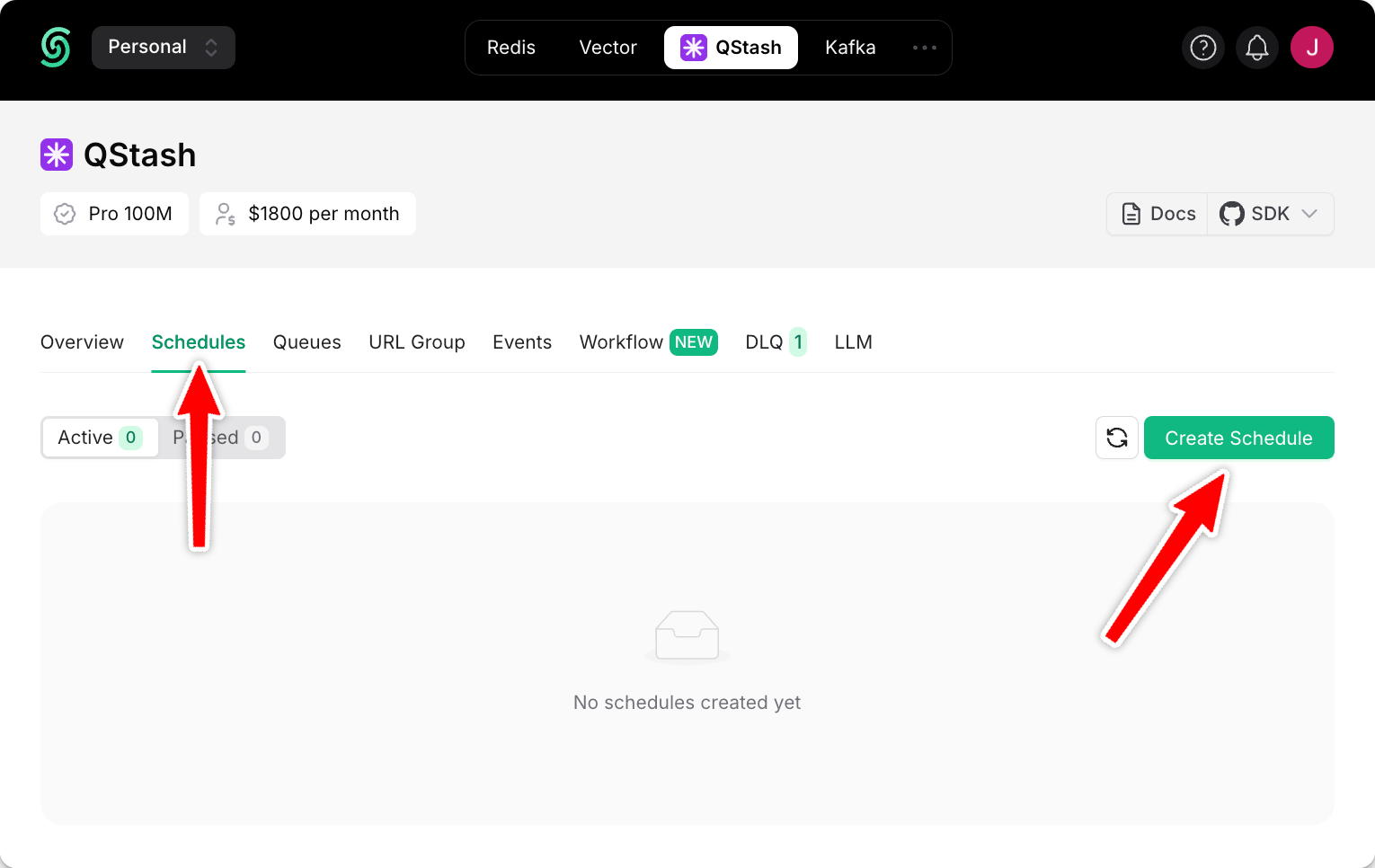 Enter your live endpoint URL, add a CRON expression to define the interval at which your endpoint is called (i.e. every day, every 15 minutes, ...) and click `Schedule`:
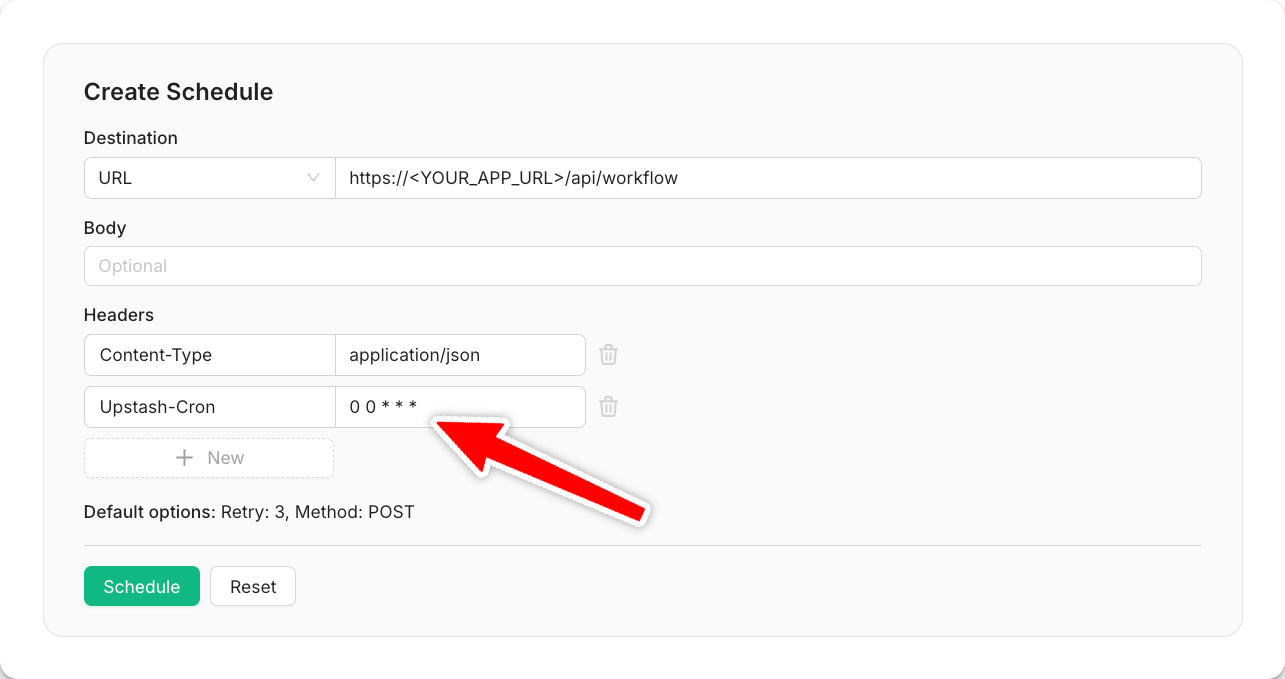 Your workflow will now run repeatedly at the interval you have defined. For more details on CRON expressions, see our [QStash scheduling documentation](/qstash/features/schedules).
## Programmatically Schedule
In order to massively improve the user experience, many applications send weekly summary reports to their users. These could be weekly analytics summaries or SEO statistics to keep users engaged with the platform.
Let's create a user-specific schedule, sending a first report to each user exactly 7 days after they signed up:
```typescript api/sign-up/route.ts theme={"system"}
import { signUp } from "@/utils/auth-utils";
import { Client } from "@upstash/qstash";
const client = new Client({ token: process.env.QSTASH_TOKEN! });
export async function POST(request: Request) {
const userData: UserData = await request.json();
// Schedule weekly account summary
await client.schedules.create({
scheduleId: `user-summary-${user.email}`,
destination: "https:///api/send-weekly-summary",
body: { userId: user.id },
cron: cron,
});
return NextResponse.json(
{ success: true, message: "User registered and summary scheduled" },
{ status: 201 }
);
}
```
```python main.py theme={"system"}
from fastapi import FastAPI, Request
from fastapi.responses import JSONResponse
from qstash import AsyncQStash
from datetime import datetime, timedelta
app = FastAPI()
client = AsyncQStash("")
@app.post("/api/sign-up")
async def sign_up(request: Request):
user_data = await request.json()
# Simulate user registration
user = await sign_up(user_data)
# Calculate the date for the first summary (7 days from now)
first_summary_date = datetime.now() + timedelta(days=7)
# Create cron expression for weekly summaries starting 7 days from signup
cron = f"{first_summary_date.minute} {first_summary_date.hour} * * {first_summary_date.day}"
# Schedule weekly account summary
await client.schedule.create_json(
schedule_id=f"user-summary-{user.email}",
destination="https:///api/send-weekly-summary",
body={"userId": user.id},
cron=cron,
)
return JSONResponse(
content={"success": True, "message": "User registered and summary scheduled"},
status_code=201,
)
```
This code will call our workflow every week, starting exactly seven days after a user signs up. Each call to our workflow will contain the respective user's ID.
When creating a per-user schedule, pass a unique `scheduleId` to identify the schedule for better management and observability.
Your workflow will now run repeatedly at the interval you have defined. For more details on CRON expressions, see our [QStash scheduling documentation](/qstash/features/schedules).
## Programmatically Schedule
In order to massively improve the user experience, many applications send weekly summary reports to their users. These could be weekly analytics summaries or SEO statistics to keep users engaged with the platform.
Let's create a user-specific schedule, sending a first report to each user exactly 7 days after they signed up:
```typescript api/sign-up/route.ts theme={"system"}
import { signUp } from "@/utils/auth-utils";
import { Client } from "@upstash/qstash";
const client = new Client({ token: process.env.QSTASH_TOKEN! });
export async function POST(request: Request) {
const userData: UserData = await request.json();
// Schedule weekly account summary
await client.schedules.create({
scheduleId: `user-summary-${user.email}`,
destination: "https:///api/send-weekly-summary",
body: { userId: user.id },
cron: cron,
});
return NextResponse.json(
{ success: true, message: "User registered and summary scheduled" },
{ status: 201 }
);
}
```
```python main.py theme={"system"}
from fastapi import FastAPI, Request
from fastapi.responses import JSONResponse
from qstash import AsyncQStash
from datetime import datetime, timedelta
app = FastAPI()
client = AsyncQStash("")
@app.post("/api/sign-up")
async def sign_up(request: Request):
user_data = await request.json()
# Simulate user registration
user = await sign_up(user_data)
# Calculate the date for the first summary (7 days from now)
first_summary_date = datetime.now() + timedelta(days=7)
# Create cron expression for weekly summaries starting 7 days from signup
cron = f"{first_summary_date.minute} {first_summary_date.hour} * * {first_summary_date.day}"
# Schedule weekly account summary
await client.schedule.create_json(
schedule_id=f"user-summary-{user.email}",
destination="https:///api/send-weekly-summary",
body={"userId": user.id},
cron=cron,
)
return JSONResponse(
content={"success": True, "message": "User registered and summary scheduled"},
status_code=201,
)
```
This code will call our workflow every week, starting exactly seven days after a user signs up. Each call to our workflow will contain the respective user's ID.
When creating a per-user schedule, pass a unique `scheduleId` to identify the schedule for better management and observability.