> ## Documentation Index
> Fetch the complete documentation index at: https://upstash.com/docs/llms.txt
> Use this file to discover all available pages before exploring further.
# Select a Region
## Overview
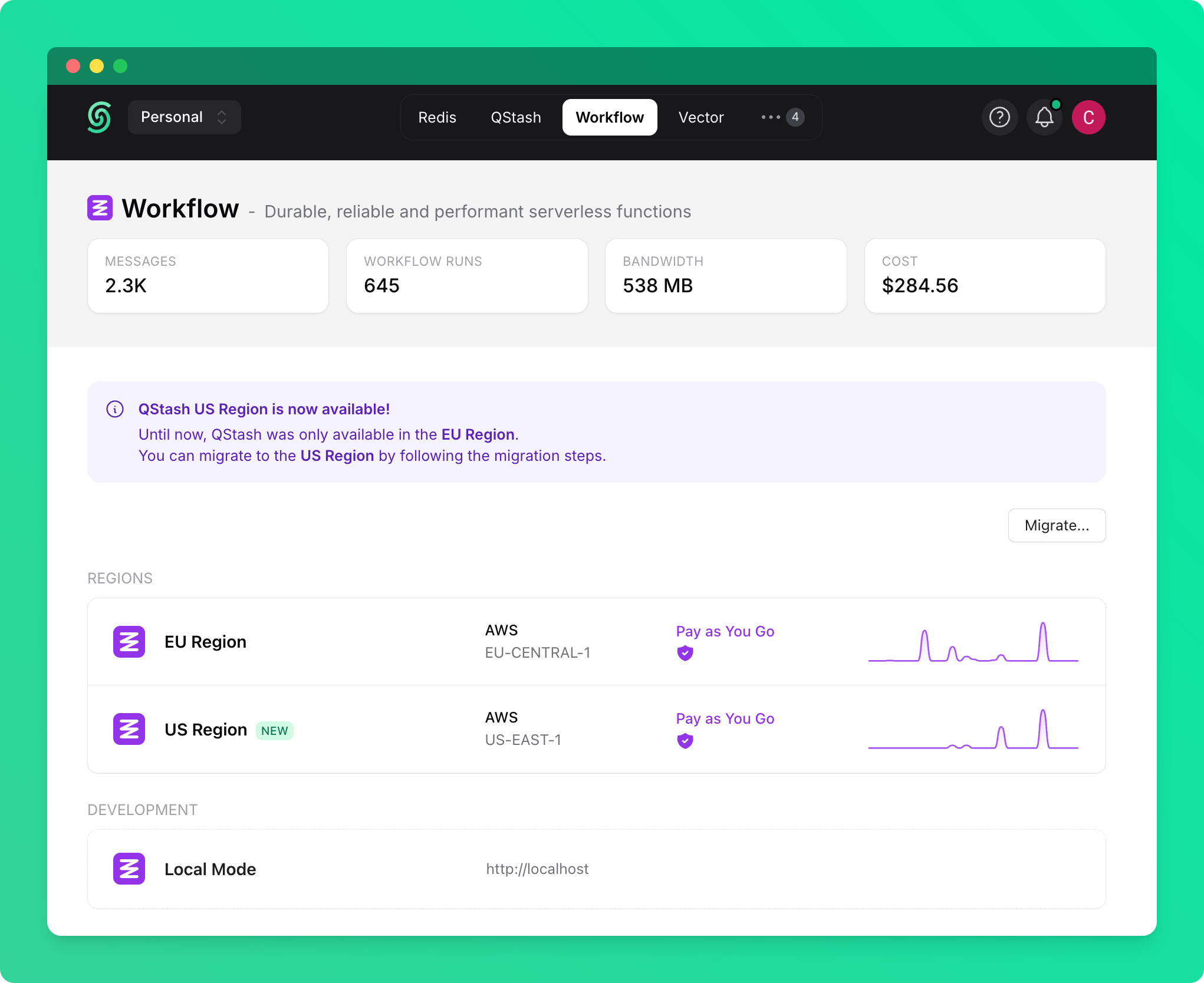
Upstash Workflow operates on top of QStash, which is available in two distinct regions: **EU region** and **US region**. Each region is completely independent with its own infrastructure, pricing, resources, and workflow runs.
## Regional URLs
* **EU Region**: `https://qstash-eu-central-1.upstash.io`, or `https://qstash.upstash.io`
* **US Region**: `https://qstash-us-east-1.upstash.io`
## Key Concepts
Each region maintains:
* Usage in each region is tracked and billed independently
* Workflow runs, events, and configurations are region-specific
* Each region has its own API tokens and signing keys
### Migration Between Regions
If you don't have any active resources (active workflow runs, schedules, url groups etc), you can simply update your environment variables with the new region to migrate. If you have active resources, you will need to migrate more gracefully, as described below.
You can migrate your Workflow resources from one region to another using the Upstash Console:
1. Navigate to the [Workflow tab on Upstash Console](https://console.upstash.com/workflow)
2. Click the **Migrate** button
3. Follow the guided migration process
 The migration tool will:
* Help you set up migration-mode environment variables
* Copy and update your QStash resources (schedules, url groups, queues)
Your workflow logs or DLQ aren't part of the migration. They will remain in the old region.
After migration, your app will be able to handle requests from both regions simultaneously to ensure a smooth transition.
## Operating Modes
Workflow SDK supports two modes of operation:
### Single-Region Mode (Default)
When `QSTASH_REGION` environment variable is **not set**, the SDK operates in single-region mode:
* Uses `QSTASH_TOKEN` and `QSTASH_URL` (or defaults to EU region)
* All workflow triggers are sent through the configured region
* Incoming workflow requests are verified using default signing keys
```bash theme={"system"}
# Single-region configuration (EU)
QSTASH_URL="https://qstash.upstash.io"
QSTASH_TOKEN="your_eu_token"
QSTASH_CURRENT_SIGNING_KEY="your_eu_current_key"
QSTASH_NEXT_SIGNING_KEY="your_eu_next_key"
```
### Migration Mode
When `QSTASH_REGION` is set to `US_EAST_1` or `EU_CENTRAL_1`, the SDK enables migration mode:
* Uses region-specific credentials for the primary region (`QSTASH_REGION`)
* Automatically handles region detection for incoming workflow requests
* Supports receiving workflow calls from multiple regions simultaneously
If a workflow run was started in one region, all its steps will execute in that region.
Environment variables:
```bash theme={"system"}
# Migration mode configuration with US as primary
QSTASH_REGION="US_EAST_1"
US_EAST_1_QSTASH_URL="https://qstash-us-east-1.upstash.io"
US_EAST_1_QSTASH_TOKEN="your_us_token"
US_EAST_1_QSTASH_CURRENT_SIGNING_KEY="your_us_current_key"
US_EAST_1_QSTASH_NEXT_SIGNING_KEY="your_us_next_key"
EU_CENTRAL_1_QSTASH_URL="https://qstash-eu-central-1.upstash.io"
EU_CENTRAL_1_QSTASH_TOKEN="your_eu_token"
EU_CENTRAL_1_QSTASH_CURRENT_SIGNING_KEY="your_eu_current_key"
EU_CENTRAL_1_QSTASH_NEXT_SIGNING_KEY="your_eu_next_key"
```
Migration mode relies on environment variables being available via `process.env`. It won't work on platforms where `process.env` is not available, such as Cloudflare Workers.
## SDK Requirements
Migration support requires:
* `@upstash/workflow` >= 1.1.0
* `@upstash/qstash` >= 2.9.0
Update your dependencies:
```bash theme={"system"}
npm install @upstash/workflow@latest @upstash/qstash@latest
```
The migration tool will:
* Help you set up migration-mode environment variables
* Copy and update your QStash resources (schedules, url groups, queues)
Your workflow logs or DLQ aren't part of the migration. They will remain in the old region.
After migration, your app will be able to handle requests from both regions simultaneously to ensure a smooth transition.
## Operating Modes
Workflow SDK supports two modes of operation:
### Single-Region Mode (Default)
When `QSTASH_REGION` environment variable is **not set**, the SDK operates in single-region mode:
* Uses `QSTASH_TOKEN` and `QSTASH_URL` (or defaults to EU region)
* All workflow triggers are sent through the configured region
* Incoming workflow requests are verified using default signing keys
```bash theme={"system"}
# Single-region configuration (EU)
QSTASH_URL="https://qstash.upstash.io"
QSTASH_TOKEN="your_eu_token"
QSTASH_CURRENT_SIGNING_KEY="your_eu_current_key"
QSTASH_NEXT_SIGNING_KEY="your_eu_next_key"
```
### Migration Mode
When `QSTASH_REGION` is set to `US_EAST_1` or `EU_CENTRAL_1`, the SDK enables migration mode:
* Uses region-specific credentials for the primary region (`QSTASH_REGION`)
* Automatically handles region detection for incoming workflow requests
* Supports receiving workflow calls from multiple regions simultaneously
If a workflow run was started in one region, all its steps will execute in that region.
Environment variables:
```bash theme={"system"}
# Migration mode configuration with US as primary
QSTASH_REGION="US_EAST_1"
US_EAST_1_QSTASH_URL="https://qstash-us-east-1.upstash.io"
US_EAST_1_QSTASH_TOKEN="your_us_token"
US_EAST_1_QSTASH_CURRENT_SIGNING_KEY="your_us_current_key"
US_EAST_1_QSTASH_NEXT_SIGNING_KEY="your_us_next_key"
EU_CENTRAL_1_QSTASH_URL="https://qstash-eu-central-1.upstash.io"
EU_CENTRAL_1_QSTASH_TOKEN="your_eu_token"
EU_CENTRAL_1_QSTASH_CURRENT_SIGNING_KEY="your_eu_current_key"
EU_CENTRAL_1_QSTASH_NEXT_SIGNING_KEY="your_eu_next_key"
```
Migration mode relies on environment variables being available via `process.env`. It won't work on platforms where `process.env` is not available, such as Cloudflare Workers.
## SDK Requirements
Migration support requires:
* `@upstash/workflow` >= 1.1.0
* `@upstash/qstash` >= 2.9.0
Update your dependencies:
```bash theme={"system"}
npm install @upstash/workflow@latest @upstash/qstash@latest
```