> ## Documentation Index
> Fetch the complete documentation index at: https://upstash.com/docs/llms.txt
> Use this file to discover all available pages before exploring further.
# How Workflow Works
Upstash Workflow is an orchestration layer that allows you to write **multi‑step workflows** which are:
* **Durable** – steps automatically recover from errors or outages
* **Scalable** – steps run independently and in parallel when possible
* **Cost‑efficient** – idle waiting (delays, sleeps, external calls) does not consume compute resources
Upstash Workflow is built on top of Upstash QStash, our serverless messaging and scheduling solution, to achieve these features.
## The Core Idea
Traditionally, backend functions are built in one of two ways: either everything is executed inside a single API function—which is difficult to maintain and prone to failures—or the flow is split across multiple APIs connected by a queueing system, which adds significant infrastructure and state‑management overhead.
These approaches can work, but they often fail to handle production load reliably or become increasingly difficult to maintain over time:
* **Timeouts** – the whole function runs inside one execution window. A slow API can easily exceed serverless limits (often 10–60 seconds).
* **Temporary issues** – slow or unreliable external services can exceed serverless limits or cause the entire request to fail.
* **Failures** – if a step fails, the whole request fails. You either restart everything or you must write custom retry logic.
* **Rate limits** – calling external APIs in bulk requires careful concurrency control, which is difficult to implement manually.
* **Complexity** – to address these issues, teams often build custom queues, schedulers, or state trackers, adding unnecessary infrastructure overhead.
***
## How Upstash Workflow Solves This
Upstash Workflow takes a different approach:
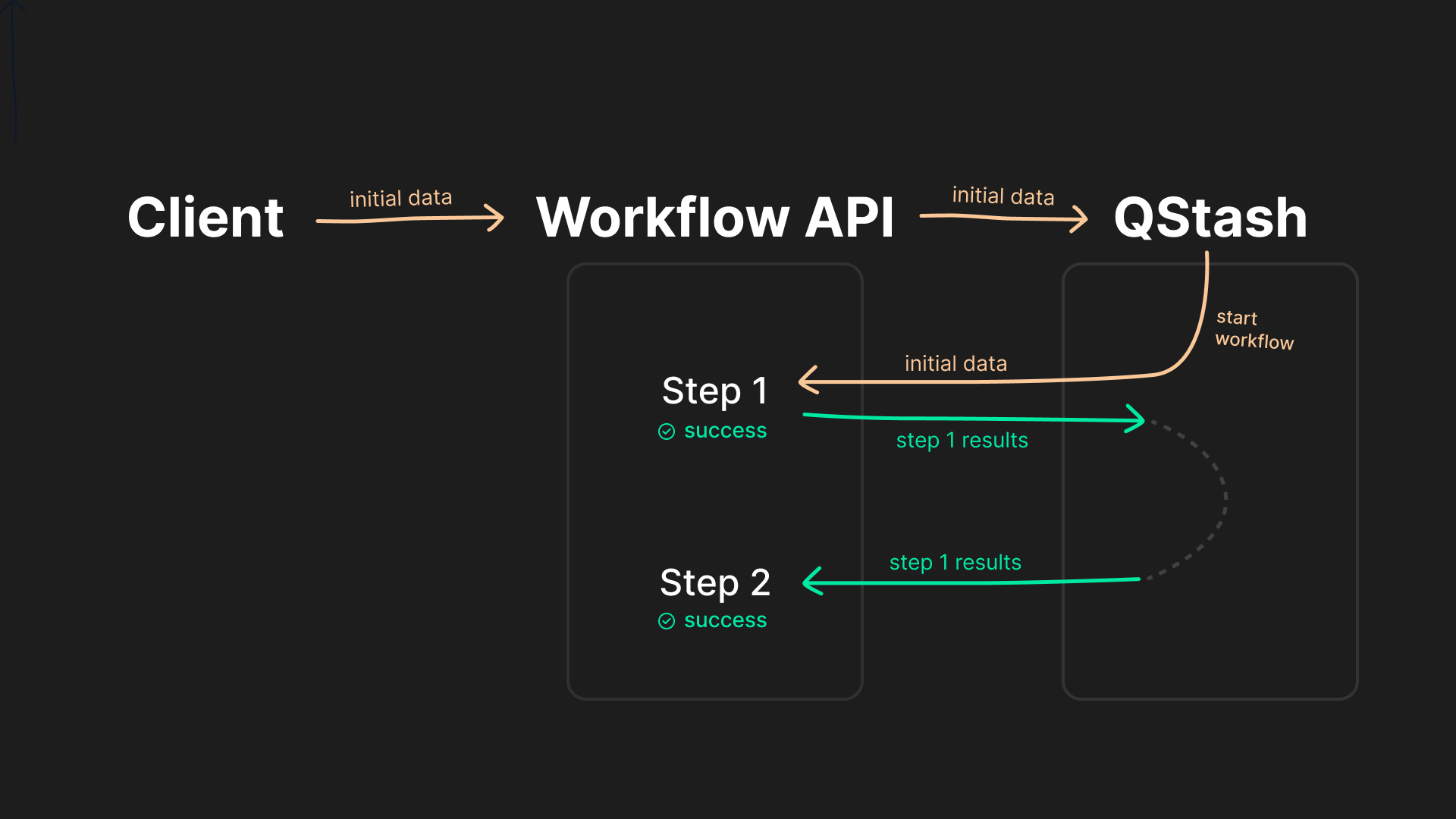
instead of treating your entire function as one continuous execution, **it splits your logic into multiple steps in a workflow endpoint**, each managed and retried by the orchestration engine.
* Each step is executed in its own **HTTP call** to your application.
* After a step finishes, its result is **stored in durable state** inside Upstash Workflow.
* On the next execution, Workflow **skips completed steps** and **resumes exactly where it left off by restoring the previous step results**.
* If a step fails, it is retried automatically based on your retry configuration.
This means you no longer need custom queues, retry logic, or manual state management. You just define your workflow once, and the orchestration layer ensures that **every step runs once, in order, with full reliability.**
 ***
## Extended Features
Upstash Workflow extends the basic step model with additional primitives:
* **Parallel Steps**
Define multiple steps (e.g. inside a `Promise.all()`). The engine detects independent work and runs steps concurrently as separate HTTP executions.
* **Delays / Sleep**
`context.sleep` and `context.sleepUntil` allow pausing a workflow for hours, days, or even months. No compute is held during the wait time; execution resumes when the delay has expired.
* **External Event Handling**
`context.waitForEvent` pauses execution until you notify the workflow externally (e.g. via webhook or user action). State is persisted until the event arrives.
* **External Calls**
Use `context.call` to have Upstash perform slow or unreliable HTTP calls. Instead of blocking your function, the call is handled by Upstash. When it completes, the workflow resumes with the response.
***
This architecture makes your serverless functions durable, reliable, and performance‑optimized, even in the face of runtime errors or temporary service outages.
It's quick and easy to get started: follow the [Quickstarts](/workflow/quickstarts/platforms) to define your first workflow in minutes.
***
## Extended Features
Upstash Workflow extends the basic step model with additional primitives:
* **Parallel Steps**
Define multiple steps (e.g. inside a `Promise.all()`). The engine detects independent work and runs steps concurrently as separate HTTP executions.
* **Delays / Sleep**
`context.sleep` and `context.sleepUntil` allow pausing a workflow for hours, days, or even months. No compute is held during the wait time; execution resumes when the delay has expired.
* **External Event Handling**
`context.waitForEvent` pauses execution until you notify the workflow externally (e.g. via webhook or user action). State is persisted until the event arrives.
* **External Calls**
Use `context.call` to have Upstash perform slow or unreliable HTTP calls. Instead of blocking your function, the call is handled by Upstash. When it completes, the workflow resumes with the response.
***
This architecture makes your serverless functions durable, reliable, and performance‑optimized, even in the face of runtime errors or temporary service outages.
It's quick and easy to get started: follow the [Quickstarts](/workflow/quickstarts/platforms) to define your first workflow in minutes.