> ## Documentation Index
> Fetch the complete documentation index at: https://upstash.com/docs/llms.txt
> Use this file to discover all available pages before exploring further.
# Embedding Models
To store text in a vector database, it must first be converted into a vector,
also known as an embedding. Typically, this vectorization is done by a third
party.
By selecting an embedding model when you create your Upstash Vector database,
you can now upsert and query raw string data when using your database instead of
converting your text to a vector first. The vectorization is done automatically
by your selected model.
## Upstash Embedding Models - Video Guide
Let's look at how Upstash embeddings work, how the models we offer compare, and
which model is best for your use case.
## Models
Upstash Vector comes with a variety of embedding models that score well in the
[MTEB](https://huggingface.co/spaces/mteb/leaderboard) leaderboard, a benchmark
for measuring the performance of embedding models. They support use cases such
as classification, clustering, or retrieval.
You can choose the following general purpose models for dense and hybrid indexes:
| Name | Dimension | Sequence Length | MTEB |
| ----------------------------------------------------------------------- | --------- | --------------- | ----- |
| [BAAI/bge-large-en-v1.5](https://huggingface.co/BAAI/bge-large-en-v1.5) | 1024 | 512 | 64.23 |
| [BAAI/bge-base-en-v1.5](https://huggingface.co/BAAI/bge-base-en-v1.5) | 768 | 512 | 63.55 |
| [BAAI/bge-small-en-v1.5](https://huggingface.co/BAAI/bge-small-en-v1.5) | 384 | 512 | 62.17 |
| [BAAI/bge-m3](https://huggingface.co/BAAI/bge-m3) | 1024 | 8192 | \* |
The sequence length is not a hard limit. Models truncate the input
appropriately when given a raw text data that would result in more tokens than
the given sequence length. However, we recommend using appropriate models and
not exceeding their sequence length to have more accurate results.
MTEB score for the `BAAI/bge-m3` is not fully measured.
For sparse and hybrid indexes, on the following models can be selected:
| Name |
| ------------------------------------------------- |
| [BAAI/bge-m3](https://huggingface.co/BAAI/bge-m3) |
| [BM25](https://en.wikipedia.org/wiki/Okapi_BM25) |
See [Creating Sparse Vectors](/vector/features/sparseindexes#creating-sparse-vectors) for the details of the above models.
## Using a Model
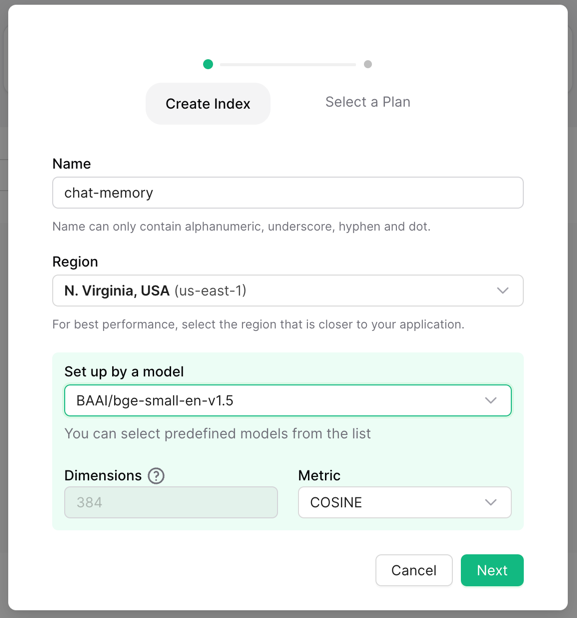
To start using embedding models, create the index with a model of your choice.
Then, you can start upserting and querying raw text data without any extra
setup.
```python theme={"system"}
from upstash_vector import Index
index = Index(
url="UPSTASH_VECTOR_REST_URL",
token="UPSTASH_VECTOR_REST_TOKEN",
)
index.upsert(
[("id-0", "Upstash is a serverless data platform.", {"field": "value"})],
)
```
```js theme={"system"}
import { Index } from "@upstash/vector"
const index = new Index({
url: "UPSTASH_VECTOR_REST_URL",
token: "UPSTASH_VECTOR_REST_TOKEN",
})
await index.upsert({
id: "id-0",
data: "Upstash is a serverless data platform.",
metadata: {
field: "value",
},
})
```
```go theme={"system"}
package main
import (
"github.com/upstash/vector-go"
)
func main() {
index := vector.NewIndex("UPSTASH_VECTOR_REST_URL", "UPSTASH_VECTOR_REST_TOKEN")
index.UpsertData(vector.UpsertData{
Id: "id-0",
Data: "Upstash is a serverless data platform.",
Metadata: map[string]any{"field": "value"},
})
}
```
```php theme={"system"}
use Upstash\Vector\Index;
use Upstash\Vector\DataUpsert;
$index = new Index(
url: 'UPSTASH_VECTOR_REST_URL',
token: 'UPSTASH_VECTOR_REST_TOKEN',
);
$index->upsertData(new DataUpsert(
id: 'id-0',
data: 'Upstash is a serverless data platform.',
metadata: [
'field' => 'value',
],
));
```
```shell theme={"system"}
curl $UPSTASH_VECTOR_REST_URL/upsert-data \
-X POST \
-H "Authorization: Bearer $UPSTASH_VECTOR_REST_TOKEN" \
-d '{"id": "1", "data": "Upstash is a serverless data platform.", "metadata": {"field": "value"}}'
```
```python theme={"system"}
from upstash_vector import Index
index = Index(
url="UPSTASH_VECTOR_REST_URL",
token="UPSTASH_VECTOR_REST_TOKEN",
)
index.query(
data="What is Upstash?",
top_k=1,
include_metadata=True,
)
```
```js theme={"system"}
import { Index } from "@upstash/vector"
const index = new Index({
url: "UPSTASH_VECTOR_REST_URL",
token: "UPSTASH_VECTOR_REST_TOKEN",
})
await index.query({
data: "What is Upstash?",
topK: 1,
includeMetadata: true,
})
```
```go theme={"system"}
package main
import (
"github.com/upstash/vector-go"
)
func main() {
index := vector.NewIndex("UPSTASH_VECTOR_REST_URL", "UPSTASH_VECTOR_REST_TOKEN")
index.QueryData(vector.QueryData{
Data: "What is Upstash?",
TopK: 1,
IncludeMetadata: true,
})
}
```
```php theme={"system"}
use Upstash\Vector\Index;
use Upstash\Vector\DataQuery;
$index = new Index(
url: 'UPSTASH_VECTOR_REST_URL',
token: 'UPSTASH_VECTOR_REST_TOKEN',
);
$index->queryData(new DataQuery(
data: 'What is Upstash?',
topK: 1,
includeMetadata: true,
));
```
```shell theme={"system"}
curl $UPSTASH_VECTOR_REST_URL/query-data \
-H "Authorization: Bearer $UPSTASH_VECTOR_REST_TOKEN" \
-d '{"data": "What is Upstash?", "topK": 1, "includeMetadata": "true"}'
```
 Then, you can start upserting and querying raw text data without any extra
setup.
Then, you can start upserting and querying raw text data without any extra
setup.