> ## Documentation Index
> Fetch the complete documentation index at: https://upstash.com/docs/llms.txt
> Use this file to discover all available pages before exploring further.
# Serverless Redis on Google Cloud Functions
You can find the project source code on GitHub.
Google Cloud Functions is the second most popular serverless execution platform.
Similar to AWS Lambda it is stateless, namely you need to access external
resources to read or write your applications state. In this post, we will
introduce Redis as a database for your Google Cloud functions.
This tutorial shows how to build a serverless API with Redis on Google Cloud
Functions. The API will simply count the views and show it in JSON format.
### Prerequisites
1. [Create a Google Cloud Project.](https://cloud.google.com/resource-manager/docs/creating-managing-projects)
2. [Enable billing for your project.](https://cloud.google.com/billing/docs/how-to/verify-billing-enabled#console)
3. Enable Cloud Functions, Cloud Build, Artifact Registry, Cloud Run, Logging, and Pub/Sub APIs.
### Database Setup
Create a Redis database using [Upstash Console](https://console.upstash.com) or [Upstash CLI](https://github.com/upstash/cli). Copy `UPSTASH_REDIS_REST_URL` and `UPSTASH_REDIS_REST_TOKEN` for the next steps.
### Counter Function Setup & Deploy
1. Go to [Cloud Functions](https://console.cloud.google.com/functions/list) in Google Cloud Console.
2. Click **Create Function**.
3. Setup **Basics and Trigger** Configuration like below:
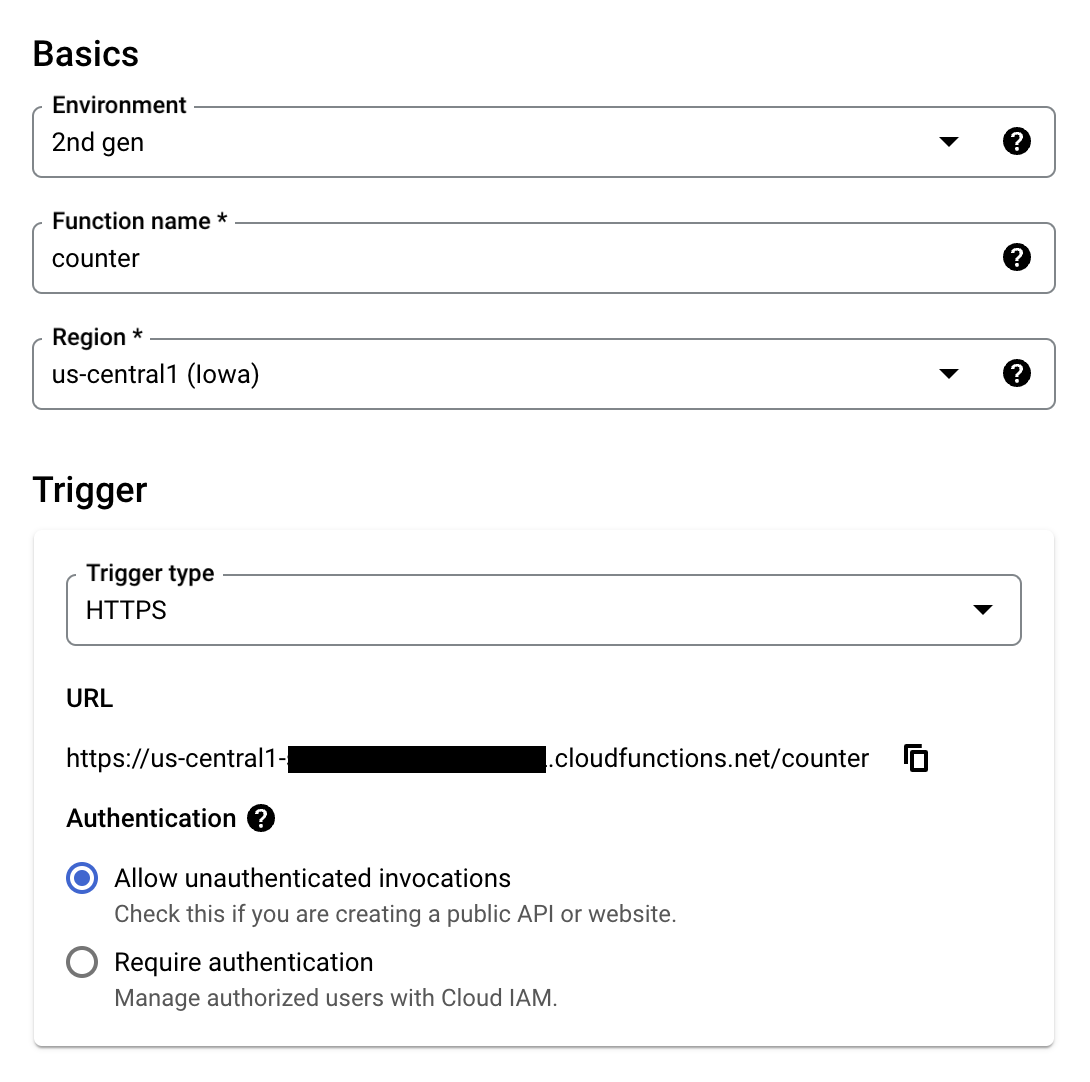 4. Using your `UPSTASH_REDIS_REST_URL` and `UPSTASH_REDIS_REST_TOKEN`, setup **Runtime environment variables** under **Runtime, build, connections and privacy settings** like below.
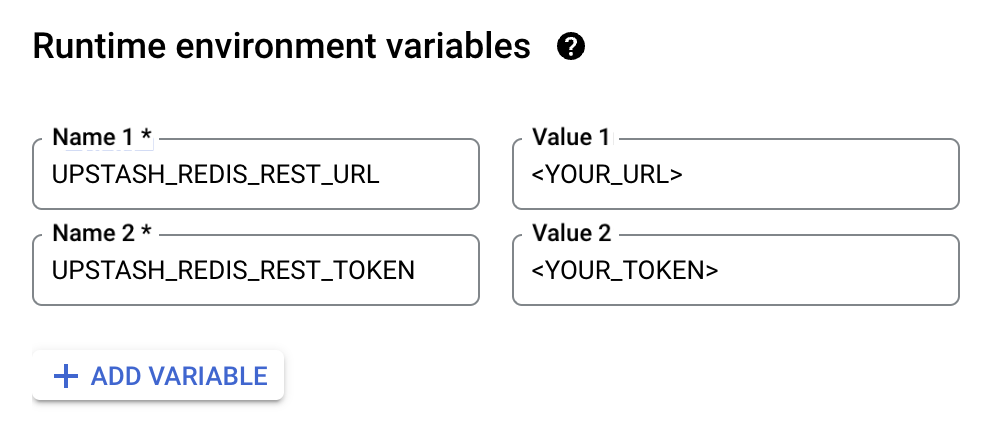 5. Click **Next**.
6. Set **Entry point** to `counter`.
7. Update `index.js`
```js index.js theme={"system"}
const { Redis } = require("@upstash/redis");
const functions = require('@google-cloud/functions-framework');
const redis = new Redis({
url: process.env.UPSTASH_REDIS_REST_URL,
token: process.env.UPSTASH_REDIS_REST_TOKEN
});
functions.http('counter', async (req, res) => {
const count = await redis.incr("counter");
res.send("Counter:" + count);
});
```
8. Update `package.json` to include `@upstash/redis`.
```json package.json theme={"system"}
{
"dependencies": {
"@google-cloud/functions-framework": "^3.0.0",
"@upstash/redis": "^1.31.6"
}
}
```
9. Click **Deploy**.
10. Visit the given URL.
5. Click **Next**.
6. Set **Entry point** to `counter`.
7. Update `index.js`
```js index.js theme={"system"}
const { Redis } = require("@upstash/redis");
const functions = require('@google-cloud/functions-framework');
const redis = new Redis({
url: process.env.UPSTASH_REDIS_REST_URL,
token: process.env.UPSTASH_REDIS_REST_TOKEN
});
functions.http('counter', async (req, res) => {
const count = await redis.incr("counter");
res.send("Counter:" + count);
});
```
8. Update `package.json` to include `@upstash/redis`.
```json package.json theme={"system"}
{
"dependencies": {
"@google-cloud/functions-framework": "^3.0.0",
"@upstash/redis": "^1.31.6"
}
}
```
9. Click **Deploy**.
10. Visit the given URL.