> ## Documentation Index
> Fetch the complete documentation index at: https://upstash.com/docs/llms.txt
> Use this file to discover all available pages before exploring further.
# Getting Started
> Create an Upstash Redis database in seconds
Upstash Redis is a **highly available, infinitely scalable** Redis-compatible database:
* 99.99% uptime guarantee with auto-scaling ([Prod Pack](/redis/overall/enterprise#prod-pack-features))
* Ultra-low latency worldwide
* Multi-region replication
* Multi-Zone High Availability ([Prod Pack](/redis/overall/enterprise#prod-pack-features))
* Durable, persistent storage without sacrificing performance
* Automatic backups
* Optional SOC-2 compliance, encryption at rest and much more
***
## 1. Create an Upstash Redis Database
Log in to the [Upstash Console](https://console.upstash.com) (or [sign up](https://console.upstash.com) for a free account). From the **Redis** tab, click `+ Create Database` in the upper right corner. A dialog opens up:
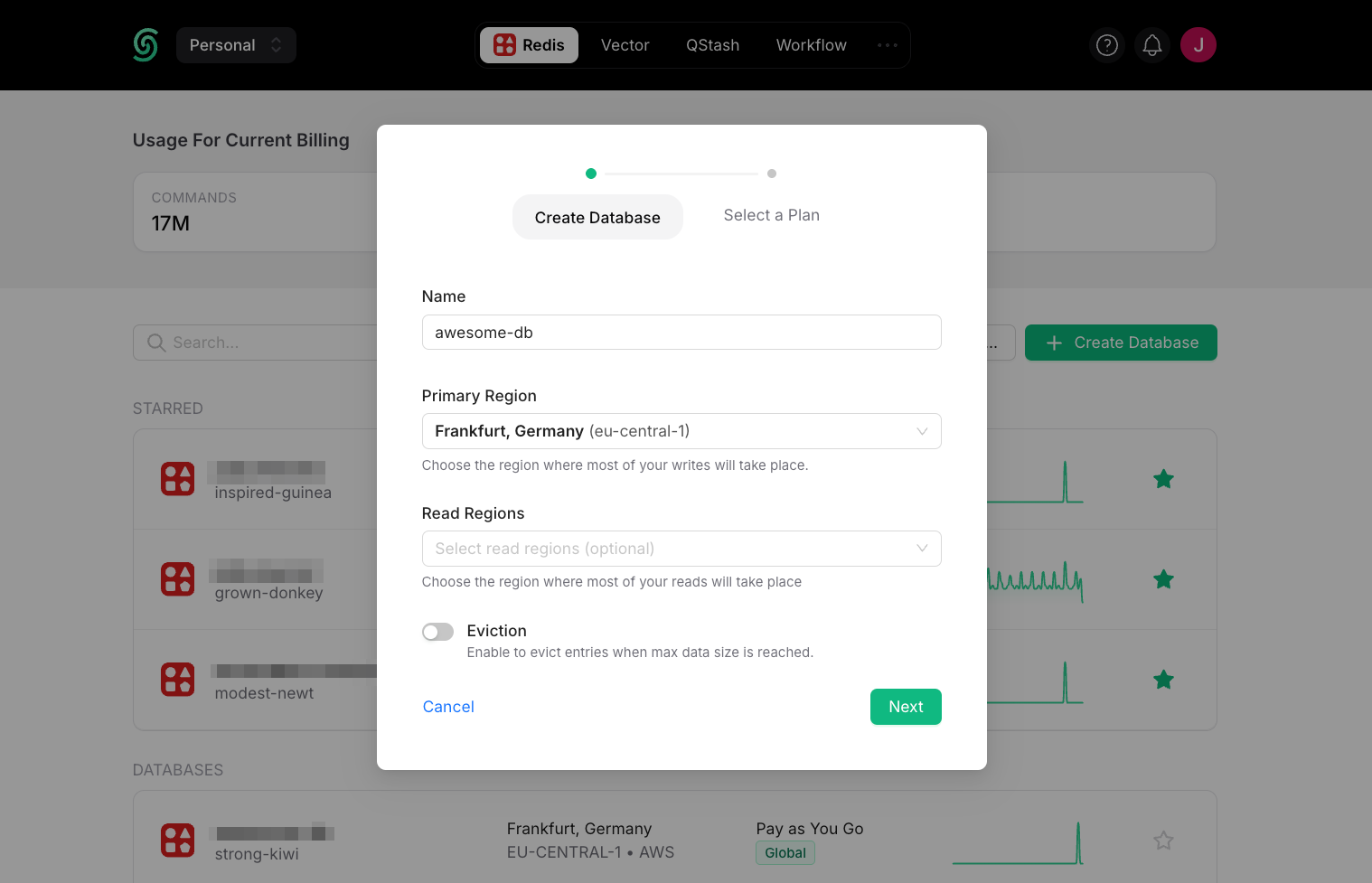 **Database Name:** Enter a name for your database.
**Primary Region and Read Regions:** For optimal performance, select the Primary Region closest to where most of your writes will occur. Select the read region(s) where most of your reads will occur.
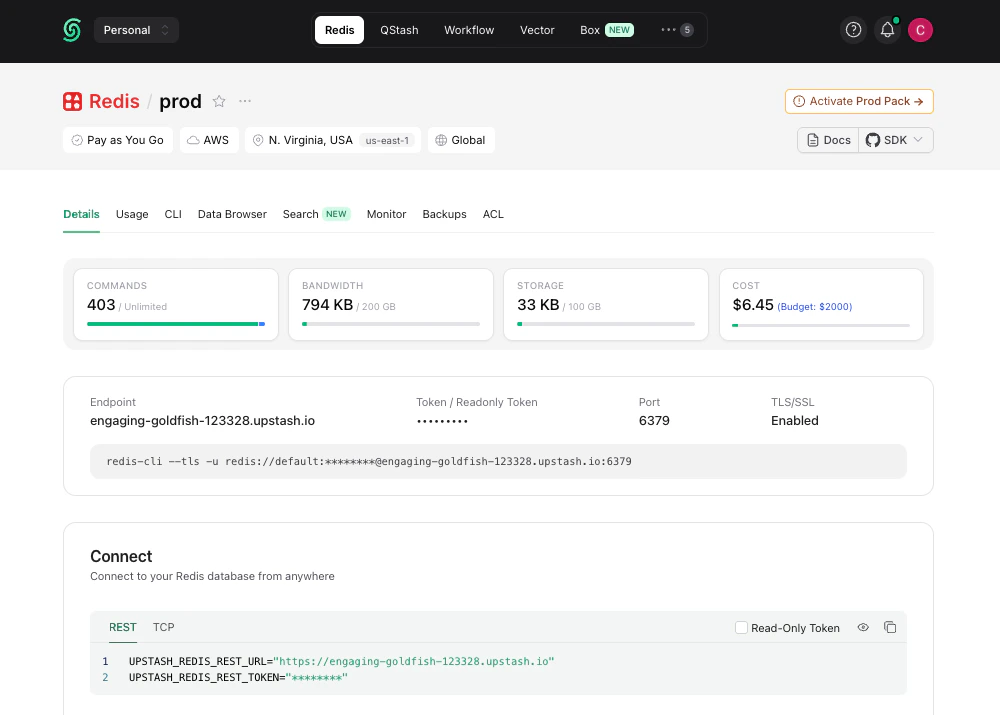
Once you click `Next` and select a plan, your database is running and ready to connect:
**Database Name:** Enter a name for your database.
**Primary Region and Read Regions:** For optimal performance, select the Primary Region closest to where most of your writes will occur. Select the read region(s) where most of your reads will occur.
Once you click `Next` and select a plan, your database is running and ready to connect:
 ***
## 2. Connect to Your Database
You can connect to Upstash Redis with any Redis client. For simplicity, we'll use `redis-cli`. See the [Connect Your Client](../howto/connect-client) section for connecting via our TypeScript or Python SDKs and other clients.
You can copy the `redis-cli` command to connect to your database from the **Details** tab of your database in the Upstash Console.
The Redis CLI is included in the official Redis distribution. If you don't
have Redis installed, you can get it [here](https://redis.io/docs/latest/operate/oss_and_stack/install/install-redis/).
Connect to your database and execute commands on it:
```bash theme={"system"}
> redis-cli --tls -a PASSWORD -h ENDPOINT -p PORT
ENDPOINT:PORT> set counter 0
OK
ENDPOINT:PORT> get counter
"0"
ENDPOINT:PORT> incr counter
(int) 1
ENDPOINT:PORT> incr counter
(int) 2
```
As you run commands, you'll see updates to your database metrics in (almost) real-time. These database metrics are refreshed every 10 seconds.
***
## 2. Connect to Your Database
You can connect to Upstash Redis with any Redis client. For simplicity, we'll use `redis-cli`. See the [Connect Your Client](../howto/connect-client) section for connecting via our TypeScript or Python SDKs and other clients.
You can copy the `redis-cli` command to connect to your database from the **Details** tab of your database in the Upstash Console.
The Redis CLI is included in the official Redis distribution. If you don't
have Redis installed, you can get it [here](https://redis.io/docs/latest/operate/oss_and_stack/install/install-redis/).
Connect to your database and execute commands on it:
```bash theme={"system"}
> redis-cli --tls -a PASSWORD -h ENDPOINT -p PORT
ENDPOINT:PORT> set counter 0
OK
ENDPOINT:PORT> get counter
"0"
ENDPOINT:PORT> incr counter
(int) 1
ENDPOINT:PORT> incr counter
(int) 2
```
As you run commands, you'll see updates to your database metrics in (almost) real-time. These database metrics are refreshed every 10 seconds.
 Congratulations! You have created an ultra-fast Upstash Redis database! 🎉
**New: Manage Upstash Redis with your agent**
Manage Upstash Redis databases from Claude and other AI tools by using our [MCP server](/agent-resources/mcp).
## Next steps
* [Connect your client](../howto/connect-client): TypeScript, Python, Go, Java, and other Redis clients.
* [Use cases](/redis/overall/usecases): caching, rate limiting, queues, pub/sub, AI workloads, and more.
* [Upstash Redis Search](/redis/search/introduction): full-text search built into Upstash Redis.
* [REST API](/redis/features/restapi): connect from edge and serverless runtimes where TCP is restricted.
Congratulations! You have created an ultra-fast Upstash Redis database! 🎉
**New: Manage Upstash Redis with your agent**
Manage Upstash Redis databases from Claude and other AI tools by using our [MCP server](/agent-resources/mcp).
## Next steps
* [Connect your client](../howto/connect-client): TypeScript, Python, Go, Java, and other Redis clients.
* [Use cases](/redis/overall/usecases): caching, rate limiting, queues, pub/sub, AI workloads, and more.
* [Upstash Redis Search](/redis/search/introduction): full-text search built into Upstash Redis.
* [REST API](/redis/features/restapi): connect from edge and serverless runtimes where TCP is restricted.