> ## Documentation Index
> Fetch the complete documentation index at: https://upstash.com/docs/llms.txt
> Use this file to discover all available pages before exploring further.
# Compare
In this section, we will compare Upstash with alternative cloud based solutions.
## AWS ElastiCache
* **Serverless Pricing:** Elasticache does not have a serverless pricing model.
The price does not scale to zero. You need to pay for the instances even when
you do not use them. Upstash charges per request.
* **REST API:** Unlike ElastiCache, Upstash has a built-in REST API, so you can
access from environments where TCP connections are not allowed such as edge
functions at Cloudflare Workers.
* **Access:** Elasticache is designed to be used inside AWS VPC. You can access
Upstash from anywhere.
* **Durability:** Upstash persists your data to the block storage in addition to
memory so you can use it as your primary database.
## AWS MemoryDB
* **Serverless Pricing:** Similar to Elasticache, MemoryDB does not offer a
serverless pricing model. The pricing does not scale down to zero, and even
the most affordable instance costs over \$200 per month. This means you are
required to pay for the instances regardless of usage. In contrast, Upstash
follows a different approach by charging per request. With Upstash, you only
incur charges when actively using your Redis database, ensuring that you do
not have to pay when it's not in use.
* **REST API:** Unlike MemoryDB, Upstash has a built-in REST API, so you can
access from environments where TCP connections are not allowed such as edge
functions at Cloudflare Workers.
* **Access:** MemoryDB is designed to be used inside AWS VPC. You can access
Upstash from anywhere.
## Redis Labs
* **Serverless Pricing:** Redis Labs does not have a serverless pricing model
either. The price does not scale to zero. You need to pay for the instances
even when you do not use them. Upstash charges per request, so you only pay
for your real usage.
* **REST API:** Unlike Redis Labs, Upstash has a built-in REST API, so you can
access from environments where TCP connections are not allowed such as edge
functions at Cloudflare Workers.
* **Durability:** Upstash persists your data to the block storage instantly in
addition to the memory, so you can use it as your primary database.
* **Full-text search:** Upstash offers [Upstash Redis Search](/redis/search/introduction), a fast
Tantivy-based full-text search extension that works with JSON, Hashes, and Strings out of the box
and stays automatically in sync as you write.
* **JSON:** Upstash supports the `JSON.*` commands natively. See [compatibility](/redis/overall/compatibility).
## AWS DynamoDB
* **Latency:** DynamoDB is a disk based data storage. Both write and read
latency are much higher than Redis. Check our
[benchmark app](https://serverless-battleground.vercel.app/) to get an idea.
* **Complex Pricing:** Initially, DynamoDB may appear cost-effective, but if you
begin utilizing advanced features such as DAX or Global Tables, you might
encounter unexpected expenses on your AWS bill. In contrast, Upstash offers a
more transparent pricing policy, ensuring that you are not taken by surprise.
With Upstash, you can optionally set a budget to cap your maximum costs,
providing clarity and preventing any unwelcome surprises in your billing.
* **Portability:** DynamoDB is exclusive to AWS and cannot be used outside of
the AWS platform. However, Redis is supported by numerous cloud providers and
can also be self-hosted. Upstash provides compatibility with Redis, ensuring
vendor neutrality.
* **Testability:** Running a local Redis for testing purposes is much easier
than running a local DynamoDB. Check
[this](https://stackoverflow.com/questions/26901613/easier-dynamodb-local-testing).
## FaunaDB
* **Latency:** FaunaDB is a globally consistent database. Consistency at global
level comes with performance cost. Check our
[benchmark app](https://serverless-battleground.vercel.app/) to get an idea.
* **Complex Pricing:** FaunaDB has a complicated pricing. It has 6 different
dimensions to calculate the price. Check
[this article](https://docs.fauna.com/fauna/current/manage/plans-billing/billing/)
where the pricing is explained. If your use case is write heavy and
if your requests have bigger payloads, then it can become expensive very easily.
On the other hand, Upstash has different options for different needs and
pricing is simple for all options. You pay per request in addition to
storage cost which is generally much smaller amount.
* **Portability:** FaunaDB is only supported by Fauna Inc. On the other hand,
you can use Redis almost in all cloud providers as well as you can host Redis
yourself. Upstash does not lock you to any vendor.
* **Testability:** Running a local Redis for testing purposes is much easier
than running a local FaunaDB. Check
[this](https://dev.to/englishcraig/how-to-set-up-faunadb-for-local-development-5ha7).
## What makes Upstash different?
You have a new project and you do not know how many requests will it receive?
You love the performance and simplicity of Redis. But all Redis Cloud services
charge you per instance or per GB of memory. But maybe your application will not
receive big traffic at first, then why will you pay the full amount?
Unfortunately none of the current Redis cloud products provides a real
`pay-per-use` pricing model.
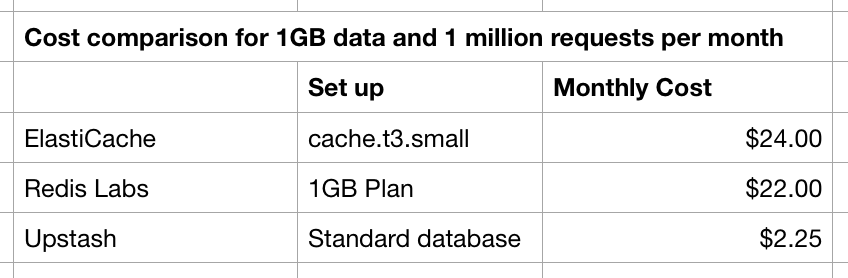
Let's do a simple calculation. Say I have a 1GB Redis database and I receive 1
million requests per month. For ElastiCache (cache.t3.small, \$0.034 hourly) this
costs at least \$24 not including data transfer and storage cost. For RedisLabs,
the 1GB plan costs \$22 per month. For Upstash the price is \$0.2 per 100k
requests. For 1 million, it is \$2 plus the storage cost that is \$0.25. So for
1GB, 1M request per months, ElastiCache is \$24, RedisLabs is \$22, Upstash is
\$2.25.
 **What if your product becomes popular and starts to gain high and steady
traffic?**
Most of the serverless products start to lose their spell if the service
receives steady and high traffic as it starts to cost higher than
server/instance based pricing models. To overcome this situation we give you
the option to switch to a [Fixed plan](/redis/overall/pricing). On a Fixed plan you set a
fixed price per month with a restriction on max throughput and data size. For high and
steady throughput use cases, Fixed plans cost less than pay-as-you-go.
The good thing is you can start your database with pay-as-you-go pricing and
move to a Fixed plan when you want. See [pricing](/redis/overall/pricing) and [enterprise plans](/redis/overall/enterprise) for more information.
Even if you choose not to upgrade to a Fixed plan, Upstash gives you control
over your spending through optional budgets. By default, there is no monthly
price ceiling on a pay-as-you-go database, but you can set a budget to cap
your costs. When a database hits its configured budget, its operations are
stopped, ensuring you never exceed the amount you've set.
**What if your product becomes popular and starts to gain high and steady
traffic?**
Most of the serverless products start to lose their spell if the service
receives steady and high traffic as it starts to cost higher than
server/instance based pricing models. To overcome this situation we give you
the option to switch to a [Fixed plan](/redis/overall/pricing). On a Fixed plan you set a
fixed price per month with a restriction on max throughput and data size. For high and
steady throughput use cases, Fixed plans cost less than pay-as-you-go.
The good thing is you can start your database with pay-as-you-go pricing and
move to a Fixed plan when you want. See [pricing](/redis/overall/pricing) and [enterprise plans](/redis/overall/enterprise) for more information.
Even if you choose not to upgrade to a Fixed plan, Upstash gives you control
over your spending through optional budgets. By default, there is no monthly
price ceiling on a pay-as-you-go database, but you can set a budget to cap
your costs. When a database hits its configured budget, its operations are
stopped, ensuring you never exceed the amount you've set.