> ## Documentation Index
> Fetch the complete documentation index at: https://upstash.com/docs/llms.txt
> Use this file to discover all available pages before exploring further.
# effect-mq with Upstash Redis
You can use [effect-mq](https://www.effect-mq.com) with Upstash Redis. effect-mq is a background job library for [Effect](https://effect.website): you define a job once with a schema-typed payload, enqueue it from anywhere, and run it in a worker. Its Redis store (`effect-mq/redis`) keeps every operation atomic with a single Lua script, so you can use Upstash Redis as its storage.
## Install
```bash theme={"system"}
npm install effect-mq effect@rc @effect/platform-node@rc redis
```
`effect-mq` targets Effect v4, which is currently published under the `rc` tag; `@effect/platform-node@latest` still targets Effect v3, so install it with the `rc` tag as well. The Redis store does not bundle a client; on Node.js it uses `node-redis` through `@effect/platform-node`. On Bun, install `@effect/platform-bun@rc` instead and use `BunRedis` (no extra client needed).
## Usage
First, get your connection string from the **TCP** tab of the **Connect** section on your database page in the [Upstash Console](https://console.upstash.com):
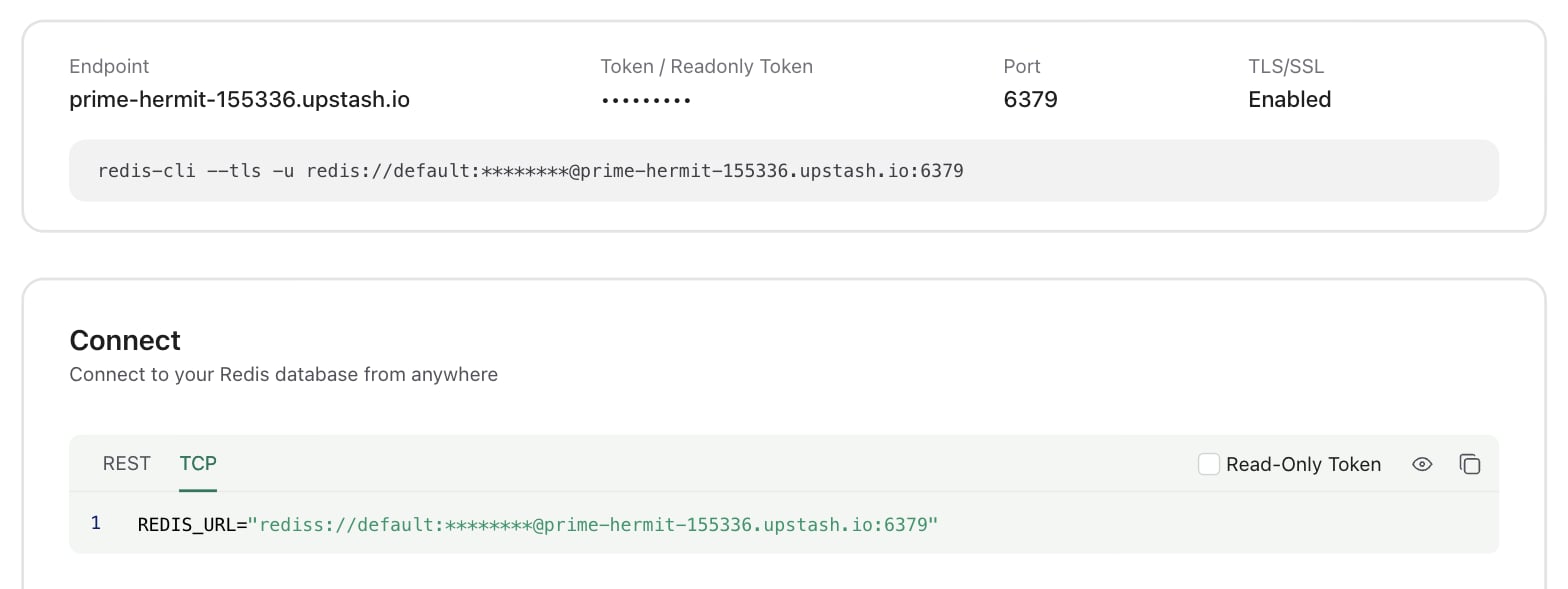 Then create the Redis store layer with that URL. It must start with `rediss://` since Upstash requires TLS; `node-redis` picks up TLS from the scheme automatically, so no extra options are needed:
```typescript theme={"system"}
import { RedisJobStore } from "effect-mq/redis"
import { NodeRedis } from "@effect/platform-node"
import { Layer } from "effect"
const StoreLive = RedisJobStore.layer({
prefix: "myapp-jobs", // key namespace (default "effect-mq")
historyTtl: "7 days" // optional retention ceiling for finished jobs
}).pipe(
Layer.provide(
NodeRedis.layer({
url: "rediss://default:UPSTASH_REDIS_PASSWORD@UPSTASH_REDIS_ENDPOINT:6379"
})
)
)
```
Define a job, enqueue it, and run a worker:
```typescript theme={"system"}
import { Job, Worker } from "effect-mq"
import { Effect, Layer, Schema } from "effect"
// Define the job once; producers and workers share this definition
class SendEmail extends Job.make("SendEmail", {
payload: { to: Schema.String, subject: Schema.String },
success: Schema.String,
queue: "email",
defaults: {
attempts: 3,
backoff: { type: "exponential", delay: "1 second" }
}
}) {}
// Enqueue from anywhere that has the store in context
const producer = Effect.gen(function* () {
const jobId = yield* SendEmail.enqueue({ to: "ada@example.com", subject: "hi" })
// ...or enqueue and await the typed result
const messageId = yield* SendEmail.execute(
{ to: "grace@example.com", subject: "now" },
{ delay: "5 seconds", priority: 2 }
)
})
// Run a worker
const RunnerLive = SendEmail.toLayer(
(payload) => Effect.succeed(`sent to ${payload.to}`),
{ concurrency: 5 }
).pipe(
Layer.provideMerge(Worker.layer()),
Layer.provideMerge(StoreLive)
)
```
Provide `RunnerLive` to your app and the worker claims, runs, retries, and records jobs. The producer only needs `StoreLive`, so your API server can enqueue without depending on any handler code.
## Connecting over HTTP
The setup above talks to Upstash over a TCP connection, which suits a long-running worker process. You may prefer to connect over HTTP with [`@upstash/redis`](/docs/redis/sdks/ts/overview) instead when:
* **You enqueue jobs from serverless or edge functions.** Vercel Functions, Cloudflare Workers, Lambda, and similar runtimes either have no TCP sockets or would open a fresh TLS connection on every cold start. `@upstash/redis` uses `fetch`, so it works anywhere and has no connection to manage.
* **You run many short-lived instances.** Each TCP client holds a connection open (two for the worker, one of them for pub/sub), which adds up across many serverless invocations or autoscaled replicas. HTTP requests are stateless, so there is no connection count to watch.
effect-mq does not need a separate storage driver for this. Its Redis store talks to Effect's client-agnostic `Redis` service, which only requires a `send` function for raw commands and a `subscribe` function for pub/sub wake-ups. `@upstash/redis` provides both (`exec` and `subscribe`), so the same store, Lua scripts, and key layout work unchanged.
Install the client:
```bash theme={"system"}
npm install @upstash/redis
```
Add the following layer, which provides the `Redis` service over the Upstash REST API:
```typescript upstash-redis.ts theme={"system"}
import { Redis as Upstash, type RedisConfigNodejs } from "@upstash/redis"
import { Redis } from "effect/unstable/persistence"
import { Deferred, Effect, Layer } from "effect"
const make = (options: Omit) =>
Effect.gen(function* () {
// The store reads back the JSON strings it wrote, so replies must not be auto-parsed
const client = new Upstash({ ...options, automaticDeserialization: false })
const fail = (cause: unknown) => new Redis.RedisError({ cause })
return yield* Redis.make({
send: (command: string, ...args: ReadonlyArray) =>
Effect.tryPromise({ try: () => client.exec([command, ...args]), catch: fail }),
subscribe: (channel, onMessage) =>
Effect.gen(function* () {
const terminal = yield* Deferred.make()
yield* Effect.acquireRelease(
Effect.try({
try: () => {
const subscriber = client.subscribe(channel)
subscriber.on("message", (event) =>
onMessage({ channel: event.channel, message: String(event.message) })
)
subscriber.on("error", (error) => Effect.runSync(Deferred.fail(terminal, fail(error))))
return subscriber
},
catch: fail
}),
(subscriber) => Effect.promise(() => subscriber.unsubscribe().catch(() => {}))
)
return Deferred.await(terminal)
})
})
})
export const UpstashRedis = {
/** Provides Effect's `Redis` service over the Upstash REST API. */
layer: (options: Omit) =>
Layer.effect(Redis.Redis, make(options))
}
```
Then provide it to the store in place of `NodeRedis`, using the REST URL and token from the **REST** tab of the **Connect** section on your database page:
```typescript theme={"system"}
import { RedisJobStore } from "effect-mq/redis"
import { Layer } from "effect"
import { UpstashRedis } from "./upstash-redis"
const StoreLive = RedisJobStore.layer({ prefix: "myapp-jobs" }).pipe(
Layer.provide(
UpstashRedis.layer({
url: "UPSTASH_REDIS_REST_URL",
token: "UPSTASH_REDIS_REST_TOKEN"
})
)
)
```
Everything else on this page stays the same: jobs, `enqueue`, `execute`, and workers all work over HTTP, including pub/sub wake-ups so idle workers pick up new jobs immediately instead of waiting for `pollInterval`.
Because both clients run the same Lua scripts against the same keys, you can mix them under one `prefix`. A common split is to enqueue over HTTP from serverless functions and run the worker over TCP on a long-running process.
## Billing Optimization
effect-mq workers poll Redis regularly (`pollInterval`), heartbeat locks on active jobs, and sweep for stalled jobs and history, even when there is no queue activity. This can incur extra costs because Upstash charges per request on the Pay-As-You-Go plan. With the introduction of [our Fixed plans](/docs/redis/overall/pricing#all-plans-and-limits), **we recommend switching to a Fixed plan to avoid increased command count and high costs in effect-mq use cases.**
## Related topics
- [Use Cases](/docs/redis/overall/usecases.md)
- [FLUSHALL](/docs/redis/commands/server/flushall.md)
- [History](/docs/realtime/features/history.md)
- [Advanced Settings](/docs/search/features/advanced-settings.md)
- [Listen Keyspace Notifications](/docs/redis/howto/keyspacenotifications.md)
Then create the Redis store layer with that URL. It must start with `rediss://` since Upstash requires TLS; `node-redis` picks up TLS from the scheme automatically, so no extra options are needed:
```typescript theme={"system"}
import { RedisJobStore } from "effect-mq/redis"
import { NodeRedis } from "@effect/platform-node"
import { Layer } from "effect"
const StoreLive = RedisJobStore.layer({
prefix: "myapp-jobs", // key namespace (default "effect-mq")
historyTtl: "7 days" // optional retention ceiling for finished jobs
}).pipe(
Layer.provide(
NodeRedis.layer({
url: "rediss://default:UPSTASH_REDIS_PASSWORD@UPSTASH_REDIS_ENDPOINT:6379"
})
)
)
```
Define a job, enqueue it, and run a worker:
```typescript theme={"system"}
import { Job, Worker } from "effect-mq"
import { Effect, Layer, Schema } from "effect"
// Define the job once; producers and workers share this definition
class SendEmail extends Job.make("SendEmail", {
payload: { to: Schema.String, subject: Schema.String },
success: Schema.String,
queue: "email",
defaults: {
attempts: 3,
backoff: { type: "exponential", delay: "1 second" }
}
}) {}
// Enqueue from anywhere that has the store in context
const producer = Effect.gen(function* () {
const jobId = yield* SendEmail.enqueue({ to: "ada@example.com", subject: "hi" })
// ...or enqueue and await the typed result
const messageId = yield* SendEmail.execute(
{ to: "grace@example.com", subject: "now" },
{ delay: "5 seconds", priority: 2 }
)
})
// Run a worker
const RunnerLive = SendEmail.toLayer(
(payload) => Effect.succeed(`sent to ${payload.to}`),
{ concurrency: 5 }
).pipe(
Layer.provideMerge(Worker.layer()),
Layer.provideMerge(StoreLive)
)
```
Provide `RunnerLive` to your app and the worker claims, runs, retries, and records jobs. The producer only needs `StoreLive`, so your API server can enqueue without depending on any handler code.
## Connecting over HTTP
The setup above talks to Upstash over a TCP connection, which suits a long-running worker process. You may prefer to connect over HTTP with [`@upstash/redis`](/docs/redis/sdks/ts/overview) instead when:
* **You enqueue jobs from serverless or edge functions.** Vercel Functions, Cloudflare Workers, Lambda, and similar runtimes either have no TCP sockets or would open a fresh TLS connection on every cold start. `@upstash/redis` uses `fetch`, so it works anywhere and has no connection to manage.
* **You run many short-lived instances.** Each TCP client holds a connection open (two for the worker, one of them for pub/sub), which adds up across many serverless invocations or autoscaled replicas. HTTP requests are stateless, so there is no connection count to watch.
effect-mq does not need a separate storage driver for this. Its Redis store talks to Effect's client-agnostic `Redis` service, which only requires a `send` function for raw commands and a `subscribe` function for pub/sub wake-ups. `@upstash/redis` provides both (`exec` and `subscribe`), so the same store, Lua scripts, and key layout work unchanged.
Install the client:
```bash theme={"system"}
npm install @upstash/redis
```
Add the following layer, which provides the `Redis` service over the Upstash REST API:
```typescript upstash-redis.ts theme={"system"}
import { Redis as Upstash, type RedisConfigNodejs } from "@upstash/redis"
import { Redis } from "effect/unstable/persistence"
import { Deferred, Effect, Layer } from "effect"
const make = (options: Omit) =>
Effect.gen(function* () {
// The store reads back the JSON strings it wrote, so replies must not be auto-parsed
const client = new Upstash({ ...options, automaticDeserialization: false })
const fail = (cause: unknown) => new Redis.RedisError({ cause })
return yield* Redis.make({
send: (command: string, ...args: ReadonlyArray) =>
Effect.tryPromise({ try: () => client.exec([command, ...args]), catch: fail }),
subscribe: (channel, onMessage) =>
Effect.gen(function* () {
const terminal = yield* Deferred.make()
yield* Effect.acquireRelease(
Effect.try({
try: () => {
const subscriber = client.subscribe(channel)
subscriber.on("message", (event) =>
onMessage({ channel: event.channel, message: String(event.message) })
)
subscriber.on("error", (error) => Effect.runSync(Deferred.fail(terminal, fail(error))))
return subscriber
},
catch: fail
}),
(subscriber) => Effect.promise(() => subscriber.unsubscribe().catch(() => {}))
)
return Deferred.await(terminal)
})
})
})
export const UpstashRedis = {
/** Provides Effect's `Redis` service over the Upstash REST API. */
layer: (options: Omit) =>
Layer.effect(Redis.Redis, make(options))
}
```
Then provide it to the store in place of `NodeRedis`, using the REST URL and token from the **REST** tab of the **Connect** section on your database page:
```typescript theme={"system"}
import { RedisJobStore } from "effect-mq/redis"
import { Layer } from "effect"
import { UpstashRedis } from "./upstash-redis"
const StoreLive = RedisJobStore.layer({ prefix: "myapp-jobs" }).pipe(
Layer.provide(
UpstashRedis.layer({
url: "UPSTASH_REDIS_REST_URL",
token: "UPSTASH_REDIS_REST_TOKEN"
})
)
)
```
Everything else on this page stays the same: jobs, `enqueue`, `execute`, and workers all work over HTTP, including pub/sub wake-ups so idle workers pick up new jobs immediately instead of waiting for `pollInterval`.
Because both clients run the same Lua scripts against the same keys, you can mix them under one `prefix`. A common split is to enqueue over HTTP from serverless functions and run the worker over TCP on a long-running process.
## Billing Optimization
effect-mq workers poll Redis regularly (`pollInterval`), heartbeat locks on active jobs, and sweep for stalled jobs and history, even when there is no queue activity. This can incur extra costs because Upstash charges per request on the Pay-As-You-Go plan. With the introduction of [our Fixed plans](/docs/redis/overall/pricing#all-plans-and-limits), **we recommend switching to a Fixed plan to avoid increased command count and high costs in effect-mq use cases.**
## Related topics
- [Use Cases](/docs/redis/overall/usecases.md)
- [FLUSHALL](/docs/redis/commands/server/flushall.md)
- [History](/docs/realtime/features/history.md)
- [Advanced Settings](/docs/search/features/advanced-settings.md)
- [Listen Keyspace Notifications](/docs/redis/howto/keyspacenotifications.md)