> ## Documentation Index
> Fetch the complete documentation index at: https://upstash.com/docs/llms.txt
> Use this file to discover all available pages before exploring further.
# Connect Your Client
Upstash works with Redis® API, that means you can use any Redis client with
Upstash. At the [Redis Clients](https://redis.io/clients) page you can find the
list of Redis clients in different languages.
Simplest way to connect to your database is to use `redis-cli`.
Because it is already covered in [Getting Started](../overall/getstarted), we
will skip it here.
## Database
After completing the [getting started](../overall/getstarted) guide, you will
see the database page as below:
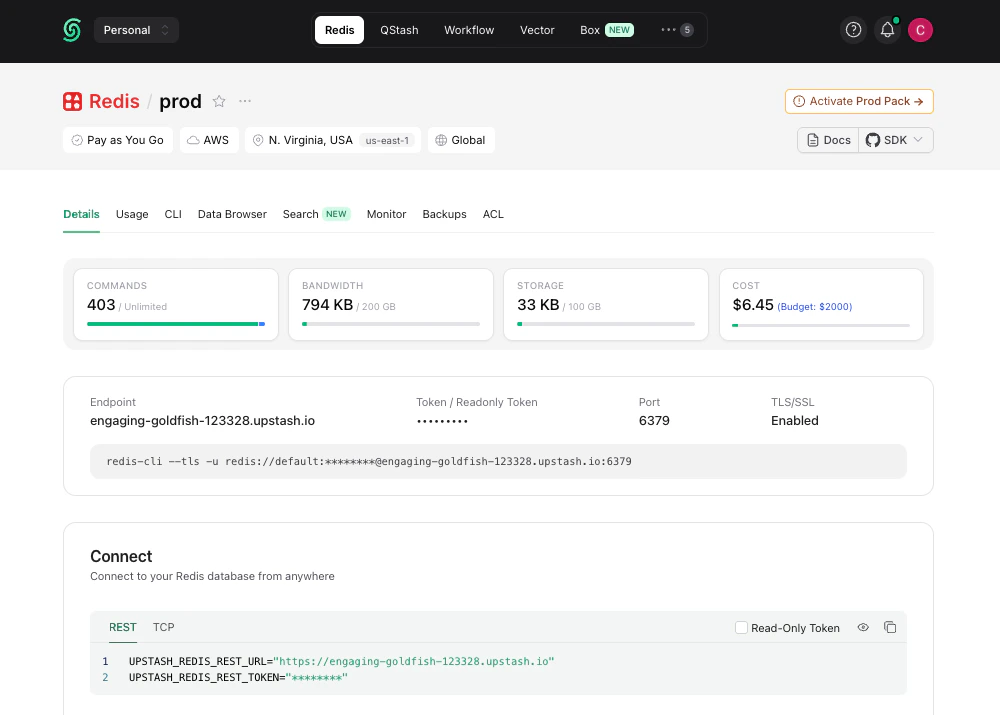 The connection details required for Redis clients are displayed here: **Endpoint**,
**Port**, and **Token** (which is also the password of the database). You can also
find the environment variables `UPSTASH_REDIS_REST_URL` and`UPSTASH_REDIS_REST_TOKEN`
on this page.
Below, we will provide examples from popular Redis clients, but the information above should help you configure all Redis clients similarly.
TLS is enabled by default for all Upstash Redis databases. It's not possible
to disable it.
## @upstash/redis
[@upstash/redis](https://github.com/upstash/redis-js) is the official SDK developed
and maintained by Upstash. It is HTTP-based, which makes it ideal for serverless
environments like Vercel and Cloudflare Workers. In highly concurrent serverless
workloads, TCP-based clients can run into connection issues.
```typescript theme={"system"}
import { Redis } from "@upstash/redis";
const redis = new Redis({
url: "UPSTASH_REDIS_REST_URL",
token: "UPSTASH_REDIS_REST_TOKEN",
});
(async () => {
try {
const data = await redis.get("key");
console.log(data);
} catch (error) {
console.error(error);
}
})();
```
See the [Connect with @upstash/redis page](/redis/howto/connect-with-upstash-redis) for more information.
## Node.js
**Library**: [ioredis](https://github.com/luin/ioredis)
```javascript theme={"system"}
const Redis = require("ioredis");
let client = new Redis("rediss://:YOUR_PASSWORD@YOUR_ENDPOINT:YOUR_PORT");
await client.set("foo", "bar");
let x = await client.get("foo");
console.log(x);
```
## Python
**Library**: [redis-py](https://github.com/andymccurdy/redis-py)
```python theme={"system"}
import redis
r = redis.Redis(
host= 'YOUR_ENDPOINT',
port= 'YOUR_PORT',
password= 'YOUR_PASSWORD',
ssl=True)
r.set('foo','bar')
print(r.get('foo'))
```
## Java
**Library**: [jedis](https://github.com/xetorthio/jedis)
```java theme={"system"}
Jedis jedis = new Jedis("YOUR_ENDPOINT", "YOUR_PORT", true);
jedis.auth("YOUR_PASSWORD");
jedis.set("foo", "bar");
String value = jedis.get("foo");
System.out.println(value);
```
Jedis does not offer command level retry config by default, but you can handle
retries using connection pool. Check [Retrying a command after a connection
failure](https://redis.io/docs/latest/develop/clients/jedis/connect/#retrying-a-command-after-a-connection-failure)
## PHP
**Library**: [phpredis](https://github.com/phpredis/phpredis)
```php theme={"system"}
connect("YOUR_ENDPOINT", "YOUR_PORT");
$redis->auth("YOUR_PASSWORD");
$redis->set("foo", "bar");
print_r($redis->get("foo"));
```
Phpredis supports connection level retries through `OPT_MAX_RETRIES`. However,
for command level retries, it only supports [SCAN
command](https://github.com/phpredis/phpredis?tab=readme-ov-file#example-29).
## Go
**Library**: [redigo](https://github.com/gomodule/redigo)
```go theme={"system"}
func main() {
c, err := redis.Dial("tcp", "YOUR_ENDPOINT:YOUR_PORT", redis.DialUseTLS(true))
if err != nil {
panic(err)
}
_, err = c.Do("AUTH", "YOUR_PASSWORD")
if err != nil {
panic(err)
}
_, err = c.Do("SET", "foo", "bar")
if err != nil {
panic(err)
}
value, err := redis.String(c.Do("GET", "foo"))
if err != nil {
panic(err)
}
println(value)
}
```
The connection details required for Redis clients are displayed here: **Endpoint**,
**Port**, and **Token** (which is also the password of the database). You can also
find the environment variables `UPSTASH_REDIS_REST_URL` and`UPSTASH_REDIS_REST_TOKEN`
on this page.
Below, we will provide examples from popular Redis clients, but the information above should help you configure all Redis clients similarly.
TLS is enabled by default for all Upstash Redis databases. It's not possible
to disable it.
## @upstash/redis
[@upstash/redis](https://github.com/upstash/redis-js) is the official SDK developed
and maintained by Upstash. It is HTTP-based, which makes it ideal for serverless
environments like Vercel and Cloudflare Workers. In highly concurrent serverless
workloads, TCP-based clients can run into connection issues.
```typescript theme={"system"}
import { Redis } from "@upstash/redis";
const redis = new Redis({
url: "UPSTASH_REDIS_REST_URL",
token: "UPSTASH_REDIS_REST_TOKEN",
});
(async () => {
try {
const data = await redis.get("key");
console.log(data);
} catch (error) {
console.error(error);
}
})();
```
See the [Connect with @upstash/redis page](/redis/howto/connect-with-upstash-redis) for more information.
## Node.js
**Library**: [ioredis](https://github.com/luin/ioredis)
```javascript theme={"system"}
const Redis = require("ioredis");
let client = new Redis("rediss://:YOUR_PASSWORD@YOUR_ENDPOINT:YOUR_PORT");
await client.set("foo", "bar");
let x = await client.get("foo");
console.log(x);
```
## Python
**Library**: [redis-py](https://github.com/andymccurdy/redis-py)
```python theme={"system"}
import redis
r = redis.Redis(
host= 'YOUR_ENDPOINT',
port= 'YOUR_PORT',
password= 'YOUR_PASSWORD',
ssl=True)
r.set('foo','bar')
print(r.get('foo'))
```
## Java
**Library**: [jedis](https://github.com/xetorthio/jedis)
```java theme={"system"}
Jedis jedis = new Jedis("YOUR_ENDPOINT", "YOUR_PORT", true);
jedis.auth("YOUR_PASSWORD");
jedis.set("foo", "bar");
String value = jedis.get("foo");
System.out.println(value);
```
Jedis does not offer command level retry config by default, but you can handle
retries using connection pool. Check [Retrying a command after a connection
failure](https://redis.io/docs/latest/develop/clients/jedis/connect/#retrying-a-command-after-a-connection-failure)
## PHP
**Library**: [phpredis](https://github.com/phpredis/phpredis)
```php theme={"system"}
connect("YOUR_ENDPOINT", "YOUR_PORT");
$redis->auth("YOUR_PASSWORD");
$redis->set("foo", "bar");
print_r($redis->get("foo"));
```
Phpredis supports connection level retries through `OPT_MAX_RETRIES`. However,
for command level retries, it only supports [SCAN
command](https://github.com/phpredis/phpredis?tab=readme-ov-file#example-29).
## Go
**Library**: [redigo](https://github.com/gomodule/redigo)
```go theme={"system"}
func main() {
c, err := redis.Dial("tcp", "YOUR_ENDPOINT:YOUR_PORT", redis.DialUseTLS(true))
if err != nil {
panic(err)
}
_, err = c.Do("AUTH", "YOUR_PASSWORD")
if err != nil {
panic(err)
}
_, err = c.Do("SET", "foo", "bar")
if err != nil {
panic(err)
}
value, err := redis.String(c.Do("GET", "foo"))
if err != nil {
panic(err)
}
println(value)
}
```