> ## Documentation Index
> Fetch the complete documentation index at: https://upstash.com/docs/llms.txt
> Use this file to discover all available pages before exploring further.
# Deno Deploy
[Source Code](https://github.com/upstash/qstash-examples/tree/main/deno-deploy)
This is a step by step guide on how to receive webhooks from QStash in your Deno
deploy project.
### 1. Create a new project
Go to [https://dash.deno.com/projects](https://dash.deno.com/projects) and
create a new playground project.
### 2. Edit the handler function
Then paste the following code into the browser editor:
```ts theme={"system"}
import { serve } from "https://deno.land/std@0.142.0/http/server.ts";
import { Receiver } from "https://deno.land/x/upstash_qstash@v0.1.4/mod.ts";
serve(async (req: Request) => {
const r = new Receiver({
currentSigningKey: Deno.env.get("QSTASH_CURRENT_SIGNING_KEY")!,
nextSigningKey: Deno.env.get("QSTASH_NEXT_SIGNING_KEY")!,
});
const isValid = await r
.verify({
signature: req.headers.get("Upstash-Signature")!,
body: await req.text(),
})
.catch((err: Error) => {
console.error(err);
return false;
});
if (!isValid) {
return new Response("Invalid signature", { status: 401 });
}
console.log("The signature was valid");
// do work
return new Response("OK", { status: 200 });
});
```
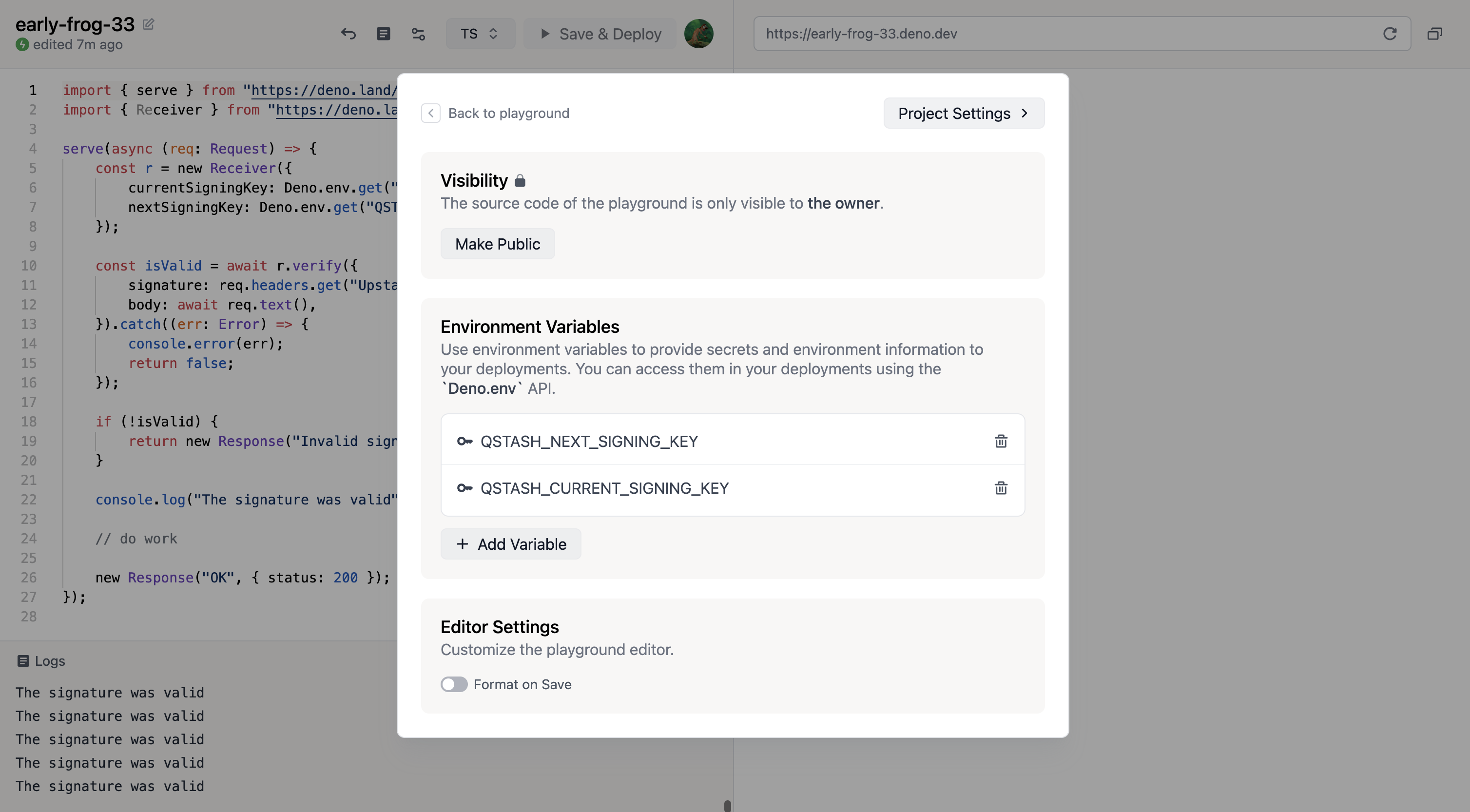
### 3. Add your signing keys
Click on the `settings` button at the top of the screen and then click
`+ Add Variable`
Get your current and next signing key from
[Upstash](https://console.upstash.com/qstash) and then set them in deno deploy.
 ### 4. Deploy
Simply click on `Save & Deploy` at the top of the screen.
### 5. Publish a message
Make note of the url displayed in the top right. This is the public url of your
project.
```bash theme={"system"}
curl --request POST "https://qstash.upstash.io/v2/publish/https://early-frog-33.deno.dev" \
-H "Authorization: Bearer " \
-H "Content-Type: application/json" \
-d "{ \"hello\": \"world\"}"
```
In the logs you should see something like this:
```basheurope-west3isolate start time: 2.21 ms theme={"system"}
Listening on http://localhost:8000/
The signature was valid
```
## Next Steps
That's it, you have successfully created a secure deno API, that receives and
verifies incoming webhooks from qstash.
Learn more about publishing a message to qstash [here](/qstash/howto/publishing)
### 4. Deploy
Simply click on `Save & Deploy` at the top of the screen.
### 5. Publish a message
Make note of the url displayed in the top right. This is the public url of your
project.
```bash theme={"system"}
curl --request POST "https://qstash.upstash.io/v2/publish/https://early-frog-33.deno.dev" \
-H "Authorization: Bearer " \
-H "Content-Type: application/json" \
-d "{ \"hello\": \"world\"}"
```
In the logs you should see something like this:
```basheurope-west3isolate start time: 2.21 ms theme={"system"}
Listening on http://localhost:8000/
The signature was valid
```
## Next Steps
That's it, you have successfully created a secure deno API, that receives and
verifies incoming webhooks from qstash.
Learn more about publishing a message to qstash [here](/qstash/howto/publishing)