> ## Documentation Index
> Fetch the complete documentation index at: https://upstash.com/docs/llms.txt
> Use this file to discover all available pages before exploring further.
# Publish Messages
Publishing a message is as easy as sending a HTTP request to the `/publish`
endpoint. All you need is a valid url of your destination.
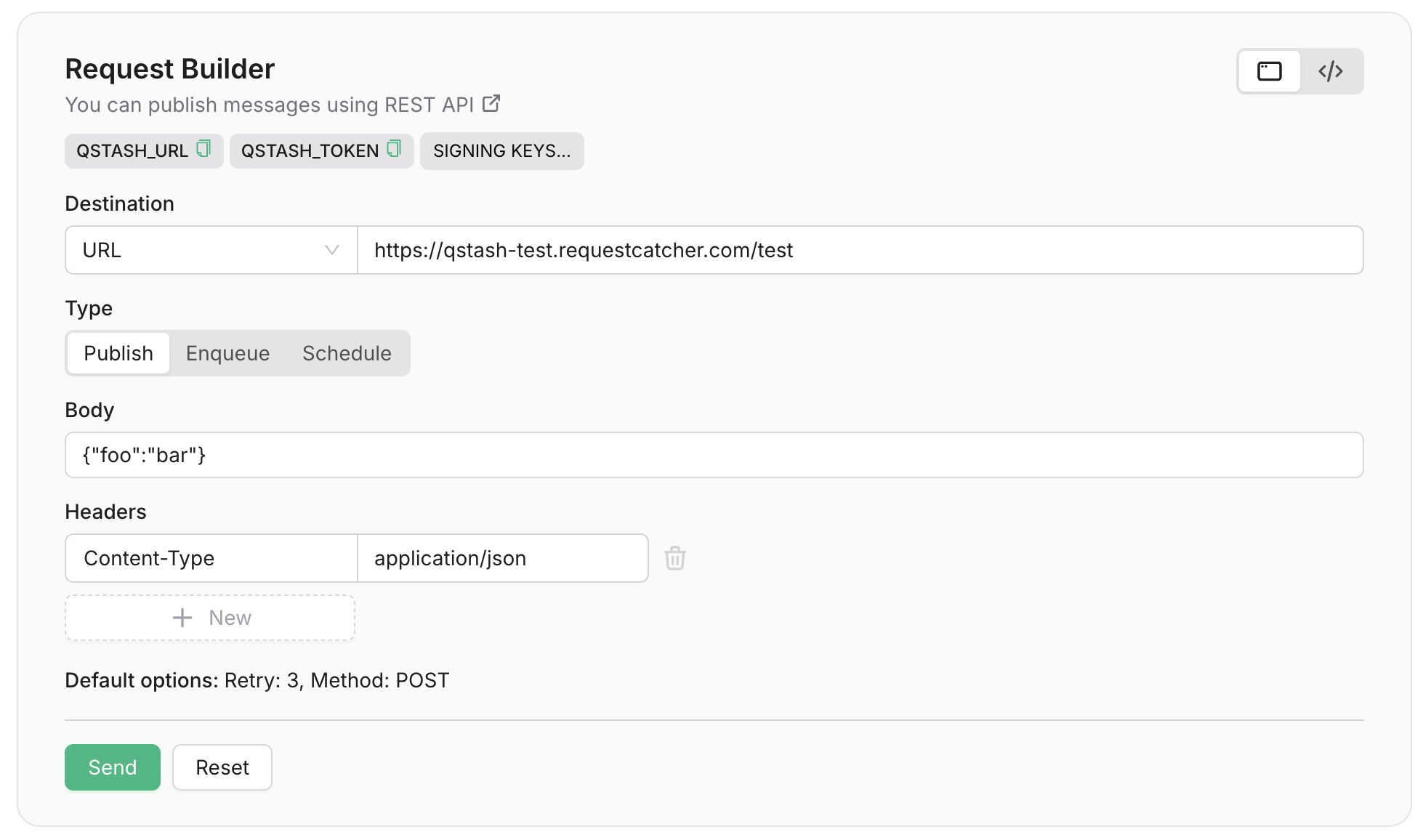 Destination URLs must always include the protocol (`http://` or `https://`)
## The message
The message you want to send is passed in the request body. Upstash does not
use, parse, or validate the body, so you can send any kind of data you want. We
suggest you add a `Content-Type` header to your request to make sure your
destination API knows what kind of data you are sending.
## Sending custom HTTP headers
In addition to sending the message itself, you can also forward HTTP headers.
Simply add them prefixed with `Upstash-Forward-` and we will include them in the
message.
#### Here's an example
```shell cURL theme={"system"}
curl -XPOST \
-H 'Authorization: Bearer XXX' \
-H 'Upstash-Forward-My-Header: my-value' \
-H "Content-type: application/json" \
-d '{ "hello": "world" }' \
'https://qstash.upstash.io/v2/publish/https://example.com'
```
```typescript Typescript theme={"system"}
import { Client } from "@upstash/qstash";
const client = new Client({ token: "" });
const res = await client.publishJSON({
url: "https://example.com",
body: { "hello": "world" },
headers: { "my-header": "my-value" },
});
```
```python Python theme={"system"}
from qstash import QStash
client = QStash("")
client.message.publish_json(
url="https://my-api...",
body={
"hello": "world",
},
headers={
"my-header": "my-value",
},
)
```
In this case, we would deliver a `POST` request to `https://example.com` with
the following body and headers:
```json theme={"system"}
// body
{ "hello": "world" }
// headers
My-Header: my-value
Content-Type: application/json
```
#### What happens after publishing?
When you publish a message, it will be durably stored in an
[Upstash Redis database](https://upstash.com/redis). Then we try to deliver the
message to your chosen destination API. If your API is down or does not respond
with a success status code (200-299), the message will be retried and delivered
when it comes back online. You do not need to worry about retrying messages or
ensuring that they are delivered.
By default, the multiple messages published to QStash are sent to your API in parallel.
## Publish to URL Group
URL Groups allow you to publish a single message to more than one API endpoints. To
learn more about URL Groups, check [URL Groups section](/qstash/features/url-groups).
Publishing to a URL Group is very similar to publishing to a single destination. All
you need to do is replace the `URL` in the `/publish` endpoint with the URL Group
name.
```
https://qstash.upstash.io/v2/publish/https://example.com
https://qstash.upstash.io/v2/publish/my-url-group
```
```shell cURL theme={"system"}
curl -XPOST \
-H 'Authorization: Bearer XXX' \
-H "Content-type: application/json" \
-d '{ "hello": "world" }' \
'https://qstash.upstash.io/v2/publish/my-url-group'
```
```typescript Typescript theme={"system"}
import { Client } from "@upstash/qstash";
const client = new Client({ token: "" });
const res = await client.publishJSON({
urlGroup: "my-url-group",
body: { "hello": "world" },
});
```
```python Python theme={"system"}
from qstash import QStash
client = QStash("")
client.message.publish_json(
url_group="my-url-group",
body={
"hello": "world",
},
)
```
## Optional parameters and configuration
QStash supports a number of optional parameters and configuration that you can
use to customize the delivery of your message. All configuration is done using
HTTP headers.
Destination URLs must always include the protocol (`http://` or `https://`)
## The message
The message you want to send is passed in the request body. Upstash does not
use, parse, or validate the body, so you can send any kind of data you want. We
suggest you add a `Content-Type` header to your request to make sure your
destination API knows what kind of data you are sending.
## Sending custom HTTP headers
In addition to sending the message itself, you can also forward HTTP headers.
Simply add them prefixed with `Upstash-Forward-` and we will include them in the
message.
#### Here's an example
```shell cURL theme={"system"}
curl -XPOST \
-H 'Authorization: Bearer XXX' \
-H 'Upstash-Forward-My-Header: my-value' \
-H "Content-type: application/json" \
-d '{ "hello": "world" }' \
'https://qstash.upstash.io/v2/publish/https://example.com'
```
```typescript Typescript theme={"system"}
import { Client } from "@upstash/qstash";
const client = new Client({ token: "" });
const res = await client.publishJSON({
url: "https://example.com",
body: { "hello": "world" },
headers: { "my-header": "my-value" },
});
```
```python Python theme={"system"}
from qstash import QStash
client = QStash("")
client.message.publish_json(
url="https://my-api...",
body={
"hello": "world",
},
headers={
"my-header": "my-value",
},
)
```
In this case, we would deliver a `POST` request to `https://example.com` with
the following body and headers:
```json theme={"system"}
// body
{ "hello": "world" }
// headers
My-Header: my-value
Content-Type: application/json
```
#### What happens after publishing?
When you publish a message, it will be durably stored in an
[Upstash Redis database](https://upstash.com/redis). Then we try to deliver the
message to your chosen destination API. If your API is down or does not respond
with a success status code (200-299), the message will be retried and delivered
when it comes back online. You do not need to worry about retrying messages or
ensuring that they are delivered.
By default, the multiple messages published to QStash are sent to your API in parallel.
## Publish to URL Group
URL Groups allow you to publish a single message to more than one API endpoints. To
learn more about URL Groups, check [URL Groups section](/qstash/features/url-groups).
Publishing to a URL Group is very similar to publishing to a single destination. All
you need to do is replace the `URL` in the `/publish` endpoint with the URL Group
name.
```
https://qstash.upstash.io/v2/publish/https://example.com
https://qstash.upstash.io/v2/publish/my-url-group
```
```shell cURL theme={"system"}
curl -XPOST \
-H 'Authorization: Bearer XXX' \
-H "Content-type: application/json" \
-d '{ "hello": "world" }' \
'https://qstash.upstash.io/v2/publish/my-url-group'
```
```typescript Typescript theme={"system"}
import { Client } from "@upstash/qstash";
const client = new Client({ token: "" });
const res = await client.publishJSON({
urlGroup: "my-url-group",
body: { "hello": "world" },
});
```
```python Python theme={"system"}
from qstash import QStash
client = QStash("")
client.message.publish_json(
url_group="my-url-group",
body={
"hello": "world",
},
)
```
## Optional parameters and configuration
QStash supports a number of optional parameters and configuration that you can
use to customize the delivery of your message. All configuration is done using
HTTP headers.