> ## Documentation Index
> Fetch the complete documentation index at: https://upstash.com/docs/llms.txt
> Use this file to discover all available pages before exploring further.
# Debug Logs
To debug the logs, first you need to understand the different states a message can
be in.
Only the last 10.000 logs are kept and older logs are removed automatically.
## Lifecycle of a Message
To understand the lifecycle of each message, we'll look at the following chart:
[comment]: # "https://mermaid.live/edit#pako:eNptU9uO2jAQ_RXLjxVXhyTED5UQpBUSZdtAK7VNtfLGTmIpsZHjrEoR_17HBgLdztPMmXPm4ssJZpIyiGGjiWYrTgpF6uErSgUw9vPdLzAcvgfLJF7s45UDL4FNbEnN6FLWB9lwzVz-EbO0xXK__hb_L43Bevv8OXn6mMS7nSPYSf6tcgIXc5zOkniffH9TvrM4SZ4Sm3GcXne-rLDYLuPNcxJ_-Rrvrrs4cGMiRxLS9K1YroHM3yowqFnTkIKBjIiMVYA3xqsqRp3azWQLu3EwaFUFFNOtEg3ICa9uU91xV_HGuIltcM9v2iwz_fpN-u0_LNYbyzdcdQQVr7k2PsnK6yx90Y5vLtXBF-ED1h_CA5wKOICF4hRirVo2gDVTNelCeOoYKdQlq1kKsXEpy0lb6RSm4mxkByJ-SFlflUq2RQlxTqrGRO2B9u_uhpJWy91RZFeNY8WUa6lupEoSykx4gvp46J5wwRtt-mVS5LzocHOABi61PjR4PO7So4Lrsn0ZZbIeN5yWROnyNQrGAQrmBHksCD3iex7NXqbRPEezaU7DyRQReD4PILP9P7n_Yr-N2YYJM8RStkJDHHqRXbfr_RviaDbyQg9NJz7yg9ksCAfwCHGARn6AfC9CKJqiiT83lf_Y85mM5uEsurfzX7VrENs"
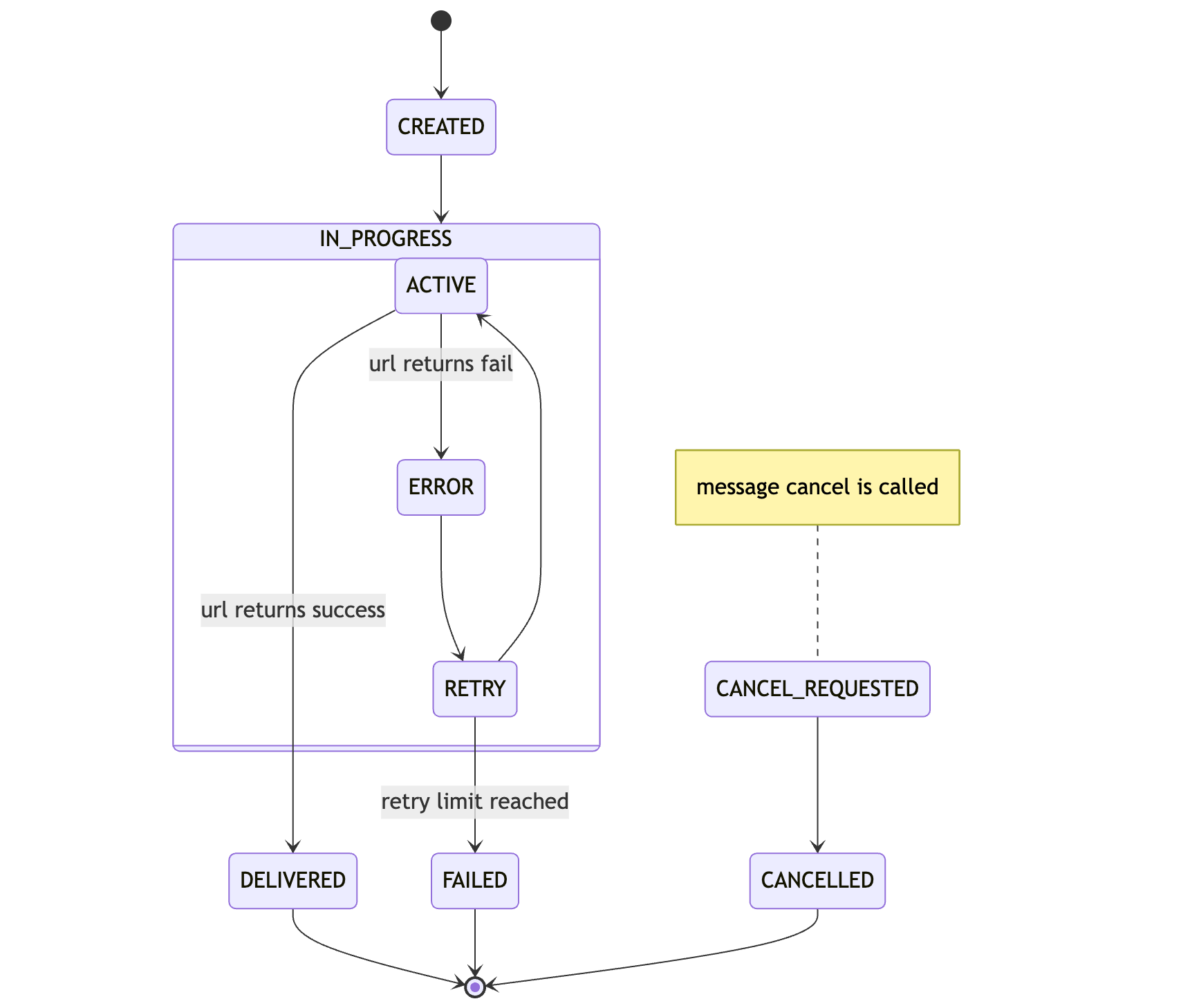 Either you or a previously setup schedule will create a message.
When a message is ready for execution, it will be become `ACTIVE` and a delivery to
your API is attempted.
If you API responds with a status code between `200 - 299`, the task is
considered successful and will be marked as `DELIVERED`.
Otherwise the message is being retried if there are any retries left and moves to `RETRY`. If all retries are exhausted, the task has `FAILED` and the message will be moved to the DLQ.
During all this a message can be cancelled via [DELETE /v2/messages/:messageId](/qstash/api-reference/messages/cancel-a-message). When the request is received, `CANCEL_REQUESTED` will be logged first.
If retries are not exhausted yet, in the next deliver time, the message will be marked as `CANCELLED` and will be completely removed from the system.
## Console
Head over to the [Upstash Console](https://console.upstash.com/qstash) and go to
the `Logs` tab, where you can see the latest status of your messages.
Either you or a previously setup schedule will create a message.
When a message is ready for execution, it will be become `ACTIVE` and a delivery to
your API is attempted.
If you API responds with a status code between `200 - 299`, the task is
considered successful and will be marked as `DELIVERED`.
Otherwise the message is being retried if there are any retries left and moves to `RETRY`. If all retries are exhausted, the task has `FAILED` and the message will be moved to the DLQ.
During all this a message can be cancelled via [DELETE /v2/messages/:messageId](/qstash/api-reference/messages/cancel-a-message). When the request is received, `CANCEL_REQUESTED` will be logged first.
If retries are not exhausted yet, in the next deliver time, the message will be marked as `CANCELLED` and will be completely removed from the system.
## Console
Head over to the [Upstash Console](https://console.upstash.com/qstash) and go to
the `Logs` tab, where you can see the latest status of your messages.