> ## Documentation Index
> Fetch the complete documentation index at: https://upstash.com/docs/llms.txt
> Use this file to discover all available pages before exploring further.
# Callbacks
All serverless function providers have a maximum execution time for each
function. Usually you can extend this time by paying more, but it's still
limited. QStash provides a way to go around this problem by using callbacks.
## What is a callback?
A callback allows you to call a long running function without having to wait for
its response. Instead of waiting for the request to finish, you can add a
callback url to your published message and we will call your callback URL with the response.
Note that the callback might be called multiple times for each retry until the endpoint
returns success(status code 2XX) or retries are exhausted. You can assert that retries
are exhausted via `callbackBody.retried == callbackBody.maxRteries`. See the complete
callback body json below.

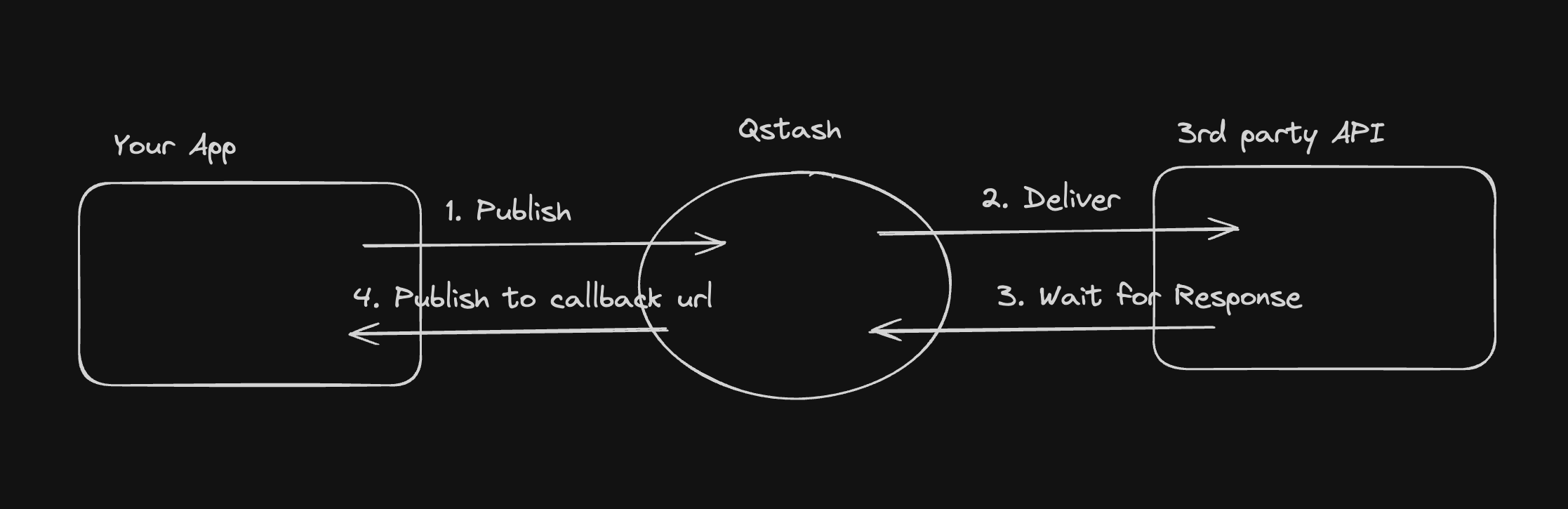 1. You publish a message to QStash using the `/v2/publish` endpoint
2. QStash will enqueue the message and deliver it to the destination
3. QStash waits for the response from the destination
4. When the response is ready, QStash calls your callback URL with the response
Callbacks publish a new message with the response to the callback URL. Messages
created by callbacks are charged as any other message.
## How do I use Callbacks?
You can add a callback url in the `Upstash-Callback` header when publishing a
message. The value must be a valid URL.
```bash cURL theme={"system"}
curl -X POST \
https://qstash.upstash.io/v2/publish/https://my-api... \
-H 'Content-Type: application/json' \
-H 'Authorization: Bearer ' \
-H 'Upstash-Callback: ' \
-d '{ "hello": "world" }'
```
```typescript Typescript theme={"system"}
import { Client } from "@upstash/qstash";
const client = new Client({ token: "" });
const res = await client.publishJSON({
url: "https://my-api...",
body: { hello: "world" },
callback: "https://my-callback...",
});
```
```python Python theme={"system"}
from qstash import QStash
client = QStash("")
client.message.publish_json(
url="https://my-api...",
body={
"hello": "world",
},
callback="https://my-callback...",
)
```
The callback body sent to you will be a JSON object with the following fields:
```json theme={"system"}
{
"status": 200,
"header": { "key": ["value"] }, // Response header
"body": "YmFzZTY0IGVuY29kZWQgcm9keQ==", // base64 encoded response body
"retried": 2, // How many times we retried to deliver the original message
"maxRetries": 3, // Number of retries before the message assumed to be failed to delivered.
"sourceMessageId": "msg_xxx", // The ID of the message that triggered the callback
"topicName": "myTopic", // The name of the URL Group (topic) if the request was part of a URL Group
"endpointName": "myEndpoint", // The endpoint name if the endpoint is given a name within a topic
"url": "http://myurl.com", // The destination url of the message that triggered the callback
"method": "GET", // The http method of the message that triggered the callback
"sourceHeader": { "key": "value" }, // The http header of the message that triggered the callback
"sourceBody": "YmFzZTY0kZWQgcm9keQ==", // The base64 encoded body of the message that triggered the callback
"notBefore": "1701198458025", // The unix timestamp of the message that triggered the callback is/will be delivered in milliseconds
"createdAt": "1701198447054", // The unix timestamp of the message that triggered the callback is created in milliseconds
"scheduleId": "scd_xxx", // The scheduleId of the message if the message is triggered by a schedule
"callerIP": "178.247.74.179" // The IP address where the message that triggered the callback is published from
}
```
In Next.js you could use the following code to handle the callback:
```js theme={"system"}
// pages/api/callback.js
import { verifySignature } from "@upstash/qstash/nextjs";
function handler(req, res) {
// responses from qstash are base64-encoded
const decoded = atob(req.body.body);
console.log(decoded);
return res.status(200).end();
}
export default verifySignature(handler);
export const config = {
api: {
bodyParser: false,
},
};
```
We may truncate the response body if it exceeds your plan limits. You can check
your `Max Message Size` in the
[console](https://console.upstash.com/qstash?tab=details).
Make sure you verify the authenticity of the callback request made to your API
by
[verifying the signature](/qstash/features/security/#request-signing-optional).
# What is a Failure-Callback?
Failure callbacks are similar to callbacks but they are called only when all the retries are exhausted and still
the message can not be delivered to the given endpoint.
This is designed to be an serverless alternative to [List messages to DLQ](/qstash/api-reference/dlq/list-dlq-messages).
You can add a failure callback URL in the `Upstash-Failure-Callback` header when publishing a
message. The value must be a valid URL.
```bash cURL theme={"system"}
curl -X POST \
https://qstash.upstash.io/v2/publish/ \
-H 'Content-Type: application/json' \
-H 'Authorization: Bearer ' \
-H 'Upstash-Failure-Callback: ' \
-d '{ "hello": "world" }'
```
```typescript Typescript theme={"system"}
import { Client } from "@upstash/qstash";
const client = new Client({ token: "" });
const res = await client.publishJSON({
url: "https://my-api...",
body: { hello: "world" },
failureCallback: "https://my-callback...",
});
```
```python Python theme={"system"}
from qstash import QStash
client = QStash("")
client.message.publish_json(
url="https://my-api...",
body={
"hello": "world",
},
failure_callback="https://my-callback...",
)
```
The callback body sent to you will be a JSON object with the following fields:
```json theme={"system"}
{
"status": 400,
"header": { "key": ["value"] }, // Response header
"body": "YmFzZTY0IGVuY29kZWQgcm9keQ==", // base64 encoded response body
"retried": 3, // How many times we retried to deliver the original message
"maxRetries": 3, // Number of retries before the message assumed to be failed to delivered.
"dlqId": "1725323658779-0", // Dead Letter Queue id. This can be used to retrieve/remove the related message from DLQ.
"sourceMessageId": "msg_xxx", // The ID of the message that triggered the callback
"topicName": "myTopic", // The name of the URL Group (topic) if the request was part of a topic
"endpointName": "myEndpoint", // The endpoint name if the endpoint is given a name within a topic
"url": "http://myurl.com", // The destination url of the message that triggered the callback
"method": "GET", // The http method of the message that triggered the callback
"sourceHeader": { "key": "value" }, // The http header of the message that triggered the callback
"sourceBody": "YmFzZTY0kZWQgcm9keQ==", // The base64 encoded body of the message that triggered the callback
"notBefore": "1701198458025", // The unix timestamp of the message that triggered the callback is/will be delivered in milliseconds
"createdAt": "1701198447054", // The unix timestamp of the message that triggered the callback is created in milliseconds
"scheduleId": "scd_xxx", // The scheduleId of the message if the message is triggered by a schedule
"callerIP": "178.247.74.179" // The IP address where the message that triggered the callback is published from
}
```
You can also use a callback and failureCallback together!
## Configuring Callbacks
Publishes/enqueues for callbacks can also be configured with the same HTTP headers that are used to configure direct publishes/enqueues.
You can refer to headers that are used to configure `publishes` [here](/qstash/api-reference/messages/publish-a-message) and for `enqueues`
[here](/qstash/api-reference/messages/enqueue-a-message)
Instead of the `Upstash` prefix for headers, the `Upstash-Callback`/`Upstash-Failure-Callback` prefix can be used to configure callbacks as follows:
```
Upstash-Callback-Timeout
Upstash-Callback-Retries
Upstash-Callback-Delay
Upstash-Callback-Method
Upstash-Failure-Callback-Timeout
Upstash-Failure-Callback-Retries
Upstash-Failure-Callback-Delay
Upstash-Failure-Callback-Method
```
You can also forward headers to your callback endpoints as follows:
```
Upstash-Callback-Forward-MyCustomHeader
Upstash-Failure-Callback-Forward-MyCustomHeader
```
1. You publish a message to QStash using the `/v2/publish` endpoint
2. QStash will enqueue the message and deliver it to the destination
3. QStash waits for the response from the destination
4. When the response is ready, QStash calls your callback URL with the response
Callbacks publish a new message with the response to the callback URL. Messages
created by callbacks are charged as any other message.
## How do I use Callbacks?
You can add a callback url in the `Upstash-Callback` header when publishing a
message. The value must be a valid URL.
```bash cURL theme={"system"}
curl -X POST \
https://qstash.upstash.io/v2/publish/https://my-api... \
-H 'Content-Type: application/json' \
-H 'Authorization: Bearer ' \
-H 'Upstash-Callback: ' \
-d '{ "hello": "world" }'
```
```typescript Typescript theme={"system"}
import { Client } from "@upstash/qstash";
const client = new Client({ token: "" });
const res = await client.publishJSON({
url: "https://my-api...",
body: { hello: "world" },
callback: "https://my-callback...",
});
```
```python Python theme={"system"}
from qstash import QStash
client = QStash("")
client.message.publish_json(
url="https://my-api...",
body={
"hello": "world",
},
callback="https://my-callback...",
)
```
The callback body sent to you will be a JSON object with the following fields:
```json theme={"system"}
{
"status": 200,
"header": { "key": ["value"] }, // Response header
"body": "YmFzZTY0IGVuY29kZWQgcm9keQ==", // base64 encoded response body
"retried": 2, // How many times we retried to deliver the original message
"maxRetries": 3, // Number of retries before the message assumed to be failed to delivered.
"sourceMessageId": "msg_xxx", // The ID of the message that triggered the callback
"topicName": "myTopic", // The name of the URL Group (topic) if the request was part of a URL Group
"endpointName": "myEndpoint", // The endpoint name if the endpoint is given a name within a topic
"url": "http://myurl.com", // The destination url of the message that triggered the callback
"method": "GET", // The http method of the message that triggered the callback
"sourceHeader": { "key": "value" }, // The http header of the message that triggered the callback
"sourceBody": "YmFzZTY0kZWQgcm9keQ==", // The base64 encoded body of the message that triggered the callback
"notBefore": "1701198458025", // The unix timestamp of the message that triggered the callback is/will be delivered in milliseconds
"createdAt": "1701198447054", // The unix timestamp of the message that triggered the callback is created in milliseconds
"scheduleId": "scd_xxx", // The scheduleId of the message if the message is triggered by a schedule
"callerIP": "178.247.74.179" // The IP address where the message that triggered the callback is published from
}
```
In Next.js you could use the following code to handle the callback:
```js theme={"system"}
// pages/api/callback.js
import { verifySignature } from "@upstash/qstash/nextjs";
function handler(req, res) {
// responses from qstash are base64-encoded
const decoded = atob(req.body.body);
console.log(decoded);
return res.status(200).end();
}
export default verifySignature(handler);
export const config = {
api: {
bodyParser: false,
},
};
```
We may truncate the response body if it exceeds your plan limits. You can check
your `Max Message Size` in the
[console](https://console.upstash.com/qstash?tab=details).
Make sure you verify the authenticity of the callback request made to your API
by
[verifying the signature](/qstash/features/security/#request-signing-optional).
# What is a Failure-Callback?
Failure callbacks are similar to callbacks but they are called only when all the retries are exhausted and still
the message can not be delivered to the given endpoint.
This is designed to be an serverless alternative to [List messages to DLQ](/qstash/api-reference/dlq/list-dlq-messages).
You can add a failure callback URL in the `Upstash-Failure-Callback` header when publishing a
message. The value must be a valid URL.
```bash cURL theme={"system"}
curl -X POST \
https://qstash.upstash.io/v2/publish/ \
-H 'Content-Type: application/json' \
-H 'Authorization: Bearer ' \
-H 'Upstash-Failure-Callback: ' \
-d '{ "hello": "world" }'
```
```typescript Typescript theme={"system"}
import { Client } from "@upstash/qstash";
const client = new Client({ token: "" });
const res = await client.publishJSON({
url: "https://my-api...",
body: { hello: "world" },
failureCallback: "https://my-callback...",
});
```
```python Python theme={"system"}
from qstash import QStash
client = QStash("")
client.message.publish_json(
url="https://my-api...",
body={
"hello": "world",
},
failure_callback="https://my-callback...",
)
```
The callback body sent to you will be a JSON object with the following fields:
```json theme={"system"}
{
"status": 400,
"header": { "key": ["value"] }, // Response header
"body": "YmFzZTY0IGVuY29kZWQgcm9keQ==", // base64 encoded response body
"retried": 3, // How many times we retried to deliver the original message
"maxRetries": 3, // Number of retries before the message assumed to be failed to delivered.
"dlqId": "1725323658779-0", // Dead Letter Queue id. This can be used to retrieve/remove the related message from DLQ.
"sourceMessageId": "msg_xxx", // The ID of the message that triggered the callback
"topicName": "myTopic", // The name of the URL Group (topic) if the request was part of a topic
"endpointName": "myEndpoint", // The endpoint name if the endpoint is given a name within a topic
"url": "http://myurl.com", // The destination url of the message that triggered the callback
"method": "GET", // The http method of the message that triggered the callback
"sourceHeader": { "key": "value" }, // The http header of the message that triggered the callback
"sourceBody": "YmFzZTY0kZWQgcm9keQ==", // The base64 encoded body of the message that triggered the callback
"notBefore": "1701198458025", // The unix timestamp of the message that triggered the callback is/will be delivered in milliseconds
"createdAt": "1701198447054", // The unix timestamp of the message that triggered the callback is created in milliseconds
"scheduleId": "scd_xxx", // The scheduleId of the message if the message is triggered by a schedule
"callerIP": "178.247.74.179" // The IP address where the message that triggered the callback is published from
}
```
You can also use a callback and failureCallback together!
## Configuring Callbacks
Publishes/enqueues for callbacks can also be configured with the same HTTP headers that are used to configure direct publishes/enqueues.
You can refer to headers that are used to configure `publishes` [here](/qstash/api-reference/messages/publish-a-message) and for `enqueues`
[here](/qstash/api-reference/messages/enqueue-a-message)
Instead of the `Upstash` prefix for headers, the `Upstash-Callback`/`Upstash-Failure-Callback` prefix can be used to configure callbacks as follows:
```
Upstash-Callback-Timeout
Upstash-Callback-Retries
Upstash-Callback-Delay
Upstash-Callback-Method
Upstash-Failure-Callback-Timeout
Upstash-Failure-Callback-Retries
Upstash-Failure-Callback-Delay
Upstash-Failure-Callback-Method
```
You can also forward headers to your callback endpoints as follows:
```
Upstash-Callback-Forward-MyCustomHeader
Upstash-Failure-Callback-Forward-MyCustomHeader
```