> ## Documentation Index
> Fetch the complete documentation index at: https://upstash.com/docs/llms.txt
> Use this file to discover all available pages before exploring further.
# Use Cases
The idea behind Upstash Box is simple: **give AI its own computer**. Your agent gets a full, isolated cloud environment it can control. Run commands, write files, or execute code independent of any user device. Freeze a box anytime, and continue days or even weeks later with perfect resumability.
***
## 1. Agent Servers
A very powerful pattern is the **Agent Server**: a long-running, per-tenant agent that persists its state across sessions. Unlike ephemeral sandboxes that lose everything on shutdown, an Agent Server keeps its history, context, and learned preferences intact forever.
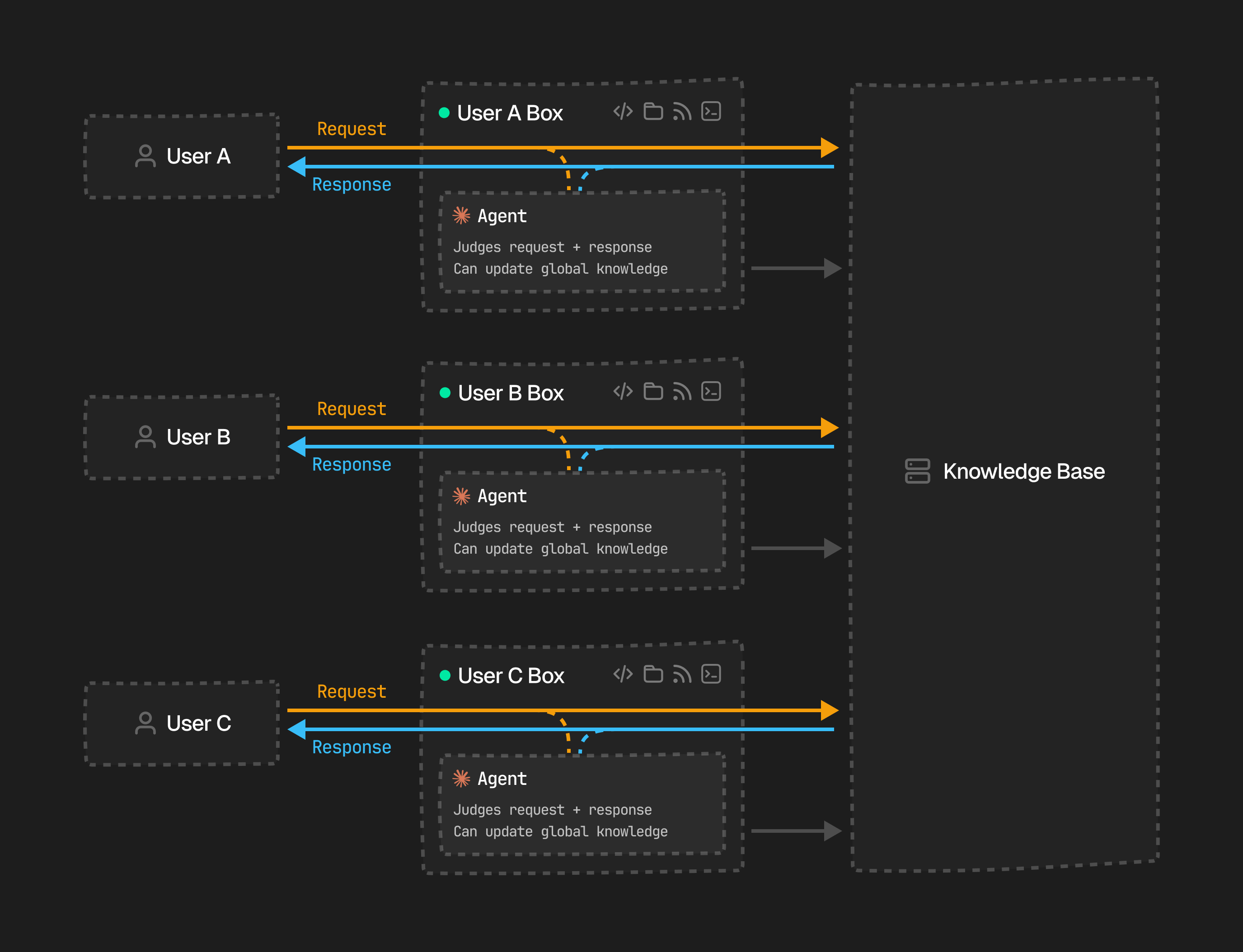 Each user gets a dedicated Box running its own agent. The agent observes every request and response in a non-blocking way. It builds up a personalized understanding of what that user needs. Over time, it contributes back to a shared **Knowledge Base**, so insights from one tenant can improve results for everyone.
Because boxes are serverless, idle tenants only cost a very low storage rate. When a user returns, their box wakes instantly with all prior state intact (installed packages, file history, learned preferences) and picks up exactly where it left off.
## 2. Multi-Agent Orchestration
Box's async SDK lets you spin up multiple boxes in parallel, each running a specialized agent with a distinct role. Once every agent finishes, a final box can synthesize their outputs into a single result.
Each user gets a dedicated Box running its own agent. The agent observes every request and response in a non-blocking way. It builds up a personalized understanding of what that user needs. Over time, it contributes back to a shared **Knowledge Base**, so insights from one tenant can improve results for everyone.
Because boxes are serverless, idle tenants only cost a very low storage rate. When a user returns, their box wakes instantly with all prior state intact (installed packages, file history, learned preferences) and picks up exactly where it left off.
## 2. Multi-Agent Orchestration
Box's async SDK lets you spin up multiple boxes in parallel, each running a specialized agent with a distinct role. Once every agent finishes, a final box can synthesize their outputs into a single result.
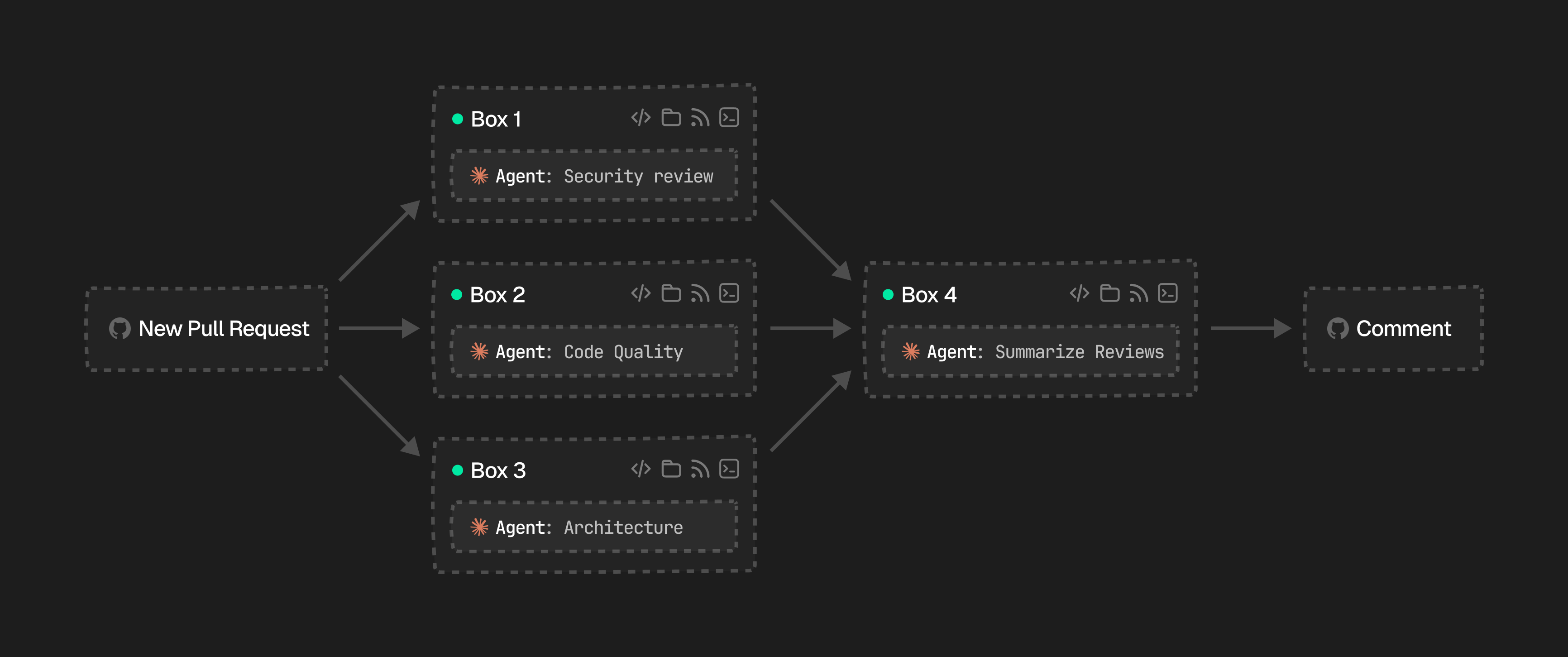 A practical example is an automated **PR review pipeline**. When a pull request is opened, you fan out to three boxes. One for security review, one for code quality, and one for architecture. Then you collect their findings in a fourth box that summarizes everything and posts a comment on GitHub.
```tsx theme={"system"}
const pr = "https://github.com/acme/app/pull/42"
const [security, quality, architecture] = await Promise.all([
Box.create({ runtime: "node", agent: { harness: Agent.ClaudeCode, model: "anthropic/claude-sonnet-4-6" } }),
Box.create({ runtime: "node", agent: { harness: Agent.ClaudeCode, model: "anthropic/claude-sonnet-4-6" } }),
Box.create({ runtime: "node", agent: { harness: Agent.ClaudeCode, model: "anthropic/claude-sonnet-4-6" } }),
])
const reviews = await Promise.all([
security.agent.run({ prompt: `Security review for ${pr}` }),
quality.agent.run({ prompt: `Code quality review for ${pr}` }),
architecture.agent.run({ prompt: `Architecture review for ${pr}` }),
])
const jury = await Box.create({
runtime: "node",
agent: { harness: Agent.ClaudeCode, model: "anthropic/claude-sonnet-4-6" },
git: { token: process.env.GIT_TOKEN },
})
await jury.agent.run({
prompt: `Summarize these reviews and post a comment on ${pr}:\n${reviews.map((r) => r.result).join("\n\n")}`,
})
```
Because each box is isolated, the agents cannot interfere with each other. You get true parallelism with independent filesystems, and the orchestration logic stays in your own code.
## 3. Parallel Testing & Comparison
Box makes it easy to run parallel test scenarios at scale. Spin up N boxes, each running a different model against the same inputs, and compare the results side by side.
A practical example is an automated **PR review pipeline**. When a pull request is opened, you fan out to three boxes. One for security review, one for code quality, and one for architecture. Then you collect their findings in a fourth box that summarizes everything and posts a comment on GitHub.
```tsx theme={"system"}
const pr = "https://github.com/acme/app/pull/42"
const [security, quality, architecture] = await Promise.all([
Box.create({ runtime: "node", agent: { harness: Agent.ClaudeCode, model: "anthropic/claude-sonnet-4-6" } }),
Box.create({ runtime: "node", agent: { harness: Agent.ClaudeCode, model: "anthropic/claude-sonnet-4-6" } }),
Box.create({ runtime: "node", agent: { harness: Agent.ClaudeCode, model: "anthropic/claude-sonnet-4-6" } }),
])
const reviews = await Promise.all([
security.agent.run({ prompt: `Security review for ${pr}` }),
quality.agent.run({ prompt: `Code quality review for ${pr}` }),
architecture.agent.run({ prompt: `Architecture review for ${pr}` }),
])
const jury = await Box.create({
runtime: "node",
agent: { harness: Agent.ClaudeCode, model: "anthropic/claude-sonnet-4-6" },
git: { token: process.env.GIT_TOKEN },
})
await jury.agent.run({
prompt: `Summarize these reviews and post a comment on ${pr}:\n${reviews.map((r) => r.result).join("\n\n")}`,
})
```
Because each box is isolated, the agents cannot interfere with each other. You get true parallelism with independent filesystems, and the orchestration logic stays in your own code.
## 3. Parallel Testing & Comparison
Box makes it easy to run parallel test scenarios at scale. Spin up N boxes, each running a different model against the same inputs, and compare the results side by side.
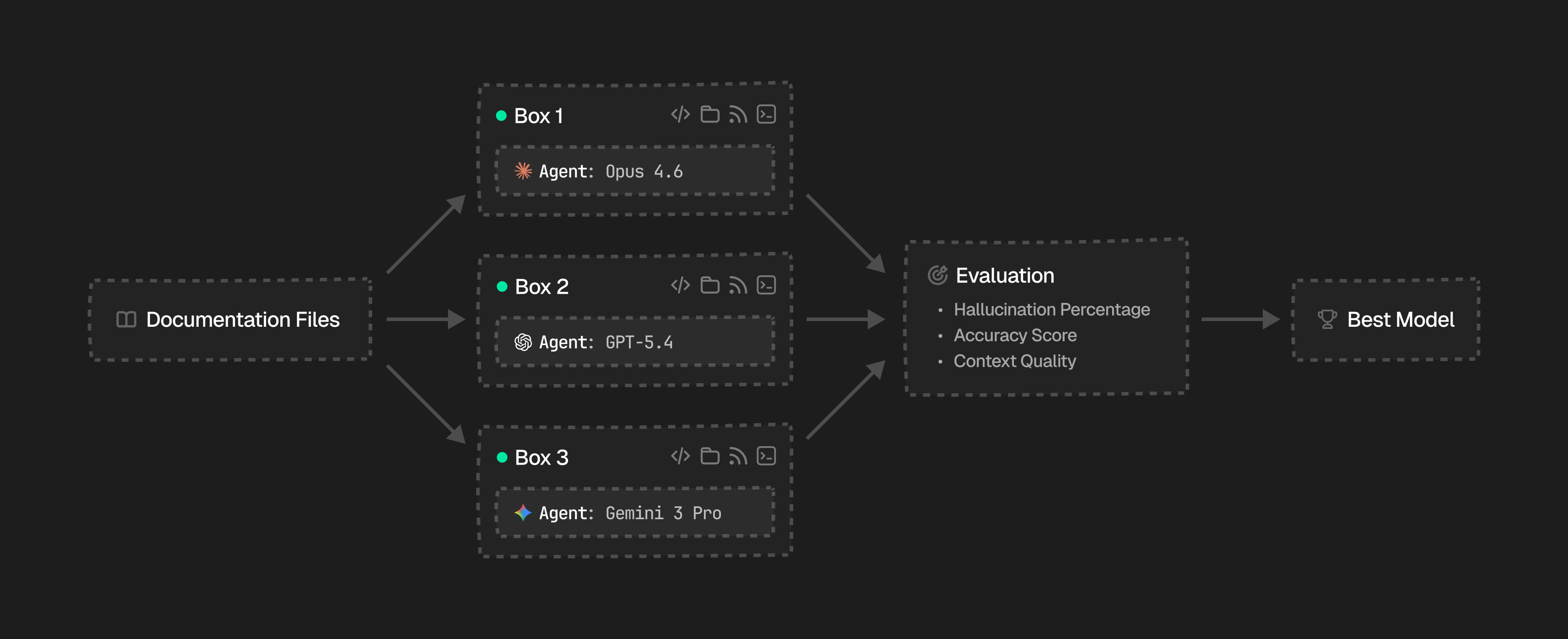 For example, at Context7 we use Box to benchmark LLMs for context extraction over documentation. We spin up boxes in parallel, each running a different model against the same documentation files and prompts. We then evaluate hallucination percentage, accuracy score, and context quality to find the best model:
```tsx theme={"system"}
const models = ["anthropic/claude-opus-4-6", "openai/gpt-5.3-codex", "openrouter/google/gemini-2.5-pro"]
const docs = await fs.readFile("./documentation.md", "utf-8")
const prompt = `Extract all API endpoints from this documentation:\n${docs}`
const boxes = await Promise.all(
models.map((model) => Box.create({ runtime: "node", agent: { model } })),
)
const results = await Promise.all(boxes.map((box) => box.agent.run({ prompt })))
const evaluation = results.map((r, i) => ({
model: models[i],
result: r.result,
hallucinationPct: evaluateHallucination(r.result, docs),
accuracyScore: evaluateAccuracy(r.result, docs),
}))
const bestModel = evaluation.sort((a, b) => a.hallucinationPct - b.hallucinationPct)[0]
```
Each box is fully isolated, so one model's behavior never leaks into another's results.
For example, at Context7 we use Box to benchmark LLMs for context extraction over documentation. We spin up boxes in parallel, each running a different model against the same documentation files and prompts. We then evaluate hallucination percentage, accuracy score, and context quality to find the best model:
```tsx theme={"system"}
const models = ["anthropic/claude-opus-4-6", "openai/gpt-5.3-codex", "openrouter/google/gemini-2.5-pro"]
const docs = await fs.readFile("./documentation.md", "utf-8")
const prompt = `Extract all API endpoints from this documentation:\n${docs}`
const boxes = await Promise.all(
models.map((model) => Box.create({ runtime: "node", agent: { model } })),
)
const results = await Promise.all(boxes.map((box) => box.agent.run({ prompt })))
const evaluation = results.map((r, i) => ({
model: models[i],
result: r.result,
hallucinationPct: evaluateHallucination(r.result, docs),
accuracyScore: evaluateAccuracy(r.result, docs),
}))
const bestModel = evaluation.sort((a, b) => a.hallucinationPct - b.hallucinationPct)[0]
```
Each box is fully isolated, so one model's behavior never leaks into another's results.