> ## Documentation Index
> Fetch the complete documentation index at: https://upstash.com/docs/llms.txt
> Use this file to discover all available pages before exploring further.
# Box Basics
Every Upstash Box is a **durable execution environment** for AI workloads. Each box is an isolated container with its own filesystem, shell, network stack, and optional coding agent. You send prompts or commands, the box executes them, and you get back structured results without managing infrastructure.
Boxes are billed per active CPU time (not idle time), state persists across runs, and you can choose from Node, Python, Go or other runtimes. By default, a box auto-pauses when idle and can be resumed days or even weeks later. If you enable `keepAlive`, the box stays on between sessions for always-available workloads.
Looking for inspiration? Check out the [Use Cases](/box/overall/use-cases) page.
***
## Architecture
Every box is a self-contained environment with five capabilities:
| Module | Description |
| -------------- | ------------------------------------------------------------ |
| **Agent** | Run a coding agent (Claude Code or Codex) |
| **Git** | Clone repos, inspect diffs, and open pull requests |
| **Shell** | Execute OS-level commands directly |
| **Filesystem** | Upload, write, read, list, and download files inside the box |
| **Snapshots** | Capture box state and restore new boxes from it |
The agent has full access to the shell, filesystem, and git inside its box. It can install packages, write files, run tests, and interact with the network.
***
## Runtimes
Each box runs in an isolated container with a pre-installed language runtime. By default, all runtimes use **Debian** (glibc), which offers the widest binary compatibility. Append `-alpine` for smaller images based on musl.
| Runtime | Default (Debian) | Alpine variant |
| ------- | ---------------- | --------------- |
| Node.js | `node` | `node-alpine` |
| Python | `python` | `python-alpine` |
| Go | `golang` | `golang-alpine` |
| Ruby | `ruby` | `ruby-alpine` |
| Rust | `rust` | `rust-alpine` |
```ts theme={"system"}
// Debian (default) — best for native modules and prebuilt binaries
const box = await Box.create({ runtime: "node" })
// Alpine — smaller image, musl-based
const box = await Box.create({ runtime: "node-alpine" })
```
***
## Agent
Every Upstash Box comes with built-in coding agent harnesses. You don't need to bring your own agent framework or wire up tool calls. The box already knows how to give an agent access to its shell, filesystem, and git, and how to stream output back to you.
We currently support Claude Code and Codex as native agents inside of a box. You choose a model when creating a box.
For more details, see the [Agent](/box/overall/agent) page.
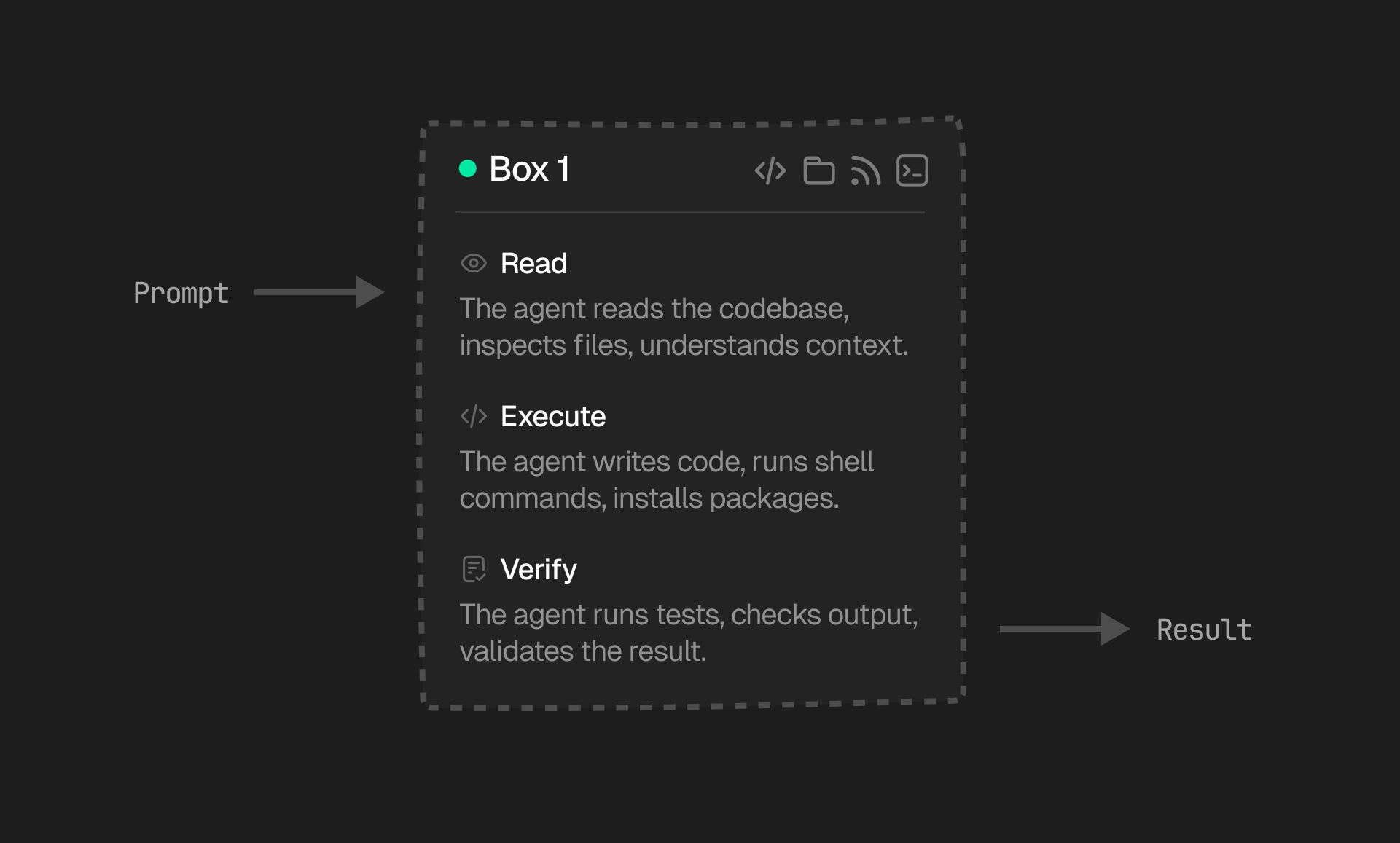 Each iteration builds on the last. If a test fails, the agent sees the error output and corrects. If a file is missing, it discovers that during the read phase and adapts. The loop continues until the task is complete or the agent determines it cannot make further progress.
You control what goes in (the prompt) and what comes out (raw text or a structured response). The agent handles reasoning and tool selection within its box, using the same [shell](/box/overall/shell), [filesystem](/box/overall/files), and [git](/box/overall/git) available to you through the SDK.
A box retains its full state between runs (files, installed packages, git history, etc.). You can send multiple prompts to the same box and the agent picks up exactly where it left off.
***
## Lifecycle
Each iteration builds on the last. If a test fails, the agent sees the error output and corrects. If a file is missing, it discovers that during the read phase and adapts. The loop continues until the task is complete or the agent determines it cannot make further progress.
You control what goes in (the prompt) and what comes out (raw text or a structured response). The agent handles reasoning and tool selection within its box, using the same [shell](/box/overall/shell), [filesystem](/box/overall/files), and [git](/box/overall/git) available to you through the SDK.
A box retains its full state between runs (files, installed packages, git history, etc.). You can send multiple prompts to the same box and the agent picks up exactly where it left off.
***
## Lifecycle
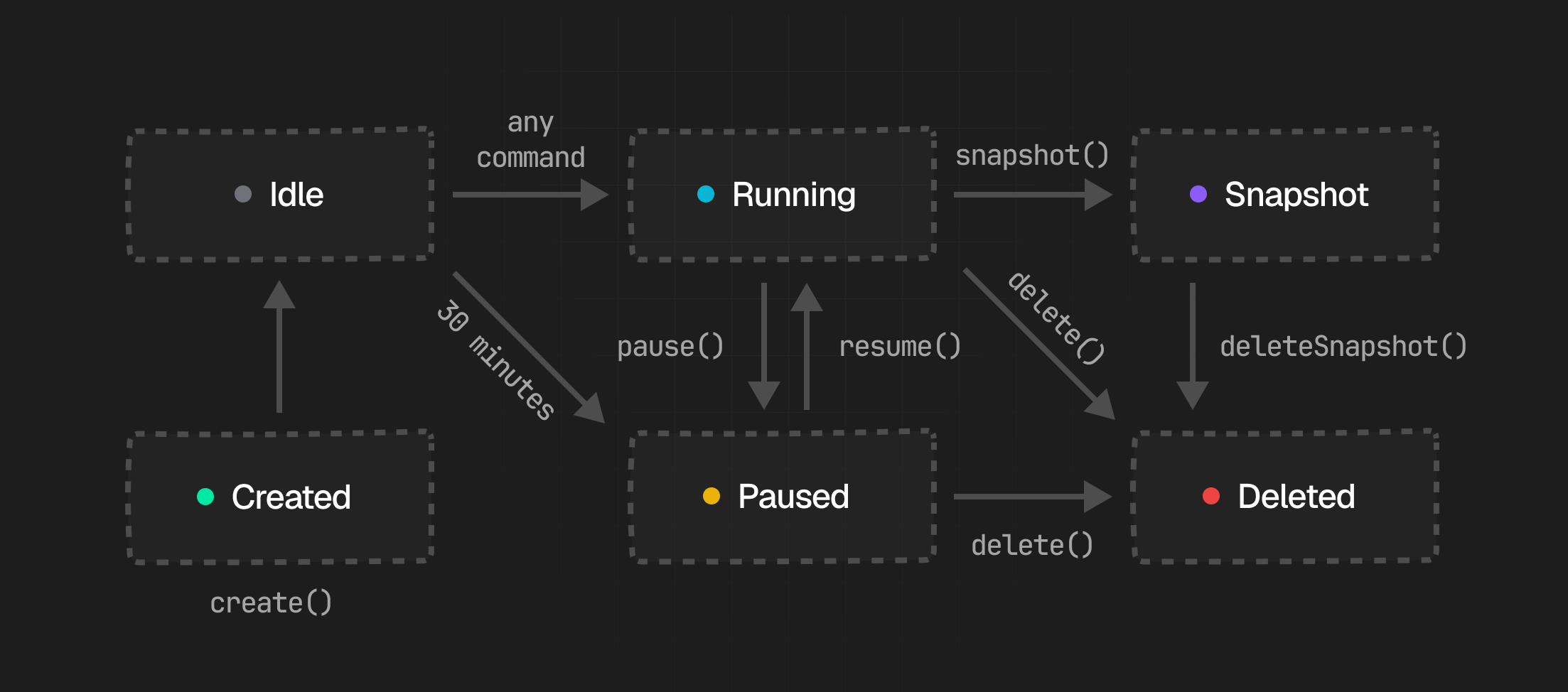 ### 1. Created
When you create a box, Upstash provisions a new isolated container with its own filesystem, shell, and network stack. You can start from a fresh box or restore from a snapshot. Once provisioning finishes, the box is ready to receive commands.
### 2. Running
The box automatically enters Running state after creation. Your agent can run bash commands, read and write files, interact with git, and make outbound network requests. `stdout` and `stderr` stream back in real-time.
If a box sits idle with no active commands, it automatically transitions to Paused after an idle timeout. Free plans auto-pause sooner than paid plans. If `keepAlive` is enabled, it stays on instead.
### 3. Paused
While a box is paused, it releases its compute resources but preserves the filesystem and environment. You can resume it explicitly or simply send new work to wake it back up.
By default, boxes are billed only on active usage, so a paused box does not incur active compute costs. Boxes with `keepAlive` enabled do not use pause/resume.
### 4. Snapshot
Snapshots capture the full workspace state of a box at a point in time. They let you checkpoint a working environment and later create a new box from that exact state.
Learn more in [Snapshots](/box/overall/snapshots).
### 5. Deleted
Deleting a box permanently destroys the live box and its current state. This is irreversible, so take a snapshot first if you may need to restore the environment later.
Any existing snapshots taken from the box are not affected by deletion.
***
## API
Use the main Box APIs to create, reconnect, inspect, pause, snapshot, and delete boxes.
For work inside a box, use the dedicated [Shell](/box/overall/shell), [Filesystem](/box/overall/files), [Git](/box/overall/git), and [Agent](/box/overall/agent) APIs.
### Create or reconnect a box
Most apps need three entry points: start a new box, show the boxes that already exist, or reopen one from a saved ID.
```tsx theme={"system"}
const box = await Box.create({ runtime: "node" })
const boxes = await Box.list()
// 👇 later, or in another serverless function
const sameBox = await Box.get(box.id)
```
You can also give a box a name and fetch it by name:
```tsx theme={"system"}
const box = await Box.create({ runtime: "node", name: "my-worker" })
// 👇 fetch by name
const sameBox = await Box.getByName("my-worker")
```
This is the core lifecycle entrypoint for dashboards, background workers, and apps that persist a box ID or name between requests.
If you want to open an interactive shell directly, you can also connect over SSH:
```bash theme={"system"}
ssh @us-east-1.box.upstash.com
```
Use your **Box API key** as the SSH password.
### Box size
Boxes have configurable resource sizes, set at creation time via the `size` option. Defaults to `"small"`.
| Size | CPU | Memory |
| -------- | ------- | ------ |
| `small` | 2 cores | 4 GB |
| `medium` | 4 cores | 8 GB |
| `large` | 8 cores | 16 GB |
```ts theme={"system"}
const box = await Box.create({
size: "large",
agent: { harness: Agent.ClaudeCode, model: "anthropic/claude-sonnet-4-5" },
})
console.log(box.size) // "large"
```
Also supported in `Box.fromSnapshot()`:
```ts theme={"system"}
const box = await Box.fromSnapshot("snap_abc123", { size: "medium" })
```
### Check status and inspect activity
```tsx theme={"system"}
const { status } = await box.getStatus()
const logs = await box.logs()
const runs = await box.listRuns()
```
These APIs are useful when you are building monitoring, history, or debugging views.
### Pause or resume
Pausing is useful when work arrives in bursts and you want to keep the environment intact without paying for active compute the whole time.
```tsx theme={"system"}
await box.pause()
await box.resume()
```
Paused boxes do not accrue active CPU charges. Pause/resume is not available when `keepAlive` is enabled.
### Snapshot and restore
Snapshots are the best way to turn a prepared environment into a reusable starting point, especially installing dependencies.
```tsx theme={"system"}
const snapshot = await box.snapshot({ name: "after-setup" })
const restored = await Box.fromSnapshot(snapshot.id)
```
This is useful for reusable base environments, checkpoints before risky work, and branching multiple boxes from the same setup state.
For detailed snapshot workflows, see [Snapshots](/box/overall/snapshots).
### Delete
Once a run is finished, delete the live box if you don't need it anymore:
```tsx theme={"system"}
await box.delete()
```
Deleting a box is irreversible, so snapshot first if you may want to recreate the same environment later.
***
## Networking
Every box has full outbound network access by default. HTTP, HTTPS, DNS, WebSockets, and raw TCP are all available. Agents can call external APIs, download packages, pull container images, and interact with any public endpoint.
Boxes run on AWS infrastructure with **22.5 Gbps** network bandwidth per host. This means large file transfers, dataset downloads, and parallel API calls are fast by default.
Because boxes run on fast AWS infrastructure, they have single-digit ms to major cloud services (S3, GitHub, etc.).
### Network Policy
You can control outbound network access for a box with a network policy. For modes, examples, and SDK usage, see [Network Policy](/box/overall/network-policy).
***
## Security & Isolation
Every box runs as its own Docker container with an independent filesystem, process tree, and network stack. Boxes cannot communicate with or observe each other. There is no shared state between them.
### 1. Created
When you create a box, Upstash provisions a new isolated container with its own filesystem, shell, and network stack. You can start from a fresh box or restore from a snapshot. Once provisioning finishes, the box is ready to receive commands.
### 2. Running
The box automatically enters Running state after creation. Your agent can run bash commands, read and write files, interact with git, and make outbound network requests. `stdout` and `stderr` stream back in real-time.
If a box sits idle with no active commands, it automatically transitions to Paused after an idle timeout. Free plans auto-pause sooner than paid plans. If `keepAlive` is enabled, it stays on instead.
### 3. Paused
While a box is paused, it releases its compute resources but preserves the filesystem and environment. You can resume it explicitly or simply send new work to wake it back up.
By default, boxes are billed only on active usage, so a paused box does not incur active compute costs. Boxes with `keepAlive` enabled do not use pause/resume.
### 4. Snapshot
Snapshots capture the full workspace state of a box at a point in time. They let you checkpoint a working environment and later create a new box from that exact state.
Learn more in [Snapshots](/box/overall/snapshots).
### 5. Deleted
Deleting a box permanently destroys the live box and its current state. This is irreversible, so take a snapshot first if you may need to restore the environment later.
Any existing snapshots taken from the box are not affected by deletion.
***
## API
Use the main Box APIs to create, reconnect, inspect, pause, snapshot, and delete boxes.
For work inside a box, use the dedicated [Shell](/box/overall/shell), [Filesystem](/box/overall/files), [Git](/box/overall/git), and [Agent](/box/overall/agent) APIs.
### Create or reconnect a box
Most apps need three entry points: start a new box, show the boxes that already exist, or reopen one from a saved ID.
```tsx theme={"system"}
const box = await Box.create({ runtime: "node" })
const boxes = await Box.list()
// 👇 later, or in another serverless function
const sameBox = await Box.get(box.id)
```
You can also give a box a name and fetch it by name:
```tsx theme={"system"}
const box = await Box.create({ runtime: "node", name: "my-worker" })
// 👇 fetch by name
const sameBox = await Box.getByName("my-worker")
```
This is the core lifecycle entrypoint for dashboards, background workers, and apps that persist a box ID or name between requests.
If you want to open an interactive shell directly, you can also connect over SSH:
```bash theme={"system"}
ssh @us-east-1.box.upstash.com
```
Use your **Box API key** as the SSH password.
### Box size
Boxes have configurable resource sizes, set at creation time via the `size` option. Defaults to `"small"`.
| Size | CPU | Memory |
| -------- | ------- | ------ |
| `small` | 2 cores | 4 GB |
| `medium` | 4 cores | 8 GB |
| `large` | 8 cores | 16 GB |
```ts theme={"system"}
const box = await Box.create({
size: "large",
agent: { harness: Agent.ClaudeCode, model: "anthropic/claude-sonnet-4-5" },
})
console.log(box.size) // "large"
```
Also supported in `Box.fromSnapshot()`:
```ts theme={"system"}
const box = await Box.fromSnapshot("snap_abc123", { size: "medium" })
```
### Check status and inspect activity
```tsx theme={"system"}
const { status } = await box.getStatus()
const logs = await box.logs()
const runs = await box.listRuns()
```
These APIs are useful when you are building monitoring, history, or debugging views.
### Pause or resume
Pausing is useful when work arrives in bursts and you want to keep the environment intact without paying for active compute the whole time.
```tsx theme={"system"}
await box.pause()
await box.resume()
```
Paused boxes do not accrue active CPU charges. Pause/resume is not available when `keepAlive` is enabled.
### Snapshot and restore
Snapshots are the best way to turn a prepared environment into a reusable starting point, especially installing dependencies.
```tsx theme={"system"}
const snapshot = await box.snapshot({ name: "after-setup" })
const restored = await Box.fromSnapshot(snapshot.id)
```
This is useful for reusable base environments, checkpoints before risky work, and branching multiple boxes from the same setup state.
For detailed snapshot workflows, see [Snapshots](/box/overall/snapshots).
### Delete
Once a run is finished, delete the live box if you don't need it anymore:
```tsx theme={"system"}
await box.delete()
```
Deleting a box is irreversible, so snapshot first if you may want to recreate the same environment later.
***
## Networking
Every box has full outbound network access by default. HTTP, HTTPS, DNS, WebSockets, and raw TCP are all available. Agents can call external APIs, download packages, pull container images, and interact with any public endpoint.
Boxes run on AWS infrastructure with **22.5 Gbps** network bandwidth per host. This means large file transfers, dataset downloads, and parallel API calls are fast by default.
Because boxes run on fast AWS infrastructure, they have single-digit ms to major cloud services (S3, GitHub, etc.).
### Network Policy
You can control outbound network access for a box with a network policy. For modes, examples, and SDK usage, see [Network Policy](/box/overall/network-policy).
***
## Security & Isolation
Every box runs as its own Docker container with an independent filesystem, process tree, and network stack. Boxes cannot communicate with or observe each other. There is no shared state between them.
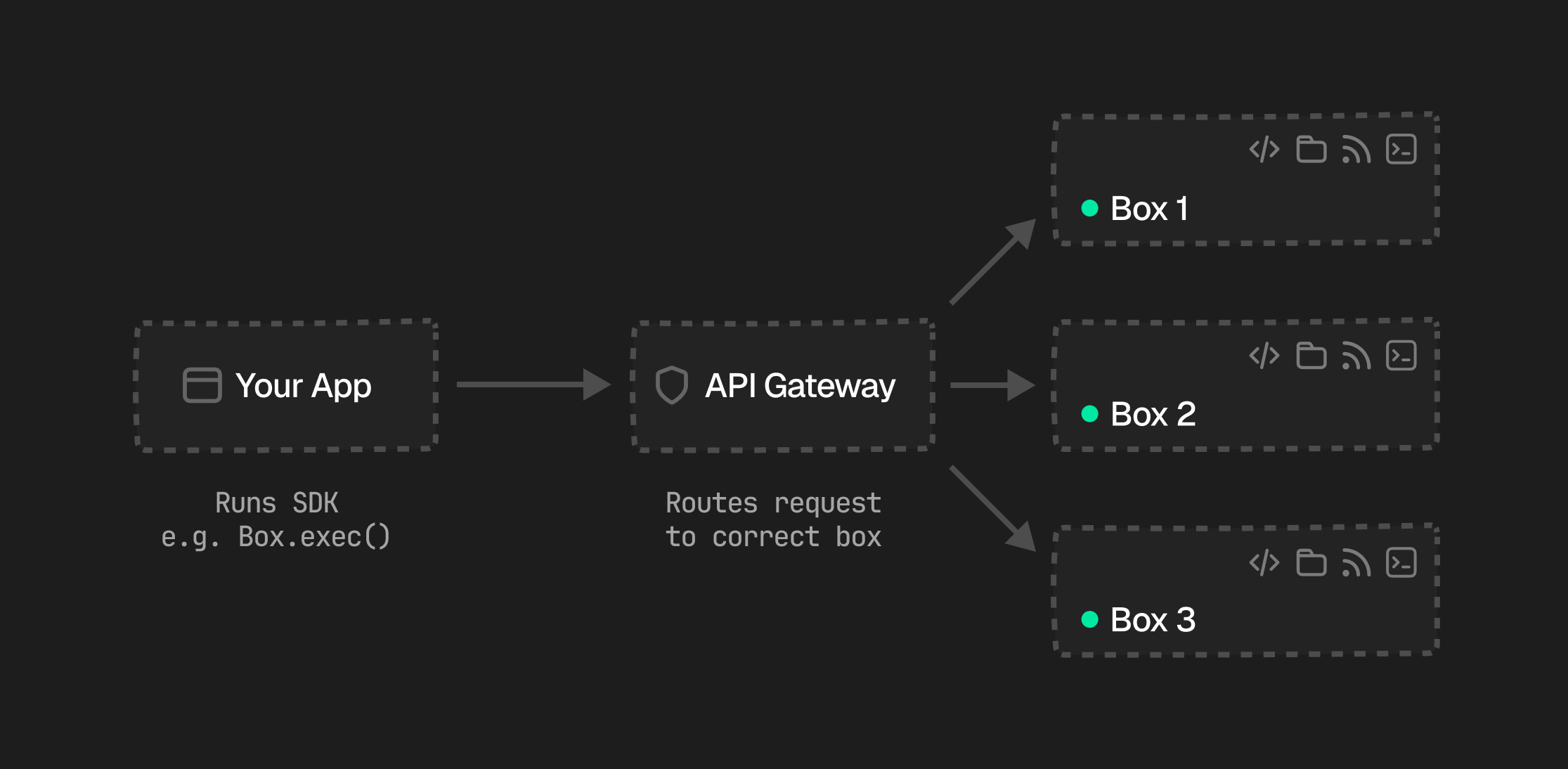 Your app makes SDK calls to the Upstash API gateway, which authenticates the request and routes it to the correct box. Each box has a unique ID, and all communication between your app and the box is encrypted in transit.
Inside a box, the agent, shell, filesystem, and git all share the same isolated environment. The agent can install packages, write files, spawn processes, and make outbound HTTP requests, but only within its own container boundary. It cannot access the host, other boxes, or any Upstash-internal infrastructure.
| Boundary | Guarantee |
| -------------- | --------------------------------------------------------------------------------------- |
| **Filesystem** | Each box has its own filesystem. No shared volumes between boxes. |
| **Processes** | Process trees are fully isolated. One box cannot signal or inspect another's processes. |
| **Network** | Boxes can make outbound requests (HTTP, DNS) but cannot reach other boxes. |
***
## Compute & Billing
Boxes are billed on active usage by default. If `keepAlive` is enabled, billing switches to an always-on model because the box stays running between sessions.
Boxes are available in three sizes:
| Size | CPU | Memory | Storage |
| -------- | ------ | ------ | ------- |
| `small` | 2 vCPU | 4 GB | 5 GB |
| `medium` | 4 vCPU | 8 GB | 10 GB |
| `large` | 8 vCPU | 16 GB | 20 GB |
For exact pricing details, see the [pricing page](https://upstash.com/pricing/box). For keep-alive behavior, see [Keep Alive](/box/overall/keep-alive).
Your app makes SDK calls to the Upstash API gateway, which authenticates the request and routes it to the correct box. Each box has a unique ID, and all communication between your app and the box is encrypted in transit.
Inside a box, the agent, shell, filesystem, and git all share the same isolated environment. The agent can install packages, write files, spawn processes, and make outbound HTTP requests, but only within its own container boundary. It cannot access the host, other boxes, or any Upstash-internal infrastructure.
| Boundary | Guarantee |
| -------------- | --------------------------------------------------------------------------------------- |
| **Filesystem** | Each box has its own filesystem. No shared volumes between boxes. |
| **Processes** | Process trees are fully isolated. One box cannot signal or inspect another's processes. |
| **Network** | Boxes can make outbound requests (HTTP, DNS) but cannot reach other boxes. |
***
## Compute & Billing
Boxes are billed on active usage by default. If `keepAlive` is enabled, billing switches to an always-on model because the box stays running between sessions.
Boxes are available in three sizes:
| Size | CPU | Memory | Storage |
| -------- | ------ | ------ | ------- |
| `small` | 2 vCPU | 4 GB | 5 GB |
| `medium` | 4 vCPU | 8 GB | 10 GB |
| `large` | 8 vCPU | 16 GB | 20 GB |
For exact pricing details, see the [pricing page](https://upstash.com/pricing/box). For keep-alive behavior, see [Keep Alive](/box/overall/keep-alive).