# Making Next.js Navigation Fast af
> **Source:** https://upstash.com/blog/fast-nextjs
> **Date:** 2025-05-14
> **Author(s):** Josh
> **Reading time:** 3 min read
> **Tags:** ai, dev-tools
> **Format:** text/markdown — machine-readable content for agents and LLMs
---
## Why I Stopped Using Next.js Navigation
Next.js has been my go-to framework for building full-stack apps for years. Built-in API routes, image optimization, and good integrations, there are a lot of reasons to use it. But there's one part I'm not a fan of...
and that's **page navigation**.
Navigations in the app router have always felt slow to me. So I've been experimenting with different ways to get instant page navigation speed. The result is **the fastest Next.js app I've probably ever built**.
👇 Our navigation speed after this article
I'm already using the pattern I'm showing you here in production. I got the
idea for this implementation from [Theo](https://x.com/theo) - the same
approach I'm showing you here powers his [t3 chat](https://t3.chat/) app.
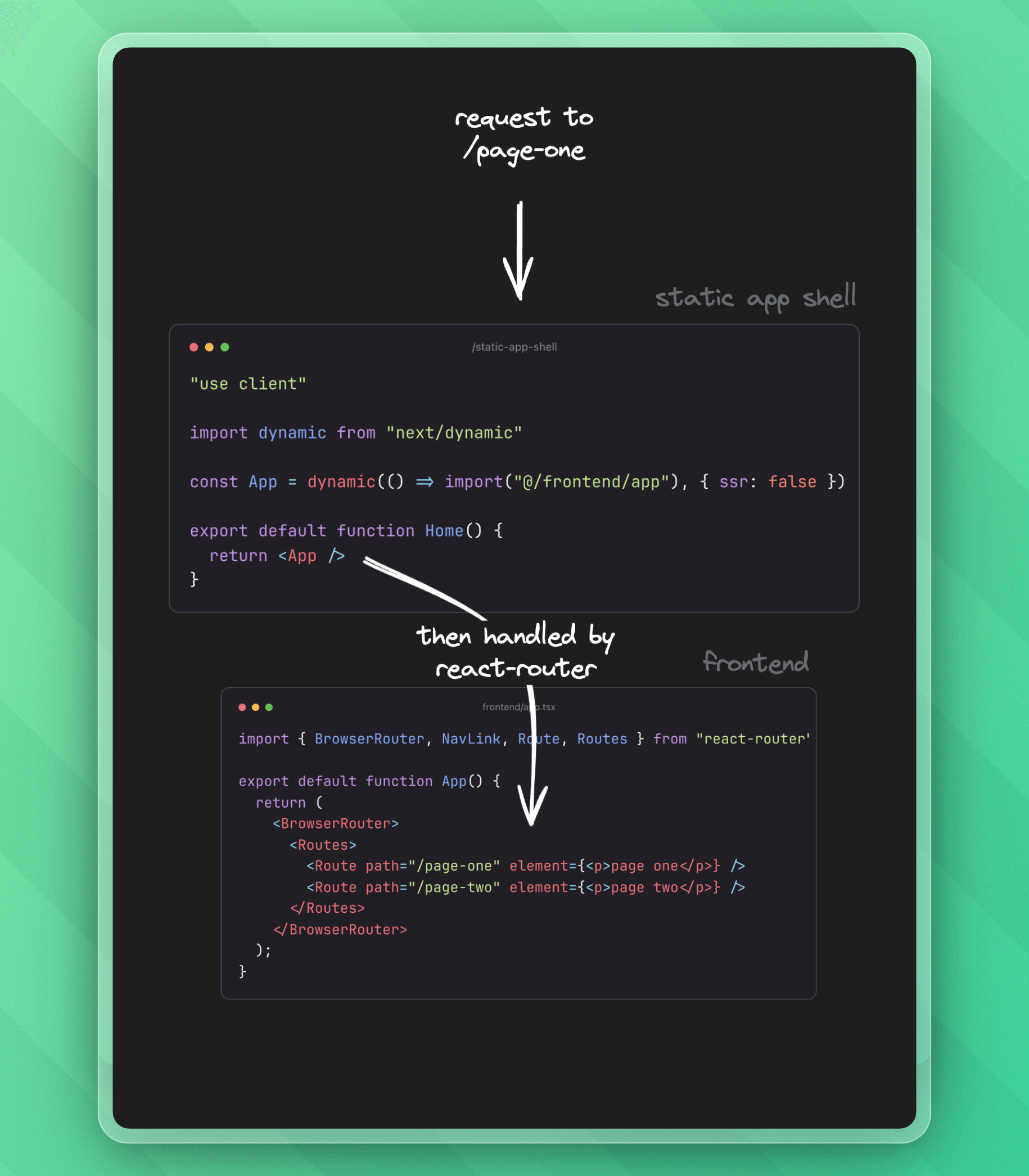
Here's an overview of the architecture:
---
## 1. Install React Router
Opting out of Next.js's default navigation is surprisingly easy with react-router (formerly part of Remix):
```bash
npm i react-router
```
---
### 2. Create a Static App Shell
This page is a simple wrapper that dynamically loads the frontend app we will create.
```tsx title="app/static-app-shell/page.tsx"
"use client";
import dynamic from "next/dynamic";
// 👇 we'll create this in step 4
const App = dynamic(() => import("@/frontend/app"), { ssr: false });
export default function Home() {
return ;
}
```
---
### 3. Update Next.js Config
In our `next.config.js`, we rewrite all non-API routes to our static app shell:
```typescript title="next.config.mjs"
/** @type {import('next').NextConfig} */
const nextConfig = {
rewrites: async () => {
return [
{
// 👇 matches all routes except /api
source: "/((?!api/).*)",
destination: "/static-app-shell",
},
];
},
};
export default nextConfig;
```
---
### 4. Define Routes With React Router
Let's define the app we import in our static shell. We'll create it in a folder different from our main app, for example, '/frontend`. Here, we use [react-router navigation](https://reactrouter.com/start/declarative/routing) to create pages and which components they render.
```tsx title="src/frontend/app.tsx"
import { BrowserRouter, NavLink, Route, Routes } from "react-router";
export default function App() {
return (
page one} />
page two} />
);
}
```
That's it - we now have full client-side routing in Next.js! 🎉
All components we now create in our `/frontend` folder are automatically client components, so we need no more `use client`. Remember to use react-router's `` instead of NextJS `` for navigation.
---
Cheers for reading! If you have any feedback or would like to be a guest author on Upstash, reach out at `josh@upstash.com` 🙌
 ---
## 1. Install React Router
Opting out of Next.js's default navigation is surprisingly easy with react-router (formerly part of Remix):
```bash
npm i react-router
```
---
### 2. Create a Static App Shell
This page is a simple wrapper that dynamically loads the frontend app we will create.
```tsx title="app/static-app-shell/page.tsx"
"use client";
import dynamic from "next/dynamic";
// 👇 we'll create this in step 4
const App = dynamic(() => import("@/frontend/app"), { ssr: false });
export default function Home() {
return
---
## 1. Install React Router
Opting out of Next.js's default navigation is surprisingly easy with react-router (formerly part of Remix):
```bash
npm i react-router
```
---
### 2. Create a Static App Shell
This page is a simple wrapper that dynamically loads the frontend app we will create.
```tsx title="app/static-app-shell/page.tsx"
"use client";
import dynamic from "next/dynamic";
// 👇 we'll create this in step 4
const App = dynamic(() => import("@/frontend/app"), { ssr: false });
export default function Home() {
return